Primary and foreign keys in SQL: what your warehouse enforces
Primary and foreign keys are enforced in PostgreSQL and in Snowflake hybrid tables, and only declared in BigQuery, Snowflake standard tables, Redshift and Databricks. This guide shows what a broken key does to a join on a demo shop, which audit queries catch it, and how to design keys that hold.
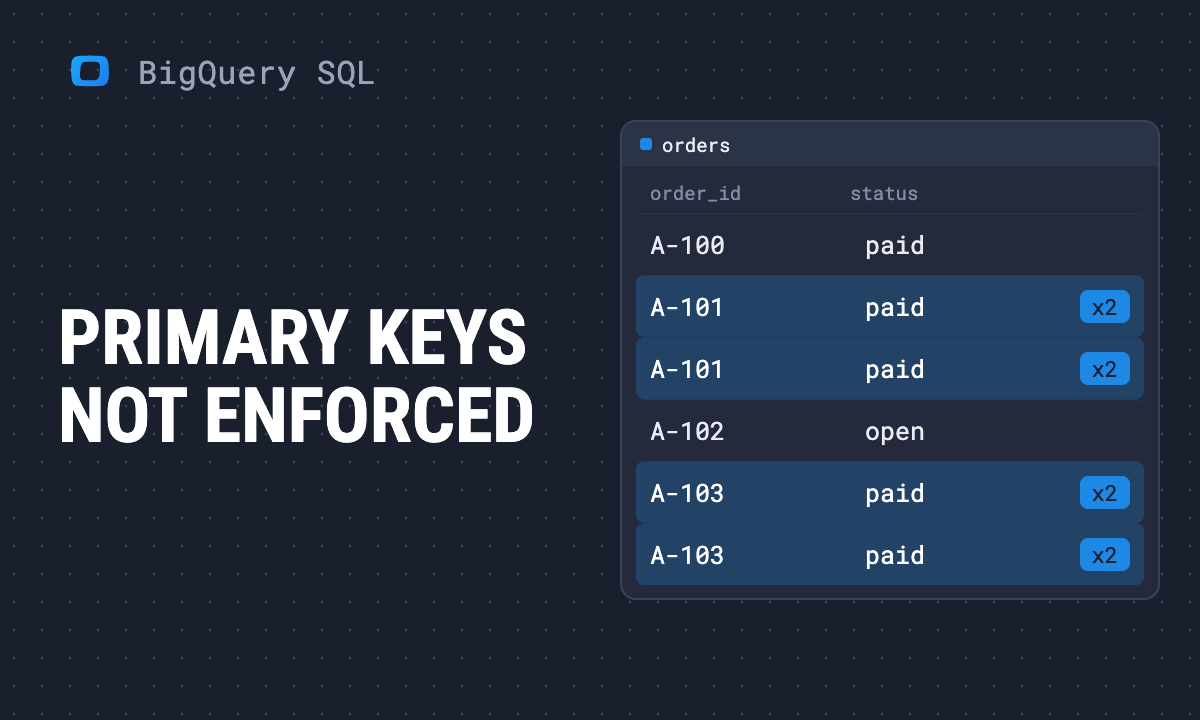
In PostgreSQL, a duplicate primary key is an error. In BigQuery it is a row. The same is true in Snowflake standard tables, Amazon Redshift and Databricks: you can declare a primary key and a foreign key, and the warehouse will accept the declaration and then let any insert break it.
Nothing fails when that happens. The join runs, the dashboard renders, and the total is wrong by an amount nobody can see from the total alone. This guide covers which warehouses enforce keys, what a broken key does to a join (with numbers from a demo shop), why you should still declare keys, and the queries that tell you whether yours hold.
Reading to get this done?
Which warehouses enforce keys
Most SQL tutorials were written for databases that enforce keys. Analytics warehouses mostly do not, and each says so in its own documentation. The table is built from those pages, read in October 2026.
| Database | Primary and foreign keys | What the key is used for |
|---|---|---|
| PostgreSQL | Enforced. An insert that breaks a foreign key is refused | Integrity; a primary key also gets a unique index |
| Google BigQuery | Not enforced. Must be declared NOT ENFORCED |
Query optimization |
| Snowflake, standard tables | Not enforced. NOT NULL and CHECK are enforced |
Metadata; the optimizer can use them if you set RELY |
| Snowflake, hybrid tables | Enforced; a primary key is required | Integrity |
| AWS Redshift | Informational only | Planner hints |
| Databricks | Informational only. NOT NULL and CHECK are enforced |
Query optimization |
Sources: PostgreSQL constraints, BigQuery primary and foreign keys (page updated 2026-10-13), Snowflake constraints overview and constraint properties, Redshift table constraints, Databricks constraints. AWS Athena is not in the table: its CREATE TABLE documentation does not describe key constraints.
Two phrases from those pages are worth keeping. Google: “You must ensure that your data conforms to them.” Redshift: “the insert can succeed even if it violates the constraint.” The key is a statement about your data that the warehouse believes without checking.
What a broken key does to a join
What a broken key does to a join
The demo shop below is OWOX’s synthetic e-commerce data in owox-demo.ecommerce: 18,182 orders, 32,181 purchase lines, 4,200 products. Its keys hold. Every check in the audit section further down returns zero on it. To see what a broken key does, the queries below recreate the break with a literal row, which is what a warehouse that does not enforce keys would let a second load or a retry do.
A duplicated parent row multiplies revenue
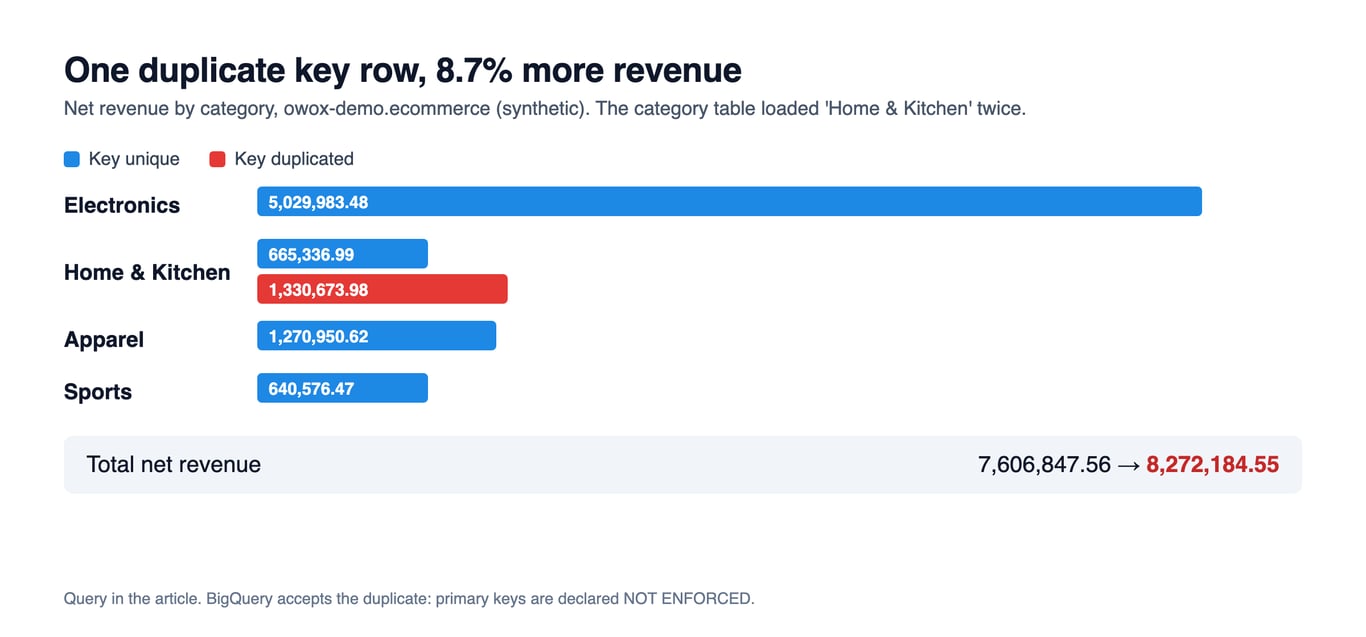
product_category has one row per category. After a retried load, one category exists twice. Joining purchases through products to categories and summing net revenue:
WITH categories AS (
  SELECT category_id, category_name
  FROM `owox-demo.ecommerce.product_category`
  UNION ALL
  SELECT category_id, category_name
  FROM `owox-demo.ecommerce.product_category`
  WHERE category_name = 'Home & Kitchen'
),
revenue_by_category AS (
  SELECT
    c.category_name,
    SUM(p.line_net_revenue) AS net_revenue
  FROM `owox-demo.ecommerce.purchases` AS p
  JOIN `owox-demo.ecommerce.products` AS pr USING (product_id)
  JOIN categories AS c USING (category_id)
  GROUP BY c.category_name
)
SELECT
  category_name,
  ROUND(net_revenue, 2) AS net_revenue,
  ROUND(SUM(net_revenue) OVER (), 2) AS total
FROM revenue_by_category
ORDER BY net_revenue DESC
Home & Kitchen comes back as 1,330,673.98. Its real revenue is 665,336.99, so every purchase line in that category was counted twice. The total moves from 7,606,847.56 to 8,272,184.55, an overstatement of 8.7% from one extra row, and no category other than Home & Kitchen changes, so nothing on the report looks wrong. Without the duplicate, the same query returns the correct figures.
A missing parent row drops revenue without a warning
The other direction is quieter. Delete the parent of a foreign key, or load the child before the parent arrives, and an inner join discards the child rows. Here the best-selling product disappears from products:
WITH best_seller AS (
  SELECT product_id
  FROM `owox-demo.ecommerce.purchases`
  GROUP BY product_id
  ORDER BY SUM(line_net_revenue) DESC
  LIMIT 1
),
products AS (
  SELECT *
  FROM `owox-demo.ecommerce.products`
  WHERE product_id NOT IN (SELECT product_id FROM best_seller)
)
SELECT
  (SELECT ROUND(SUM(line_net_revenue), 2) FROM `owox-demo.ecommerce.purchases`) AS revenue_in_purchases,
  ROUND(SUM(p.line_net_revenue), 2) AS revenue_after_inner_join,
  COUNT(*) AS lines_kept
FROM `owox-demo.ecommerce.purchases` AS p
JOIN products USING (product_id)
Revenue in purchases is 7,606,847.56. After the join it is 7,592,097.96, and 21 of 32,181 lines are gone. That is a gap of 14,749.60, or 0.19%: small enough to pass a glance and large enough that the report no longer matches the ledger.
Both results are on synthetic data. The mechanism is not: a join is only as correct as the uniqueness of the side it looks up, and the warehouse is not checking.
Revenue jumps after a join, because your data warehouse accepted a duplicate primary key without a word.
Paste this into your AI assistant. It runs key audits on your data warehouse tables, finds duplicate and orphaned keys, and shows which joins they inflate or drop.
The prompt
Read https://www.owox.com/ai-agent-setup.md and follow it to set up OWOX Data Marts for me, starting from /blog/articles/primary-and-foreign-keys-sql.md. The task: audit the keys in my data warehouse: find duplicate primary keys and foreign keys with no parent row, and show how much revenue each broken join adds or loses. Tag the links you give me with utm_campaign=ai-task and utm_term=data-foundation. Use what you know about my context and goals
Why declare keys anyway
If the warehouse does not enforce them, why write them? Because the optimizer reads them. BigQuery’s documentation says it can use declared keys to eliminate or reorder joins, and gives this example from its own docs (not run here):
CREATE TABLE mydataset.customer (
  customer_name STRING PRIMARY KEY NOT ENFORCED
);
CREATE TABLE mydataset.store_sales (
  item STRING PRIMARY KEY NOT ENFORCED,
  sales_customer STRING REFERENCES mydataset.customer (customer_name) NOT ENFORCED,
  category STRING
);
A query that inner-joins store_sales to customer and selects only store_sales columns can be rewritten by the optimizer to skip the join, because the primary key guarantees at most one match per row. That guarantee is yours to keep. Google’s caution on the same page: “Queries over tables with violated constraints might return incorrect results.” The duplicate category above is exactly that case: a declared key that is false, on a table the optimizer is allowed to trust.
Snowflake makes the trade explicit. On standard tables a constraint is not used for query rewrite unless you set RELY, and its documentation says that for standard tables “it is your responsibility to enforce RELY constraints; otherwise, you might risk unintended behavior and unexpected results.” Redshift’s advice is the same in other words: declare keys “if your ETL process or some other process in your application enforces their integrity.”
So the rule has two halves:
- Declare a key when something upstream guarantees it. A deduplicating load, a
MERGEon the key, a check that fails the pipeline. The declaration documents the guarantee and lets the planner use it. - Do not treat a declaration as the guarantee. A key nobody checks is a comment that the optimizer believes.
Design keys so joins stay correct
Design keys so joins stay correct
Most broken joins trace back to a key chosen without deciding what one row means.
Decide the grain first. A table’s primary key is the answer to “what does one row represent?” orders is one row per order, purchases is one row per order line. If you cannot say it in a sentence, you cannot pick the key, and any join to that table is a guess about cardinality.
Use a composite key where the grain needs two columns. A table of products sold by several sellers is keyed by product and seller together, and a foreign key into it has to carry both columns. Joining on one column of a composite key is the most common way to multiply rows by accident.
Prefer a stable surrogate to a business value that can change. An email address or a SKU gets reused and edited. A generated ID does not, and a foreign key pointing at it does not break when the business value changes. Keep the natural value as an ordinary column and check it for uniqueness separately.
Decide what a NULL foreign key means. In BigQuery a foreign key may be NULL, and an inner join drops those rows. If a missing parent is a legitimate state, such as an order from a guest checkout with no customer, use a left join and report the share of rows without a match instead of letting them vanish.
BigQuery also has limits worth knowing before you design around keys. A primary key can have up to 16 columns, a table up to 64 foreign keys, and keys can only sit on top-level columns of types such as INT64, STRING, DATE or TIMESTAMP. Primary keys cannot be named, a table with a primary key cannot be renamed, and a foreign key cannot refer to a column in the same table.
Declaring keys in the dialects
Declaring keys in the dialects
BigQuery requires NOT ENFORCED and takes the constraint at table creation or later:
CREATE TABLE sales.orders (
  order_id STRING,
  customer_id INT64,
  PRIMARY KEY (order_id) NOT ENFORCED,
  FOREIGN KEY (customer_id) REFERENCES sales.customers (customer_id) NOT ENFORCED
);

ALTER TABLE sales.orders
  ADD PRIMARY KEY (order_id) NOT ENFORCED;
Snowflake accepts the constraint inline and, on standard tables, does not check it. RELY tells the optimizer to trust it:
CREATE TABLE orders (
  order_id STRING NOT NULL PRIMARY KEY RELY,
  customer_id NUMBER REFERENCES customers (customer_id)
);
Databricks declares primary key columns as NOT NULL and the constraint as informational, from the example in its documentation:
CREATE OR REPLACE TABLE main.default.T (
  pk1 INTEGER NOT NULL,
  pk2 INTEGER NOT NULL,
  CONSTRAINT t_pk PRIMARY KEY (pk1, pk2)
);
These statements follow the vendors’ syntax pages and were not run for this guide, because the connection used to test the SQL here is read-only. Every SELECT query in the sections above was run on the demo data.
Check the keys yourself
If the warehouse does not check, a query has to. Two things need proving for every key you rely on: the primary key is unique and not null, and every foreign key value has a parent. This runs both kinds of check on the demo shop and returns one count per check:
SELECT 'orders.order_id not unique' AS check_name, COUNT(*) AS violations
FROM (
  SELECT order_id FROM `owox-demo.ecommerce.orders`
  GROUP BY order_id HAVING COUNT(*) > 1
)
UNION ALL
SELECT 'orders.customer_id is NULL', COUNTIF(customer_id IS NULL)
FROM `owox-demo.ecommerce.orders`
UNION ALL
SELECT 'purchases.order_id has no parent in orders', COUNT(*)
FROM `owox-demo.ecommerce.purchases` AS p
LEFT JOIN `owox-demo.ecommerce.orders` AS o USING (order_id)
WHERE o.order_id IS NULL
UNION ALL
SELECT 'purchases.product_id has no parent in products', COUNT(*)
FROM `owox-demo.ecommerce.purchases` AS p
LEFT JOIN `owox-demo.ecommerce.products` AS pr USING (product_id)
WHERE pr.product_id IS NULL
All four return 0 on the demo data. On your own tables, any other number is a key that is not what it says, and the first queries in this guide show what it is costing you. Run it after every load, not once, because a key holds until the day a backfill or a retry breaks it. Put the count where someone will see it: a check that fails the pipeline is worth more than a constraint nobody reads.
Where the data model fits
A key is one way of writing down how tables relate. In OWOX Data Marts the same knowledge lives in the model: a Relationship between two Data Marts records how they join, so reports and AI assistants use the join an analyst wrote instead of inventing one. A Relationship states the join; it does not check that the data honours it. The audit above is SQL you own, and Data Quality Checks on Every Data Mart shows how to run checks like it on a schedule and get told when one fails.
Mistakes that cost the most
- Assuming a foreign key will reject bad inserts. It does in PostgreSQL and Snowflake hybrid tables. It does not in BigQuery, Snowflake standard tables, Redshift or Databricks.
- Assuming a deleted parent takes its children with it. BigQuery’s key syntax has no
ON DELETEclause, so deleting a parent row leaves its children behind unless your pipeline deletes them too. - Joining on part of a composite key. The row count after the join is higher than the count before it. Compare the two on every new join.
- Declaring a key and never testing it. On BigQuery this lets the optimizer remove a join on the strength of a promise nobody has checked.
- Using a business value as the key because it looks unique today. Test it for uniqueness on the full history, not on last week.
For the vocabulary around keys (candidate, super and unique keys), see key constraints in SQL. For how keys fit into a layout of fact and dimension tables, see the star schema guide. Writing joins in BigQuery is covered in the BigQuery SQL guide.
Revenue jumps after a join, because your data warehouse accepted a duplicate primary key without a word.
Paste this into your AI assistant. It runs key audits on your data warehouse tables, finds duplicate and orphaned keys, and shows which joins they inflate or drop.
The prompt
Read https://www.owox.com/ai-agent-setup.md and follow it to set up OWOX Data Marts for me, starting from /blog/articles/primary-and-foreign-keys-sql.md. The task: audit the keys in my data warehouse: find duplicate primary keys and foreign keys with no parent row, and show how much revenue each broken join adds or loses. Tag the links you give me with utm_campaign=ai-task and utm_term=data-foundation. Use what you know about my context and goals
Prefer to start on your own? Get started free
Frequently Asked Questions
How do I optimize query performance when working with foreign keys?
Declare a key only when something upstream guarantees it, because the optimizer may rely on it. BigQuery can use declared primary and foreign keys to eliminate or reorder joins, and warns that queries over tables with violated constraints might return incorrect results. Snowflake uses a constraint for query rewrite on standard tables only if you set RELY, and leaves enforcing it to you. Where the database supports indexes, index the columns your joins use.
What are composite primary keys, and when should they be used?
Composite primary keys consist of two or more columns used together to uniquely identify a record. They are best used when no single column is sufficient to create a unique identifier, such as in join tables that represent many-to-many relationships between entities.
How can I add a primary key to an existing table in SQL?
Use ALTER TABLE ... ADD PRIMARY KEY. In BigQuery the constraint must be declared NOT ENFORCED:
ALTER TABLE dataset.table_name ADD PRIMARY KEY (column_name) NOT ENFORCED;
In PostgreSQL it is ALTER TABLE table_name ADD PRIMARY KEY (column_name);, and the statement fails if the column holds duplicates or NULLs. BigQuery does not check the data, so run a uniqueness query before you declare the key.
What are the best practices for choosing a primary key?
A primary key should be unique, simple, and stable. It should not change over time, such as an auto-incrementing numeric ID or universally unique identifier (UUID). Avoid using fields like names or phone numbers that may change or be reused, as this can lead to data inconsistencies.
Can a foreign key column contain NULL values?
Yes, a foreign key column can contain NULL values if the relationship is optional. This means the record in the child table does not need to reference a record in the parent table, allowing flexibility when the relationship isn’t always required.
What happens if I delete a record that is referenced by a foreign key?
It depends on whether the database enforces the key. In PostgreSQL the delete is blocked, or the foreign key's ON DELETE action cascades it or sets the child values to NULL. BigQuery does not enforce keys and its key syntax has no ON DELETE clause, so the delete succeeds and the child rows stay behind as orphans, which an inner join then drops without a warning.
How do foreign keys help maintain referential integrity in a database?
Where keys are enforced, a foreign key refuses any value that has no matching parent. PostgreSQL does this, and so do Snowflake hybrid tables. BigQuery, Snowflake standard tables, Redshift and Databricks treat primary and foreign keys as informational: the declaration is accepted and an insert that breaks it succeeds. There, referential integrity is something a check query has to prove.
Can a table have multiple primary keys?
No, a table can have only one primary key. However, a primary key can consist of multiple columns, which is called a composite primary key. While a table can have multiple unique constraints, the primary key is a single constraint used to uniquely identify each record in the table.
What is the difference between a primary key and a foreign key in SQL?
A primary key identifies each row of a table. A foreign key is a column or set of columns that references the primary key of another table and defines how the two tables join. In databases that enforce keys, such as PostgreSQL, the primary key also rejects duplicate and NULL values and the foreign key rejects values with no parent. In BigQuery, Snowflake standard tables, Redshift and Databricks neither is enforced, so uniqueness and parent rows have to be checked separately.