RAG over your warehouse metadata is a trap: describe the schema instead
Loading your Notion, wiki or other documentation into an AI assistant is a good fix for questions about text. For numbers it helps the assistant find a definition, not the right one. This guide shows where that breaks, with tests you can re-run, reports what happened when we gave an assistant the same question with and without column descriptions, and ends with a check for this week and a summary to forward.
“Everyone says RAG stops the AI making things up. Can’t we just load all our documentation into it, so it knows our data?” It is a fair thing to be asked and the right question to ask. The honest answer has two halves. For questions about text, such as policies or customer notes, yes: load the Notion, the wiki, whatever you have. For numbers, you can, and it will not settle the thing your boss is worried about, which is whether the number that comes back is the right one.
RAG, in plain words: before the AI answers, it searches your documents and reads the few passages that look closest to the question.
If you are the person who asked, the last section is for you: six lines, no jargon. The rest is working detail for whoever got the request.
The short answer
Search finds the passages that sound like the question. It does not know which of them is your definition. If three documents describe revenue three ways, the search returns the ones that sound most alike. Choosing one is a decision, and no search can make it for you.
So make the decision once, and save the agreed sentence in the database, on the number itself, not in a document about it. We tested that too, and the result is narrower than we expected: where your rule is the obvious one, the AI guessed it without help. Where it is not, it followed the saved sentence every time.
What each option consists of: loading documents means building a search over them and keeping it running as they change. The alternative is one meeting, one written definition, and one sentence saved next to the number. The trap in the title is effort spent on finding text faster when the text itself disagrees.
What you would build
Your documentation, whether that is a Notion page, a wiki, comments on saved queries or dbt docs, is cut into passages. Each passage is converted into a list of numbers that stands for its meaning, called an embedding. The lists are stored so that the closest ones to a question can be fetched and handed to the AI.
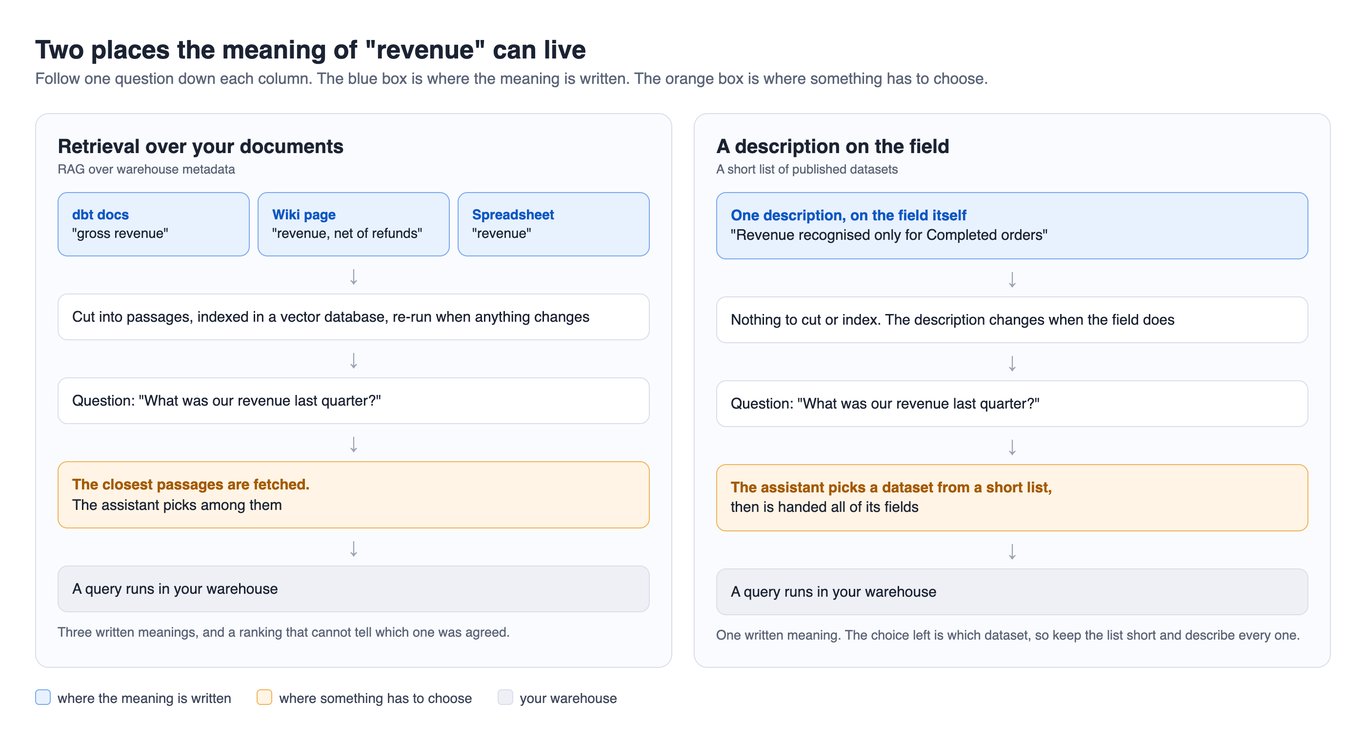
That is a job to pull the documents, a model, a store and a schedule. All of it is yours to keep working.
OWOX Data Marts
See your first report built in real time. 15 minutes.
- Connect your data warehouse
- Pick your metrics
- Get a live Google Sheets report
In the time it takes to write a ticket. Then imagine never writing that ticket again.
Book a DemoWe'll use your actual use case
Where it breaks for numbers
Three places, the first one with a test.
Search ranks what sounds alike, not what is current
We ran a small test you can re-run. It is four short documents we wrote for the test, the way a wiki page, a comment on a saved query and a finance note define revenue, scored against three phrasings of one question with BigQuery’s AI.SIMILARITY function (reference) and two of Google’s embedding models. Closer to 1 means closer in meaning.
WITH docs AS (
  SELECT 'Wiki page' AS source,
    'Revenue is the total value of all orders placed in the period, including orders that were later cancelled or returned. Marketing uses this figure in the weekly dashboard.' AS body
  UNION ALL
  SELECT 'Comment on a saved query',
    'fct_orders.revenue: order revenue in USD. Sum of sale_price times quantity for each order line. Excludes tax and shipping.'
  UNION ALL
  SELECT 'Finance note',
    'Revenue for a quarter counts completed orders only, net of refunds and discounts, in the quarter the order was delivered. This is the figure reported to the board.'
  UNION ALL
  SELECT 'Finance note, old version',
    'Revenue for a quarter counts all orders placed in the quarter, before refunds and cancellations. This is the figure reported to the board.'
),
questions AS (
  SELECT q FROM UNNEST([
    'What was our revenue last quarter?',
    'How much did we earn in Q3 2026?',
    'What was the Q3 top line?'
  ]) AS q
)
SELECT
  q AS question,
  source,
  ROUND(AI.SIMILARITY(q, body,
    endpoint => 'text-embedding-005'), 3)
    AS score_005,
  ROUND(AI.SIMILARITY(q, body,
    endpoint => 'gemini-embedding-001'), 3)
    AS score_gemini
FROM questions, docs
ORDER BY question, score_gemini DESC
First run, 9 October 2026, without the fourth document and with the first model only. The finance note, which we had picked as the agreed definition, came first for all three questions. We did not expect that and report it as it came. The first question scored 0.727, 0.653 and 0.651, so a search that fetches the top few passages hands the AI all three definitions.
Second run, as printed, 11 October 2026. We added one thing every wiki has: last year’s version of the same note, which nobody deleted. Each cell is text-embedding-005 / gemini-embedding-001.
| Question | Old finance note | Current finance note | Saved query comment | Wiki page |
|---|---|---|---|---|
| What was our revenue last quarter? | 0.740 / 0.835 | 0.727 / 0.829 | 0.653 / 0.793 | 0.651 / 0.795 |
| How much did we earn in Q3 2026? | 0.646 / 0.807 | 0.641 / 0.805 | 0.628 / 0.779 | 0.585 / 0.767 |
| What was the Q3 top line? | 0.656 / 0.813 | 0.642 / 0.804 | 0.590 / 0.790 | 0.585 / 0.768 |
The superseded note outranked the current one in all six cases, by 0.002 to 0.014. The margins are small and the documents are ours, so this is an illustration, not a benchmark: nothing in a similarity score says which note is still true. Paste your own definitions into the query.
The same thing, seen in our own product
OWOX Data Marts has a search step too: an assistant can ask which published Data Marts fit a question. (A Data Mart is a dataset an analyst defines on a table, a view or a SQL query.) We called that tool on our demo project, which holds 70 published Data Marts, many of them undescribed test copies, so this shows our messy catalogue, not your wiki. The call, made on 9 and again on 11 October 2026 with the same result:
{
  "tool": "get_relevant_data_marts_by_prompt",
  "prompt": "What was our revenue last quarter?",
  "limit": 10
}
The response, cut to three keys per entry:
[
  {"title": "Microsoft Ads Performance",
   "description": "", "relevance_score": 103},
  {"title": "eCommerce Report",
   "description": "", "relevance_score": 101},
  {"title": "eCommerce Report",
   "description": "", "relevance_score": 100},
  {"title": "Purchases",
   "description": "The order lines behind every order ... Revenue is recognised only for completed orders ...",
   "relevance_score": 100},
  {"title": "eCommerce Report (IK)",
   "description": "", "relevance_score": 96},
  {"title": "e-Commerce Growth Demo",
   "description": "", "relevance_score": 93}
]
An advertising dataset came first. We do not know how the score is computed. Purchases is the only entry that says what it is for.
Copies part, and the search can drop what the query needs
The documents you index are copies of what the tables mean, and copies part. In our demo one column, line_cost, is described in two places. On the BigQuery view: “Cost of goods sold for this order line = Unit Cost × Quantity, on all order statuses including Cancelled and Returned.” On the Data Mart built on that view: “Cost of goods sold for this order line = Unit Cost × Quantity.” Both read on 11 October 2026. Someone sharpened one and not the other, which is also why a Data Mart is one more place to keep a description.
Search over the schema itself loses things too. In text-to-SQL systems the step that picks which tables and columns to show the model is called schema linking, and a 2024 paper notes that it “can often exclude required columns” (Maamari and others). On Spider 2.0, a benchmark of 632 enterprise tasks whose databases often have more than 1,000 columns, the best setup its authors tried solved 21.3% (Lei and others).
Does a description change the answer? We ran it
Does a description change the answer? We ran it
This is the test of the alternative, and it did not come out the way the title suggests. On 11 October 2026 we gave a fresh Claude session one page and nothing else: a list of tables and columns, and the question “What was our revenue last quarter?”. It had to write one BigQuery query and say what it assumed. We ran each query as written. Fifteen sessions, three per setup.
| Setup | What the page held | Query it wrote, 3 of 3 | Result |
|---|---|---|---|
| 1. Our demo, bare | names and types only | sum of line_net_revenue |
$849,177.41 |
| 2. Our demo, described | plus the stored descriptions of the two order tables | sum of line_net_revenue |
$849,177.41 |
| 3. Google’s sample shop, bare | names and types only | sum of sale_price, Cancelled and Returned left out |
$1,050,284.83 |
| 4. Same, described | plus that same rule written as a description | the same rule | $1,050,284.83 |
| 5. Same, a different rule described | plus “revenue is recognised when an item ships” | sum of sale_price by shipped_at, returns kept |
$908,058.85 |
Setups 1 to 4: the description did not change the number. In our demo the column is called line_net_revenue, and the name did the work. On Google’s undescribed sample, bigquery-public-data.thelook_ecommerce, the model left out cancelled and returned items three times out of three. What changed was the footing. Without descriptions every session flagged what it could not know, in words like “The status values ‘Cancelled’ and ‘Returned’ are my guess at the spelling”, and two of the three demo sessions added a status filter they could not check. With descriptions, none did, and each cited the description.
Setup 5: when the rule is not the obvious one, only the description carries it. We cannot alter Google’s table, so we wrote the descriptions for setups 4 and 5 and put them in the page. The one for setup 5, line breaks added:
order_items.sale_price: Price the customer paid
for this item, in USD. Finance recognises revenue
when an item ships: revenue for a quarter is the
sum of sale_price over items whose shipped_at
falls in that quarter. An item returned later
still counts in the quarter it shipped; the
return is booked separately. Items that never
shipped are not revenue.
The first session’s query; the other two differ only in how the dates are written:
SELECT
  ROUND(SUM(sale_price), 2) AS revenue_usd
FROM `bigquery-public-data.thelook_ecommerce.order_items`
WHERE shipped_at >= TIMESTAMP('2026-07-01 00:00:00+00')
  AND shipped_at <  TIMESTAMP('2026-10-01 00:00:00+00');
That is $142,225.98 less than the guess, on the same table and the same question. A model cannot guess a rule your finance team made.
How strong this is: one model, one question, fifteen sessions, two datasets, one day. Google’s sample is regenerated, so its figures are for that day. It says nothing about a weaker model.
The same question through a published Data Mart
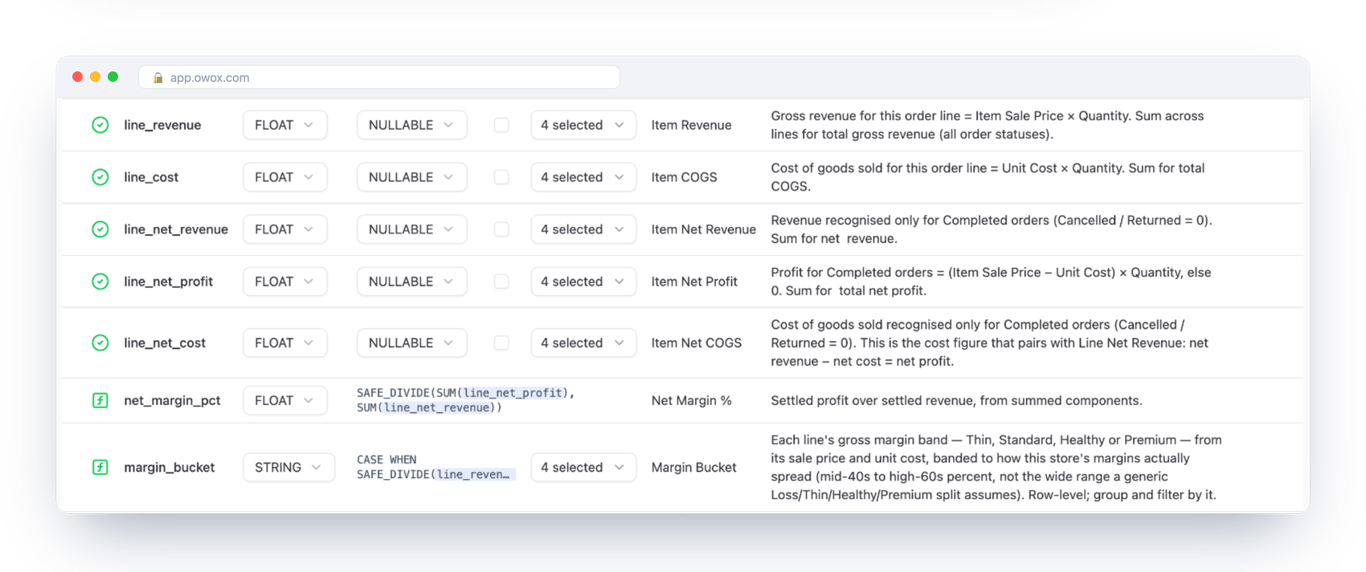
In OWOX Data Marts the description sits on a field of a Data Mart. An assistant connected through the OWOX MCP server (MCP is the standard way an AI assistant calls an outside system) is handed the fields with their descriptions and asks for sums and filters; the tools “cannot run arbitrary SQL” (OWOX documentation). We made the call ourselves on 11 October 2026, shown here with the Data Mart’s name in place of its id:
{
  "tool": "query_data_mart",
  "data_mart": "Purchases",
  "fields": ["line_net_revenue", "line_revenue"],
  "aggregations": [
    {"field": "line_net_revenue", "function": "SUM"},
    {"field": "line_revenue", "function": "SUM"}
  ],
  "filters": [
    {"field": "orders_e_commerce__order_date",
     "operator": "last_quarter"}
  ]
}
It returned 849177.41 and 998140.86, each with its description attached: “Revenue recognised only for Completed orders” and “Gross revenue … (all order statuses)”. The response does not include the SQL. That is in the Data Mart’s Run History, not opened for this run; an earlier run with its SQL is in governed AI analytics on BigQuery.
Three things to be straight about. The assistant still chooses which Data Mart to ask, by the search step above, and can choose wrong. The result rows go to the AI provider, Anthropic for Claude or OpenAI for ChatGPT; whether that is acceptable is a call for whoever answers for data protection in your company. And the MCP server is part of OWOX Data Marts Cloud.
Put the meaning next to the number
Put the meaning next to the number
A column in your warehouse can carry its own description. Deciding what it says is modeling work, not search work. The examples are for Google BigQuery.
Start with one column
Take the number people argue about most, and start where your rule is not the one a stranger would guess. In BigQuery a description is one statement. We did not run this one (our connection is read-only); the syntax is from Google’s reference.
ALTER TABLE shop.order_items
ALTER COLUMN sale_price
SET OPTIONS (
  description =
    'Unit price when bought. Returned items included.'
);
The hard part is the sentence itself. Somebody has to say that returned items are in or out, and get finance to agree. No tool shortens that.
If you use dbt: do not type it twice. The persist_docs setting, off by default, writes your model and column descriptions into the warehouse as comments (dbt documentation, read October 2026).
What a description does not fix
A description settles what a number means. It does not fix how the number is calculated. A monthly recurring revenue figure that counts an upgrade twice is wrong in its logic, and no sentence on a column would have caught it. That calculation has to live in one view or published dataset whose SQL one person owns, and the assistant has to read its result instead of working it out again.
Find what is not described yet
This runs as written on Google’s public sample shop. Swap in your own project and dataset.
SELECT
  table_name,
  COUNT(*) AS columns,
  COUNTIF(description IS NULL
    OR description = '') AS undescribed
FROM `bigquery-public-data`
  .thelook_ecommerce
  .INFORMATION_SCHEMA
  .COLUMN_FIELD_PATHS
WHERE column_name = field_path
GROUP BY table_name
ORDER BY undescribed DESC
On 9 October 2026 it returned seven tables and 75 columns, all 75 undescribed. That is the normal starting point. Do not describe everything: describe the columns behind the numbers leadership asks for, and let the assistant see only those tables. Past a list you would read yourself, it has to search for the right table again, and you are back to a ranking.
When document search is the right tool
When document search is the right tool
Use it for text that has no column: policies, customer notes, why a metric dropped in March. That is the job RAG was made for. It also fits finding the literal value a filter needs when the question names it loosely, such as a product name: Snowflake describes a fuzzy, semantic search over a column’s values for this (Snowflake’s guidance, read October 2026). If you already built one, keep it for those questions, and stop asking it to define your numbers.
A check to run this week
No new tools. Agreeing on what you find is the slow part.
- Pick the number leadership argues about most. Search your Notion, wiki, saved queries and dashboards for its name and count the different definitions.
- Paste those definitions into the similarity query above and see which one a search would put first.
- If you found more than one, stop and take it to the person who asked. That is the problem, and no search fixes it.
- Give an assistant your bare table list and the question, and read the rule it guesses. If it is not your rule, the description is the fix.
- When one definition is agreed, describe the column, check that the calculation lives in one view, and delete or link the other definitions.
What to send back to the person who asked
A summary short enough to forward:
- It was the right question. For questions about text, like policies and customer notes, yes: we can load our Notion and documents into the AI, and it works well.
- For numbers it is different. Our documents describe one number in more than one way, and a search brings back whichever sounds closest. In a test, an out-of-date definition came back ahead of the current one.
- Loading the documents means building a search and keeping it running. The other way is one meeting, one written definition, and one sentence saved in the database next to the number, where the AI reads it every time.
- In a test, the AI guessed the usual meaning of revenue without that sentence. It could not guess a rule of our own, and followed it once it was written down.
- I will start with the number we argue about most, and tell you how many different definitions of it I find.
- The part that is yours: get finance and me in a room and pick one definition for each of those numbers. I can find the disagreements. I cannot settle them.
Turn your data into decisions.
Governed data marts give you the clean foundation ML needs to actually work.
- No AI hallucinations
- Analyst-governed definitions
- Every number traces to SQL
Frequently Asked Questions
What is RAG over warehouse metadata?
It is a pipeline that cuts your table definitions and documentation (a wiki, Notion pages, saved queries, dbt docs) into passages, stores them in a vector database, and fetches the passages closest to each question so an AI assistant can read them before it answers. RAG stands for retrieval-augmented generation. The aim is for the assistant to learn what your columns mean from the documents where that is written down.
Does RAG stop an AI assistant from getting our numbers wrong?
It helps the assistant find text about your data. It does not decide which text is right. If your documents describe revenue in more than one way, retrieval returns the passages that sound closest to the question, and the assistant picks among them. The fix for that is to agree on one definition and write it on the column or field the query reads, which no pipeline can do for you.
When is RAG the right tool in analytics?
Use it where there is no schema to describe: Slack threads, tickets, meeting notes and reports that explain why a number moved. It also fits finding the literal value a filter needs when the question names it loosely, such as a product name (Snowflake describes a fuzzy, semantic search for this), matching a question to a query somebody already approved, and finding the right table in a warehouse too large to narrow down. In all of these, describe the columns as well, so the search has something true to find.
How do I find columns that have no description in BigQuery?
Query the INFORMATION_SCHEMA.COLUMN_FIELD_PATHS view of the dataset and count the rows where description is NULL or empty, grouped by table_name. The article has the query as we ran it. On Google's public thelook_ecommerce dataset it returned 75 columns and 75 undescribed on 9 October 2026. Google's page for that view says you need the bigquery.tables.get and bigquery.tables.list permissions, which the BigQuery Data Viewer and Metadata Viewer roles include.
We already built a RAG pipeline over our docs. Should we switch it off?
No. Log every question for two weeks together with the passages fetched for it, then sort the questions into two kinds: those a described column could have answered, and those that needed text that lives nowhere in the warehouse. Write descriptions for the first kind and stop indexing the documents that repeated them. Keep the pipeline for the second kind, which is the job it is good at.
What does an AI assistant read from an OWOX Data Mart?
Through the OWOX MCP server, which is part of OWOX Data Marts Cloud, the assistant gets the Data Mart's description and its fields: name, type, business name, description and the aggregations allowed on each. It then requests fields, filters and sums, and OWOX Data Marts builds the SQL; the OWOX MCP documentation says the tools cannot run arbitrary SQL. When the assistant queries a Data Mart, the result rows and totals are sent to the AI provider, as the same page states, so publish only what you are comfortable sending.