Governed AI analytics on BigQuery: who writes the SQL when your team asks in chat
Connecting an AI assistant to BigQuery is the quick part. Standing behind the number it returns takes a definition somebody owns. This guide compares three ways to set it up on six questions an analyst is accountable for, shows one question traced from the chat to the executed SQL, and ends with a test to run before rollout.
“Can’t we just ask Claude what we earned last quarter?” If your data is in BigQuery, the honest answer is yes. The question that follows is harder: when the number comes back, who wrote the SQL behind it, and can you show it to the person who asked?
If you are the person who asked, the last section is written for you: five lines on what to expect, in plain words. The rest is working detail for the analyst who got the request. It compares the three ways to put an AI assistant on BigQuery, lists what BigQuery itself lets you lock down, and walks one revenue question from the chat window to the executed SQL.
The short answer
Connecting an AI assistant to BigQuery is the quick part. Trusting the number takes a definition. Governed AI analytics on BigQuery means the assistant answers only from datasets an analyst has defined and published, every question it asks is recorded with the SQL that ran, and the same question returns the same number.
Three setups get you a chat over BigQuery today. They differ in one thing that matters more than the model: where the SQL gets written. In the first, the assistant writes it. In the second, it writes it unless you prepared a query in advance. In the third, it cannot write it at all.
To be exact about time: the connection itself is a few clicks and a sign-in. Setting up a separate identity with the right access is an afternoon if you have not done it before. Writing down what revenue means, and getting people to agree, is the long part, and no tool shortens it.
One thing to know before any of it. In two of the three setups the result rows leave your warehouse and go to the company behind the assistant, Anthropic for Claude or OpenAI for ChatGPT. Decide whether that is acceptable for your data first, and read on second.
Three ways to put an AI assistant on BigQuery
Three ways to put an AI assistant on BigQuery
Two terms first. MCP (Model Context Protocol) is the standard way an AI assistant such as Claude or ChatGPT connects to an outside system and calls its tools. A Data Mart, in OWOX Data Marts, is a dataset an analyst defines on top of a table, a view or a SQL query, with a description for every field and declared joins to other Data Marts.
The same six questions apply to each. They are the ones you will be asked after the first wrong number, so they make a usable control sheet for any tool, including ones not listed here.
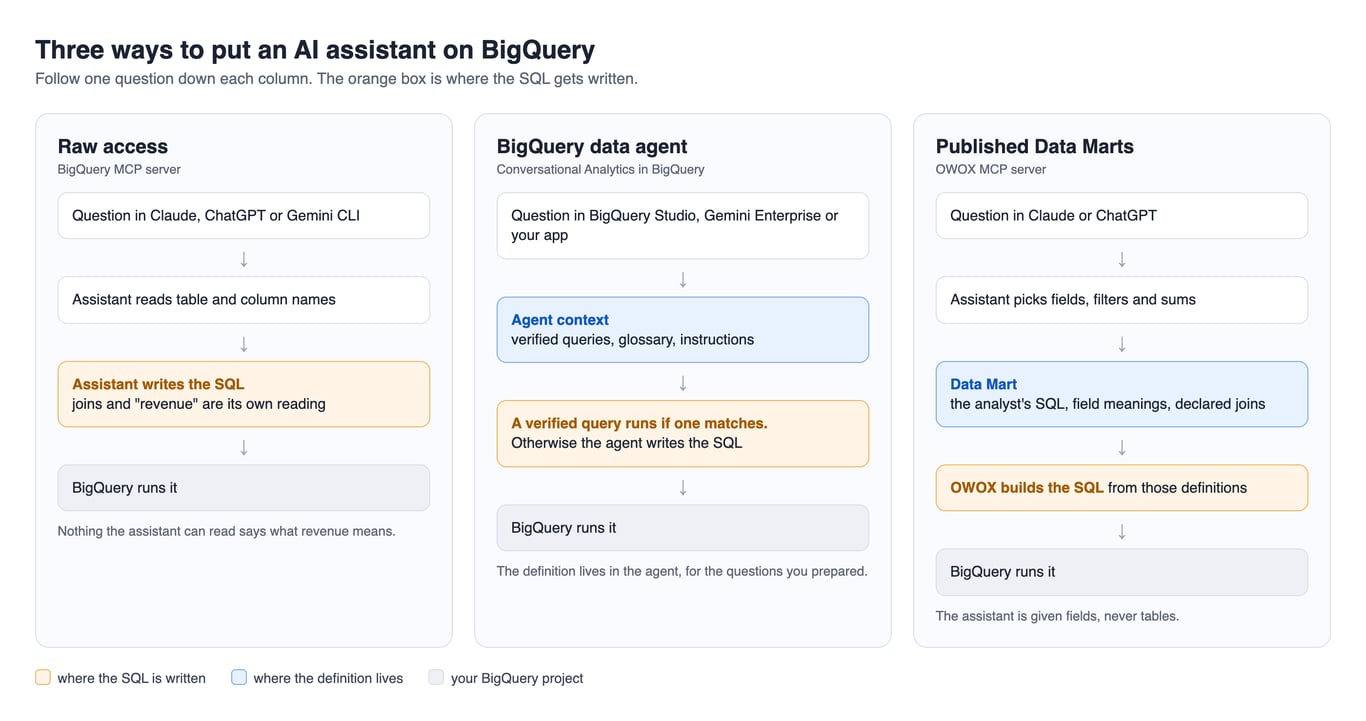
| Raw access | BigQuery data agent | Published Data Marts over MCP | |
|---|---|---|---|
| Who writes the SQL | The assistant | A verified query when one matches, the agent otherwise | OWOX, from the analyst’s definitions |
| What the assistant can see | Whatever its identity can read | The sources you selected | Published Data Marts your role allows |
| Where “revenue” is defined | Nowhere it can read | In the agent’s context | In the Data Mart |
| Where people ask | Claude, ChatGPT, Gemini CLI | Google’s own surfaces or your app | Claude or ChatGPT |
| What is logged | BigQuery jobs | BigQuery jobs | Run History and BigQuery jobs |
| Where rows go | To the AI provider | To Gemini, inside Google Cloud | To the AI provider |
Raw access: the BigQuery MCP server
Google runs a remote MCP server for BigQuery that works with “Gemini CLI, ChatGPT, Claude, and custom applications”. It gives the assistant two query tools, execute_sql and execute_sql_readonly, and caps results at 3,000 rows (Google’s documentation, read October 2026). The assistant reads your schema and writes its own query.
That is fine for exploration by someone who can read the SQL. It is the wrong setup for a founder, because a column called total_price looks like revenue to a model and nothing tells it otherwise. The setup itself, and the bugs you will hit on the way, are covered in BigQuery MCP for Claude.
BigQuery data agents: Google’s own answer
Conversational Analytics in BigQuery has been generally available since 1 July 2026. You create a data agent, select its sources, and give it context. Google ranks that context in this order: verified queries, which it describes as “deterministic SQL that executes when it matches a user prompt”, then glossaries, then instructions (overview, read October 2026).
This is real governance and it deserves a fair hearing. The agent “can only access the knowledge sources that you explicitly select”, “can’t perform write operations and can’t run DML queries”, and you can cap its query size in bytes. Users reach it in BigQuery Studio and Data Canvas, and you can publish it “to Gemini Enterprise, Data Studio, or your own application” (launch post).
Published Data Marts over MCP
In OWOX Data Marts the analyst publishes Data Marts on top of BigQuery: a table, a view or a SQL query, with field descriptions and declared joins. The OWOX MCP server exposes those, and only those, to Claude or ChatGPT. The assistant picks fields, filters and aggregations; it “cannot run arbitrary SQL” (OWOX documentation, read October 2026).
The MCP server is part of OWOX Data Marts Cloud. The queries still run in your own BigQuery project.
OWOX Data Marts
See your first report built in real time. 15 minutes.
- Connect your data warehouse
- Pick your metrics
- Get a live Google Sheets report
In the time it takes to write a ticket. Then imagine never writing that ticket again.
Book a DemoWe'll use your actual use case
What BigQuery itself lets you lock down
What BigQuery itself lets you lock down
Whichever setup you choose, four controls belong to BigQuery and cost nothing extra. Use them before you argue about tools.
A dedicated identity. Connect the assistant through its own service account or user, never your own. Its IAM roles are then the outer wall of everything it can touch. With published Data Marts the assistant never holds BigQuery credentials: the jobs run under the credentials of the storage you connected in OWOX Data Marts, so that is the identity to scope and the one to look for in the jobs log.
A dataset of views. Grant that identity read access to one dataset that holds only the views you are willing to defend, not to the raw tables behind them.
The read-only tool and a byte cap. On Google’s MCP server, execute_sql is the only tool that can write, and a deny policy removes it. For cost, BigQuery’s maximum bytes billed setting stops a query that would read more than you allow.
The jobs log. Every query the assistant runs is a BigQuery job, which means you can list them.
Find every query the assistant ran last week
This runs as written once you replace the region and the email. It needs the bigquery.jobs.listAll permission, which the BigQuery Resource Viewer role includes.
SELECT
  creation_time,
  user_email,
  job_id,
  ROUND(total_bytes_billed / POW(1024, 3), 2)
    AS gb_billed,
  ARRAY(
    SELECT CONCAT(t.dataset_id, '.', t.table_id)
    FROM UNNEST(referenced_tables) AS t
  ) AS tables_read,
  query
FROM `region-us`.INFORMATION_SCHEMA.JOBS
WHERE creation_time >= TIMESTAMP_SUB(
    CURRENT_TIMESTAMP(), INTERVAL 7 DAY)
  AND job_type = 'QUERY'
  AND user_email = 'assistant@example.com'
ORDER BY creation_time DESC
Read the query column for a week and you will know what your assistant actually does. More ways to use this view are in the guide to BigQuery query history.
None of these controls answers the founder’s question, though. IAM decides which tables the assistant may read. It has no opinion on whether cancelled orders count as revenue. That is a definition, and it has to live somewhere. For the wider checklist, see data governance for BigQuery.
Where the definition lives: an agent’s context or a Data Mart
Where the definition lives: an agent’s context or a Data Mart
With a data agent, the definition lives in the agent. A verified query for “net revenue by month” returns the same SQL every time someone asks for it. That works, and for a team that lives inside Google Cloud it may be all you need.
What happens when no verified query matches
People do not ask the questions you prepared. For the rest, the agent generates SQL from your glossary and instructions, and Google’s launch post says the user can review “the exact SQL it generates before it returns an answer”. That review is useful to someone who writes SQL for a living. It does not help the person who asked the question and only sees the answer. So the coverage of your verified queries is the coverage of your guarantee, and somebody has to keep extending it.
There is a second cost. The agent’s context is one more description of your business to maintain, next to the ones behind your dashboards and spreadsheets. When the definition of net revenue changes, it changes in each place or it drifts.
The Data Mart is the definition
A Data Mart puts the definition under the question instead of beside it. Net revenue is a field with a description, built from SQL the analyst wrote, joined to orders on a key the analyst chose. The assistant cannot reach around it, because fields are all it is given.
The same Data Mart feeds the reports in Google Sheets and Data Studio, so there is one description to maintain. It is also not tied to one warehouse: Data Marts run on Google BigQuery, Snowflake, AWS Redshift, AWS Athena and Databricks. The mechanism is described link by link in how governed MCP works.
If you already have dbt models or views, a Data Mart does not redefine them. Its input can be an existing table or view, so it points at what your model already builds; what you add is the field descriptions and the joins. That is still one more place to keep current, and it is fair to count it. What you get for it is that the chat, the spreadsheet and the dashboard read the same published definition.
If you are the only analyst and your definitions live in saved queries, the smallest first step is one of them: take the query behind the number you are asked for most, save it as a view, publish it as one Data Mart and describe its fields. Roles and members matter later. On day one the member in the log is you.
OWOX Data Marts does not write that SQL for you. Deciding what counts as revenue stays the analyst’s job. The product publishes the decision and holds every consumer to it.
One question, start to finish, on a BigQuery storage
One question, start to finish, on a BigQuery storage
Here is the founder’s question against a demo e-commerce project whose storage is Google BigQuery. Every screen below is the real product, captured on 9 October 2026.
The definition the analyst published
The Purchases Data Mart points at a view in BigQuery. The view is the analyst’s SQL; the Data Mart is what makes it available to reports and assistants.
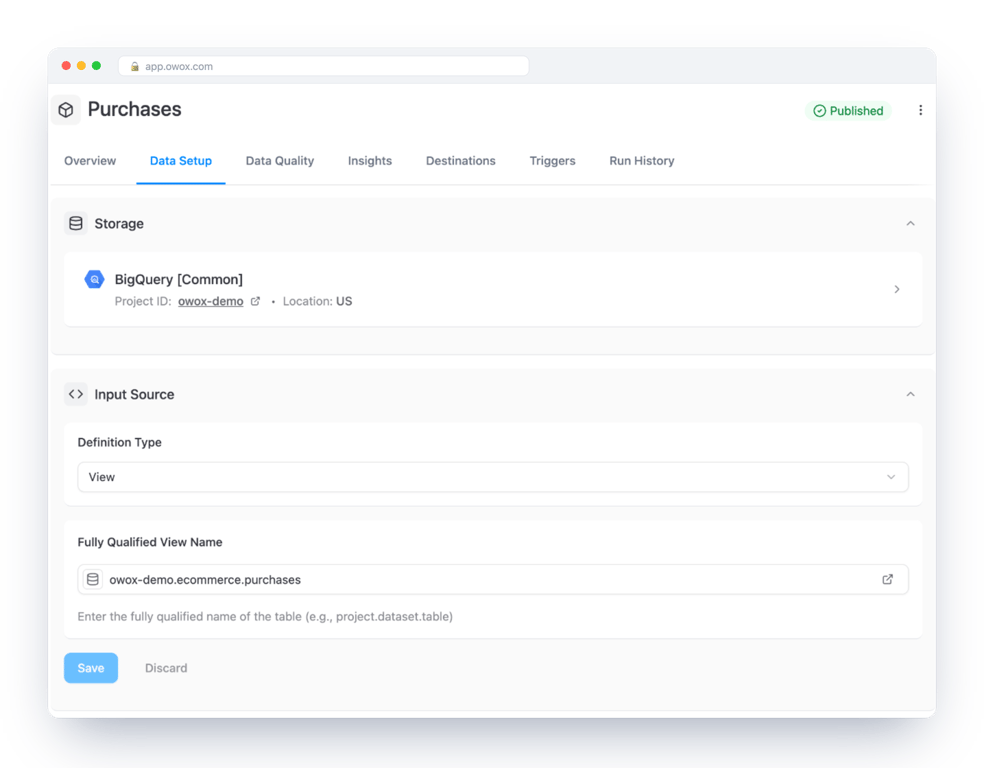
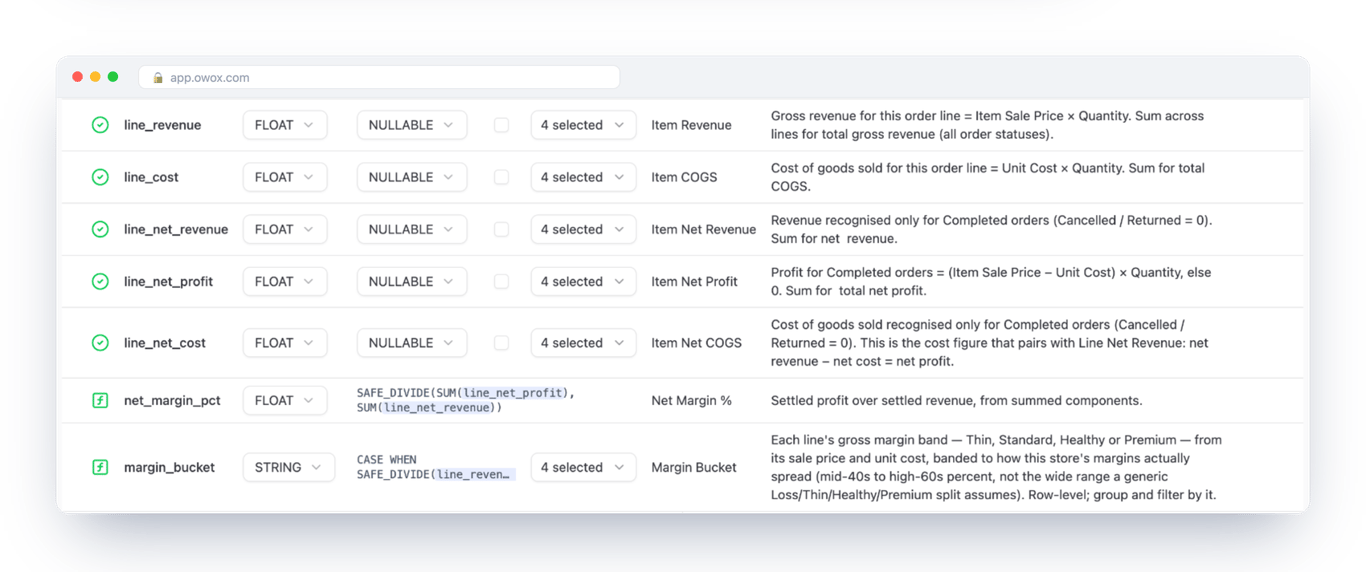
Its output schema is where gross and net revenue stop being a matter of opinion. line_revenue is every order line. line_net_revenue counts completed orders only. Each field says so in plain words, and those words are what the assistant reads.
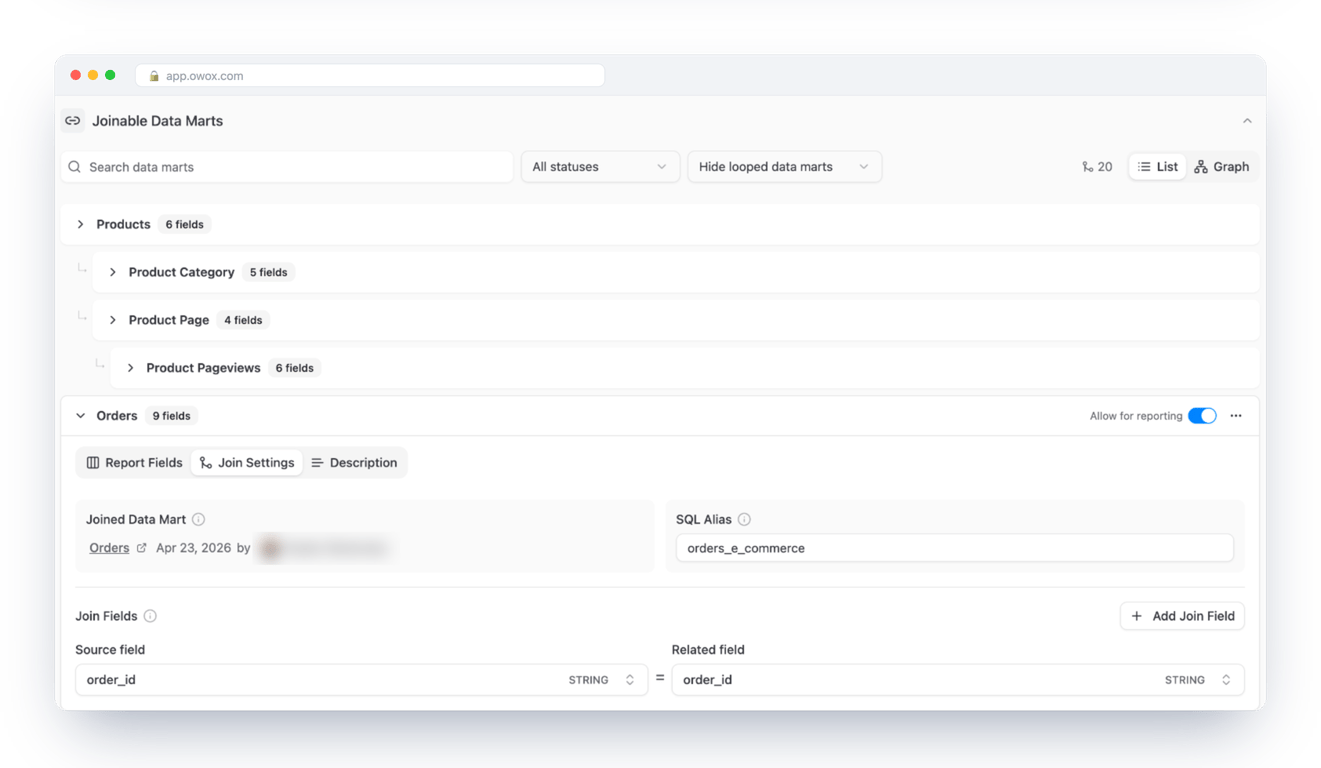
Order dates sit in another Data Mart, Orders. The join between the two is declared once, on order_id.
The question, and what the assistant sent
The prompt, typed into Claude with the OWOX Data Marts connector enabled:
How much did we actually earn in Q3 2026? Show gross and net revenue from the Purchases Data Mart.
Claude looked for a relevant Data Mart, read its fields, and queried it.
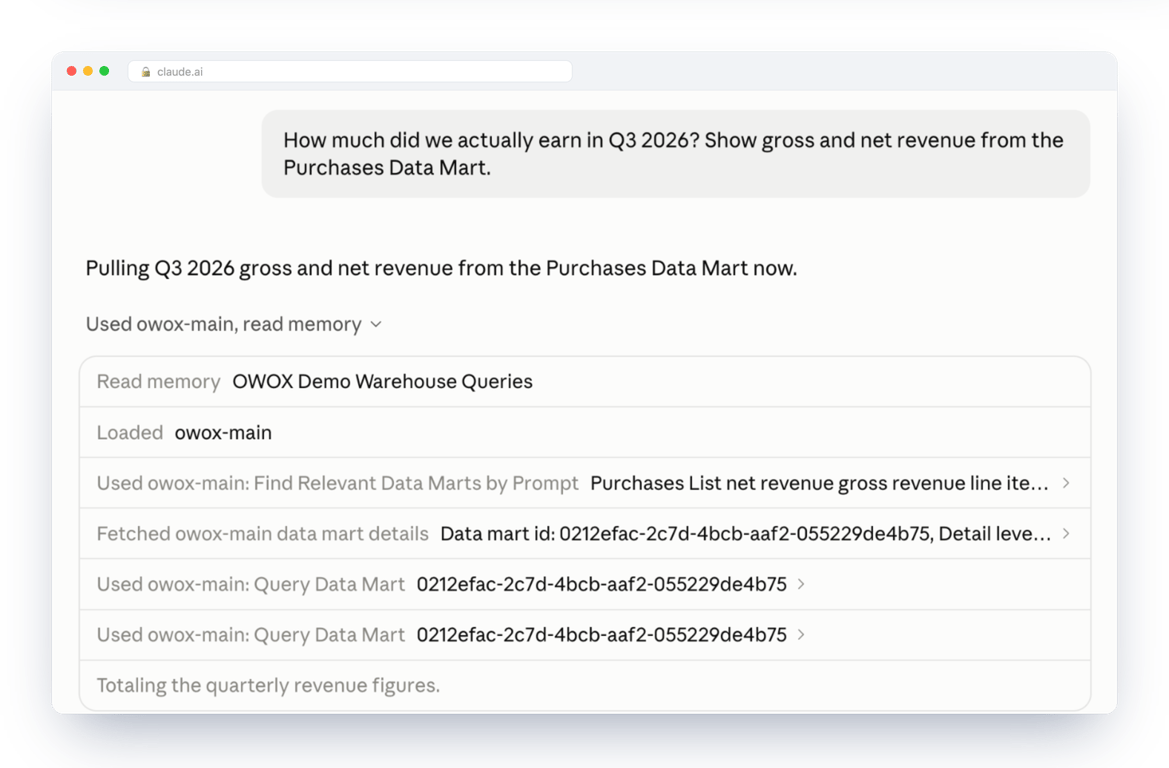
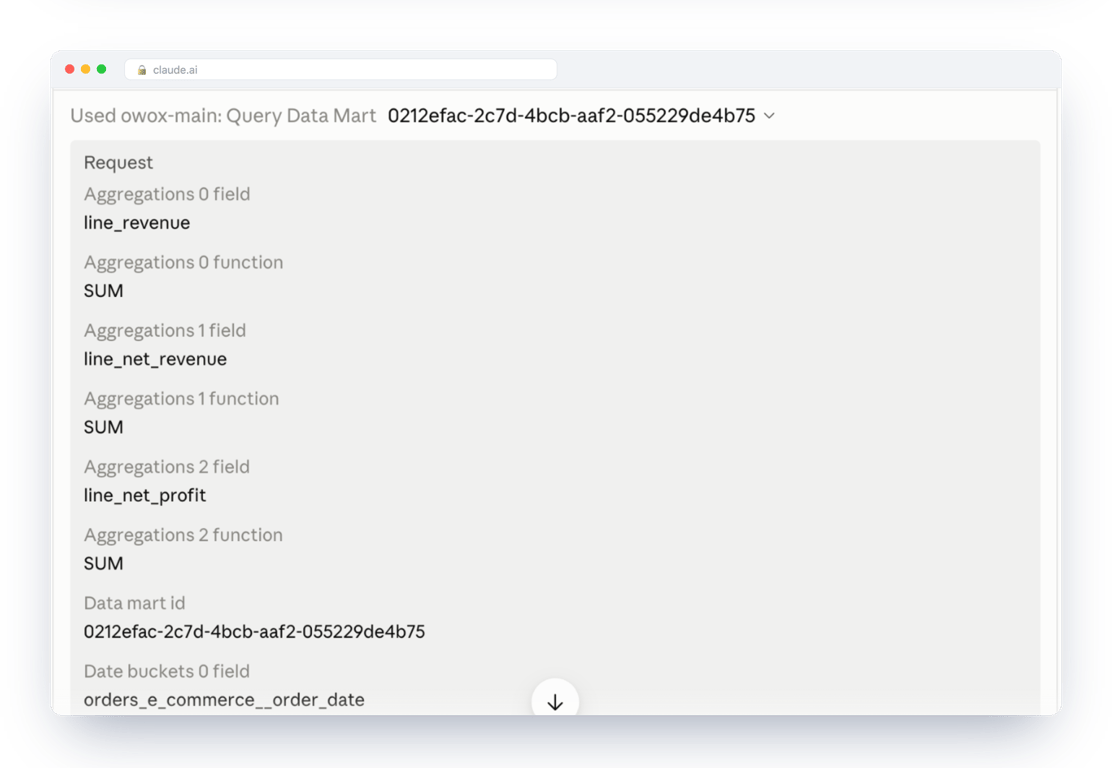
Open the call and there is no SQL in it. There are field names, three sums, a date bucket and a date filter. This is the request as Run History recorded it:
{
  "fields": [
    "orders_e_commerce__order_date",
    "line_revenue",
    "line_net_revenue",
    "line_net_profit",
    "net_margin_pct"
  ],
  "aggregations": [
    { "column": "line_revenue",
      "function": "SUM" },
    { "column": "line_net_revenue",
      "function": "SUM" },
    { "column": "line_net_profit",
      "function": "SUM" }
  ],
  "dateBuckets": [
    { "column": "orders_e_commerce__order_date",
      "unit": "MONTH" }
  ],
  "filters": [
    { "column": "orders_e_commerce__order_date",
      "operator": "gte",
      "value": "2026-04-01" },
    { "column": "orders_e_commerce__order_date",
      "operator": "lte",
      "value": "2026-09-30" }
  ],
  "limit": 20
}
The assistant asked for two quarters so it could compare them. Nobody told it to; more on that below.
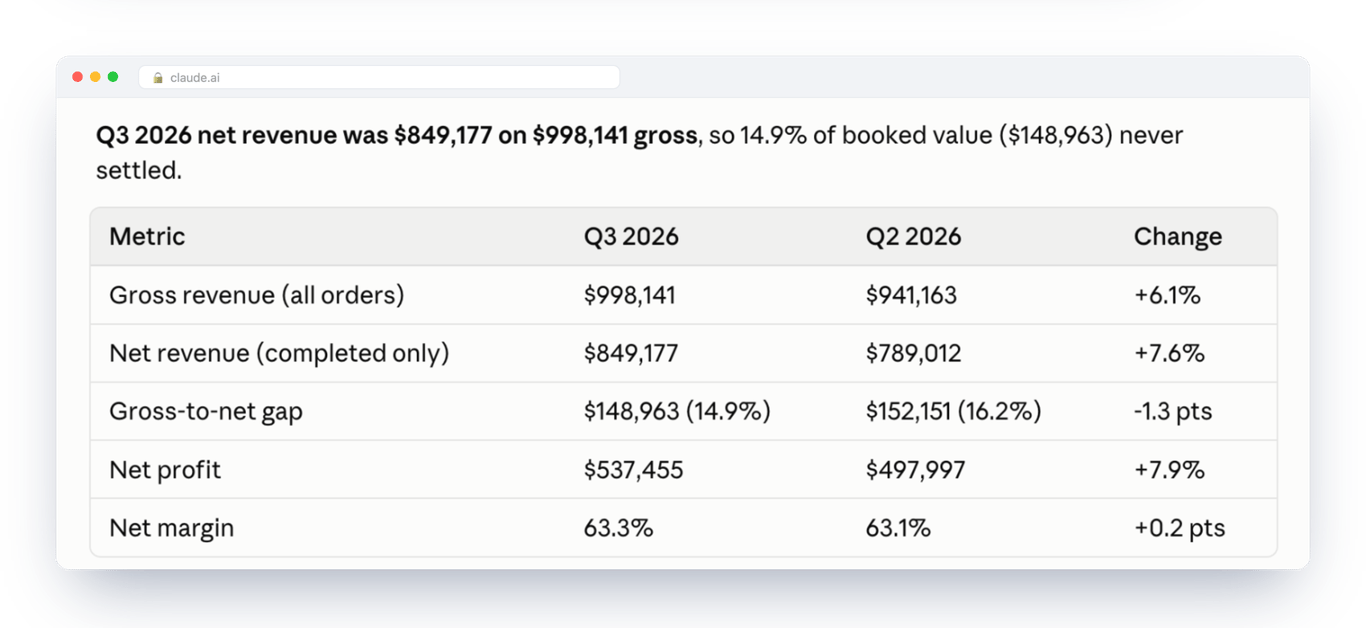
The answer, and the SQL behind it
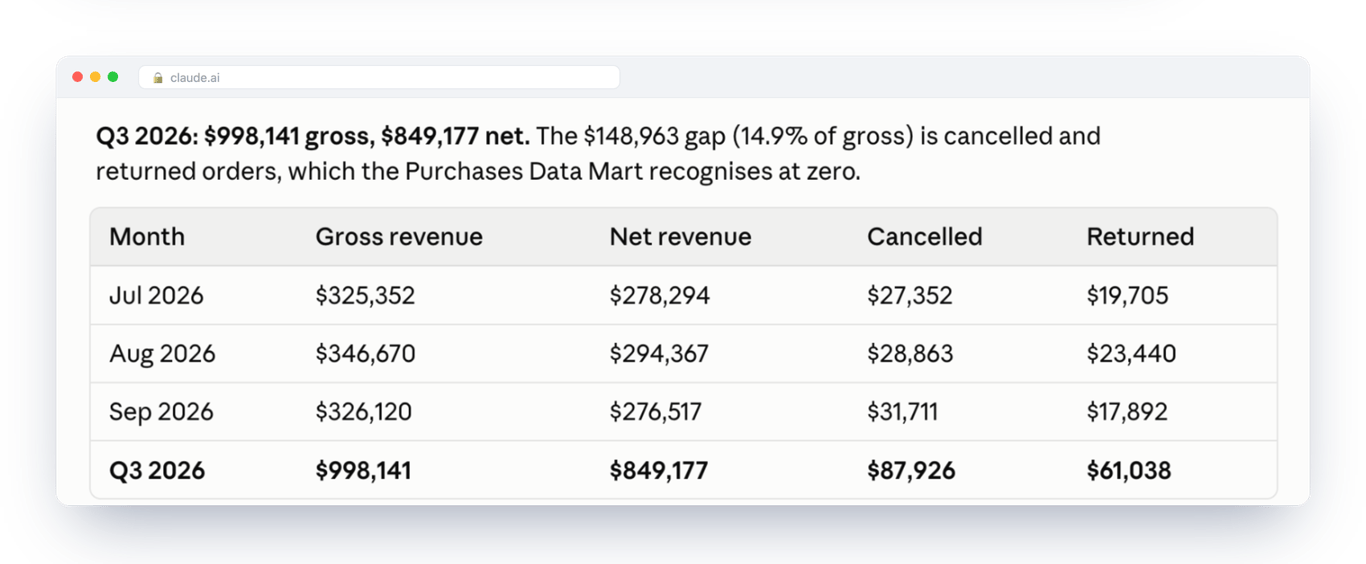
Claude returned $849,177 net on $998,141 gross. It added a comparison with the previous quarter that nobody asked for, and it said which figures came from OWOX and which were its own arithmetic.
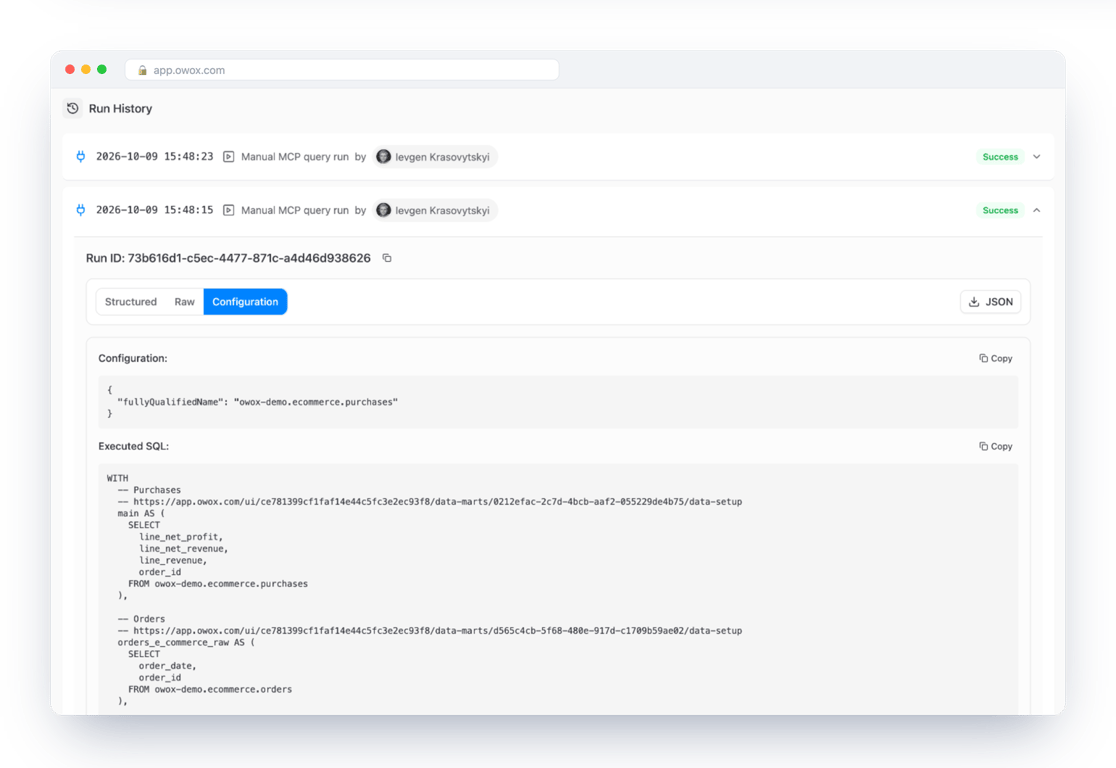
On the analyst’s side, the question is already in the Data Mart’s Run History: who asked, when, and the SQL that OWOX built and ran in BigQuery. Row values are not stored there, only the query.
This is the executed SQL from that entry, unedited except for line breaks and two comment lines with internal links removed:
WITH
  -- Purchases
  main AS (
    SELECT
      line_net_profit,
      line_net_revenue,
      line_revenue,
      order_id
    FROM owox-demo.ecommerce.purchases
  ),
  -- Orders
  orders_e_commerce_raw AS (
    SELECT
      order_date,
      order_id
    FROM owox-demo.ecommerce.orders
  ),
  orders_e_commerce AS (
    SELECT
      order_id,
      MAX(order_date)
        AS orders_e_commerce__order_date
    FROM orders_e_commerce_raw
    GROUP BY order_id
  )
SELECT
  DATE_TRUNC(
    orders_e_commerce
      .orders_e_commerce__order_date,
    MONTH
  ) AS `orders_e_commerce__order_date`,
  SUM(main.line_revenue)
    AS `line_revenue | SUM`,
  SUM(main.line_net_revenue)
    AS `line_net_revenue | SUM`,
  SUM(main.line_net_profit)
    AS `line_net_profit | SUM`,
  SAFE_DIVIDE(
    SUM(main.line_net_profit),
    SUM(main.line_net_revenue)
  ) AS `net_margin_pct`
FROM main
LEFT JOIN orders_e_commerce
  ON main.order_id
   = orders_e_commerce.order_id
WHERE orders_e_commerce
    .orders_e_commerce__order_date
    >= CAST('2026-04-01' AS DATE)
  AND orders_e_commerce
    .orders_e_commerce__order_date
    <= CAST('2026-09-30' AS DATE)
GROUP BY
  DATE_TRUNC(
    orders_e_commerce
      .orders_e_commerce__order_date,
    MONTH
  )
LIMIT 21
The join is the one declared in the Data Mart, on order_id. The margin is the calculated field from the output schema, not something the assistant derived.
The same question again
A new chat, the same prompt. The layout changed and so did the wording. The assistant chose a monthly table this time and split out cancellations and returns. The two numbers did not move.
Three different phrasings
The identical prompt twice is the easy case. So the same afternoon we asked three ways, in three new chats, without naming a Data Mart:
| What we typed | What came back first | Did it query BigQuery? |
|---|---|---|
| What was our revenue last quarter? | Net revenue $849,177 | Yes |
| How much did we earn in Q3 2026? | Net revenue $849,177 | Yes |
| What was the Q3 top line? | Gross revenue $998,141, “or $849,177 net” | No |
Two things in that table are worth more than a clean result.
The figures never disagreed, but the headline did. All three answers carried both numbers, and both matched to the dollar. Asked for “revenue” or what we “earned”, the assistant led with net. Asked for the “top line”, it led with gross. The definitions held; the choice of which one to say first is still the assistant’s. If your leadership means one of them by “revenue”, say which in the Data Mart’s description.
The third answer was not a query at all. The assistant found the earlier chats in its own history and reused them, and said so: the figures were “not a fresh query”. Run History agrees: there are entries for the first two questions and none for the third. This was one Claude account with memory switched on, which is how most people run it. A chat can answer from memory, so the log is the only proof that a number came from the warehouse.
A question outside the published Data Marts
We also asked for something the project does not hold: “How many employees did we have at the end of Q3 2026?” The assistant searched the published Data Marts, found nothing, and answered: “Can’t answer this from the OWOX Data Marts connector: there is no headcount or HR data in it.” It then listed what is there and what would have to be published. No number was produced.
That is the whole promise, and it is a narrow one: the same definitions behind every answer, and a query you can open. The reasons an assistant gives different numbers without it are in why AI gives different answers to the same data question.
Where your rows go, and what this does not fix
Where your rows go, and what this does not fix
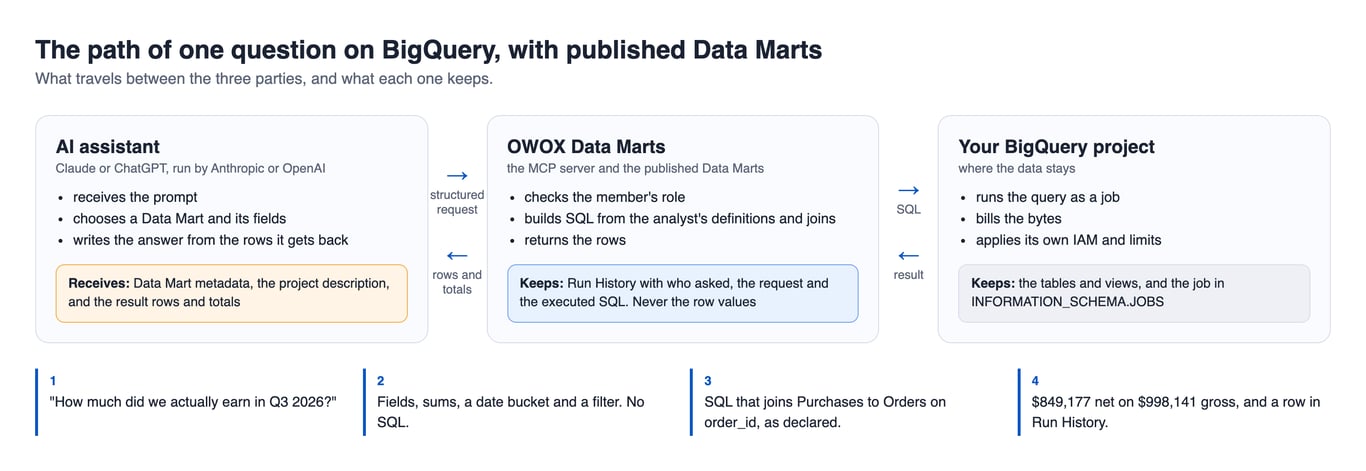
Rows go to the AI provider. OWOX’s documentation says it in one line: when the assistant queries a Data Mart, “the resulting data rows and totals are sent to that provider”. The Data Mart’s metadata and your project description go too. If a field must not leave, do not publish it.
The assistant can still be wrong. It can choose the wrong Data Mart, or do its own arithmetic on correct rows and get the arithmetic wrong. In the walkthrough it labelled its arithmetic; treat that as good manners, not a guarantee.
A question outside the published set gets no number. That is the point, and it is also work: every gap is a Data Mart someone has to write.
Each question has a cost you can see. It is a query job in your BigQuery project, so it scans bytes like any other query; the jobs query above shows how many. It is also a recorded run in OWOX Data Marts. And each definition costs analyst time, once to write and again whenever the business changes its mind.
It does not join what is not in the warehouse. If the data still sits in five tools, start with why cross-tool joins need a warehouse.
A test to run before you roll it out
A test to run before you roll it out
Once an assistant is connected, the test itself takes about ten minutes. It works on any of the three setups. Connecting, and writing the first definition, are not part of the ten minutes.
- Pick the number your leadership argues about most. Usually revenue.
- Ask for it three ways in three separate chats: “revenue last quarter”, “how much did we earn in Q3”, “Q3 top line”.
- Write down the three numbers, and which one each answer led with. If they differ, stop here: you have found where the definition is missing.
- If they agree, open the log and find the SQL behind each of them. An answer with no entry in the log came from the chat’s memory, not from your data. Check the SQL is the definition you would sign.
- Run the jobs query from this guide for the identity the queries ran under (the assistant’s own, or the storage credentials with Data Marts) and confirm nothing else was read.
What to send back to the person who asked
A summary short enough to forward:
- Yes, we can ask our BigQuery data in an AI chat. Connecting it is the quick part.
- The risk is not the AI inventing numbers. It is the AI choosing its own meaning of “revenue” each time someone asks.
- The fix is that I write down what each number means, once, and the AI is only allowed to answer from that. I have not done this yet for every number; I will start with the one we argue about most.
- Once that is done, you will get the same figures however you phrase the question, and I will be able to show the exact calculation behind any answer.
- What the AI reads to answer you is sent to the company that makes it, so I will only make available what we are comfortable sending.
Turn your data into decisions.
Governed data marts give you the clean foundation ML needs to actually work.
- No AI hallucinations
- Analyst-governed definitions
- Every number traces to SQL
Frequently Asked Questions
Does BigQuery have a built-in AI analyst?
Yes. Conversational Analytics in BigQuery has been generally available since 1 July 2026. You can ask a table directly, or create a data agent with selected sources, verified queries, glossary terms and instructions. Google's documentation says a direct conversation "can be less accurate" than one with a data agent, so the agent is the option to evaluate.
Can Claude or ChatGPT query BigQuery directly?
Yes. Google runs a remote MCP server for BigQuery that works with Claude and ChatGPT. It gives the assistant two tools, execute_sql and execute_sql_readonly, so the assistant writes its own SQL against whatever its identity can read. To have it answer from definitions an analyst wrote instead, connect it to published Data Marts through the OWOX MCP server.
What is a verified query in BigQuery, and how is it different from a Data Mart?
A verified query is SQL you attach to a BigQuery data agent. Google describes it as deterministic SQL that executes when it matches a user prompt. It covers the questions you prepared. A Data Mart is a published dataset with field meanings and declared joins; an assistant can only pick its fields, so every question it can ask is answered from the same definition. The same Data Mart also feeds reports in Google Sheets and Data Studio.
Where do my rows go when an assistant answers from BigQuery?
It depends on the setup. With Claude or ChatGPT connected over MCP, the rows each query returns are sent to the company behind the assistant, Anthropic or OpenAI, so it can write the answer. With OWOX Data Marts, Run History keeps the query and the executed SQL but never the row values. With Google's own Conversational Analytics the processing stays in Google Cloud.
Do I need a semantic layer to use AI on BigQuery?
You need the definitions written down somewhere the assistant must go through. That can be verified queries and a glossary on a BigQuery data agent, a semantic layer, or published Data Marts. What does not work is leaving the definition in an analyst's head and giving the assistant raw tables.
How do I see which queries an AI assistant ran in my BigQuery project?
Connect the assistant through its own identity, then query INFORMATION_SCHEMA.JOBS filtered on that user_email. Each row shows the time, the SQL, the tables read and the bytes billed. You need the bigquery.jobs.listAll permission, which the BigQuery Resource Viewer role includes. If the assistant works through OWOX Data Marts, each question also appears in the Data Mart's Run History with the member's name and the executed SQL.