Snowflake for data analysts: how to turn your warehouse into a reusable reporting layer
A reusable reporting layer is a small set of tables and views in Snowflake, one per business question, that every report reads from. Build them in their own schema, refresh the heavy ones on a schedule, give readers a role that can see nothing else, and publish each one under a business name so the logic is written once.
If you are the analyst on a Snowflake account, you know how a week goes. The same question arrives from three teams, each wants it in a different tool, and each answer starts with a slightly different copy of the same SQL. Six months later there are four definitions of revenue and you are the only person who can explain why.
A reporting layer is how you stop that. It is not a product and it does not need a project plan. It is a decision about where reporting logic lives: in a small set of named tables and views in Snowflake that every report reads, instead of in every report. This guide shows how to build one, with the SQL.
What a reporting layer is
Think of the data in three levels, each in its own schema.
- Raw: data as it arrived from sources. Shaped like the source system, not like a question.
- Modeled: cleaned and joined into entities such as customers, orders and sessions.
- Reporting: tables shaped like questions. One row per day and channel. One row per customer per month.
The reporting level is the only one that business tools should touch. Each table in it has a stated grain, plain column names and one owner. That is the whole idea. When “revenue by channel” exists as a table, nobody needs to rebuild it from raw events in a dashboard.
Why ad hoc SQL does not scale
Ad hoc SQL is the right tool for a new question. It is the wrong place to keep an answer.
Logic forks. One query excludes refunds, a copy made in March does not. Both are labelled revenue.
Cost multiplies. Each tool that recomputes a heavy join keeps a warehouse awake to do it. Snowflake bills for that time whether the query is new or the hundredth copy, as Snowflake pricing explained works through.
You become the bottleneck. Every change request comes to the one person who knows which of the copies is current.
OWOX Data Marts
See your first report built in real time. 15 minutes.
- Connect your data warehouse
- Pick your metrics
- Get a live Google Sheets report
In the time it takes to write a ticket. Then imagine never writing that ticket again.
Book a DemoWe'll use your actual use case
Step 1: give reporting its own schema
Step 1: give reporting its own schema
Start with a schema that holds only reporting objects, so that access can be granted to it and to nothing else.
CREATE SCHEMA analytics.reporting;Name the objects for what they answer and at what grain: channel_daily, customer_monthly, product_weekly. A reader should be able to guess the contents from the name.
Step 2: build each reporting table once
Step 2: build each reporting table once
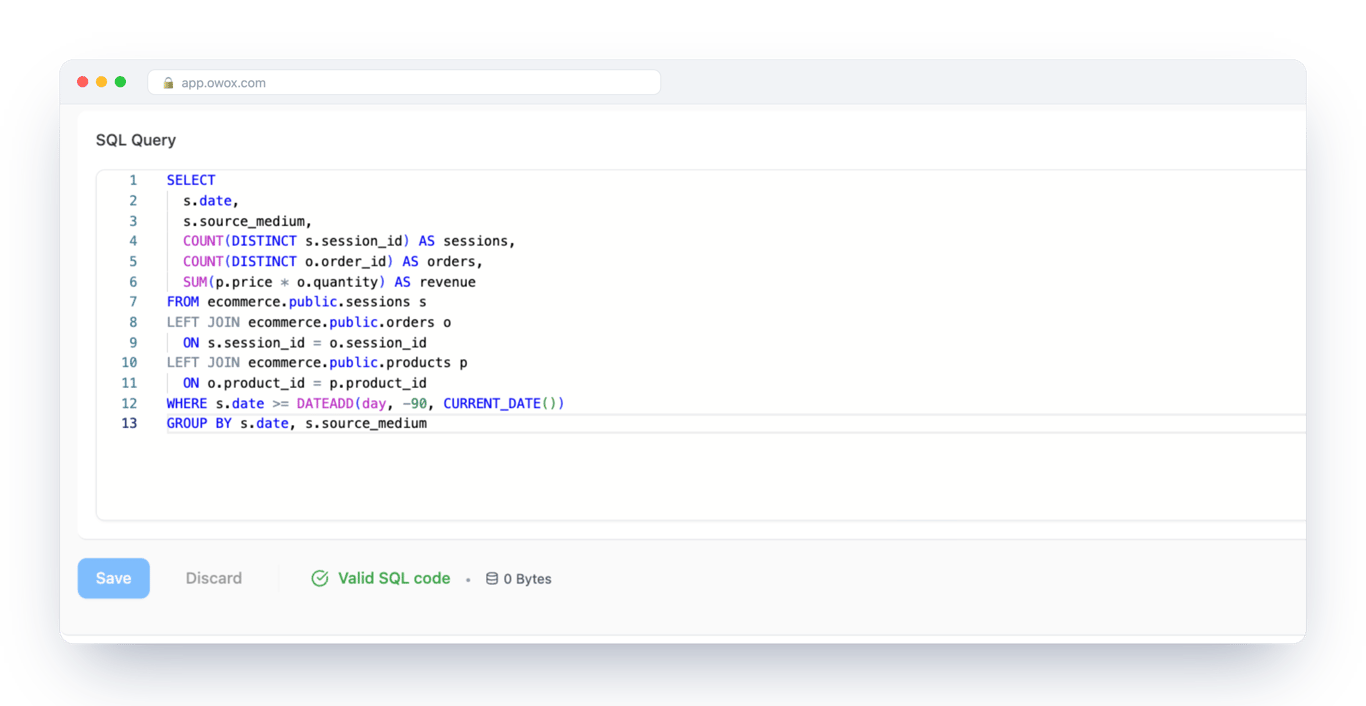
Take one recurring question and write it down as an object. This one is sessions, orders and revenue per channel per day, and the query was validated on Snowflake:
CREATE OR REPLACE VIEW
  analytics.reporting.channel_daily AS
SELECT
  s.date,
  s.source_medium,
  COUNT(DISTINCT s.session_id) AS sessions,
  COUNT(DISTINCT o.order_id) AS orders,
  SUM(p.price * o.quantity) AS revenue
FROM ecommerce.public.sessions s
LEFT JOIN ecommerce.public.orders o
  ON s.session_id = o.session_id
LEFT JOIN ecommerce.public.products p
  ON o.product_id = p.product_id
WHERE s.date >=
  DATEADD(day, -90, CURRENT_DATE())
GROUP BY s.date, s.source_medium;
A view stores the definition and runs the query each time it is read. That is fine while the query is light. When the joins get heavy, or many reports read the same result, compute it once and store it. Snowflake’s dynamic tables do this declaratively: you state how fresh the result must be and which warehouse refreshes it.
CREATE OR REPLACE DYNAMIC TABLE
  analytics.reporting.channel_daily
  TARGET_LAG = '1 day'
  WAREHOUSE = transform_wh
AS
SELECT
  s.date,
  s.source_medium,
  COUNT(DISTINCT s.session_id) AS sessions,
  COUNT(DISTINCT o.order_id) AS orders,
  SUM(p.price * o.quantity) AS revenue
FROM ecommerce.public.sessions s
LEFT JOIN ecommerce.public.orders o
  ON s.session_id = o.session_id
LEFT JOIN ecommerce.public.products p
  ON o.product_id = p.product_id
GROUP BY s.date, s.source_medium;
The rule of thumb: views for definitions that are cheap to run, stored tables for anything a dashboard would otherwise recompute all day.
A note on tables loaded by connectors
If ad platform or shop data is loaded into Snowflake by OWOX Data Marts connectors, the schema, table and column names are created quoted, so they are case-sensitive. A query written the usual way fails with “does not exist or not authorized”. Quote the names exactly as they were created:
SELECT
  "date_start" AS date,
  "campaign_name" AS campaign,
  SUM("impressions") AS impressions,
  SUM("clicks") AS clicks,
  SUM("spend") AS spend
FROM ads_owox."PUBLIC"."facebook_ads_ad_account_insights"
WHERE "date_start" >=
  DATEADD(day, -30, CURRENT_DATE())
GROUP BY "date_start", "campaign_name"
ORDER BY date, spend DESC;
A reporting view over such a table is also the place to rename the columns once, so nobody downstream has to think about quoting.
Step 3: grant read access to the layer, and only the layer
Step 3: grant read access to the layer, and only the layer
A reporting layer is also an access boundary. Create a role that can read the reporting schema and nothing else, and use it for every tool and every person who consumes reports.
CREATE ROLE reporting_reader;

GRANT USAGE ON DATABASE analytics
  TO ROLE reporting_reader;
GRANT USAGE ON SCHEMA analytics.reporting
  TO ROLE reporting_reader;
GRANT SELECT ON ALL TABLES
  IN SCHEMA analytics.reporting
  TO ROLE reporting_reader;
GRANT SELECT ON FUTURE TABLES
  IN SCHEMA analytics.reporting
  TO ROLE reporting_reader;
The FUTURE grant means a table you add next month is readable without another statement. Raw and modeled schemas stay invisible to this role, so a reader cannot join against a table that was never meant for reporting.
Step 4: publish each definition where people work
Step 4: publish each definition where people work
Up to here everything is plain Snowflake, and it is yours whatever tools you use. What remains is delivery: getting each reporting table to the people who need it, in the tool they already open, without you running exports.
OWOX Data Marts is built for that step. It does not transform your data and it does not replace the layer you just built. It connects Snowflake as a storage and lets you publish a SQL query, a table or a view as a Data Mart: a named definition with an owner.
Document it once
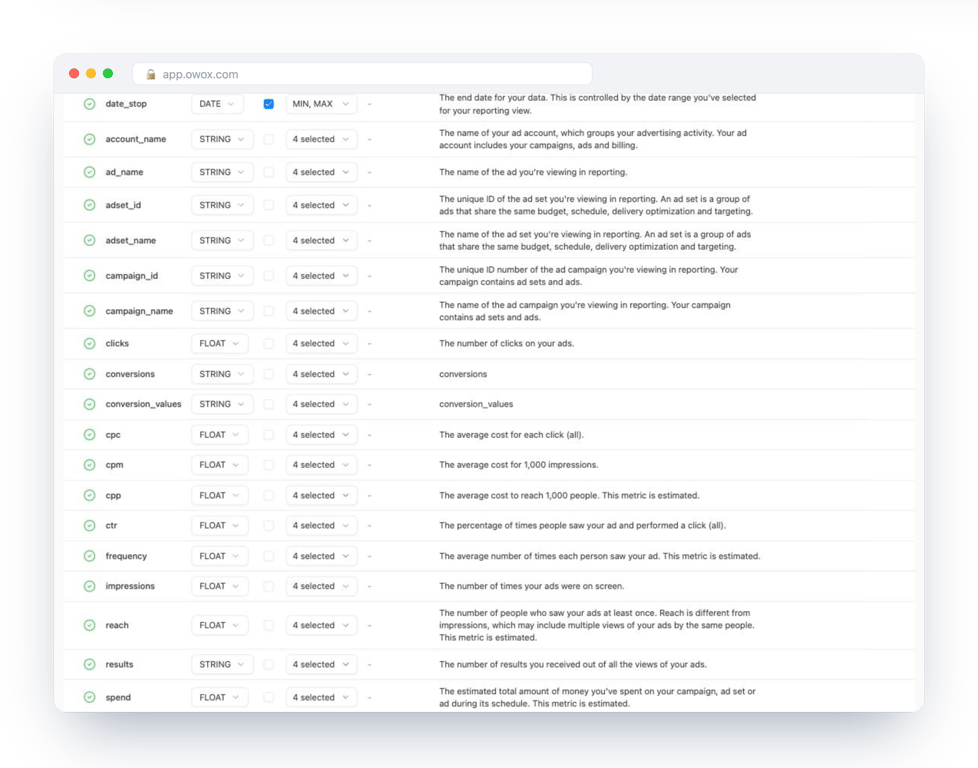
Each Data Mart has an output schema: every field with its type, an alias in business language and a description. This is the documentation that travels with the data, so “revenue” says whether it includes refunds without anyone opening the SQL.
Deliver it on a schedule
From one Data Mart you create reports to Google Sheets, Data Studio, Slack or email, each with its own columns and schedule. A trigger runs the report daily, weekly or at an interval, and Run History records every run. The marketing lead gets a sheet, finance gets another, and both come from the same definition.
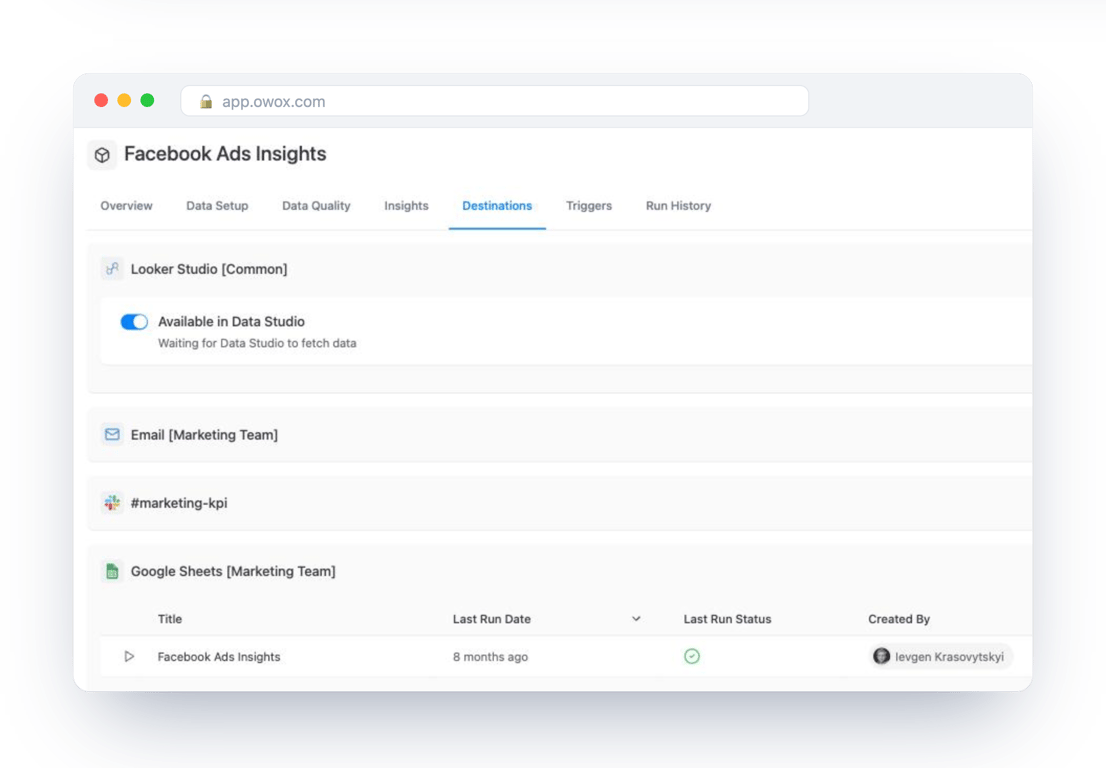
That is what orchestration means here: the refresh that used to be you, running a query on Monday morning, is a schedule with a log. Snowflake reports in Google Sheets walks through the spreadsheet route step by step.
Let other tools read the same definitions
Because the definitions are published and described, they are also what an assistant can be pointed at. Over MCP, an assistant reads the Data Marts you published and the joins you declared, instead of guessing at raw tables. The interface is not what makes the answer trustworthy. The published definition behind it is. How that compares with Snowflake’s own Cortex Analyst is in governed AI analytics on Snowflake.
What changes for you as the analyst
What changes for you as the analyst
A reporting layer moves your work from answering to defining.
- One place to change a metric. Fix it in the reporting table and every sheet and dashboard follows.
- Fewer tickets. A new slice of an existing table is a new report, or something the reader pulls themselves.
- A bill you can read. Refreshes run on a warehouse you chose, on a schedule you set.
- Ownership that is visible. Each definition has a name, an owner and a description.
Start with one table. Pick the question you were asked most often last month, build its reporting table, publish it, and retire the copies. What is Snowflake covers the platform basics if you need them, and self-service marketing analytics on Snowflake shows the same layer from the marketing team’s side.
Turn your data into decisions.
Governed data marts give you the clean foundation ML needs to actually work.
- No AI hallucinations
- Analyst-governed definitions
- Every number traces to SQL
Frequently Asked Questions
How do reports in different tools stay consistent with a reporting layer?
They all read the same definition. In OWOX Data Marts a reporting table, view or query is published once as a Data Mart with described fields, and reports to Google Sheets, Data Studio, Slack and email are built on it. A metric is changed in one place, in the analyst's SQL, and every report follows on its next run.
Can AI assistants use the reporting layer?
Yes. AI Insights runs on published Data Marts and delivers a written summary on a schedule, and over MCP an assistant reads the Data Marts you published and the joins you declared. In both cases the numbers come from the analyst's definitions, the same ones the reports use, not from SQL written against raw tables.
Why not point an AI assistant at raw Snowflake tables?
Raw tables do not say which rows count, how tables join or what a metric includes, so an assistant has to guess, and a wrong guess still returns a plausible number. A published Data Mart carries the analyst's query and a description of each field, which gives the assistant the same definition a report would read.
How can analysts get started with OWOX Data Marts on Snowflake?
Create a reporting schema in Snowflake and build one table or view for a question you are asked often. Connect Snowflake as a storage in OWOX Data Marts with a dedicated warehouse, publish that table, view or SQL query as a Data Mart, describe its fields, and add a report to Google Sheets or Data Studio on a schedule.
What role does OWOX Data Marts play in turning Snowflake into a reusable reporting layer?
OWOX Data Marts publishes and delivers what the analyst built. A SQL query, table or view in Snowflake becomes a named Data Mart with documented fields, and reports from it go to Google Sheets, Data Studio, Slack or email on a schedule, with every run recorded. It does not transform the data or create the tables; that logic stays in Snowflake, written by the analyst.
How does owning an analyst-controlled reporting layer improve analytics workflows?
When reporting logic lives in one set of tables that the analyst owns, a metric is changed in one place and every report follows. New slices become new reports on an existing definition instead of new queries, readers can pull data themselves, and the analyst spends time defining metrics instead of re-running exports.
What does a reusable reporting layer on Snowflake look like for analysts?
Three levels, each in its own schema: raw data as it arrived, modeled entities such as customers and orders, and reporting tables shaped like questions, for example one row per day and channel. Only the reporting level is read by business tools. Each table in it has a stated grain, plain column names and one owner, and readers use a role that can see that schema and nothing else.
Why is ad hoc SQL not enough for reporting on Snowflake?
Ad hoc SQL is the right tool for a new question and the wrong place to keep an answer. Copies of the same query drift apart, each tool that recomputes a heavy join keeps a warehouse awake to do it, and every change request comes back to the one person who knows which copy is current. A reporting layer keeps each answer in one named table.