Stripe to BigQuery: Load the Payments and Reconcile Them to the Payouts
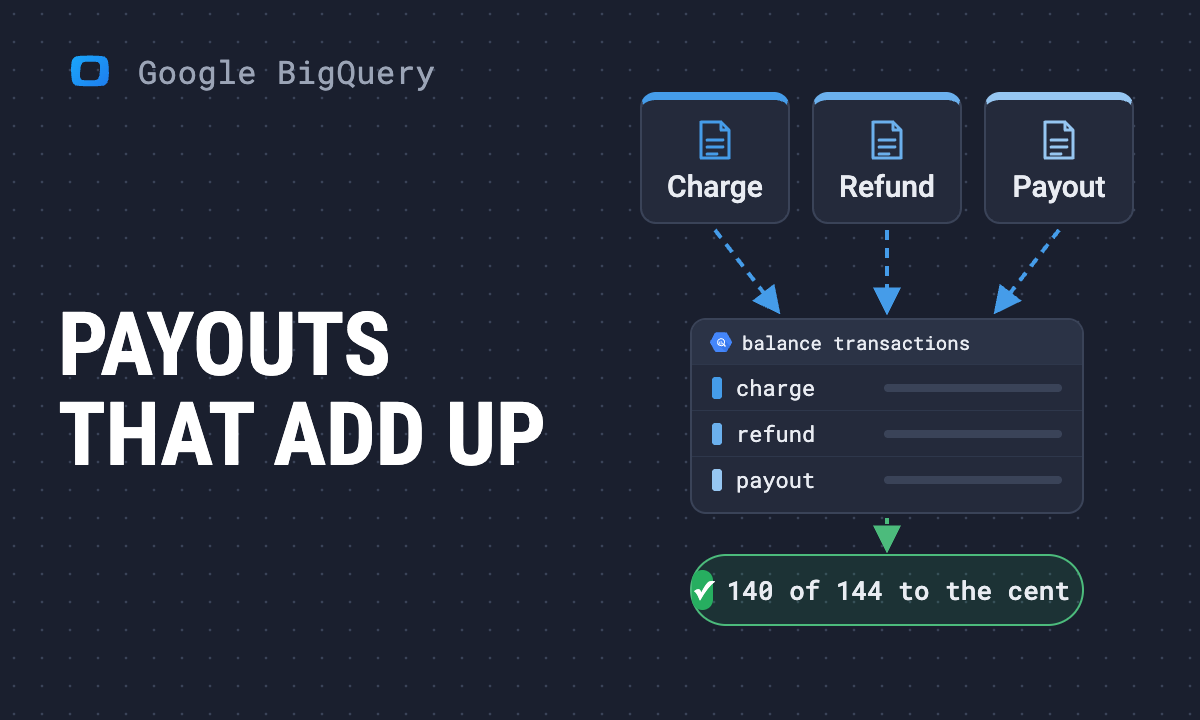
Stripe's dashboard shows gross volume, the books show revenue and the bank shows payouts, and the three never agree. This guide is for the analyst asked to end that argument with tables: the five routes into BigQuery, the 14 Stripe tables and the one that is the ledger, the three-amounts-three-dates rule, and two checks we ran on one account's loaded tables: the balance transactions inside each payout summed to the payout to the cent for 140 of 144 payouts, with every gap named, and MRR rebuilt from subscription items.
The CEO circles “gross volume” on a Stripe screenshot and asks why your dashboard shows less. The CFO asks which bank deposits belong to October. Finance says revenue is a third number. All three are right, and none of them is the one you need.
The short answer: land Stripe’s objects as tables in your data warehouse, read money from balance_transactions rather than from charges, and check the tables against the one thing Stripe produces that your bank also sees: the payouts. Each amount has its own date field, and the rule for which one to use is the middle of this guide.
Most pages on this topic stop once the data has moved. We loaded one Stripe account through a custom connector in OWOX Data Marts into the BigQuery dataset stripe, 14 tables, and ran the checks. The account is small: 146 automatic payouts in thirteen months, most of them under 500.00. For 140 of the 144 payouts with a complete window, the balance transactions that became available in that window summed to the payout to the cent. Four did not, and each gap has a name. MRR rebuilt from subscription items came to 7,258.01 for 45 active subscriptions. Every query below ran against that dataset on 2026-11-06, and every number is as it came out.
Five ways to get Stripe into BigQuery
Five ways to get Stripe into BigQuery
The routes differ in what arrives, who owns the schema, and whether anything tells you which amount is revenue. The general menu is in how to load data into BigQuery.
| Route | What arrives | Who owns the schema | Says which amount is revenue |
|---|---|---|---|
| Stripe Data Pipeline | Stripe’s own tables, pushed into the data warehouse | Stripe | No |
| BigQuery Data Transfer Service, Stripe connector | Objects plus reports already generated in Stripe | No | |
| An ELT tool | Objects, on the vendor’s schema | The vendor | No |
| Your own script on the REST API | Whatever you write | You | No |
| OWOX Data Marts with the Stripe custom connector | 14 objects as tables in your dataset | You: the manifest is open | No |
What the vendor pages said when we read them on 2026-11-06: Google’s Stripe transfer is in Preview, transfers reports you have already generated in Stripe plus a list of objects, and defaults its start date to three years back. Airbyte drives most streams from Stripe’s events and documents the 30-day events limit and a lookback window for objects that change after creation. Fivetran re-syncs pending balance transactions weekly and relates payouts to balance transactions through a separate table, not a column. Estuary, Coupler.io and Peliqan list objects and sync frequencies. None of the six says which amount is revenue or shows a payout adding up; that part is the analyst’s whichever row you pick (the ETL vs ELT question sits behind it), and it is the rest of this guide.
The 14 tables, and the one that is the ledger
The 14 tables, and the one that is the ledger
Stripe has one object that records every movement of money into or out of your balance: the balance transaction. Charges, refunds, disputes and payouts each point at theirs, so the table design is a hub and spokes.
The money side. stripe_balance_transactions is the spine: amount (gross), fee, net, type, reporting_category, source (the charge, refund or payout that caused it), created and available_on. stripe_charges, stripe_refunds, stripe_disputes and stripe_payouts each carry a balance_transaction id, so a charge’s fee is a join, not an estimate. In our account 565 of 565 succeeded charges resolved to a balance transaction, and the 14 refunds in stripe_refunds summed to the same 8,587.43 as SUM(amount_refunded) over the charges.
The billing side. stripe_customers (463 rows, 6 delinquent), stripe_invoices (141: 126 paid, 7 open, 8 void), stripe_invoice_line_items, stripe_subscriptions in every status, stripe_subscription_items, and the catalogue, stripe_products and stripe_prices. Invoice subtotal equalled the sum of its lines on all 141 invoices, which is the first check to run on your own load.
Lost checkouts and the audit trail. stripe_payment_intents holds every payment attempt: 552 succeeded, 54 still waiting for a payment method, 5 waiting for the customer, 130 cancelled, the 189 that stripe_charges cannot show you. stripe_events records every change Stripe saw, typed and tied to its object.
The 14 tables and their joins are drawn once in the Stripe model: customers is the hub of the billing side, every money table points at balance transactions. It is on the model canvas and as a bundle on GitHub.
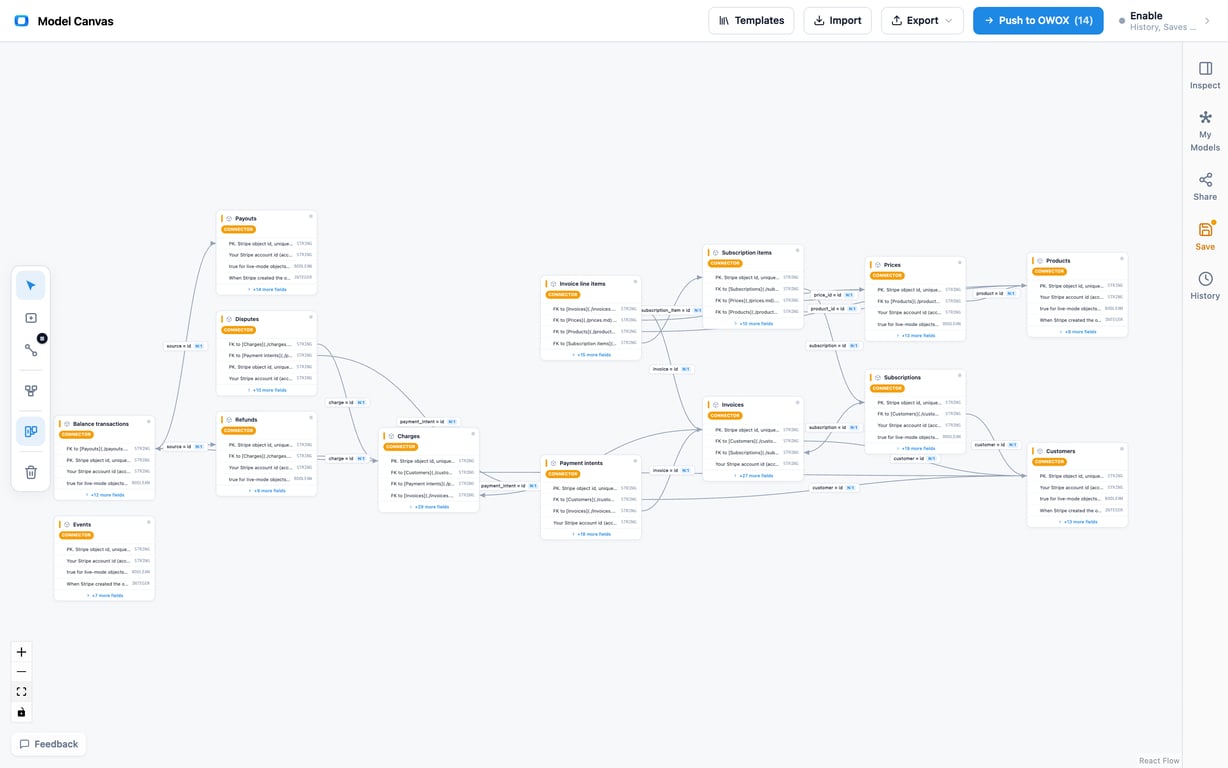
Three facts about every table before the first query. Keys are id, with Stripe’s object prefix (ch_, txn_, po_). Timestamps are Unix seconds, so wrap them in TIMESTAMP_SECONDS() (BigQuery timestamp functions). Money is an integer in the smallest currency unit: divide by 100 for USD, not for a zero-decimal currency, and group by currency before you sum.
OWOX Data Marts
See your first report built in real time. 15 minutes.
- Connect your data warehouse
- Pick your metrics
- Get a live Google Sheets report
In the time it takes to write a ticket. Then imagine never writing that ticket again.
Book a DemoWe'll use your actual use case
Three amounts, three dates: the decision rule
Three amounts, three dates: the decision rule
Stripe gives you three amounts that all look like revenue, each with its own date. Pick by the question, not by habit.
| Question | Amount | Date | Table |
|---|---|---|---|
| What did we sell? | amount |
created |
stripe_charges |
| What reached our Stripe balance after fees? | net |
available_on |
stripe_balance_transactions |
| What reached the bank? | amount |
arrival_date |
stripe_payouts |
created is when Stripe made the object. available_on is when the money could be paid out. arrival_date is when it reached the bank. In our account a card charge created on 5 October 2026 for 29.00 carried a fee of 1.14, became available on 7 October, and left in the payout of 7 October. Two dates for one sale; the bank sees the third.
The three monthly totals differ by construction. October 2026 in our dataset: sales by charges.created were 102,816.48; net that became available by available_on was 102,620.17; cash that arrived by arrival_date was 102,623.28. Each is right for its question. The dashboard’s “gross volume” is the first; the books, net of fees and with refunds in the month they happen, are closest to the second; the bank statement is the third. The 132.00 of gross between the first two is six charges created in the last days of October that became available in November; the 3.11 between the last two is the gap the next two sections explain.
Gross to fees to net, by month
Gross to fees to net, by month
Revenue after fees comes from one table. reporting_category is the field Stripe’s balance transaction types page tells you to classify by for accounting (type is finer and older), and available_on is the date:
SELECT
  DATE_TRUNC(DATE(TIMESTAMP_SECONDS(available_on)),
    MONTH) AS month,
  SUM(IF(reporting_category = 'charge',
    amount, 0)) / 100 AS gross,
  SUM(IF(reporting_category = 'charge',
    fee, 0)) / 100 AS fees,
  SUM(IF(reporting_category = 'refund',
    net, 0)) / 100 AS refunds,
  SUM(IF(reporting_category = 'dispute',
    net, 0)) / 100 AS disputes,
  SUM(IF(type != 'payout', net, 0)) / 100
    AS net_to_balance,
  SUM(IF(type = 'payout', -amount, 0)) / 100
    AS paid_out
FROM `stripe.stripe_balance_transactions`
WHERE currency = 'usd'
GROUP BY month
ORDER BY month
What it returned for July to October 2026:
Month (by available_on) |
Gross charges | Fees | Refunds | Net to balance | Paid out |
|---|---|---|---|---|---|
| Jul 2026 | 673.00 | 21.90 | -96.93 | 557.17 | 654.10 |
| Aug 2026 | 2,484.06 | 90.44 | 0.00 | 2,415.32 | 2,415.32 |
| Sep 2026 | 1,943.00 | 61.13 | 0.00 | 1,879.32 | 1,887.27 |
| Oct 2026 | 102,684.48 | 90.49 | -1.00 | 102,620.17 | 102,623.28 |
Three things to read off it. Net to balance and paid out agree in August and disagree in the other three months, and each disagreement is one row: July’s refund of 96.93 became available on the day of a payout that did not carry it; September carries two Stripe software fees of 7.95 together (type = stripe_fee); October’s 3.11 is one of the payout gaps below. (October’s gross here is by available_on; sales by created were 102,816.48, the figure of the previous section.) Fees are a mix, not a rate. Card charges in this account cost 2.9% plus 0.30 (1.14 on 29.00, 3.20 on 100.00); the one payment that makes October large, 100,000.00 through a bank payment method, cost 5.00, so an average fee rate for the month says 0.09% and describes nothing. Net to balance also includes rows the table above does not show: platform_earning (this account collects application fees from connected accounts; if yours is not a Connect platform and the category appears, the load is wrong, not the business) and small adjustments. Keep every reporting_category in the net, and show the ones your reader asks about.
Refunds and disputes keep their own tables for the why (reason, evidence_due_by); their money is already in balance transactions. A dispute debits the amount plus a 15.00 fee, which is how 6 disputes of 5,630.00 became 6 adjustment rows netting 5,720.00.
Does it add up to the payouts?
Does it add up to the payouts?
Stripe’s own answer to “which transactions were in this payout” is an API call, GET /v1/balance_transactions?payout=po_..., or the itemized payout reconciliation report with its automatic_payout_id column. A table loaded by a daily created window has neither: the balance transaction object does not carry the payout it left in. The rule that works on the fields you do have is this.
An automatic payout carries the balance transactions whose available_on falls after the previous payout and up to this one. The window runs on the payout’s created, the moment Stripe debited the balance, not on arrival_date, which is the bank’s day. Exclude the payout’s own row (type = payout, its negative amount), sum net, compare with payouts.amount:
WITH p AS (
  SELECT id, amount, created, arrival_date,
    LAG(created) OVER (ORDER BY created)
      AS prev_created
  FROM `stripe.stripe_payouts`
  WHERE automatic AND status = 'paid'
)
SELECT
  DATE(TIMESTAMP_SECONDS(p.arrival_date)) AS arrived,
  p.amount / 100 AS payout,
  COUNT(bt.id) AS transactions,
  SUM(bt.net) / 100 AS net_inside,
  (p.amount - SUM(bt.net)) / 100 AS gap
FROM p
JOIN `stripe.stripe_balance_transactions` bt
  ON bt.type != 'payout'
 AND bt.available_on > p.prev_created
 AND bt.available_on <= p.created
GROUP BY p.id, p.amount, p.arrival_date
ORDER BY arrived
The result, as it came out, over the 146 automatic payouts from 2 October 2025 to 6 November 2026. The first has no previous payout to open its window, and the second drew on funds that became available before the loaded history begins, so 144 have a complete window:
| Arrived | Payout | Transactions | Net inside | Gap |
|---|---|---|---|---|
| 140 payouts | 0.00 | |||
| 2026-07-24 | 281.67 | 4 | 184.74 | 96.93 |
| 2026-09-21 | 27.86 | 4 | 21.50 | 6.36 |
| 2026-10-05 | 48.25 | 4 | 46.66 | 1.59 |
| 2026-10-21 | 461.52 | 13 | 458.41 | 3.11 |
One hundred and forty match to the cent. Four do not, and the four are two stories. The July gap is a refund of 96.93 that became available on the morning of the payout and was not in it; the payout went out for the window’s charges, and the refund was carried against the balance instead. The other three are each a pair of balance transactions booked one to two days before the payout with the same source: balance_transfer_outbound and balance_transfer_inbound for the same amount, both reporting_category = other_adjustment, which Stripe’s documentation describes as funds moving between two of your Stripe balances. In this account each pair followed a debit of the same size, twice a Stripe software fee, once a reserve on a connected account, that had pushed the balance below zero. The pair nets to zero in the window, but the payout carried only the inbound leg, so each payout is larger than its window by exactly that amount. If your account shows these rows, exclude balance_transfer_outbound from the window, or better, treat the row as the signal that two balances are involved and reconcile each on its own.
Two more cases this rule does not cover, from Stripe’s own notes: a manual or instant payout, where you chose the amount and Stripe cannot say which transactions were inside, and a payout_failure row, which puts the money back and moves it into the next payout. When the reconciliation has to hold up to the bank statement every month, schedule it like any other data quality check on a Data Mart, and keep the gap column.
MRR from subscription items
MRR is an operating metric with no accounting standard behind it, so the definition is yours to write down; the MRR page has the usual one. In Stripe’s tables it comes from stripe_subscription_items: each item carries quantity, unit_amount, recurring_interval and recurring_interval_count, so no join to prices is needed for the amount, only for the plan’s name.
SELECT
  COUNT(DISTINCT s.id) AS subscriptions,
  ROUND(SUM(si.quantity * si.unit_amount /
    CASE si.recurring_interval
      WHEN 'month' THEN si.recurring_interval_count
      WHEN 'year'  THEN 12 * si.recurring_interval_count
      WHEN 'week'  THEN si.recurring_interval_count / 4.33
      WHEN 'day'   THEN si.recurring_interval_count / 30
    END) / 100, 2) AS mrr
FROM `stripe.stripe_subscription_items` si
JOIN `stripe.stripe_subscriptions` s
  ON s.id = si.subscription
WHERE s.status IN ('active', 'past_due', 'trialing')
  AND si.price_currency = 'usd'
On 2026-11-06 it returned 45 subscriptions and an MRR of 7,258.01: 5,974.84 from 38 monthly items and 1,283.17 from 7 yearly items divided by twelve. Canceled subscriptions, which the full-refresh table also holds, would have added 1,807.25 had the status filter been missing, and seven incomplete ones another 1,843.50. The filter is the definition.
What we did not do: put Stripe’s own MRR figure next to it. The Billing overview in the Stripe dashboard shows one, nobody on this build could open that dashboard, and we do not quote a number we did not see. When you compare yours with Stripe’s, expect to differ on four choices Stripe makes for you: discounts applied, trials excluded, metered prices counted from usage, currencies converted at Stripe’s rate. Decide each in writing before the first comparison, as the subscription e-commerce data model argues, churn included.
Keeping the tables fresh
The refresh rule follows from which objects change after they are created.
Load by created window: balance transactions, charges, refunds, disputes, payouts, invoices, payment intents, events. Each daily run reads one day with created[gte] and created[lte]; a backfill reads the history in segments. Balance transactions never change once written, so the window is complete for them, which is the second reason to read money from that table.
Reload in full: customers, subscriptions, subscription items, products, prices. They are small and their status is the point: a subscription cancelled in October was created in July, and a window on created would never see the change.
The catch, and the rule for it. A charge’s amount_refunded and disputed, and an invoice’s status, change after creation; a created window loads them once and keeps the old value. Two ways out: once a month, re-run the backfill over the last 60 days (each table’s unique key is id, so a re-run rewrites the row rather than appending one), or read every money question from balance transactions and keep charges and invoices as the descriptive side. We do both. Airbyte’s lookback window and Fivetran’s weekly re-sync of pending balance transactions are the same rule under other names.
Substreams run after their parents, and can be wider. Invoice line items are fetched invoice by invoice (/v1/invoices/{id}/lines), subscription items subscription by subscription. The line-items node reads every invoice in the account to find its parents, while the invoices table reads a window. On 2026-11-06, with the invoices backfill still running, 101 of 213 line items had no invoice row; when it finished, 21 remained, the lines of invoices created before the window begins. The join is right; the parent is late or out of range. Check COUNT(*) WHERE invoice NOT IN (SELECT id FROM stripe_invoices) before you trust a revenue-by-product number, and run the parent’s backfill first.
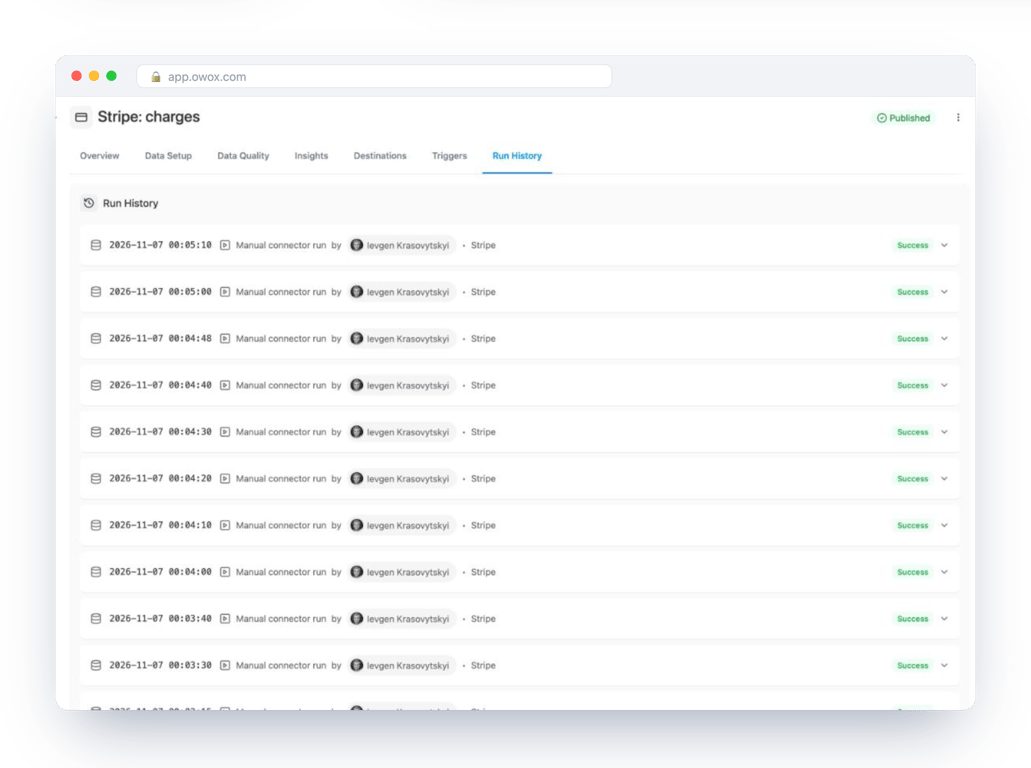
Events start 30 days back, and that is the floor. Stripe keeps 30 days of events. Our stripe_events table begins on 8 October 2026 for a first load on 6 November: the daily window is the only way the history grows, and a daily run that fails for a month loses a month of the audit trail (invoice.paid, charge.refunded, customer.subscription.deleted) for good.
Setting it up, and joining the business model
Setting it up, and joining the business model
Stripe is not one of the native connectors in OWOX Data Marts. It is a custom connector, built in the connector builder from Stripe’s API reference: 14 nodes, each a request and the fields it lands, with the whole manifest readable in the builder’s Code tab. It pins Stripe-Version: 2024-06-20, retries an HTTP 429 with the Retry-After header, and stamps an optional account id into account_id on every row, so several Stripe accounts can share one table.
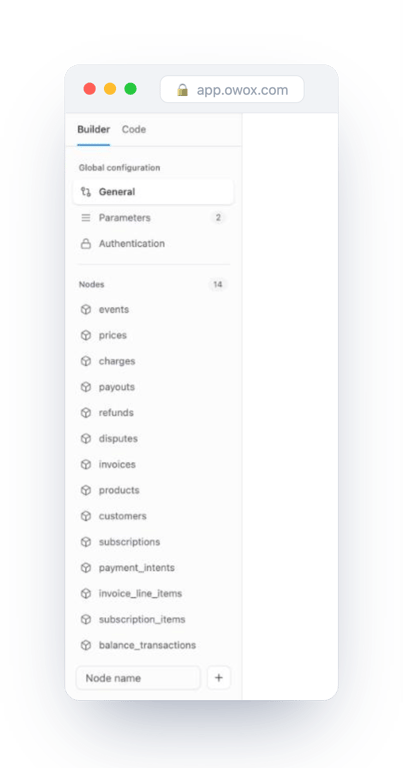
To set it up: in Stripe, create a restricted key with read access to Balance transactions, Charges, Customers, Disputes, Invoices, Payment Intents, Payouts, Prices, Products, Refunds, Subscriptions and Events; the key lives in an OWOX credential. Choose the custom connector Stripe under Connectors, create one Data Mart per table pointed at a dataset in your data storage, and add a Connector Trigger that runs them daily; backfill the dated tables once over the history you want. The Stripe data source page lists every table and field.
Then the part no connector does for you: joining Stripe to the rest of the business. The Stripe bundle is written to sit inside two models. In the data model, stripe_customers joins Account on the ids you stored in metadata, or on email when nothing was stored; subscriptions and their items feed the MRR-movement table, and stripe_invoices is the cash view next to recognised revenue (why). In the data model, stripe_charges joins Orders through the charge id the store saved with the order, so refunds and fees land on the order and its campaign. On the accounting side, stripe_payouts matches bank deposits on arrival_date and amount, where the QuickBooks to BigQuery guide’s deposits meet this one’s payouts.
OWOX Data Marts works with Google BigQuery, Snowflake, AWS Redshift, AWS Athena and Databricks; this build used BigQuery, so TIMESTAMP_SECONDS and DATE_TRUNC need translating elsewhere, and the tables, the rule and the two checks stay the same. To run them on your own account, set up OWOX Data Marts, connect Stripe with a restricted key, and start with the payout reconciliation. It is the check that should match to the cent, so it tells you fastest whether the load is right.
Turn your data into decisions.
Governed data marts give you the clean foundation ML needs to actually work.
- No AI hallucinations
- Analyst-governed definitions
- Every number traces to SQL
Frequently Asked Questions
Which Stripe amount is revenue: gross volume, net or the payout?
It depends on the question, and each amount has its own date. `amount` on `stripe_charges` by `created` is what you sold, the figure the Stripe dashboard calls gross volume. `net` on `stripe_balance_transactions` by `available_on` is what reached your Stripe balance after fees, refunds and disputes, and it is the closest of the three to revenue in the books. `amount` on `stripe_payouts` by `arrival_date` is what reached the bank. The three monthly totals differ by construction: in the account we loaded, October 2026 sales were 102,816.48, net that became available was 102,620.17 and cash that arrived was 102,623.28. Pick the table by the question, and say which one a number came from.
How do I find which transactions were in a Stripe payout?
Stripe's own answer is the API call `GET /v1/balance_transactions?payout=po_...` or the itemized payout reconciliation report, which carries an `automatic_payout_id` column. A balance transaction loaded by a daily `created` window has neither, because the object does not store the payout it left in. The rule that works on the loaded tables: an automatic payout carries the balance transactions whose `available_on` falls after the previous payout's `created` and up to this payout's `created`, excluding the payout's own row (`type` = `payout`). Sum `net` inside that window and compare it with `payouts.amount`. On the account we loaded, 140 of the 144 payouts with a complete window matched to the cent.
Why doesn't a Stripe payout match the sum of its balance transactions?
Four causes cover every gap we found or that Stripe documents. A refund or dispute that became available on the morning of the payout may be carried against the balance instead of being deducted from that payout; the gap is exactly its amount. A pair of `balance_transfer_outbound` and `balance_transfer_inbound` rows (`reporting_category` = `other_adjustment`) means money moved between two of your Stripe balances; the pair nets to zero in the window but the payout carried only one leg. A manual or instant payout has an amount you chose, so Stripe cannot say which transactions were inside it. A `payout_failure` row returns the money to the balance and moves it into the next payout. Keep the gap column in the reconciliation query and name each gap rather than tolerating a rounding allowance.
Is Stripe Data Pipeline or the BigQuery Data Transfer Service enough to get Stripe into BigQuery?
Either one moves the data, and that is where both stop. Stripe Data Pipeline pushes Stripe's own tables, on Stripe's schema, into your data warehouse. Google's Stripe transfer in the BigQuery Data Transfer Service was in Preview when we read it on 2026-11-06; it transfers reports you have already generated in Stripe plus a list of objects, and defaults its start date to three years back. Neither tells you which amount is revenue, which date to group by, or whether the loaded rows add up to the payouts the bank saw. Those checks are the analyst's whichever route you choose, including a custom connector in OWOX Data Marts, where the 14 tables land on a schema you own.
How do I calculate MRR from Stripe tables in BigQuery?
From `stripe_subscription_items` joined to `stripe_subscriptions`. Each item carries `quantity`, `unit_amount`, `recurring_interval` and `recurring_interval_count`, so normalise every item to a month (monthly amounts divided by the interval count, yearly amounts by twelve times it), sum them, divide by 100, and filter the subscription status to `active`, `past_due` and `trialing`. On the account we loaded that returned 45 subscriptions and an MRR of 7,258.01; without the status filter, cancelled subscriptions would have added 1,807.25. When you compare the result with the figure in the Stripe dashboard, expect to differ on four choices Stripe makes for you: discounts applied, trials excluded, metered prices counted from usage, and currencies converted at Stripe's rate. Write each choice down before the first comparison.
Why does my Stripe events table only go back 30 days?
Because Stripe keeps 30 days of events and no more, so a first load can reach back only that far. Our `stripe_events` table begins on 8 October 2026 for a load made on 6 November. The history grows only through the daily window from then on, which makes events the one table where a failed month cannot be backfilled: the `invoice.paid`, `charge.refunded` and `customer.subscription.deleted` records of that month are gone. Monitor that Data Mart's runs more closely than the others, and read the money itself from `stripe_balance_transactions`, which never changes once written and has no 30-day floor.