Advertising reporting tools: which ones put spend against store orders
Every ad platform reports its own conversions, and together they claim more orders than the store took. Most advertising reporting tools chart those claims side by side, which cannot tell you whether paid is paying. This guide shows how to read a claims-vs-store view on three connected dashboards, what to ask a tool before you buy it, and where ten tools stand, each re-checked on its vendor's own page.
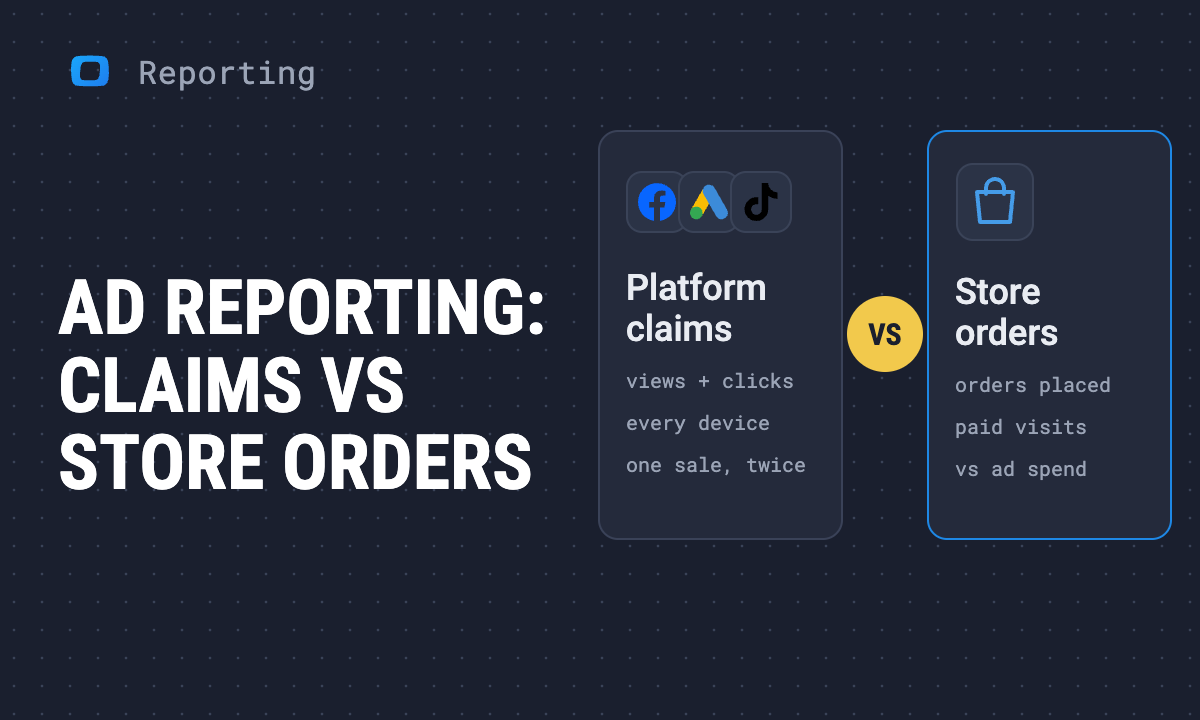
You open Facebook Ads, Google Ads and TikTok, add up the conversions each one reports, and the total is higher than the number of orders your store took. Then you look at advertising reporting tools to fix it, and most of them put the same three numbers on one page, side by side, in nicer charts. The sum is still wrong, and the question you started with, is paid paying?, is still open.
The short answer: choose an ad reporting tool by whether it puts your spend against the orders your store recorded, not against what each platform claims. In the demo shop we use for examples (synthetic data, 1 January to 21 October 2026), seven ad platforms took $156,933. The platforms claim 2,731 conversions between them; the store recorded 1,879 orders from paid visits. A report built on the first number answers “how much does each platform take credit for”. Only a report built on the second answers “what did the money buy”.
Why the platforms add up to more orders than you took
Why the platforms add up to more orders than you took
Each platform counts a conversion by its own rules. It counts views as well as clicks and joins visits across devices, and two platforms can claim the same order. Two platforms can both be right by their own definition and still describe one sale. None of them is a count of orders, so their sum is not one either.
The store counts something narrower: orders placed in visits that arrived from a platform’s paid click. That is the floor, not the truth. An order from someone who saw an ad on their phone and bought on a laptop a day later is credited to whatever brought the later visit, often direct or organic. So the honest view keeps both columns: what the platform claims, what the store recorded, and the gap between them, read platform by platform.
That is what a claims-vs-store view is, and it is the thing to look for in any tool you compare. Why the same order gets three different numbers in three reports, and how to settle which one goes to the board, is the subject of conflicting numbers in reporting.
How to read a claims-vs-store view
How to read a claims-vs-store view
The Paid channels report opens on “What is paid media returning?” and its third view, Claims vs store, asks “How far apart are the claims?”. It reads seven platforms through one Data Mart, Unified Ad Spend, and sets each platform’s own conversions against the orders the store recorded from that platform’s paid visits, through the Sessions and Purchases Data Marts:
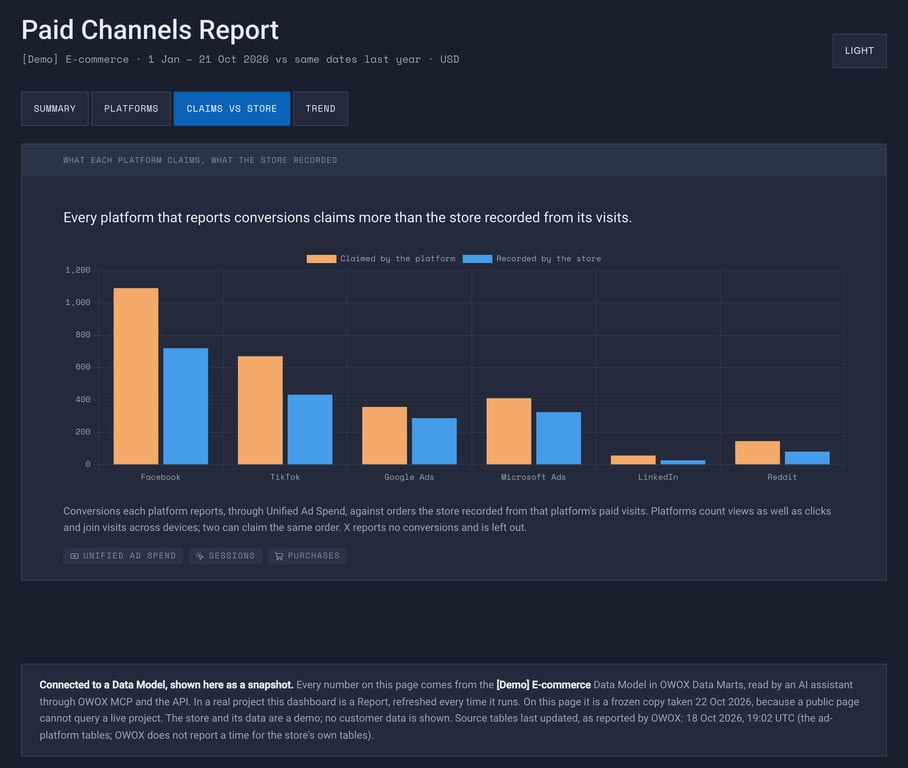
The same figures as a table. Spend, store orders and store net sales are from the dashboard’s Platforms view; claims from Unified Ad Spend; the last two columns are our division of those figures. Claims are rounded to whole conversions, so the rows add up to 2,732 against the dashboard’s total of 2,731.
| Platform | Spend | Claimed | Store orders | Claimed per order | Store net sales per $1 |
|---|---|---|---|---|---|
| $48,438 | 1,091 | 720 | 1.52 | $5.07 | |
| TikTok | $32,708 | 670 | 433 | 1.55 | $4.55 |
| Google Ads | $28,033 | 357 | 288 | 1.24 | $4.32 |
| Microsoft Ads | $27,848 | 411 | 325 | 1.26 | $4.59 |
| $13,530 | 57 | 27 | 2.11 | $0.64 | |
| $4,921 | 146 | 81 | 1.80 | $6.45 | |
| X | $1,456 | none reported | 5 | – | $0.85 |
| All seven | $156,933 | 2,731 | 1,879 | $4.37 |
Three rules for reading it:
- Read the ratio, not the gap. Every platform that reports conversions claims more than the store recorded, so “over 1” tells you nothing. What tells you something is the platform far from the others. Google Ads and Microsoft Ads claim about 1.25 conversions per store order; LinkedIn claims 2.11.
- Compare platforms on the store column, campaigns inside one platform on either. A platform’s claims are consistent with themselves, so they rank its own campaigns well enough. They do not rank one platform against another, because each counts by different rules.
- Turn the store column into money before deciding. LinkedIn reports a CPA of $238. On the store’s side, $13,530 bought 27 orders, about $501 each, and the dashboard shows LinkedIn $8,020 short after cost of goods and its own spend, marked Cut. On the platform’s own report, LinkedIn looks expensive. On the store’s, it loses money.
Across all seven, every $1 of spend brought $4.37 of net sales the store recorded, against $4.04 in the demo’s plan. That is the answer to “is paid paying?” in this shop, and it is a store-side ROAS: net sales recorded, not conversion value claimed.
OWOX Data Marts
See your first report built in real time. 15 minutes.
- Connect your data warehouse
- Pick your metrics
- Get a live Google Sheets report
In the time it takes to write a ticket. Then imagine never writing that ticket again.
Book a DemoWe'll use your actual use case
Which campaign is over-claiming
Which campaign is over-claiming
The same view one level down is the Facebook Ads dashboard, whose Claims vs store view asks “Which campaign is over-claiming?”. Facebook’s claimed conversions sit beside the store’s orders on the same campaign name:
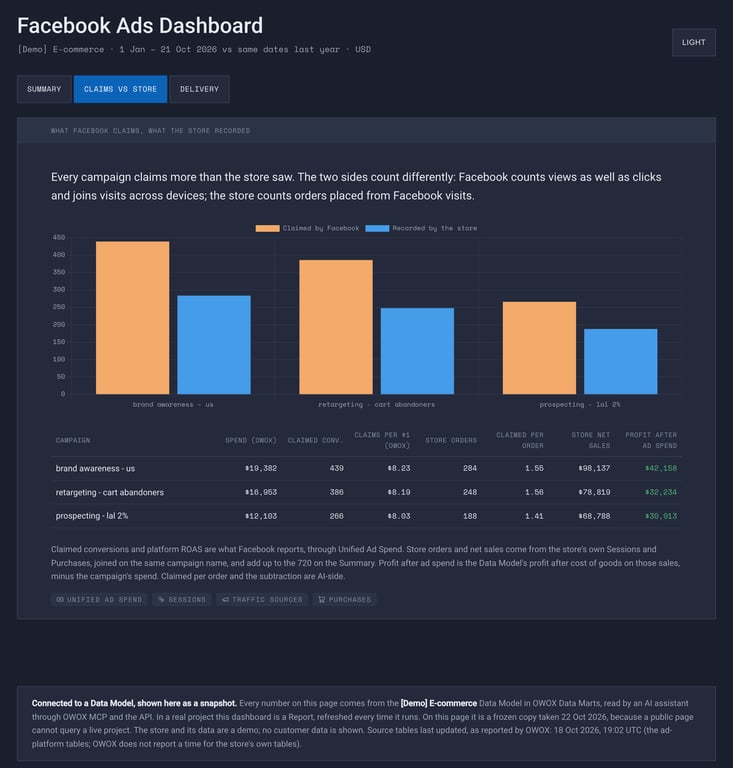
Read it the way the platform reads it, and the three campaigns are nearly tied: Facebook claims $8.23, $8.19 and $8.03 per $1, with prospecting last. Divide each campaign’s store net sales by its spend and the order turns over:
| Campaign | Facebook claims per $1 | Store net sales per $1 | Claimed per store order |
|---|---|---|---|
| brand awareness - us | $8.23 | $5.06 | 1.55 |
| retargeting - cart abandoners | $8.19 | $4.65 | 1.56 |
| prospecting - lal 2% | $8.03 | $5.68 | 1.41 |
Prospecting, last on Facebook’s numbers, returns the most per dollar on the store’s. Retargeting claims the most conversions per order the store saw. A budget moved on the first column goes the wrong way. All three campaigns still make money after their spend, so the decision here is where the next dollar goes, not what to switch off.
The same discipline applies to rates, not only to conversions. On the Google Ads dashboard, the CTR trap view computes click-through rate two ways for this year to October: averaging each day’s rate gives 7.6%, dividing all clicks by all impressions gives 5.5%. A report that averages a rate column from a daily export shows the first, because a day with three impressions and one click counts as much as a day with three hundred.
What to ask a tool before you choose it
What to ask a tool before you choose it
A vendor demo will show you a dashboard with conversions on it. Four questions find out whose conversions:
- “Show me one platform’s claimed conversions and our store’s orders in the same row.” If the tool can only show the first, it is a chart of claims.
- “Where does the order count come from, and what is the join key?” The answer you want names your order system and a key you recognise: the UTM source and campaign name on the session that placed the order. “From the platform’s API” means the platform’s claim again.
- “What does the total row show when the platforms’ claims add up to more than our orders?” A single “total conversions” figure is the claims, added up.
- “Who defines an order?” Cancelled, returned and test orders in or out is a decision your analyst or finance makes once. A tool that makes it for you, differently in each report, gives you a new number every time someone builds one.
Advertising reporting tools, re-checked on 30 October 2026
Advertising reporting tools, re-checked on 30 October 2026
The ten tools from the earlier version of this guide all still exist; one now sends new users to its parent company’s product. Each entry quotes the vendor’s own page, read on 30 October 2026, and answers one question: does it put spend against store orders, and what do you have to bring for it to do so? They are grouped by what they are, not ranked.
| Tool | What it is | Spend against store orders? |
|---|---|---|
| Google Analytics 4 | Web analytics | Against GA4’s own conversions, once costs are imported |
| Adobe Analytics | Web and journey analytics | Against what you collect into it |
| Data Studio | Dashboards | If one source already holds both |
| Tableau | BI | If you connect data that already joins them |
| Klipfolio | Dashboards | Each service on its own unless you add a warehouse |
| Sisense | Embedded analytics | Built for analytics inside a product |
| Stitch | Pipeline | Moves the data; the join is yours |
| Integrate.io | Pipeline | Moves the data; the join is yours |
| Salesforce Marketing Intelligence | Marketing suite | Yes, against revenue in Salesforce |
| OWOX Data Marts | Data Model on your warehouse | Yes, against your store’s orders |
Analytics tools that count their own conversions
These see the visit and the purchase on your site, so they hold a third count of their own, next to the platforms’ and the store’s.
Google Analytics 4
GA4 can take in the other side of the ledger. Google’s help page describes campaign data import (previously cost data import) as a way to “import campaign data, such as aggregated cost, clicks, and impressions, from your online advertising platforms to measure return on investment (ROI)” (Google Analytics Help). The same page lists direct imports from Meta, Pinterest, Reddit, Snap and TikTok.
What it puts that spend against is GA4’s own key events. That is closer to the store than a platform’s claim, and it is still GA4’s count, not your order system’s.
Adobe Analytics
Adobe’s page now presents a family of products, and the one that answers this question is Customer Journey Analytics, which “connects customer identities and interactions across channels, devices, and time” (Adobe). For an enterprise already collecting into Adobe, ad cost and orders can meet there. The page does not say how platform-reported conversions are kept apart from orders, so ask in the demo.
Dashboards and BI
These draw what you connect. Whether spend meets store orders depends on whether something upstream already joined them.
Data Studio
Google’s dashboard tool, which many still search for as Looker Studio, joins sources with blends, and Google’s documentation sets the limit: “A blend can have up to five tables.” It also notes that Data Studio “groups and aggregates rows in each table” before joining them (Google Cloud documentation). Seven ad platforms plus your orders is eight tables. In practice that means consolidating spend and orders in your warehouse first and pointing Data Studio at one table.
Tableau
Tableau’s page says Tableau Desktop lets you “connect directly to your data, explore it with drag-and-drop tools” (Tableau). It will chart a claims-vs-store view well. Building the table underneath it, platform spend and store orders on one key, is your analyst’s job before Tableau sees it.
Klipfolio
Klipfolio’s page says you can “connect directly to 200+ services” and that “Klips works great with or without a data warehouse” (Klipfolio). Without a warehouse, each Klip reads each service’s own numbers, which on an ad dashboard means each platform’s claims. With one, it can show whatever join you built there.
Sisense
Sisense now calls itself “the embedded AI analytics platform” and describes putting “AI inside your product. Under your brand.” (Sisense). That is a tool for companies shipping analytics to their own customers. A marketing team that wants an in-house ad report is not who the page is written for.
Pipelines that land ad data in your warehouse
These move ad data into your warehouse. They do not decide what it is compared with.
Stitch
“Stitch is now part of Qlik”, says its home page, and new users who want to start syncing data are pointed to Qlik Talend Cloud instead; existing customers can still sign in (Stitch). It connects “130+” sources. Once ad spend and orders land in the same warehouse, putting one against the other is SQL someone on your side writes and maintains.
Integrate.io
Integrate.io describes itself as a platform “for ETL, ELT, CDC and Reverse ETL” (Integrate.io). Same position as Stitch: it gets platform spend into the warehouse, and the join to orders is yours to build.
Marketing suites
Salesforce Marketing Intelligence
Salesforce’s marketing analytics page promises to “follow a prospect from their first ad impression to closed revenue”, on a pre-built “Marketing Intelligence Data Model” (Salesforce). That is the claims-vs-revenue question asked directly, with the revenue side coming from Salesforce. It fits when Salesforce is already where your orders or deals live. The same page names Marketing Cloud Intelligence, formerly Datorama, as a separate product for heavier multi-source work.
A Data Model on your warehouse
OWOX Data Marts
The three dashboards in this guide run on OWOX Data Marts. OWOX has for Facebook Ads, Google Ads, Microsoft Ads, LinkedIn Ads, TikTok Ads, Reddit Ads, X Ads and Shopify (the list in the docs), and they land in your own warehouse: Google BigQuery, Snowflake, AWS Redshift, AWS Athena or Databricks. OWOX keeps no copy of the data.
What puts spend against store orders is your Model: the Data Marts your analyst published, with their definitions and declared joins, from which OWOX builds every query. In the demo, Unified Ad Spend is seven SELECTs, one per platform’s connector table, normalised to one daily grain and one source, medium and campaign naming. A declared relationship joins it to Traffic Sources on those three fields, which is how spend reaches the sessions and orders its clicks produced (Joinable Data Marts). The analyst decides once what an order is; every report reads that definition.
The dashboards themselves were built by Claude through OWOX MCP for Claude and ChatGPT, which builds queries from the fields of published Data Marts and “cannot run arbitrary SQL” (MCP documentation). On OWOX an AI dashboard is kept as a Report and refreshed every time it runs, the same as a Report in Google Sheets or Excel. It is connected, not a snapshot. The pages linked above are frozen demo copies taken on 22 October 2026, because a public page cannot query a live project, and each one says so at the bottom.
What it does not do: decide your attribution, or merge the two columns into one number. It shows the platform’s claim and the store’s record side by side, with the definitions behind both.
What a claims-vs-store view does not settle
What a claims-vs-store view does not settle
The store column undercounts. It credits a platform only for orders placed in a visit that came from its paid click. View-through and cross-device sales land elsewhere, so a platform’s real contribution sits somewhere between its two columns. Testing where, with holdouts or lift studies, is a separate job.
A missing tag moves orders between columns. The join runs on the source and campaign name of the session. A campaign that lost its UTM parameters sends its orders elsewhere, usually to direct, and the platform looks worse on the store’s side than it is.
The definitions are still a decision. The view holds every report to one definition of an order. It does not tell you whether that definition is the one finance uses. Agree it with them before the first budget meeting that uses the numbers.
The full set of AI dashboards, including the CMO dashboard for the same question one level up, is on the dashboards page. How the AI side works is on AI dashboards, and the twelve Data Marts behind every number are on the demo e-commerce Data Model.
Turn your data into decisions.
Governed data marts give you the clean foundation ML needs to actually work.
- No AI hallucinations
- Analyst-governed definitions
- Every number traces to SQL
Frequently Asked Questions
Can advertising reporting tools integrate data from all marketing channels?
Most connect to many channels, but they usually chart each platform's own numbers side by side. Ask whether the tool can put each channel's spend against the orders your store recorded; that is what tells you whether paid is paying.
What should you look for in an advertising reporting tool?
First, whether it puts spend against your store's orders rather than the platforms' claimed conversions. Then where its order count comes from, the key it joins spend to orders on, and who defines an order.
What is advertising reporting?
Advertising reporting involves the collection and analysis of data from marketing campaigns to evaluate their performance and effectiveness. This reporting helps marketers understand the return on investment (ROI), audience engagement, and conversion rates.
Why are advertising reporting tools important?
They put spend and results in one place on a schedule. The useful ones show what each platform claims next to what the store recorded, so budget is decided on orders, not on claims.
What does attribution mean in advertising?
The goal of attribution in advertising is to define how the value of a conversion is distributed across channels that move the user through the funnel.
How to evaluate the impact of media advertising on marketing in general?
Combine impression data with site visits and the orders your store or CRM recorded, in your own warehouse, so each platform's spend sits next to the sales it brought. With OWOX Data Marts, an analyst defines that join once in the Data Model and every report reads it. For impressions inside Google's ad ecosystem, Google Ads Data Hub is the other route.