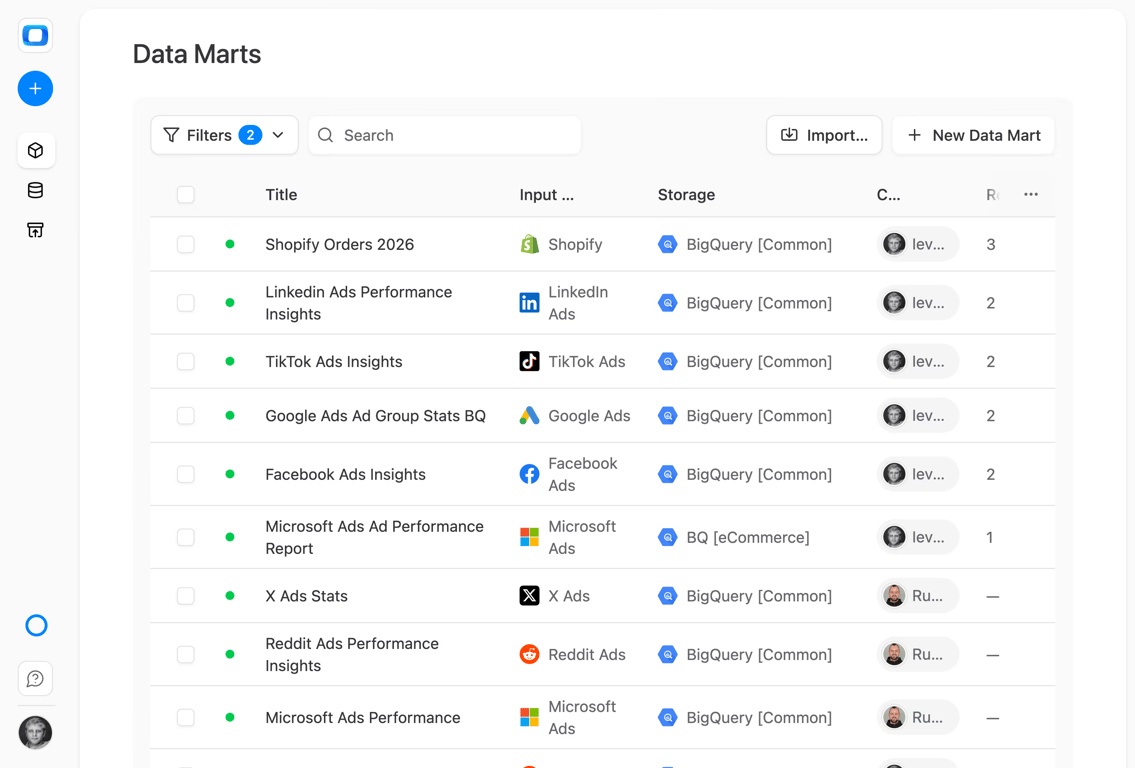
Collect LinkedIn Ads data. Deliver reports. Automate AI Insights.
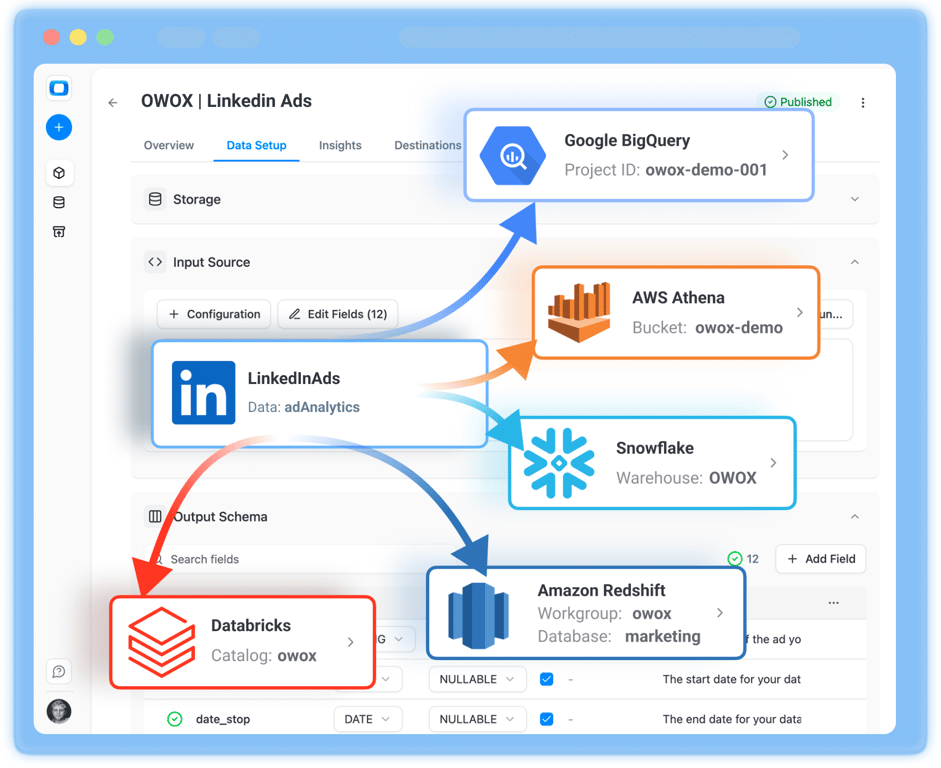
Easily collect LinkedIn Ads data with OWOX Data Marts, store in your data warehouse, automate reporting across major BI Tools and AI Insights (the ones that matter) delivered straight to corporate messengers on a schedule.
Data Partner You Can Trust
users
175K
Executives and data analysts across 20+ industries
G2 rating
4.9★
“A trusted data analytics partner” — verified review
Customers
Available connectors










LinkedIn Ads endpoints
5 LinkedIn Ads endpoints you can import. Each lands in its own table in your warehouse.
Ad Accounts
Your ad account settings, billing details, currency, and account status.
14 fieldsAd Analytics
Daily performance metrics for your campaigns — impressions, clicks, spend, and conversions.
104 fieldsTime seriesCampaign Groups
Top-level containers that group campaigns with shared objectives, budgets, and scheduling.
14 fieldsCampaigns
Individual campaigns defining your targeting, ad format, bid strategy, and budget.
29 fieldsCreatives
The visual and copy elements of your ads shown to members across LinkedIn.
14 fields
LinkedIn Ads Ad Accounts schema
14 fieldslinkedin_ads_ad_accountsSchema on GitHub
Your ad account settings, billing details, currency, and account status.
| Field | Type | Description |
|---|---|---|
currency | STRING | The 3 character standard currency code such as USD for United States Dollar. Refer to the list of supported currencies for the full list. |
id | STRING | Unique internal ID representing the account |
name | STRING | A label for the account |
notifiedOnCampaignOptimization | BOOLEAN | Indicates if the campaign contact is notified about campaign optimization opportunities |
notifiedOnCreativeApproval | BOOLEAN | Indicates if the creative contact is notified when a creative has been reviewed and approved |
notifiedOnCreativeRejection | BOOLEAN | Indicates if the creative contact is notified when a creative has been rejected due to content |
notifiedOnEndOfCampaign | BOOLEAN | Indicates if the campaign contact is notified when an associated campaign has been completed |
notifiedOnNewFeaturesEnabled | BOOLEAN | Indicates if the account owner is notified about new Campaign Manager features |
reference | STRING | The entity on whose behalf the account is advertised. Must either be in the format urn:li:person:{id} or urn:li:organization:{id} |
referenceInfo | OBJECT | Information about the entity associated with the reference. If the entity is an organization, an Organizationinfo object is returned. If the entity is a person, a Personinfo object is returned. For all other entity types an empty record will be returned. This is a read only field. Please refer to Additional Info Fields to learn how to access this field. |
servingStatuses | ARRAY | An array of enums with information about the account's system serving statuses. If an account is eligible for serving, then the array has a single element:RUNNABLE Otherwise, the array contains one or more reasons why the account is not servable: |
status | STRING | ACTIVE - Account is active; this is the default state |
type | STRING | BUSINESS – This is the only value allowed when creating accounts through the API. |
test | BOOLEAN | Flag showing whether this account is marked as a test account. An account can be marked as test only during creation. This is an immutable field. |
LinkedIn Ads Ad Analytics schema
104 fieldsTime serieslinkedin_ads_ad_analyticsSchema on GitHub
Daily performance metrics for your campaigns — impressions, clicks, spend, and conversions.
| Field | Type | Description |
|---|---|---|
actionClicks | NUMBER | The count of clicks on the action button of the Sponsored Messaging ad. |
adUnitClicks | NUMBER | The count of clicks on the ad unit displayed alongside the Sponsored Messaging ad. |
approximateMemberReach | NUMBER | Non-demographic pivots only (i.e. not MEMBER\_). The estimated number of unique member accounts with at least one impression. This metric is an updated and more accurate version of legacy metric approximateUniqueImpressions. This metric is only available when the number of days in the date range is less than or equal to 92 days. This metric is fully launched in Jan 2024. |
averageDwellTime | NUMBER | Average user dwell time (in seconds). It measures the duration for which more than 50% of the ad's pixels remain visible in the viewport. |
audiencePenetration | NUMBER | The approximate number of unique members reached by the advertiser divided by the approximate total target audience size. The field will be null if the date range has more than 92 days. This metric only supports the CAMPAIGN pivot. |
cardClicks | NUMBER | Non-demographic pivots only (i.e. not MEMBER\_). The number of clicks for each card of a carousel ad. The first card click of the carousel ad results in an immediate cardClick and click, whereas scrolling to other cards and clicking will count as additional cardClick. |
cardImpressions | NUMBER | Non-demographic pivots only (i.e. not MEMBER\_). The number of impressions shown for each card of a carousel ad. The first card of the carousel ad results in an immediate cardImpression and impression, whereas scrolling to other cards will count as additional cardImpressions. |
clicks | NUMBER | The count of chargeable clicks. Despite not charging for clicks for CPM campaigns, this field still represents those clicks for which we would otherwise charge advertisers based on objective (for example, clicks to view the landing page or company page). |
commentLikes | NUMBER | The count of likes of a comment. Sponsored Content only. |
comments | NUMBER | The count of comments. Sponsored Content only. |
companyPageClicks | NUMBER | The count of clicks to view the company page. |
conversionValueInLocalCurrency | NUMBER | Non-demographic pivots only (i.e. not MEMBER\_). Value of the conversions in the account's local currency based on rules defined by the advertiser. Conversion value is set by the advertiser at a per conversion level, and aggregated across the query time range. |
costInLocalCurrency | NUMBER | Cost in the account's local currency based on the pivot and timeGranularity. For example, this would be spend by member company size per month if the pivot is MEMBER_COMPANY_SIZE and timeGranularity is MONTHLY. Cost is not adjusted for over delivery when a member professional demographic pivot is specified in the request. |
costInUsd | NUMBER | Cost in USD based on the pivot and timeGranularity. For example, this would be spend by campaign on a given day if the pivot is CAMPAIGN and timeGranularity is DAILY. Cost is not adjusted for over delivery when a member professional demographic pivot is specified in the request. |
costPerQualifiedLead | NUMBER | How much money was spent per qualified lead. Ratio is costInLocalCurrency / qualifiedLeads. |
dateRangeStart | DATE | Start date of the report data point. Date is specified in UTC format (YYYY-MM-DD). |
dateRangeEnd | DATE | End date of the report data point. Date is specified in UTC format (YYYY-MM-DD). |
documentCompletions | NUMBER | The number of times users reached 100% of the document's length, including those that skipped to this point. This metric is only available for document ads and not all dimensions. |
documentFirstQuartileCompletions | NUMBER | The number of times users reached the first quartile of the document's length, including those that skipped to this point. This metric is only available for document ads and not all dimensions. |
documentMidpointCompletions | NUMBER | The number of times users reached the second quartile of the document's length, including those that skipped to this point. This metric is only available for document ads and not all dimensions. |
documentThirdQuartileCompletions | NUMBER | The number of times users reached the third quartile of the document's length, including those that skipped to this point. This metric is only available for document ads and not all dimensions. |
downloadClicks | NUMBER | The number of times users have indicated the intent to download the media in an ad by clicking the download icon. This may or may not result in an actual download (e.g. if the user rejects a browser download prompt). This metric is only available for ad formats supporting media downloads. |
externalWebsiteConversions | NUMBER | Total number of times users took a desired action after clicking on or seeing your ad. When conversions cannot be attributed to individual users, group level attribution or estimation may be used. |
externalWebsitePostClickConversions | NUMBER | Total number of times users took a desired action after clicking on your ad. When conversions cannot be attributed to individual users, group level attribution or estimation may be used. |
externalWebsitePostViewConversions | NUMBER | Total number of times users took a desired action after seeing your ad. When conversions cannot be attributed to individual users, group level attribution or estimation may be used. |
follows | NUMBER | The count of follows. Sponsored Content and Follower ads only. |
fullScreenPlays | NUMBER | Number of times members click on the full screen button or on the video(mobile only) to go into full screen mode. |
headlineClicks | NUMBER | The number of times members clicked on the headline of conversation ads. |
headlineImpressions | NUMBER | The number of times members were shown the headline of conversation ads. |
impressions | NUMBER | This is the count of impressions for Sponsored Content and sends for Sponsored Messaging. |
jobApplications | NUMBER | The number of times a member completed a job application after viewing or clicking on an ad. Currently, this metric is broken down into postViewJobApplications (if the member applied after viewing the ad) and postClickJobApplications (if the member applied after clicking the ad). |
jobApplyClicks | NUMBER | The number of times a member clicked on the job's apply button on an LinkedIn jobs page after viewing or clicking on an ad which has a LinkedIn job landing page. Currently, this metric is broken down into postViewJobApplyClicks (if the member performed the action after viewing the ad) and postClickJobApplyClicks (if the member performed the action after clicking the ad). |
landingPageClicks | NUMBER | The count of clicks which take the user to the creative landing page. |
leadGenerationMailContactInfoShares | NUMBER | The number of times users shared contact info through the One Click Lead Gen for Sponsored Messaging ads. |
leadGenerationMailInterestedClicks | NUMBER | The count of Sponsored Messaging ad recipients who clicked to demonstrate interest. |
likes | NUMBER | The count of likes. Sponsored Content only. |
oneClickLeadFormOpens | NUMBER | The count of times users opened the lead form for a One Click Lead Gen campaign. |
oneClickLeads | NUMBER | The count of leads generated through One Click Lead Gen. |
opens | NUMBER | The count of opens of Sponsored Messaging ads. |
otherEngagements | NUMBER | The count of user interactions with the ad unit that do not fit into any other more specific category. |
pivotValues | ARRAY | The value of the pivots for a specific record returned. For example, supplying pivots of CREATIVE and CONVERSION results in a list of records, one for each creative/conversion combination. The pivotValues contain serialized URNs for the specific creative and conversion for a record. To resolve these URNs to their corresponding entities, refer to LinkedIn Marketing API URN Resolution. |
postClickJobApplications | NUMBER | The number of times a member completed a job application after clicking on an ad. See also jobApplications. |
postClickJobApplyClicks | NUMBER | The number of times a member clicked on the job's apply button on an LinkedIn jobs page after clicking on an ad which has a LinkedIn job landing page. See also jobApplyClicks. |
postClickRegistrations | NUMBER | The number of times a member has registered for an event or seminar after clicking on an ad which has a LinkedIn landing page. This includes gross registrations and does not account for a user unregistering. |
postViewJobApplications | NUMBER | The number of times a member completed a job application after viewing an ad. See also jobApplications. |
postViewJobApplyClicks | NUMBER | The number of times a member clicked on the job's apply button on an LinkedIn jobs page after clicking an ad which has a LinkedIn job landing page. See also jobApplyClicks. |
postViewRegistrations | NUMBER | The number of times a member has registered for an event or seminar after viewing an ad which has a LinkedIn event landing page. This includes gross registrations and does not account for a user unregistering. See also registrations. |
qualifiedLeads | NUMBER | The count of qualified leads shared by the advertiser. Qualified lead is a lead that has been deemed more likely to become a customer compared to other leads, based on their engagement and fit. |
reactions | NUMBER | The count of positive reactions on Sponsored Content which can capture, like, interest, praise, and other responses. |
registrations | NUMBER | The number of times a member has registered for an event or seminar after viewing or clicking on an ad which has a LinkedIn event landing page. This includes gross registrations and does not account for a user unregistering. |
sends | NUMBER | The count of sends of Sponsored Messaging ads. |
shares | NUMBER | The count of shares. Sponsored Content only. |
subscriptionClicks | NUMBER | The count of clicks to subscribe to a series, such as a Newsletter. |
talentLeads | NUMBER | Number of leads captured through a talent media campaign. |
textUrlClicks | NUMBER | The count of clicks on any links (anchor tags) that were included in the body of the Sponsored Messaging ad. |
totalEngagements | NUMBER | The count of all user interactions with the ad unit. |
validWorkEmailLeads | NUMBER | The count of leads with a valid work email that does not use an established free or personal email domain. |
videoCompletions | NUMBER | The count of video ads that played 97-100% of the video. This includes watches that skipped to this point if the serving location is ON_SITE. |
videoFirstQuartileCompletions | NUMBER | The count of video ads that played through the first quartile of the video. This includes watches that skipped to this point if the serving location is ON_SITE. |
videoMidpointCompletions | NUMBER | The count of video ads that played through the midpoint of the video. This includes watches that skipped to this point if the serving location is ON_SITE. |
videoStarts | NUMBER | The count of video ads that were started by users. |
videoThirdQuartileCompletions | NUMBER | The count of video ads that played through the third quartile of the video. This includes watches that skipped to this point if the serving location is ON_SITE. |
videoViews | INTEGER | A video ad playing for at least 2 continuous seconds 50% in-view, or a click on the CTA, whichever comes first. An interaction with the video (like going to fullscreen mode) does not count as a view. |
viralCardClicks | NUMBER | Non-demographic pivots only (i.e. not MEMBER\_). The number of viralClicks for each card of a carousel ad. The first viralCardClick of the carousel ad results in an immediate viralCardClick and viralClick, whereas scrolling to other cards and clicking will count as additional viralCardClick. |
viralCardImpressions | NUMBER | Non-demographic pivots only (i.e. not MEMBER\_). The number of viralImpressions shown for each card of a carousel ad. The first card of the carousel ad results in an immediate viralCardImpression and viralImpression, whereas scrolling to other cards will count as additional viralCardImpressions. |
viralClicks | NUMBER | The count of clicks on viral impressions. See viral impressions definition. Sponsored Content only. |
viralCommentLikes | NUMBER | The count of likes on comments from viral impressions for this activity. See viral impressions definition. Sponsored Content only. |
viralComments | NUMBER | The count of comments from viral impressions for this activity. See viral impressions definition. Sponsored Content only. |
viralCompanyPageClicks | NUMBER | The count of clicks to view the company page from viral impressions for this activity. See viral impressions definition. Sponsored Content only. |
viralDocumentCompletions | NUMBER | The number of times users reached 100% of the document's length on a viral post, including those that skipped to this point. This metric is only available for document ads. |
viralDocumentFirstQuartileCompletions | NUMBER | The number of times users reached the first quartile of the document's length on a viral post, including those that skipped to this point. This metric is only available for document ads. |
viralDocumentMidpointCompletions | NUMBER | The number of times users reached the second quartile of the document's length on a viral post, including those that skipped to this point. This metric is only available for document ads. |
viralDocumentThirdQuartileCompletions | NUMBER | The number of times users reached the third quartile of the document's length on a viral post, including those that skipped to this point. This metric is only available for document ads. |
viralDownloadClicks | NUMBER | The number of times users have indicated the intent to download the media in a viral ad by clicking the download icon. This may or may not result in an actual download (e.g. if the user rejects a browser download prompt). Only available for ads supporting media downloads. |
viralExternalWebsiteConversions | NUMBER | The count of conversions that are attributed to your ads driven by a viral event. See viral impressions definition. |
viralExternalWebsitePostClickConversions | NUMBER | The count of post-click conversions that are attributed to your ads driven by a viral click. See viral impressions definition. |
viralExternalWebsitePostViewConversions | NUMBER | The count of post-view conversions that are attributed to your ads driven by a viral impression. See viral impressions definition. |
viralFollows | NUMBER | The count of follows from viral impressions for this activity. See viral impressions definition. Sponsored Content only. |
viralFullScreenPlays | NUMBER | Number of times members click on the full screen button or on the video(mobile only) to go into full screen mode. See viralImpressions definition. |
viralImpressions | NUMBER | The count of viral impressions for this activity. Viral impressions are those resulting from users sharing sponsored content to their own network of connections. Viral impressions are not counted as regular impressions. Sponsored Content only. |
viralJobApplications | NUMBER | The number of times a member completed a job application after viewing or clicking on a viral ad. Currently, this metric is broken down into viralPostViewJobApplications (if the member performed the action after viewing the viral ad) and viralPostClickJobApplications (if the member performed the action after clicking the viral ad). |
viralJobApplyClicks | NUMBER | The number of times a member clicked on the job's apply button on an LinkedIn jobs page after viewing or clicking on a viral ad which has a LinkedIn job landing page during the date range.Currently, this metric is broken down into viralPostViewJobApplyClicks (if the member performed the action after viewing the viral ad) and viralPostClickJobApplyClicks (if the member performed the action after clicking the viral ad). |
viralLandingPageClicks | NUMBER | The count of clicks on viral impressions to take the user to the creative landing page. See viral impressions definition. Sponsored Content only. |
viralLikes | NUMBER | The count of likes from viral impressions for this activity. See viral impressions definition. Sponsored Content only. |
viralOneClickLeadFormOpens | NUMBER | The count of times users opened the lead form for viral impressions from a Lead Gen campaign. See viral impressions definition. |
viralOneClickLeads | NUMBER | The count of leads generated through One Click Lead Gen from viral impressions for this activity. See viral impressions definition. |
viralOtherEngagements | NUMBER | The count of user interactions with viral impressions that do not fit into any other more specific category. See viral impressions definition. Sponsored Content only. |
viralPostClickJobApplications | NUMBER | The number of times a member completed a job application after clicking on a viral ad. |
viralPostClickJobApplyClicks | NUMBER | The number of times a member clicked on the job's apply button on an LinkedIn jobs page after clicking on a viral ad which has a LinkedIn job landing page. |
viralPostClickRegistrations | NUMBER | The number of times a member has registered for an event or seminar after clicking on a viral ad which has a LinkedIn landing page. See viralImpressions definition. This includes gross registrations and does not account for a user unregistering. |
viralPostViewJobApplications | NUMBER | The number of times a member completed a job application after viewing a viral ad. |
viralPostViewJobApplyClicks | NUMBER | The number of times a member clicked on the job's apply button on an LinkedIn jobs page after viewing a viral ad which has a LinkedIn job landing page. |
viralPostViewRegistrations | NUMBER | The number of times a member has registered for an event or seminar after viewing a viral ad which has a LinkedIn event landing page. See viralImpressions definition. This includes gross registrations and does not account for a user unregistering. |
viralReactions | NUMBER | The count of positive reactions on viral Sponsored Content which can capture like, interest, praise, and other responses. See viral impressions definition for details on viral engagements. |
viralRegistrations | NUMBER | The number of times a member has registered for an event or seminar after viewing or clicking on a viral ad which has a LinkedIn event landing page. See viralImpressions definition. This includes gross registrations and does not account for a user unregistering. |
viralShares | NUMBER | The count of shares from viral impressions for this activity. See viral impressions definition. Sponsored Content only. |
viralSubscriptionClicks | NUMBER | The count of viral clicks to subscribe to a series, such as a Newsletter. |
viralTotalEngagements | NUMBER | The count of all user interactions with a viral ad unit. See viral impressions definition. Sponsored Content only. |
viralVideoCompletions | NUMBER | The count of viral video ads that played 97-100% of the video. This includes watches that skipped to this point. See viralImpressions definition. |
viralVideoFirstQuartileCompletions | NUMBER | The count of viral video ads that played through the first quartile of the video. This includes watches that skipped to this point. See viralImpressions definition. |
viralVideoMidpointCompletions | NUMBER | The count of viral video ads that played through the midpoint of the video. This includes watches that skipped to this point. See viralImpressions definition. |
viralVideoStarts | NUMBER | The count of viral video ads that were started by users. See viralImpressions definition. Since viral videos are automatically played for ON_SITE, this will be the same as viralImpressions if the servingLocation is ON_SITE. |
viralVideoThirdQuartileCompletions | NUMBER | The count of viral video ads that played through the third quartile of the video. This includes watches that skipped to this point. See viralImpressions definition |
viralVideoViews | NUMBER | A viral video ad playing for at least 2 continuous seconds 50% in-view, or a click on the CTA, whichever comes first. An interaction with the video (like going to full screen mode) does not count as a view. See viralImpressions definition. |
LinkedIn Ads Campaign Groups schema
14 fieldslinkedin_ads_ad_campaign_groupsSchema on GitHub
Top-level containers that group campaigns with shared objectives, budgets, and scheduling.
| Field | Type | Description |
|---|---|---|
account | STRING | URN identifying the advertising account associated with the campaign. This value is immutable once set. For example, urn:li:SponsoredAccount:{id}. |
accountInfo | OBJECT | Information about the advertising account associated with the campaign. This is a read only field. Please refer to Additional Info Fields to learn how to access this field. |
backfilled | BOOLEAN | Flag that denotes whether the campaign group was created organically or to backfill existing campaigns. This is a read-only field set by the system. |
id | STRING | Numerical identifier for the campaign group. This is a read-only field set by the system. |
name | STRING | The name of the campaign group used to make it easier to reference a campaign group and recall its purpose. The value of this field cannot exceed 100 characters. |
runSchedule | OBJECT | Scheduled date range to run associated campaigns under this campaign group. The start date must be non-null. Represents the inclusive (greater than or equal to) value in which to start the range. The end date is optional and if unset, it indicates an open range with no end date. This field is required if totalBudget is set. |
servingStatuses | ARRAY | Array of enums that determine whether or not campaigns within the campaign group may be served. Unlike status, which is user-managed, the values are controlled by the service. This is a read-only field. Possible values are:RUNNABLE Campaign group is currently active; billing information, budgetary constraints, or start and end dates are valid. |
status | STRING | Status of campaign group. Possible values are:ACTIVE - Denotes that the campaign group is capable of serving ads, subject to run date and budget limitations (as well as any other limitations at the account or campaign level). |
totalBudget | OBJECT | If budgetOptimization.budgetOptimizationStrategy is DYNAMIC, the total budget of the campaign group will be shared among all campaigns within the same campaign group. Otherwise, it represents the maximum amount to be spent over the life of the campaign group. The amount of money as a real number string. The currency must match the ISO currency code of the account. |
test | BOOLEAN | Flag showing whether this campaign group is a test campaign group, i.e., belongs to a test account. This is a read-only and immutable field that is set implicitly during creation based on whether the account is a Test Account or not. |
allowedCampaignTypes | ARRAY | Array of enums that indicates allowed campaign types within the specific campaign group. Possible values are:TEXT_AD - Text-based ads that show up in the right column or top of the page on LinkedIn. |
objectiveType | STRING | Campaign Group Objective type values. This field is optional and immutable. Campaigns in this group will automatically have the same objective type. Click here for Objective descriptionsBRAND_AWARENESS |
budgetOptimization | OBJECT | Denotes the strategy used for bidding in auction and budget optimization across campaigns under the campaign group. Campaigns under the campaign group must have the same bid strategy. Possible values for bidStrategy: MAXIMUM_DELIVERY. Possible values for budgetOptimizationStrategy: DYNAMIC. |
dailyBudget | NUMBER | Daily budget for the campaign group and will be shared among all campaigns within the campaign group. This field is optional and mutable. It can only be used if budgetOptimization.budgetOptimizationStrategy is DYNAMIC Note: This field applies to API Versions starting from 202504 and later. |
LinkedIn Ads Campaigns schema
29 fieldslinkedin_ads_ad_campaignsSchema on GitHub
Individual campaigns defining your targeting, ad format, bid strategy, and budget.
| Field | Type | Description |
|---|---|---|
id | STRING | Unique internal ID representing the campaign |
account | STRING | URN identifying the advertising account associated with the campaign. This value is immutable once set. For example, urn:li:sponsoredAccount:{id} |
accountInfo | OBJECT | Information about the advertising account associated with the campaign. This is a read only field. Please refer to Additional Info Fields to learn how to access this field. |
associatedEntity | STRING | An URN identifying the intended beneficiary of the advertising campaign such as a specific company or member |
associatedEntityInfo | OBJECT | Information about the associatedEntity. If the entity is an organization, an OrganizationInfo object is returned. If the entity is a person, a PersonInfo object is returned. For all other entity types an empty record will be returned. This is a read only field. Please refer to Additional Info Fields to learn how to access this field. |
audienceExpansionEnabled | BOOLEAN | Enable Audience Expansion for the campaign provides query expansion for certain targeting criteria. |
campaignGroup | STRING | URN identifying the campaign group associated with the campaign. The campaign group URN must be specified for campaign creation starting October 30, 2020. |
campaignGroupInfo | OBJECT | Information about the Campaign Group associated with the campaign. This is a read only filed. Please refer to Additional Info Fields to learn how to access this field. |
costType | STRING | CPM- Cost per thousand advertising impressions. If type=SPONSORED_INMAILS; cost per send(CPS) is measured as CPM x 1000. |
creativeSelection | STRING | ROUND_ROBIN - Rotate through available creatives to serve them as evenly as possible. |
dailyBudget | OBJECT | Maximum amount to spend per day UTC. The amount of money as a real number string. ISO currency code. The currency must match that of the parent account. |
locale | OBJECT | Locale of the campaign. An uppercase two-letter country code as defined by ISO-3166 and a lowercase two-letter language code as defined by ISO-639. The country and language combination must match one of the supported locales. |
name | STRING | The name of the campaign; primarily used to make it easier to reference a campaign and to recall its purpose. |
objectiveType | STRING | Campaign Objective type values. Click here for Campaign Objective descriptionsBRAND_AWARENESS |
offsiteDeliveryEnabled | BOOLEAN | Allows your campaign to be served on the LinkedIn Audience Network to extend the reach of the campaign by delivering ads beyond the LinkedIn feed to members on third-party apps and sites. There is no default set. |
offsitePreferences | OBJECT | Offsite preferences that an advertiser specifies for this campaign. An example OffsitePreference is an object that contains App Categories, App Store URLs, Web Domain Names for which this campaign should be included/excluded. See the OffsitePreferences object for more details and examples. |
runSchedule | OBJECT | Scheduled date range to run associated creatives. Object with start (inclusive) and end (exclusive) timestamp fields. The start date must be non-null. The end date is optional and if unset, it indicates an open range. |
targetingCriteria | OBJECT | Specifies targeting criteria that the member should match. This is a more advanced boolean expression than the previous targeting field. It provides a generic AND/OR construct to include and exclude different targeting facets when defining audiences for campaigns. |
totalBudget | OBJECT | Maximum amount to spend over the life of the campaign. The amount of money as a real number string. ISO currency code. The currency must match that of the account. Deprecated for campaigns not using lifetime pacing. |
type | STRING | TEXT_AD - Text-based ads that show up in the right column or top of the page on LinkedIn. |
unitCost | OBJECT | Amount to bid per click, impression, or other event depending on the pricing model. The amount of money as a real number string. The amount should be non-negative if the bidding strategy is manual, target cost, or cost cap bidding. The default is 0 with the currency code set to match that of the associated account. ISO currency code. |
status | STRING | ACTIVE - Denotes that the campaign is fully servable. |
optimizationTargetType | STRING | Determines how this campaign is optimized for spending. If this is not set, there is no optimization. Refer to the documentation here. |
format | STRING | The ad format on campaign level. |
pacingStrategy | STRING | Identifies the pacing option used for the campaign. |
test | BOOLEAN | Flag showing whether this campaign is a test campaign, i.e., belongs to a test account. This is a read-only and immutable field that is set implicitly during creation based on whether the account is a Test Account or not. |
servingStatuses | ARRAY | Array of enums that determine whether or not a campaign may be served; unlike 'status', which is user-managed, the values are controlled by the service. This is a read-only field. Possible values are:RUNNABLE Campaign is eligible for serving. |
connectedTelevisionOnly | BOOLEAN | Flag showing whether this campaign is a Connected Television Only campaign. Allow advertisers to specify when they're creating a CTV campaign. Not specifying the boolean can be considered false. When 'connectedTelevisionOnly = true', offsiteDeliveryEnabled should be set to true. Note: Applicable only from versions 202408 and above. |
optimizationPreference | OBJECT | Allows granular optimization customization on this campaign on top of optimizationTargetType. FrequencyOptimizationPreference is the first type of optimizationPreference we support now. Note: Applicable only from versions 202408 and above. |
LinkedIn Ads Creatives schema
14 fieldslinkedin_ads_creativesSchema on GitHub
The visual and copy elements of your ads shown to members across LinkedIn.
| Field | Type | Description |
|---|---|---|
account | STRING | URN identifying the advertising account associated with the creative. This field is read-only. |
campaign | STRING | URN identifying the campaign associated with the creative |
content | STRING | Content sponsored in the creative. On creation, it can be dynamic Ad content (follower, job, spotlight), text, document, or a reference to InMail Content or post (image, video, article, carousel). Content can also be extended and specified as inline content instead of an URN. A reference must be a adInMailContent{id}, share{id}, or ugcPost{id}. |
createdAt | NUMBER | Creation time |
createdBy | STRING | Entity (e.g., a person URN) that developed the creative |
id | STRING | Unique ID for a creative (e.g.,SponsoredCreativeUrn). Read-only |
intendedStatus | STRING | Creative user intended status. The creative intended status is set independently from parent entity status, but parent entity status overrides creative intended status in effect. For example, parent entity status may be PAUSED while creative status is ACTIVE, in which case the creative's effective status is PAUSED, and not served.ACTIVE - Creative development is complete and the creative is available for review and can be served. |
isServing | BOOLEAN | This indicates whether the creative is currently being served or not. This field is read-only. |
lastModifiedAt | INTEGER | Time at which the creative was last modified in milliseconds since epoch. |
lastModifiedBy | STRING | The entity (e.g., person URN) who modified the creative |
leadgenCallToAction | OBJECT | The field is needed for call to action. This currently only applies if the campaign objective is LEAD_GENERATION. |
review | OBJECT | Creative review status. The review status cannot be set/updated via the API but is started when the creative is activated (i.e., moves from draft state to active state). Hence, the review is absent (null) when the creative is in DRAFT state. Read-only. |
servingHoldReasons | ARRAY | Array that contains all the reasons why the creative is not serving. In the case a creative is being served, this field will be null and not present in the response. |
name | STRING | The name of the creative that can be set by advertiser; primarily used to make it easier to reference a Creative and to recall its purpose. |
Why collect LinkedIn Ads data into your warehouse with OWOX?
Your LinkedIn Ads data shouldn’t be trapped in a platform you can’t query. OWOX collects it into your warehouse on autopilot — no per-connector fees, no vendor lock-in. The entire platform is open-source on GitHub, so you can self-host it today and never worry about losing access to your own data pipelines.
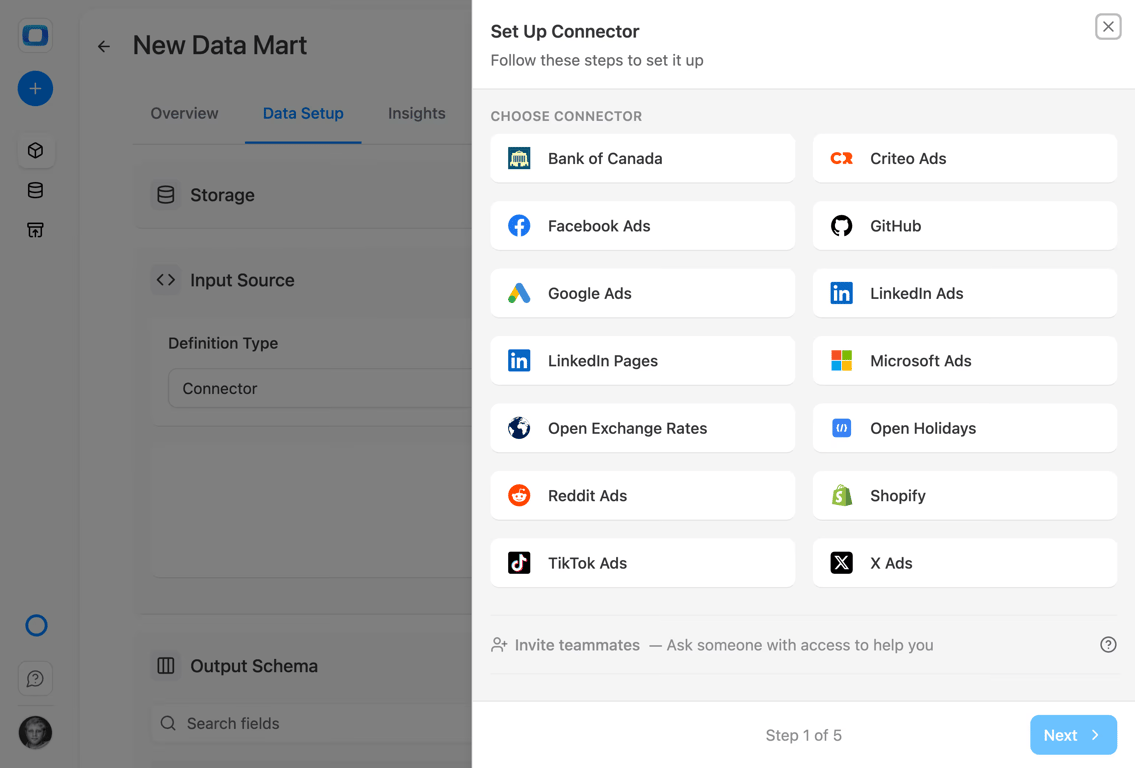
Collect to your warehouse
No per-connector pricing — connect as many sources as you need, all included
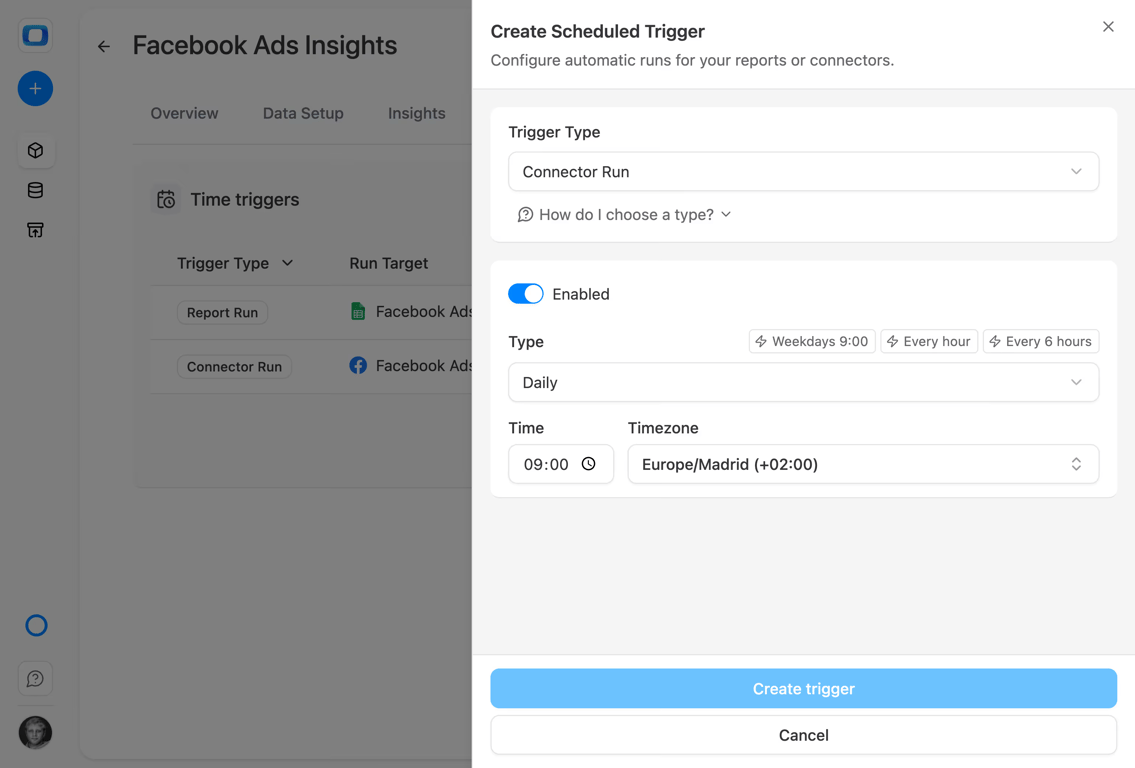
Zero-maintenance syncs
Fully open-source on GitHub — self-host anytime, no vendor lock-in, your data stays yours
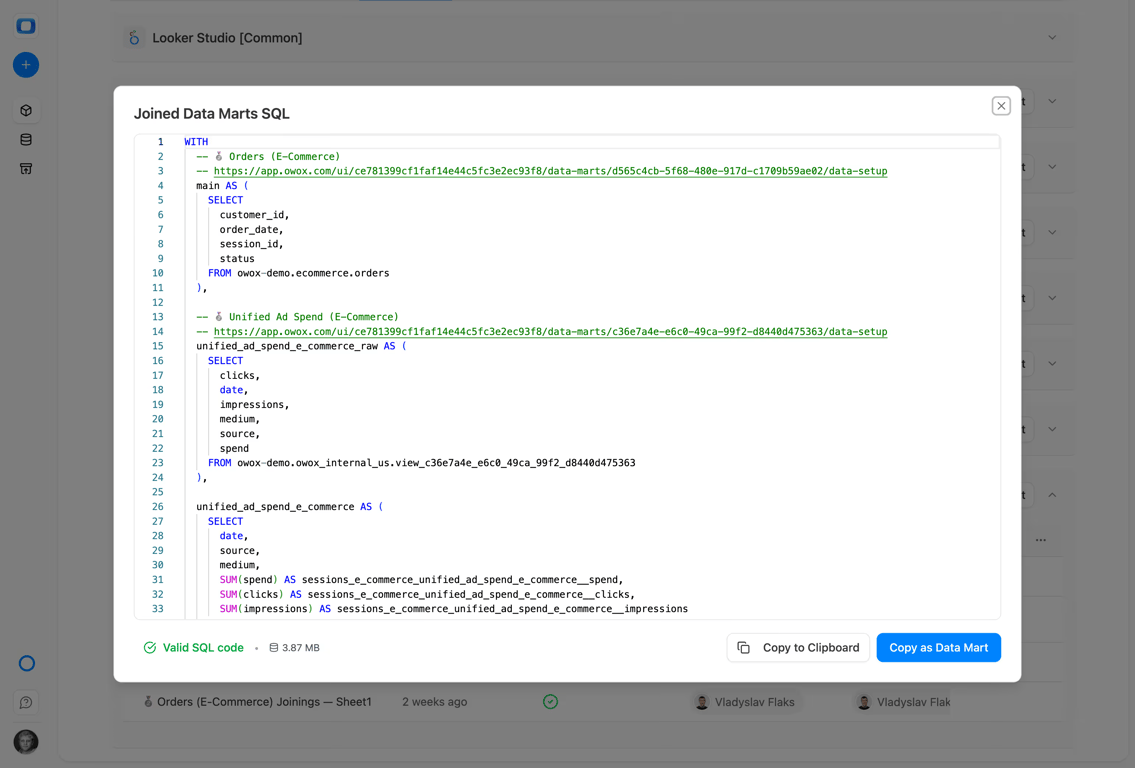
Full-funnel joins
Full transparency and control — every query, every schema, every schedule is visible and auditable
R01 · Collect
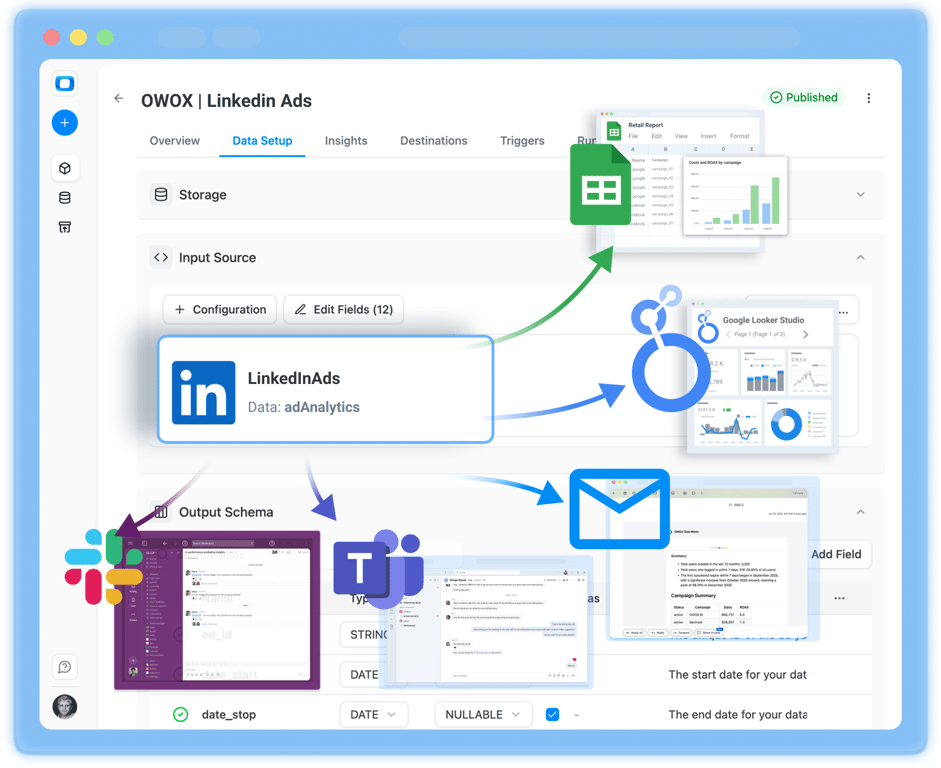
Collect all your LinkedIn Ads data with zero engineering
Pull everything your company needs from LinkedIn Ads without touching code or maintaining custom scripts. OWOX Data Marts handle the heavy lifting.
- Your LinkedIn Ads data is stored in one place – your own infrastructure. OWOX Data Marts automatically land your data into BigQuery, Snowflake, or Redshift.
- Your LinkedIn Ads data lands on a schedule: clean, complete, and ready to re-use across reports, dashboards, BI tools, and spreadsheets.
- No API maintenance, no broken scripts — just reliable daily syncs
R02 · Report
Build reports with LinkedIn Ads data that everyone trusts
Once your LinkedIn Ads data lands in your warehouse, OWOX Data Marts make it instantly reusable across spreadsheets and BI tools.
- Pre-built data marts for campaign performance, spend, and lead generation
- Join LinkedIn Ads with CRM, GA4, and revenue data in one query
- Self-serve reporting for marketing teams — no analyst tickets needed
R03 · Visualize
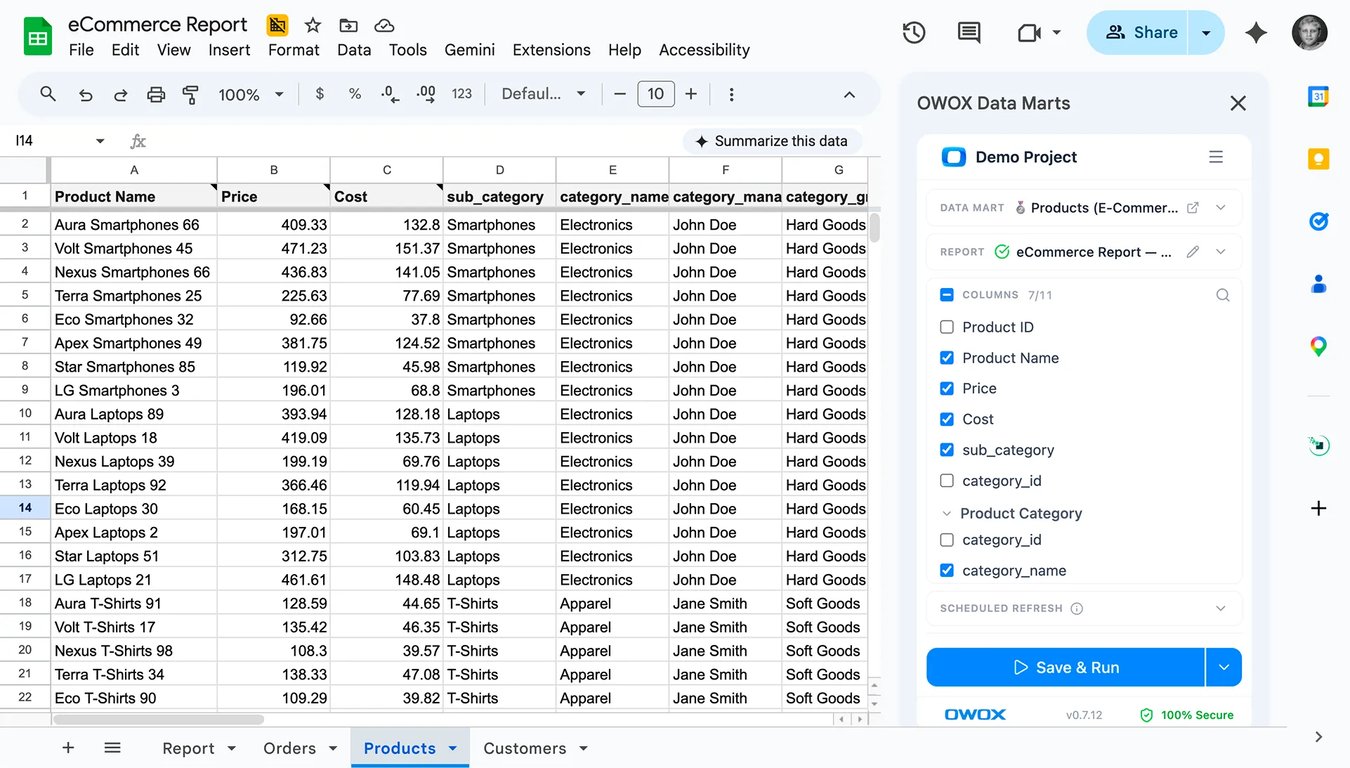
Visualize LinkedIn Ads data instantly in your BI tools
With OWOX Data Marts, your LinkedIn Ads data becomes instantly available for charts, dashboards, pivots, and spreadsheets.
- Whether you use Google Sheets, Looker Studio, Excel, or Power BI, OWOX delivers clean, scheduled LinkedIn Ads data that just works.
- Deliver to Looker Studio, Google Sheets, Power BI, or Excel automatically
- Same numbers everywhere — one source of truth for all stakeholders
Why use OWOX connectors to collect your LinkedIn Ads data?
Eight outcomes you get the moment your data marts go live.
Full picture, one screen
Send LinkedIn Ads spend and engagement into dashboards from one governed source — a clear view of your most expensive B2B channel.
Beyond native dashboards
LinkedIn shows leads; your warehouse shows pipeline. Slice ad spend against opportunities and closed revenue, not just form fills.
Your questions, your reports
Build reports that answer your questions — cost per opportunity, pipeline influenced, CAC by segment — on your definitions, not LinkedIn’s.
Faster decisions, better data
B2B cycles are long; with data in your warehouse you can tie this quarter’s spend to deals that close months later.
Always fresh, always complete
OWOX Data Marts automate LinkedIn Ads collection on a schedule — campaigns, spend, and engagement — with no manual exports.
All sources, one warehouse
Merge LinkedIn Ads with your CRM to connect ad spend to pipeline and revenue, not vanity lead counts.
Zero manual work
Automate transfer into BigQuery, Snowflake, or Redshift — governed and reusable across every report, saving time and removing errors.
Blended reports
Once LinkedIn data lands in governed Data Marts, anyone can ask in their own AI chat — “what pipeline did LinkedIn spend actually create?” — every number tracing to analyst-written SQL.
Not testimonials. Comment threads.
Real things real customers said — each quote pinned to a specific claim, straight from the quotes database.
 Nodari RizunFounder & CEO, Pürblack®
“AI, by the nature of the models, will hallucinate. And because of that, you need something which will create guardrails to ensure that there are no hallucinations, that you can trust your data.”
 Mark SimmonsCMO, Pürblack®
“We had six or seven different channels and no single source of truth — it was almost impossible, a lot of guesswork.”
Nodari RizunFounder & CEO, Pürblack®“We regained time. And time is the one resource that never comes back.”
Start collecting LinkedIn Ads data for free
Set up your LinkedIn Ads connector in minutes. No credit card, no engineering team required.