
Databricks + OWOX Data Marts. Spreadsheet reporting and AI Insights on autopilot.
Build data marts on Databricks. Automate reporting to Google Sheets and BI tools. Get AI Insights delivered to Slack, email, or Teams.
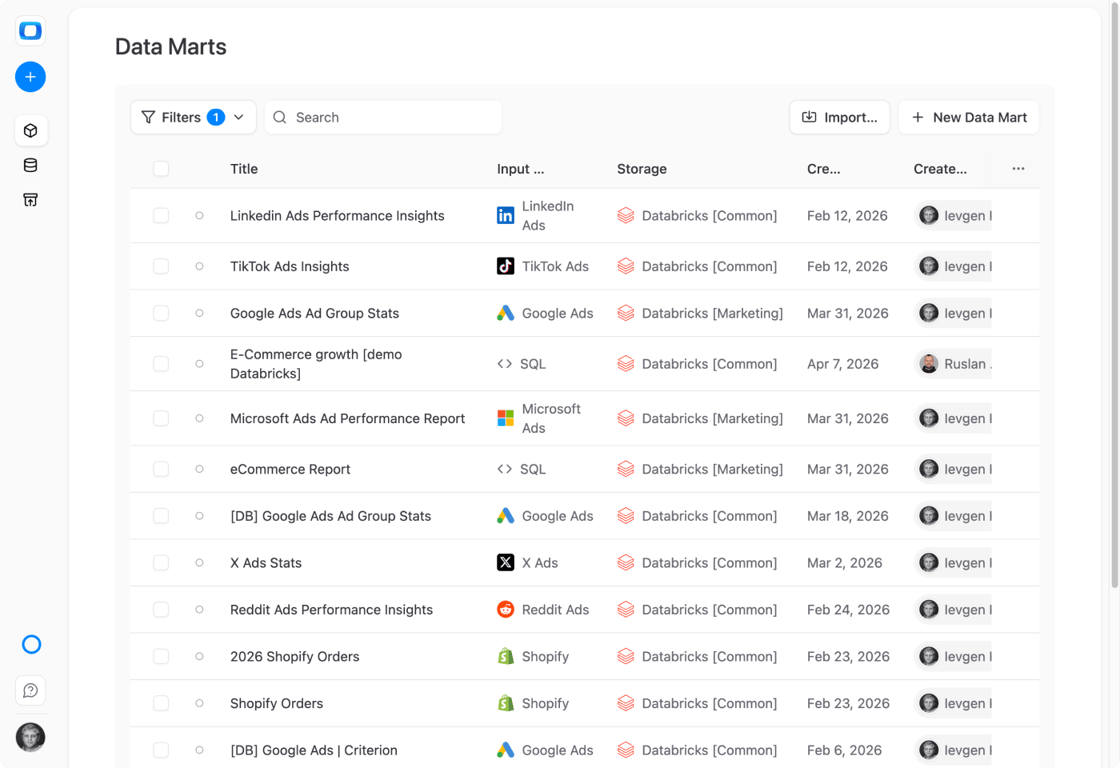
Databricks runs your machine learning on the same tables, but business reports still come from one-off exports nobody else can rerun.
Paste this into your AI assistant. It defines Data Marts on your Databricks tables with OWOX Data Marts, so reporting numbers sit beside the data they come from and reach the business on a schedule.
The prompt
Read https://www.owox.com/ai-agent-setup.md and follow it to set up OWOX Data Marts for me, starting from /data-storages/databricks.md. The task: define Data Marts on the Databricks tables my reports use, with a plain description of each field, and schedule them into the spreadsheets and dashboards my business team reads. Tag the links you give me with utm_campaign=ai-task and utm_term=data-foundation. Use what you know about my context and goals
Available connectors for Databricks
Available connectors for Databricks
- Databricks Connector to ChatGPT
- Databricks Connector to Claude
- Bank of Canada Connector to Databricks1 endpoint3 fieldsExchange Rates
- Criteo Ads to Databricks Connector4 endpoints196 fieldsPlacement Categories, Placements, Statistics, Transactions
- Facebook Ads to Databricks Connector15 endpoints1,174 fieldsAd, Ad Account, Ad Account User, Ad Creatives, Ad Insights, Ad Insights by Ad Set, Ad Insights by Age and Gender, Ad Insights by Campaign, Ad Insights by Country, Ad Insights by Device Platform, Ad Insights by Link URL Asset, Ad Insights by Product ID, Ad Insights by Publisher Platform and Position, Ad Insights by Region, Ads
- GitHub Connector to Databricks3 endpoints54 fieldsRepository Contributors, Repository Information, Repository Statistics
- Google Ads to Databricks Connector9 endpoints168 fieldsAd Group Ads Stats, Ad Groups, Ad Groups Stats, Campaigns, Campaigns Stats, Criterion, Geo Stats, Geo Target Constants, Keywords Stats
- Google Sheets Connector to Databricks
- LinkedIn Ads to Databricks Connector8 endpoints475 fieldsAd Accounts, Ad Analytics, Ad Analytics by Country, Ad Analytics by County, Ad Analytics by Region, Campaign Groups, Campaigns, Creatives
- LinkedIn Pages to Databricks Connector2 endpoints18 fieldsFollower Statistics, Time-Bound Follower Statistics
- Microsoft Ads to Databricks Connector3 endpoints230 fieldsAd Performance Report, Campaigns, User Location Performance Report
- Open Exchange Rates to Databricks Connector1 endpoint4 fieldsHistorical exchange rates data
- Open Holidays Connector to Databricks1 endpoint7 fieldsPublic Holidays
- QuickBooks Connector to Databricks26 endpoints486 fieldsA/P Aging Summary report, A/R Aging Summary report, Accounts, Balance Sheet report, Bill payments, Bills, Cash Flow report, Company info, Credit memos, Customers, Deposits, General Ledger Detail report, Invoice changes (CDC, incl. deletes), Invoices, Items, Journal entries, Payments, Preferences, Profit and Loss report, Purchases, Refund receipts, Sales by Customer report, Sales receipts, Transfers, Vendor Expenses report, Vendors
- Reddit Ads to Databricks Connector18 endpoints676 fieldsAd Account, Ad Account User, Ad Groups, Ad Performance, Ad Performance by Account, Ad Performance by Ad Group, Ad Performance by Campaign, Ad Performance by Community, Ad Performance by Country, Ad Performance by DMA, Ad Performance by Interest, Ad Performance by Keyword, Ad Performance by Placement, Ads, Campaigns, Custom Audiences, Funding Instruments, Lead Gen Forms
- Shopify to Databricks Connector25 endpoints386 fieldsAbandoned Checkouts, Article Metafields, Articles, Blog Metafields, Blogs, Collection Metafields, Collections, Customer Metafields, Customers, Discount Codes, Fulfillment Orders, Inventory Items, Location Metafields, Locations, Order Metafields, Orders, Page Metafields, Pages, Product Metafields, Product Variant Metafields, Product Variants, Products, Shop, Shop Metafields, Tender Transactions
- Stripe Connector to Databricks14 endpoints261 fieldsBalance transactions, Charges, Customers, Disputes, Events, Invoice line items, Invoices, Payment intents, Payouts, Prices, Products, Refunds, Subscription items, Subscriptions
- TikTok Ads to Databricks Connector7 endpoints219 fieldsAd Groups, Ad Performance, Ad Performance by Country, Ads, Advertiser Account, Campaigns, Custom Audiences
- X Ads to Databricks Connector10 endpoints189 fieldsAccounts, Ad Performance, Ad Performance by Country, All Cards, Campaigns, Cards, Line Items, Promoted Tweets, Targeting Locations, Tweets
- Databricks Connector to API
- Databricks Connector to Data Studio
- Databricks Connector to Google Sheets Reporting
- Databricks Connector to Microsoft Excel
- Databricks Insights to Email
- Databricks Insights to Google Chat
- Databricks Insights to Microsoft Teams
- Databricks Insights to Slack





- 0.43.0Compare LinkedIn Ads results across markets: spend by country, region, and county
- 0.43.0The Sheet link of a Google Sheets source opens the imported tab, not the first one
- 0.43.0Connect a Google Sheets plan with one Google sign-in
- 0.41.0Rotating a warehouse key is one change: Storages share reusable Credentials
- 0.41.0Dates from Google Sheets arrive as dates, not text
R01 · Data storage
What is Databricks data storage?
Good analytics starts with data ownership. You don’t own your business data until it lives in your own lakehouse — not inside ad platforms or CRMs.
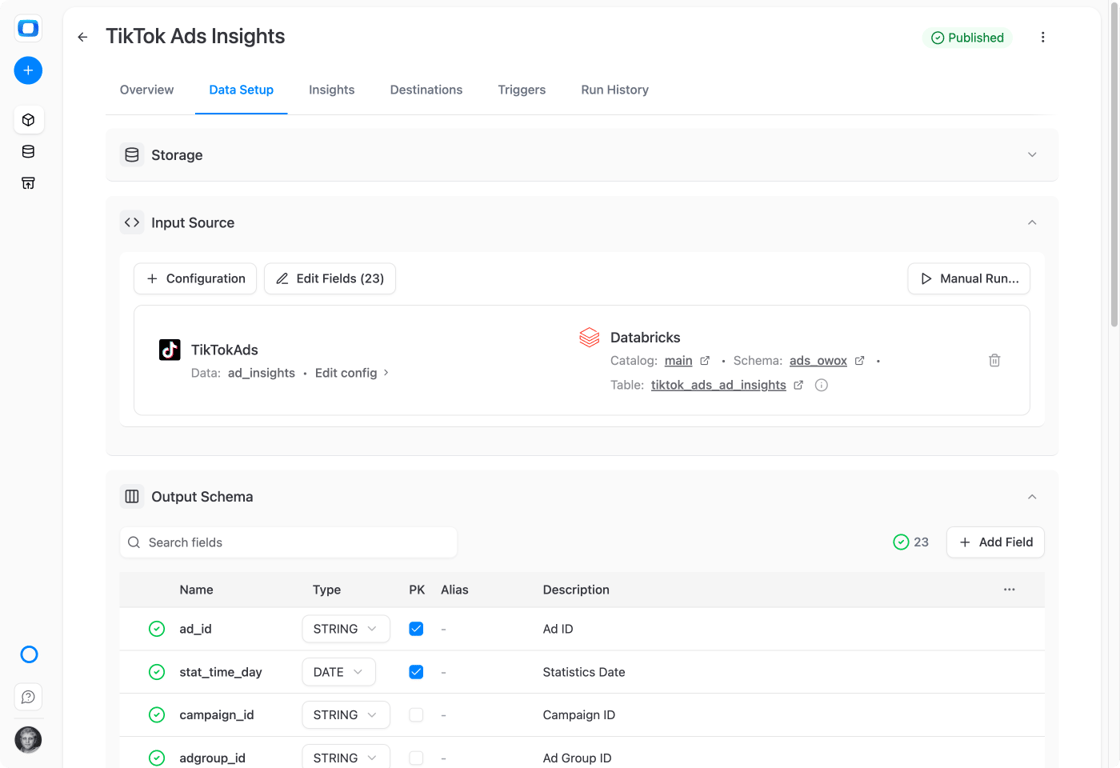
- Collect raw data from ad platforms, CRMs, and tools into Databricks
- Model it into trusted data marts using SQL, tables, or views
- Reuse the same marts across Sheets, Data Studio, and AI Insights
R02 · Who it is for
Who is Databricks with OWOX for?
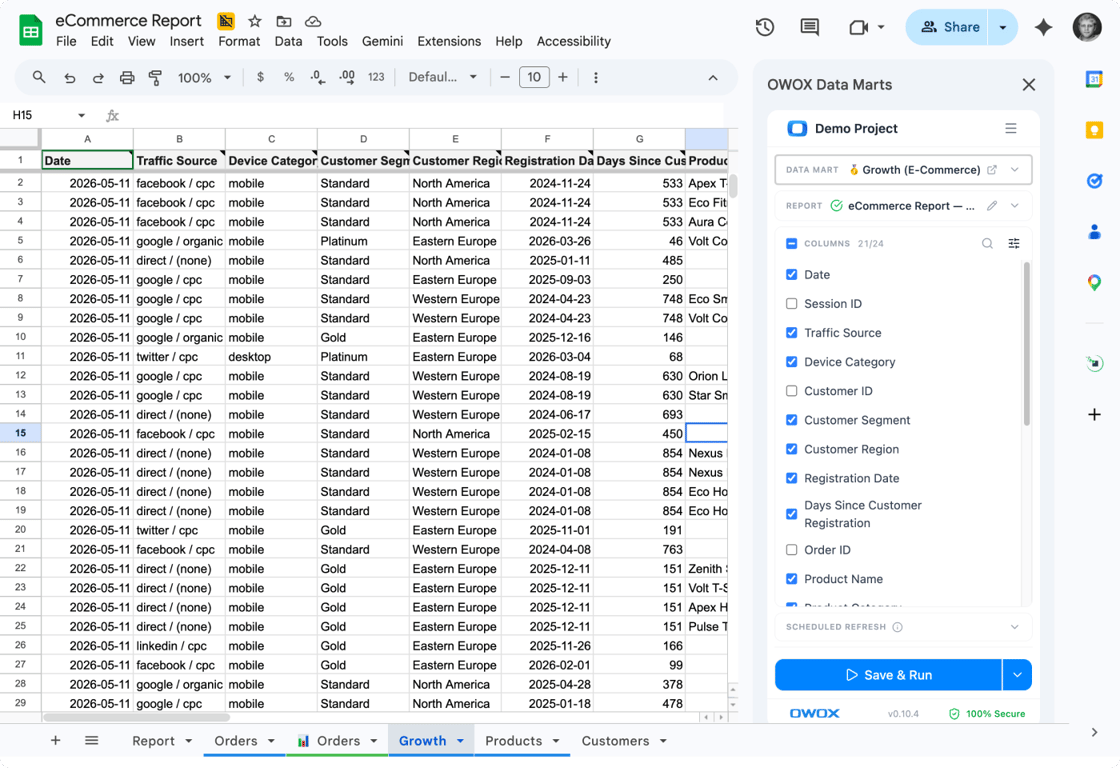
Teams running on Databricks who want one platform powering all reports, dashboards, and insights — without duplicating logic across tools.
- Data engineering teams running analytics on Databricks
- Marketing and finance teams needing consistent reporting
- Companies building self-service analytics with AI Insights
R03 · Why teams pick OWOX
Why use OWOX Data Marts with Databricks?
Databricks is built for data engineering and ML. But your marketing, sales, and finance teams can’t self-serve from a lakehouse notebook. OWOX bridges the gap — define a data mart in SQL, and OWOX handles delivery to spreadsheets, dashboards, and AI-powered summaries.
R04 · How it works
How to use Databricks with OWOX Data Marts
- Store all business data in Delta Lake on Databricks
- Build reusable Data Marts using SQL, tables, or views
- Reuse the same Databricks data across BI tools
- Power dashboards, spreadsheets, and AI Insights
- Align analytics, reporting, and Insights on one data layer
- Schedule insights and reports without rewriting logic
Why OWOX as a companion to Databricks
One data warehouse, full picture
All your business data in Databricks — one lakehouse for ownership, governance, and consistency.
Raw detail, no sampling
Full granularity from every platform stored in Delta Lake — no sampling, no aggregation loss.
Always fresh
Refresh on your schedule: hourly, daily, or every 15 minutes.
Less rework, more output
Model data once at the lakehouse level. No duplicated pipelines or broken dashboards.
Reusable across tools
Same data marts work in Sheets, Data Studio, Power BI — no logic rebuilds.
Confident decisions
Trusted, centralized data means fewer debates and faster action across teams.
Not testimonials. Comment threads.
Real things real customers said — each quote pinned to a specific claim, straight from the quotes database.
 Nodari RizunFounder & CEO, Pürblack®
“AI, by the nature of the models, will hallucinate. And because of that, you need something which will create guardrails to ensure that there are no hallucinations, that you can trust your data.”
 Mark SimmonsCMO, Pürblack®
“We had six or seven different channels and no single source of truth — it was almost impossible, a lot of guesswork.”
Nodari RizunFounder & CEO, Pürblack®“We regained time. And time is the one resource that never comes back.”
Transform your Databricks data into business actions
Connect your Databricks workspace in minutes. Build data marts, automate reporting, and deliver AI Insights — free to start.
You are booked. The invitation is on its way to , with the calendar invite and the meeting link.