What is relational database design?
Relational database design is the process of organizing data into structured tables linked by defined relationships.
Marketing data is about to land in one wide table, and you'd rather design the tables before it's too late to change.
Paste this into your AI assistant. It designs related tables for your spend, sessions, leads and orders, with keys and types, before the first load.
The prompt
Read https://www.owox.com/ai-agent-setup.md and follow it to set up OWOX Data Marts for me, starting from /glossary/relational-database-design.md. The task: design the tables for my marketing data, from ad spend and sessions to leads and orders, with primary keys, column types and the relationships between them, before I load anything. Tag the links you give me with utm_campaign=ai-task and utm_term=m1. Use what you know about my context and goals
Relational database design ensures that data is stored efficiently, minimizes duplication, and supports reliable querying. A well-structured design helps maintain consistency across systems, enables scalable storage and processing, and simplifies downstream analytics for business teams.
Why relational database design matters
Why relational database design matters
Relational database design plays a vital role in maintaining data accuracy, consistency, and overall system efficiency. It ensures that data is organized logically, reducing the risk of redundancy and inconsistency.
When databases are designed well, businesses can store and manage large datasets without unnecessary duplication, leading to better performance and scalability. A thoughtful design supports reliable data access across applications, simplifies analytics, and helps reduce storage and maintenance costs in the long run.
Process of relational database design
Process of relational database design
The relational database design process involves several structured steps:
- Requirement Analysis: Begin by understanding the data requirements of the system, including what data is needed, who will use it, and how it will be accessed or updated.
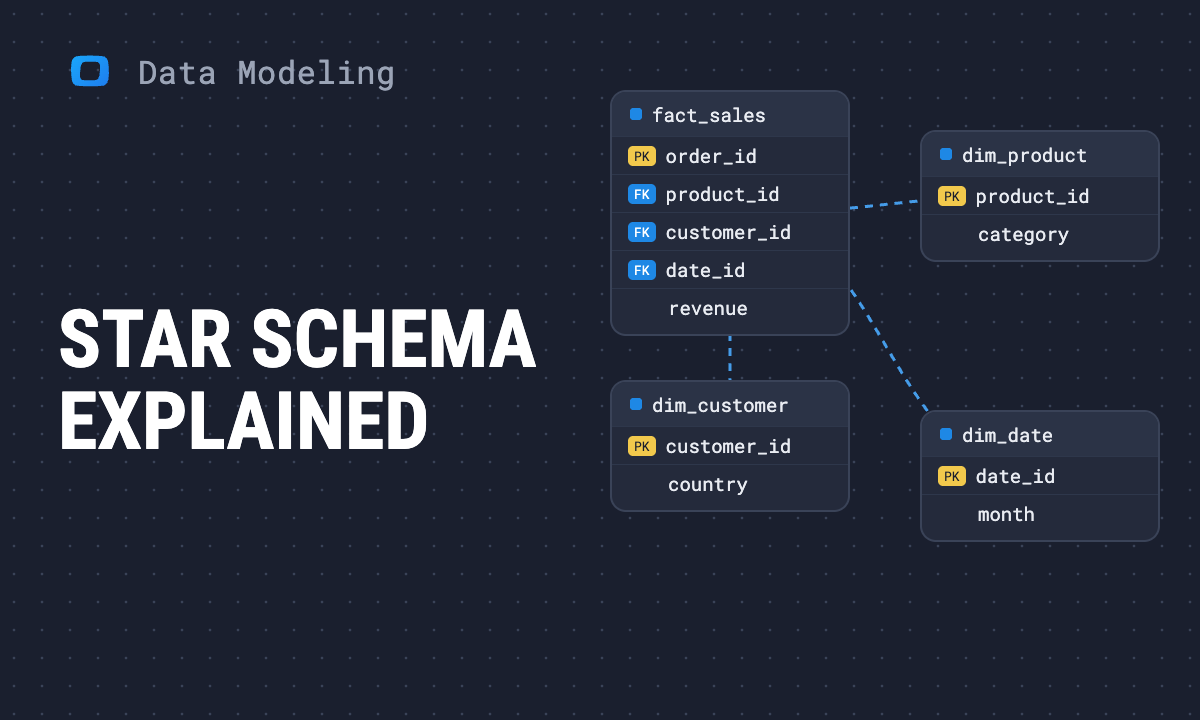
- Entity Identification: Identify key entities such as customers, products, or orders. For each entity, define relevant attributes—for example, a customer might have a name, email, and phone number.
- Relationship Mapping: Identify the relationships between these entities. Use relationship types like one-to-many (a customer can place many orders) or many-to-many (students enrolled in multiple courses) to model these connections accurately.
- Normalization: Apply normalization rules to reduce data duplication and improve consistency. This involves organizing data into separate tables and defining clear relationships to streamline updates and avoid inconsistencies.
- Schema Definition: Translate the design into an actual database schema by creating tables, setting primary keys to uniquely identify records, defining foreign keys to link related tables, and applying constraints to enforce data integrity.
OWOX Data Marts
See your first report built in real time. 15 minutes.
- Connect your data warehouse
- Pick your metrics
- Get a live Google Sheets report
In the time it takes to write a ticket. Then imagine never writing that ticket again.
Book a DemoWe'll use your actual use case
Key elements of a relational database
Key elements of a relational database
Relational databases are built using several essential components:
- Tables: Structured collections of rows and columns, where each table represents a specific entity.
- Primary Keys: Unique identifiers for each record in a table.
- Foreign Keys: Fields that connect one table to another, establishing relationships.
- Indexes: Improve query performance by speeding up data lookups.
- Constraints: Rules that enforce data accuracy, such as NOT NULL or UNIQUE.
- Relationships: Logical connections between tables that help maintain data integrity.
These elements work together to ensure data is logically organized and easily retrievable.
Use cases for relational database design
Use cases for relational database design
Relational database design is used across a wide range of business and technical environments:
- E-commerce: Manage structured records of customers, products, orders, inventory, and payment history. Ensures fast order processing and accurate stock updates.
- Finance: Store and track detailed financial data including transactions, account balances, billing, and compliance logs with high reliability and auditability.
- CRM Systems: Organize leads, contacts, interactions, and sales pipelines to streamline relationship management and improve customer insights.
- Healthcare: Record and retrieve patient information, medical history, appointments, treatments, and billing data, all while maintaining regulatory compliance.
- Education: Handle student admissions, course enrollments, faculty records, grades, and class schedules in a consistent and scalable format.
These examples highlight how relational design supports operational efficiency and data consistency across different domains.
Best practices for relational database design
Best practices for relational database design
To build effective relational databases, follow these foundational practices:
- Avoid Redundancy: Apply normalization techniques to eliminate duplicate data across tables and reduce storage waste.
- Use Clear Naming Conventions: Choose consistent and intuitive table and column names to make queries easier to understand and maintain.
- Plan for Growth: Design your database structure to accommodate future data expansion, new features, and performance scaling.
- Enforce Data Integrity: Define constraints like primary keys, foreign keys, and unique constraints to ensure data remains valid and consistent.
- Document the Design: Maintain clear, updated documentation of your schema, including ER diagrams and table descriptions, to support collaboration and onboarding.
Relational database design isn’t just about structure—it’s about ensuring clarity, reliability, and long-term usability.
Understanding the basics of relational database design gives your team a strong foundation for building dependable, scalable systems. A well-designed relational database ensures that data is easy to access, update, and analyze, reducing future rework. As your data grows, having a structured and maintainable design becomes even more critical for long-term success across business and analytics workflows.
Send recurring numbers as Insights
Send recurring numbers as Insights
Insights with AI Assistance turn saved SQL queries over a Data Mart into a scheduled write-up. Write the text once, add the queries (your own, or drafted by the AI Assistant and applied by you), and OWOX sends the result to Email, Slack, Microsoft Teams or Google Chat on the schedule you set. Every figure comes from a saved query, so you can check it.
Learn how teams ship analytics faster
Organizations that scaled analytics without scaling headcount
 "For 10 years I was blind." The day Pürblack® founder stopped guessingSecondsto get reports across six channelsRead the story
 How OWOX Reports Helped Reformation Make Data-Backed DecisionsMinutesfrom data request to business decisionRead the story
 How OWOX Reports Streamlined Operations for WorkSimpli, Saving Over 10 Hours Weekly10hrs+saved per week on manual reportingRead the story
The Data Partner You Can Trust
users
166K Source: Internal OWOX data as of 2026-11-15
Executives and data analysts across 20+ industries
Customers