BigQuery SQL: syntax, clause order and tested examples
A working tour of BigQuery SQL in the order BigQuery evaluates a query: FROM and JOIN, WHERE, GROUP BY, HAVING, window functions, QUALIFY, SELECT, ORDER BY and LIMIT. Every query runs on the same two small inline tables and is followed by its real result, including the default window frame that turns a running total into a wrong number when dates tie, and the GoogleSQL vs legacy SQL rules for table names.
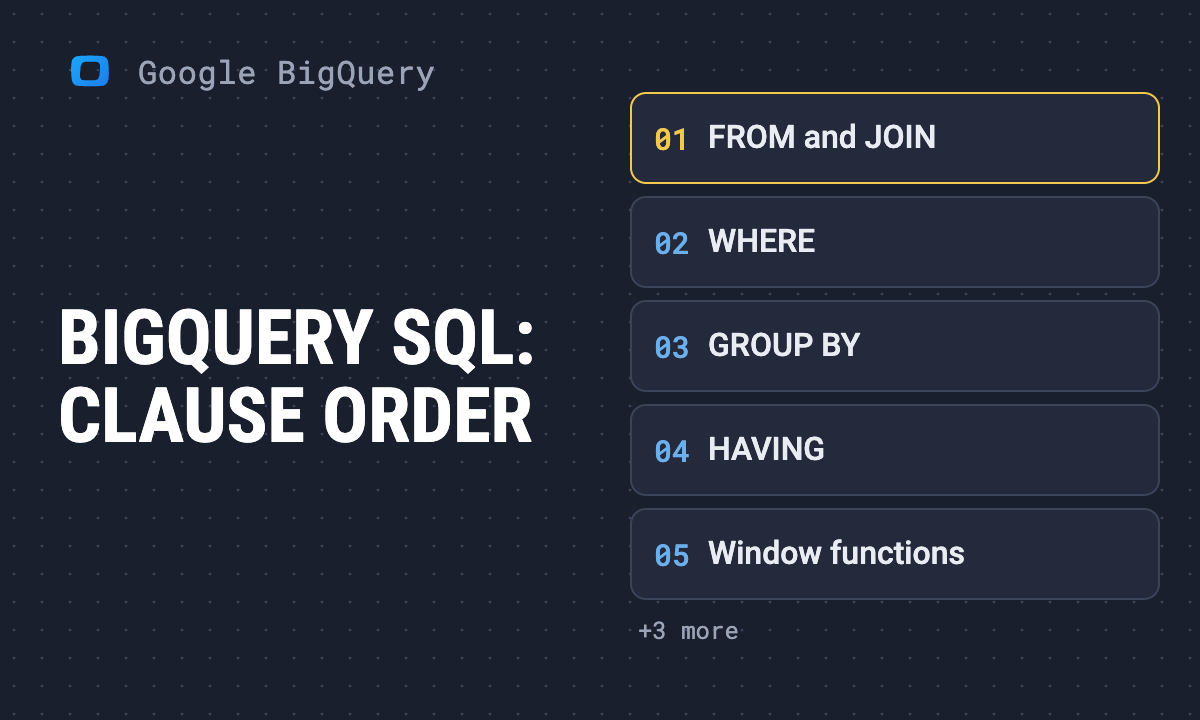
BigQuery SQL is GoogleSQL: standard SQL with a few BigQuery habits on top. Table names are written as project.dataset.table, often in backticks. QUALIFY filters on window functions. UNPIVOT turns columns into rows. And a window function with ORDER BY uses a frame that most people do not expect. This guide walks a query in the order BigQuery evaluates it, and runs every example on the same two inline tables, so you can paste each one into the console and get the same result.
| Step | Clause | What it does | Trap |
|---|---|---|---|
| 1 | FROM, JOIN |
reads and combines tables | a join can multiply rows before SUM |
| 2 | WHERE |
filters rows | cannot see SELECT aliases |
| 3 | GROUP BY |
makes one row per group | every column grouped or aggregated |
| 4 | HAVING |
filters groups | |
| 5 | window functions | compute over related rows, keep every row | with ORDER BY, the frame stops at the current date, ties included |
| 6 | QUALIFY |
filters on a window function | |
| 7 | SELECT DISTINCT |
removes duplicate rows | |
| 8 | ORDER BY |
sorts | |
| 9 | LIMIT |
cuts the output | does not cut the bytes billed |
Note: Originally published in January 2024. Fully rewritten in October 2026: every result below was produced by running the query in BigQuery on 16 October 2026.
GoogleSQL, legacy SQL and table names
GoogleSQL, legacy SQL and table names
BigQuery has two dialects. Google’s introduction to SQL in BigQuery (read in October 2026) calls GoogleSQL “the recommended dialect for all new projects” and recommends migrating from legacy SQL. The console uses GoogleSQL by default; the bq command-line tool still defaults to legacy SQL, so pass --use_legacy_sql=false there. A query can also choose its dialect with a first line of #standardSQL or #legacySQL.
The visible difference is the table name:
| Dialect | Table reference |
|---|---|
| GoogleSQL | `bigquery-public-data.samples.shakespeare` |
| Legacy SQL | [bigquery-public-data:samples.shakespeare] |
Run a legacy-style query in the console and GoogleSQL stops at the bracket:
SELECT COUNT(*) AS rows_ FROM [bigquery-public-data:samples.shakespeare]Syntax error: Unexpected "[" at [1:31]. If this is a table identifier,
escape the name with `, e.g. `table.name` rather than [table.name].Backticks quote a whole path. In our test, FROM bigquery-public-data.samples.shakespeare ran without them and counted 164,656 rows, because GoogleSQL accepts dashes in a table path after FROM. Two cases still need them:
- Wildcard tables.
FROM bigquery-public-data.noaa_gsod.gsod192*fails withExpected end of input but got "*"; in backticks it runs. More in wildcard tables. - Reserved words as names. A column called
groupbreaksSELECT order_id, group; write`group`.
Quoting every table path in backticks costs nothing and avoids both. The full list of what changed between the dialects, and how to convert old queries, is in standard SQL vs legacy SQL.
The tables used in every example
The tables used in every example
Paste this before any query below and it runs as is. It reads no stored table, so BigQuery processes 0 bytes:
WITH orders AS (
  SELECT 1 AS order_id, 101 AS customer_id,
         DATE '2026-09-01' AS order_date, 'web' AS channel, 120 AS amount
  UNION ALL SELECT 2, 101, DATE '2026-09-03', 'email', 80
  UNION ALL SELECT 3, 102, DATE '2026-09-03', 'web', 200
  UNION ALL SELECT 4, 102, DATE '2026-09-05', 'ads', 50
  UNION ALL SELECT 5, 103, DATE '2026-09-05', 'web', 40
  UNION ALL SELECT 6, 101, DATE '2026-09-08', 'web', 60
),
customers AS (
  SELECT 101 AS customer_id, 'anna' AS name, 'DE' AS country
  UNION ALL SELECT 102, 'ben', 'US'
  UNION ALL SELECT 103, 'cara', 'US'
  UNION ALL SELECT 104, 'dan', 'DE'
)
Six orders worth 550 in total, four customers, and Dan has no orders. Two pairs of orders share a date (3 and 5 September); that matters in the window section. WITH blocks like this one are covered in the CTE guide.
OWOX Data Marts
See your first report built in real time. 15 minutes.
- Connect your data warehouse
- Pick your metrics
- Get a live Google Sheets report
In the time it takes to write a ticket. Then imagine never writing that ticket again.
Book a DemoWe'll use your actual use case
The order BigQuery runs a query in
The order BigQuery runs a query in
You write SELECT first, but BigQuery does not run it first. The query syntax reference (read in October 2026) gives the usual evaluation order as FROM, WHERE, GROUP BY and aggregation, HAVING, WINDOW, QUALIFY, DISTINCT, ORDER BY, LIMIT, and adds that “evaluation order doesn’t always match syntax order.” Each clause can only use what the clauses before it produced. That one rule explains most “Unrecognized name” errors.
FROM and JOIN
SELECT
  c.name,
  COUNT(o.order_id) AS orders,
  SUM(o.amount) AS revenue
FROM customers AS c
LEFT JOIN orders AS o
  ON o.customer_id = c.customer_id
GROUP BY c.name
ORDER BY c.name;| name | orders | revenue |
|---|---|---|
| anna | 3 | 260 |
| ben | 2 | 250 |
| cara | 1 | 40 |
| dan | 0 | NULL |
LEFT JOIN keeps Dan although he has no orders. Two details in his row: COUNT(o.order_id) is 0 because it counts non-NULL values, and SUM of no values is NULL, not 0. Wrap it in COALESCE(SUM(o.amount), 0) if the report needs a zero. With an inner JOIN, Dan disappears.
JOIN ... USING (customer_id) is the short form when both sides use the same column name. Joins across datasets or projects need nothing special as long as the datasets are in the same location: give the full path of each table. Joining across regions needs Google’s global queries, in Preview as of October 2026 and off by default. How each join type and UNION ALL behaves, and how a join multiplies rows, is in JOIN vs UNION.
WHERE, GROUP BY and HAVING
SELECT
  c.name,
  COUNT(*) AS orders,
  SUM(o.amount) AS revenue
FROM orders AS o
JOIN customers AS c USING (customer_id)
WHERE o.channel != 'ads'
GROUP BY c.name
HAVING SUM(o.amount) > 100
ORDER BY revenue DESC;| name | orders | revenue |
|---|---|---|
| anna | 3 | 260 |
| ben | 1 | 200 |
Read it in run order. WHERE removes Ben’s 50 ads order before any grouping, so Ben has one order, not two. GROUP BY makes one row per customer. HAVING then drops Cara, whose 40 is under 100. A condition on a row goes in WHERE; a condition on an aggregate goes in HAVING.
WHERE runs before SELECT, so it cannot use a SELECT alias:
WITH orders AS (SELECT 1 AS order_id, 120 AS amount)
SELECT order_id, amount * 1.19 AS gross
FROM orders
WHERE gross > 100;
Unrecognized name: gross at [4:7]Repeat the expression (WHERE amount * 1.19 > 100) or compute it in a CTE first. GROUP BY and ORDER BY do accept aliases.
GROUP BY ALL groups by every SELECT column that is not an aggregate, so the list is written once:
SELECT channel, SUM(amount) AS revenue
FROM orders
GROUP BY ALL
ORDER BY revenue DESC
LIMIT 2;| channel | revenue |
|---|---|
| web | 420 |
| 80 |
Web is orders 1, 3, 5 and 6: 120 + 200 + 40 + 60. Ads (50) is third and cut by LIMIT 2. The functions that go inside GROUP BY queries, and the NULL rule each follows, are in aggregate functions. Grouping by day, week or month is DATE_TRUNC(order_date, WEEK); see date functions.
Window functions and the default frame
Window functions and the default frame
A window function computes over a set of rows related to the current row and keeps every row. The set is written in OVER (...). The part that catches people is what happens when OVER has ORDER BY and no frame.
SELECT
  order_id,
  order_date,
  amount,
  SUM(amount) OVER () AS no_order_by,
  SUM(amount) OVER (ORDER BY order_date) AS default_frame,
  SUM(amount) OVER (ORDER BY order_date, order_id
                    ROWS BETWEEN UNBOUNDED PRECEDING AND CURRENT ROW) AS rows_frame
FROM orders
ORDER BY order_date, order_id;| order_id | order_date | amount | no_order_by | default_frame | rows_frame |
|---|---|---|---|---|---|
| 1 | 2026-09-01 | 120 | 550 | 120 | 120 |
| 2 | 2026-09-03 | 80 | 550 | 400 | 200 |
| 3 | 2026-09-03 | 200 | 550 | 400 | 400 |
| 4 | 2026-09-05 | 50 | 550 | 490 | 450 |
| 5 | 2026-09-05 | 40 | 550 | 490 | 490 |
| 6 | 2026-09-08 | 60 | 550 | 550 | 550 |
Three columns, three different frames:
- No
ORDER BY: the whole partition. Every row gets 550. ORDER BYalone: a running total, but by date, not by row. The window function calls reference (read in October 2026) says that whenORDER BYis present and no frame is given, an aggregate usesRANGE BETWEEN UNBOUNDED PRECEDING AND CURRENT ROW.RANGEtakes every row with the sameorder_dateas the current one. Orders 2 and 3 both show 400, so the running total skips the value 200; orders 4 and 5 both show 490.ROWSframe: one row at a time. 120, 200, 400, 450, 490, 550. Add a unique tiebreaker (order_id) to theORDER BY, or the order inside a tie is not fixed.
The previous version of this article said that without a frame the window “defaults to the entire partition.” That is only true without ORDER BY. With it, a “running total” built on a date column silently double-steps on every tied date, and the last row still matches the total, so a spot check of the end value does not catch it. Write the frame out whenever the order column can tie.
Ranking (ROW_NUMBER, RANK), LAG and LEAD, and moving averages are in the window functions guide and numbering functions.
QUALIFY: filter on a window function
QUALIFY: filter on a window function
WHERE runs before window functions, so it cannot filter on one. QUALIFY runs after them. The latest order per customer:
SELECT customer_id, order_id, order_date, amount
FROM orders
QUALIFY ROW_NUMBER() OVER (
  PARTITION BY customer_id ORDER BY order_date DESC) = 1
ORDER BY customer_id;| customer_id | order_id | order_date | amount |
|---|---|---|---|
| 101 | 6 | 2026-09-08 | 60 |
| 102 | 4 | 2026-09-05 | 50 |
| 103 | 5 | 2026-09-05 | 40 |
This query has no WHERE, GROUP BY or HAVING and ran as is; older guides say QUALIFY needs one of them. Without QUALIFY, the same answer takes a subquery that computes ROW_NUMBER() and an outer WHERE rn = 1. When to use which of the three filters is in WHERE vs HAVING vs QUALIFY.
SELECT, ORDER BY and LIMIT
SELECT picks and names the output columns; AS gives an alias. SELECT DISTINCT removes duplicate rows after everything above. SELECT * EXCEPT (col) returns every column but the ones listed, which is handy on wide tables. ORDER BY sorts, DESC reverses, and LIMIT n keeps the first n rows.
LIMIT does not make a query cheaper. Dry runs on the public Shakespeare table:
| Query | Bytes processed |
|---|---|
SELECT * |
6,432,064 |
SELECT * ... LIMIT 10 |
6,432,064 |
SELECT word ... LIMIT 10 |
1,332,943 |
BigQuery stores each column separately and bills the columns it reads. Google’s compute best practices (read in October 2026) state that applying LIMIT to a SELECT * query “does not affect the amount of data read”. Choosing columns cut the bytes by about 80%. The other lever is filtering on the partition column of a partitioned table, which skips whole partitions. What those bytes cost is in BigQuery pricing.
UNPIVOT: columns into rows
Sales exported with one column per quarter are hard to chart or sum by quarter. UNPIVOT turns them into rows. This example uses its own small table:
WITH quarterly AS (
  SELECT 'shoes' AS product, 100 AS q1_sales, 120 AS q2_sales,
         NULL AS q3_sales, 90 AS q4_sales
  UNION ALL SELECT 'bags', 40, 55, 60, 70
)
SELECT product, quarter, sales
FROM quarterly
UNPIVOT (sales FOR quarter IN (q1_sales, q2_sales, q3_sales, q4_sales))
ORDER BY product, quarter;| product | quarter | sales |
|---|---|---|
| bags | q1_sales | 40 |
| bags | q2_sales | 55 |
| bags | q3_sales | 60 |
| bags | q4_sales | 70 |
| shoes | q1_sales | 100 |
| shoes | q2_sales | 120 |
| shoes | q4_sales | 90 |
Two products times four quarters should be eight rows; there are seven. UNPIVOT drops rows whose value is NULL, so the shoes’ empty Q3 is gone, and a count of quarters per product would be wrong. UNPIVOT INCLUDE NULLS (...) keeps it and returns 8 rows. To rename the quarter labels, write IN (q1_sales AS 'Q1', q2_sales AS 'Q2', ...). PIVOT goes the other way.
Changing data: INSERT, UPDATE, DELETE and MERGE
Changing data: INSERT, UPDATE, DELETE and MERGE
Everything above reads data. BigQuery also has DML to change it: INSERT, UPDATE, DELETE and MERGE. UPDATE and DELETE must include a WHERE clause, as the DML reference (read in October 2026) states; to change every row, write WHERE true. Several statements can run as one unit between BEGIN TRANSACTION and COMMIT TRANSACTION. The syntax, with examples, is in the DML guide. BigQuery is built for reading large tables, and Google’s advice is to batch changes: one statement that changes many rows, not many statements that change one row each. That applies to row-by-row INSERTs as much as to UPDATEs; a batch of appended versions, read back with QUALIFY as above, is one common pattern.
Where to go next
This page is the map. Each family has its own tested guide:
- Functions by family: BigQuery functions overview
- Arrays and
UNNEST: array functions - Ready-made queries on GA4 data: BigQuery query examples
- A free place to run everything above: BigQuery sandbox
From a correct query to a number people trust
From a correct query to a number people trust
The default frame is a good example of how SQL goes wrong in reporting: the query runs, the last row matches the total, and the numbers in between are off. Once a query is right, the problem becomes keeping it the one everyone uses. In OWOX Data Marts that query is published once as a Data Mart, with the frame and the NULL decisions written into it, and every report in Google Sheets or Data Studio reads the same model. OWOX Data Marts runs your SQL as written, in your own BigQuery project, and does not transform the data.
Turn your data into decisions.
Governed data marts give you the clean foundation ML needs to actually work.
- No AI hallucinations
- Analyst-governed definitions
- Every number traces to SQL
Frequently Asked Questions
In what order does BigQuery evaluate the clauses of a query?
BigQuery typically evaluates FROM, then WHERE, GROUP BY and aggregation, HAVING, window functions, QUALIFY, DISTINCT, ORDER BY and LIMIT. Each clause can only use what earlier clauses produced, which is why WHERE cannot see a SELECT alias but ORDER BY can.
How do I JOIN tables from different datasets or projects in BigQuery?
Write the full path of each table, such as project.dataset.table, in backticks, give each an alias and join on the shared column. Nothing else changes, as long as the tables are in the same location and you can read both.
When do I need backticks around table names in BigQuery?
GoogleSQL accepts a dashed project name after FROM without backticks, but wildcard tables such as gsod192* and names that are reserved words like group need them. Quoting every table path in backticks avoids both errors.
What is the default window frame in a BigQuery window function?
Without ORDER BY in OVER, the frame is the whole partition. With ORDER BY and no frame, an aggregate uses RANGE BETWEEN UNBOUNDED PRECEDING AND CURRENT ROW, so rows that tie on the ORDER BY column share one running total; write ROWS BETWEEN UNBOUNDED PRECEDING AND CURRENT ROW with a unique tiebreaker for a row-by-row total.
Does LIMIT reduce the cost of a BigQuery query?
No. LIMIT cuts the rows returned, not the bytes read: SELECT * on the public Shakespeare table processed 6,432,064 bytes with and without LIMIT 10. Selecting fewer columns and filtering on the partition column are what reduce the bytes billed.
What is the difference between legacy SQL and GoogleSQL in BigQuery?
GoogleSQL is the standard-compliant dialect Google recommends for all new work, and the console default; legacy SQL is the older dialect that the bq command-line tool still uses by default. The visible difference is table names: GoogleSQL uses project.dataset.table in backticks, legacy SQL uses [project:dataset.table].
How do I filter on a window function in BigQuery?
Use QUALIFY, which runs after window functions, for example QUALIFY ROW_NUMBER() OVER (PARTITION BY customer_id ORDER BY order_date DESC) = 1 to keep each customer's latest order. WHERE runs before window functions, so it cannot reference them.
Why does UNPIVOT return fewer rows than expected in BigQuery?
UNPIVOT drops rows whose value is NULL by default, so an empty quarter disappears from the output. Write UNPIVOT INCLUDE NULLS to keep those rows.