How to Export Google Search Console Data to BigQuery
Learn how to export Google Search Console Data to BigQuery for better decisions. Build advanced search analytics now.

In the digital age, data is pivotal in sculpting successful business strategies, especially for those who rely on organic search performance to drive business outcomes: more traffic, sessions, leads, sales, you name it.
Google Search Console (GSC) for years has offered fundamental insights into how websites perform in search results, yet it is not without its limitations, particularly in terms of data depth and analytical flexibility.
That is why integrating GSC with Google BigQuery allows businesses to fix these boundaries, by granting access to advanced analytical capabilities that are essential for customized, in-depth analysis.

This integration not only enhances the understanding of search data through sophisticated, scalable analytics but also ensures full data sovereignty – empowering businesses to leverage their digital footprints to forge strategic decisions.
In this article, we’ll go into the mechanics of exporting GSC data into BigQuery, its benefits, and the potential of combining these tools to make quicker and more informed marketing decisions.
Why Export Google Search Console Data to BigQuery?
Why Export Google Search Console Data to BigQuery?
Google Search Console (GSC) offers absolutely great insights into your website’s performance in Google search results, yet the platform has inherent limitations in how data can be analyzed and utilized.
Exporting this data to BigQuery removes these limitations and also opens a wealth of new opportunities you never thought of for deep, really custom analytics. And by saying custom, I mean the ones that suit YOUR specific needs.
So let’s look at the GSC limitations first:
Limitations of Google Search Console UI
Limitations of Google Search Console UI
While Google Search Console provides essential keyword and performance metrics that every marketer or SEO Specialist can use, its user interface (UI) poses several constraints that can hinder comprehensive data analysis:
1. Data Granularity and Sampling
The UI limits data views to 1,000 rows at a time, restricting access to the full depth of data captured, especially for larger sites. Plus, it’s just not customizable enough for every purpose. Sure, you can export that data to spreadsheets on the fly, but you have to do that again and again each time you need a report.
If you use a direct GSC to Looker Studio integration, you can get up to 50,000 rows, which doesn’t sound enough for a comprehensive analysis.
With the Google Search API, you get up to 50,000 rows as well.
Daniel Waisberg from Google shares it this way:
The most powerful way to export performance data is the bulk data export to BigQuery, where you can get the biggest amount of data.
2. Data Retention Window
GSC retains detailed search data for only the last 16 months, which is insufficient for long-term trend analysis and comparison.
Great blog posts live for ages, and keyword behavior is different from time to time. You might want to compare it Y-o-Y (Year-over-Year), but you simply can’t when you’re limited within the period of 16 months. Yes, that’s way more than the standard data retention window in Google Analytics 4 which is only 2 months.
3. Filtering and Segmentation
Although GSC offers basic filtering options, they are not robust enough for complex or custom analysis needs that many advanced SEO strategies require.
Imagine you want to segment the Google Search performance just the articles of the specific category (and you don’t have that topic specified in the URL slug) - you simply can’t handle that within the GSC UI.
Or if you want to see trends over time, for example, search behavior over the last 6 periods of 28 days each (to remove the effect of weekdays vs weekends)… that all becomes possible when you start exporting GSC data to Google BigQuery.
OWOX Data Marts
See your first report built in real time. 15 minutes.
- Connect your data warehouse
- Pick your metrics
- Get a live Google Sheets report
In the time it takes to write a ticket. Then imagine never writing that ticket again.
Book a DemoWe'll use your actual use case
Benefits of GSC data to BigQuery Export
Benefits of GSC data to BigQuery Export
Sending data from Google Search Console to BigQuery transforms your SEO and marketing efforts by providing a scalable, flexible platform for your data needs. This level of access means you can conduct thorough, granular studies on every aspect of your site’s search performance. It opens up new avenues for discovering underperforming keywords, identifying emerging trends, and much more.
This integration not only enhances your ability to perform complex analyzes and create custom reports but also facilitates a seamless flow of source-of-truth information across departments.
Avoid Sampling Limitations
There are no row limits applied when you use the GSC BigQuery bulk export. BigQuery’s bulk data export allows you to pull all rows of all the data available in your GSC account.
This makes Google BigQuery way more suitable for high-traffic websites or just SEO-related analyzes requiring working with more of the long-tailed, low-volume keywords.
Full Data Ownership
When you have your data stored in the warehouse, you truly own your data instead of the data provider (Google, in this example). Owning your data fully means no third party can restrict how you access, use, or analyze your business-critical information.
Exporting your GSC data to BigQuery ensures that you have uninterrupted access to historical data beyond the standard 16-month window offered by Google.
This complete data access allows businesses to perform trend analyzes (like Y-o-Y or Q-o-Q), maintain data security within their own cloud infrastructure, and build predictive models to estimate future search performance based on trends and stay on track.
Ability to JOIN with Data from Other Sources
One of the most powerful capabilities unlocked by having GSC data in BigQuery is the ability to merge it with data from other sources.
For example:
- You can join GSC data with Google Analytics 4 data to get a holistic view of user behavior from the first click through various interactions to the final conversion, helping you understand the complete user journey
- You can also match those keywords folks are clicking around to conversions (oh yes, you won’t be able to build a direct connection between the keyword clicked, and the sale happened, but you will be able to see patterns and build so-to-say the keywords’ attribution model all the way through your funnel.
- You can enrich your search performance data with CMS metadata such as page or article categories and topics, authorship, creation, publication, or modification dates, enabling deeper content performance analysis and optimization. Because let’s face it: it’s not enough to just tweak pages on the fly, sometimes we need the author to be involved, a writer to change the keywords, etc.
- And you can even add CRM data such as customer lifecycle stages or purchasing behavior, and the role of the specific page in the sales funnel, so you can enhance audience segmentation and targeting strategies for re-marketing or re-targeting.
Advanced Data Analysis and Automated Reporting
By making GSC data available in BigQuery, your options for analysis are virtually limitless.
For instance, now you can use SQL and write queries that reflect your specific analytics needs and get for sophisticated reports beyond the capabilities of standard GSC filters, including categories by the fields from other data sources or multi-dimensional analysis.
You also can employ any BI tool of your choice (thanks BigQuery has all the integrations with BIs: Google Sheets, Looker Studio, Power BI, or Tableau) to create dynamic reports and dashboards that update automatically, so business users can interact with search performance data in more meaningful ways.
Or you can do exactly what we do (and what we used to 10X Organic Traffic in less than 1 year) - automate entire search console reporting in Google Sheets.
With tools like the OWOX BigQuery Data Marts, you can build and schedule reports directly within Google Sheets, transforming it into a powerful window to your corporate data.
This eliminates the need to manually export data or use cumbersome methods like VLOOKUPs, ensuring your reports are always up-to-date and accurate. Just write a query once, create a broad data mart, and share it with business users or team members – they will be able to run reports themselves, update with the frequency they need, and also apply the filters THEY need for the specific task.
This comprehensive approach to data handling not only enhances operational efficiency in the SEO team, but also significantly improves decision-making capabilities, powered by really deeper and more detailed insights into your search performance and user patterns while googling.
Preparing for Search Console Data Export
Preparing for Search Console Data Export
Before diving into setting up the data export process from Google Search Console to BigQuery, it’s essential to ensure that you have the necessary Google Cloud setup and permissions in place.
This preparation involves a few key steps and configurations:
Google Cloud & BigQuery Configuration
1. First, you’ll need a Google Cloud Platform (GCP) account. If you don’t already have one, you can create it by visiting the Google Cloud website. This account is crucial as BigQuery is part of Google Cloud.
You can find a quick-start guide here.
2. Once your GCP account is ready, create a new project or select an existing project where you will conduct your data analysis. This project will house your BigQuery instance.
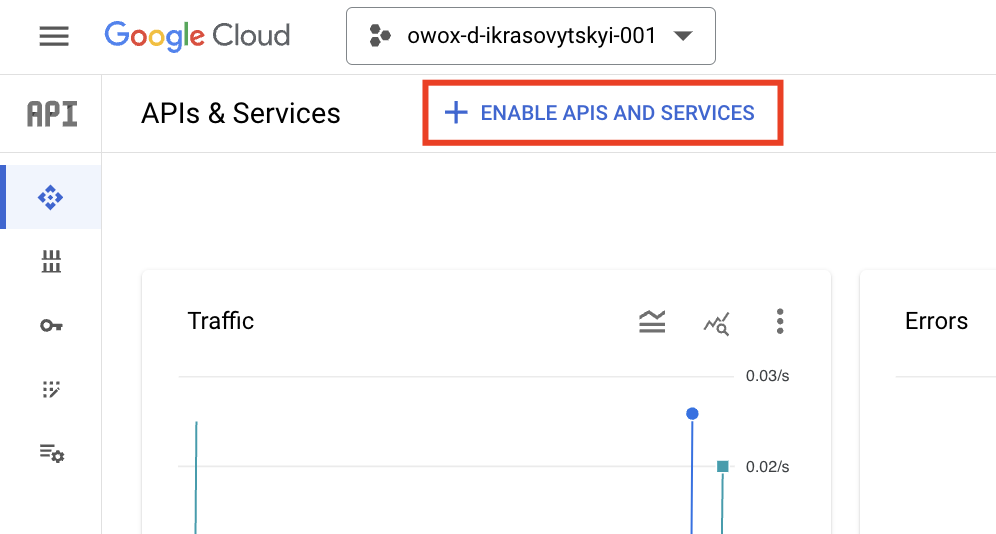
3. Next, in your Google Cloud project, ensure that the BigQuery API is enabled. Navigate in the sidebar to ‘APIs & Services’ > ‘Enabled APIs & Services’.
If BigQuery is not enabled, click to ‘+ENABLE APIS AND SERVICES’:
Then search for**‘BigQuery API**’ and ‘BigQuery Storage API’ and enable them:
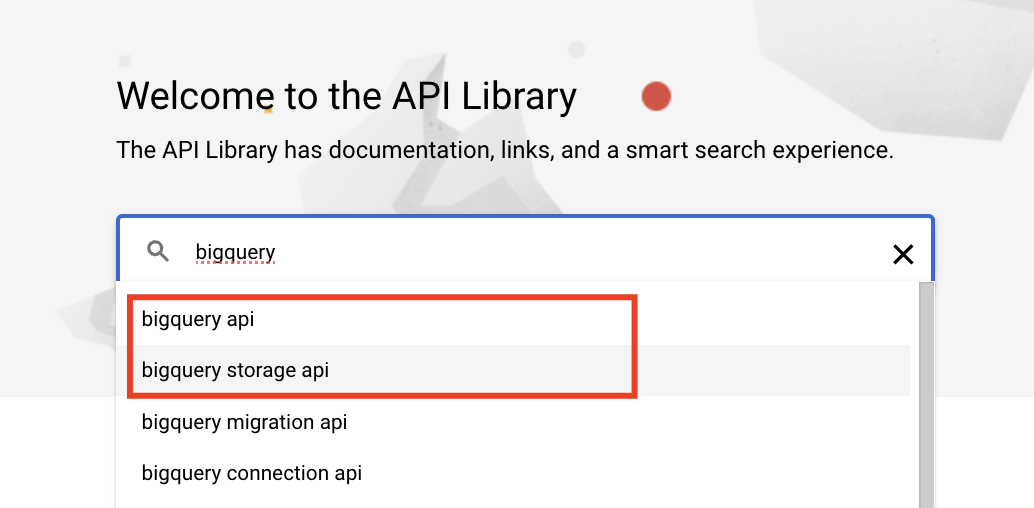
This step is essential for integrating and managing your datasets from Google Search Console.
4. Next, you need to verify that billing is enabled for your Google Cloud project. BigQuery offers a free tier (with $300 of Free Credits), however export setup requires a billing account setup.
5. One more step in Google Cloud Console to take is to grant permission to Search Console to pull data to your BigQuery project:
- Navigate in the sidebar to ‘IAM and Admin’. The page should say Permissions for project .
- Click ‘+ GRANT ACCESS’ to open a side panel that’s named Add principals.
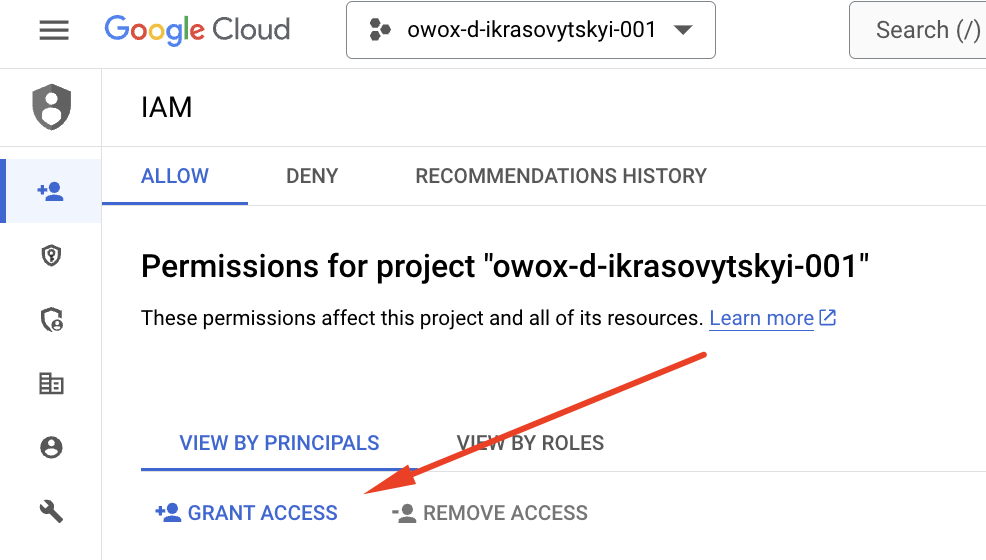
- In ‘New Principals’, paste the GSC service account name: search-console-data-export@system.gserviceaccount.com
- Assign it two roles: BigQuery Job User and BigQuery Data Editor (select from the drop-down) search-console-data-export@system.gserviceaccount.com
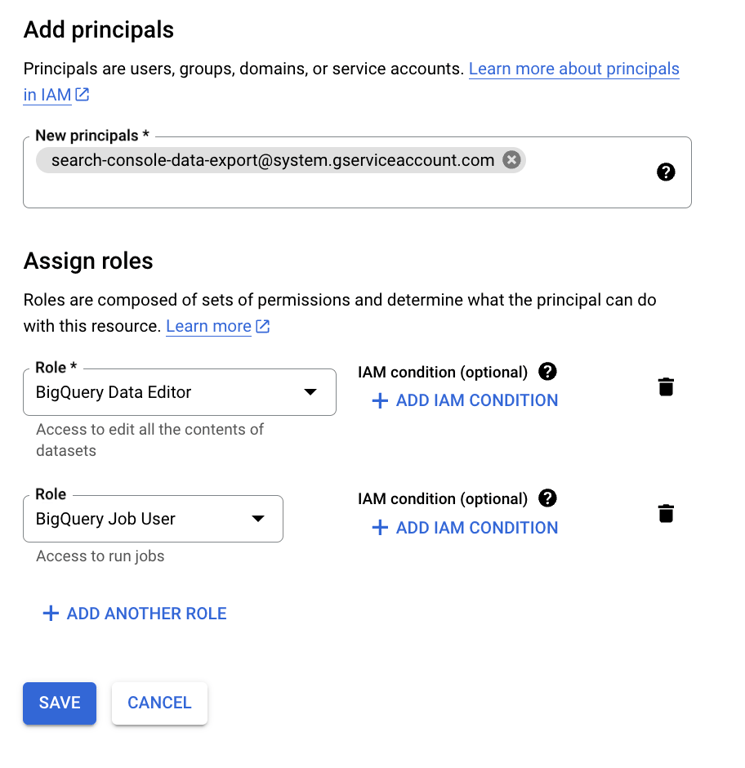
- Click ‘Save’.
Google Search Console
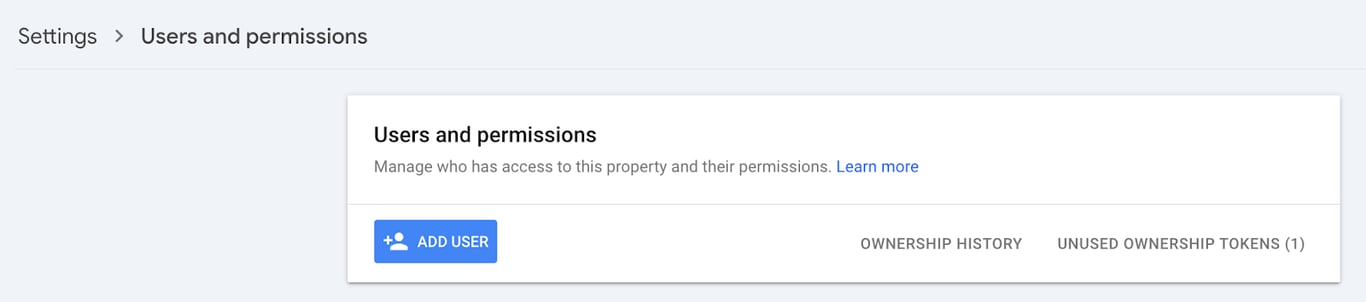
Now, you need to ensure that you have verified ownership of your website in Google Search Console. You need the ‘owner’ level permissions to set up data export to BigQuery. You can request that from your colleagues if you don’t have it yet. In order to do this - use ‘Users and permissions’ section of the Settings.
Step-by-Step Guide to Exporting GSC Data to BigQuery
Step-by-Step Guide to Exporting GSC Data to BigQuery
Exporting data from Google Search Console to BigQuery can be streamlined with a clear step-by-step approach.
Here’s how you can set up and automate the process:
Step 1: Enable Data Export
- Log into your Google Search Console dashboard and select the property you wish to export data from.
- Then, navigate to the ‘Settings’ menu, where you’ll find the option for ‘Bulk Data Export’.
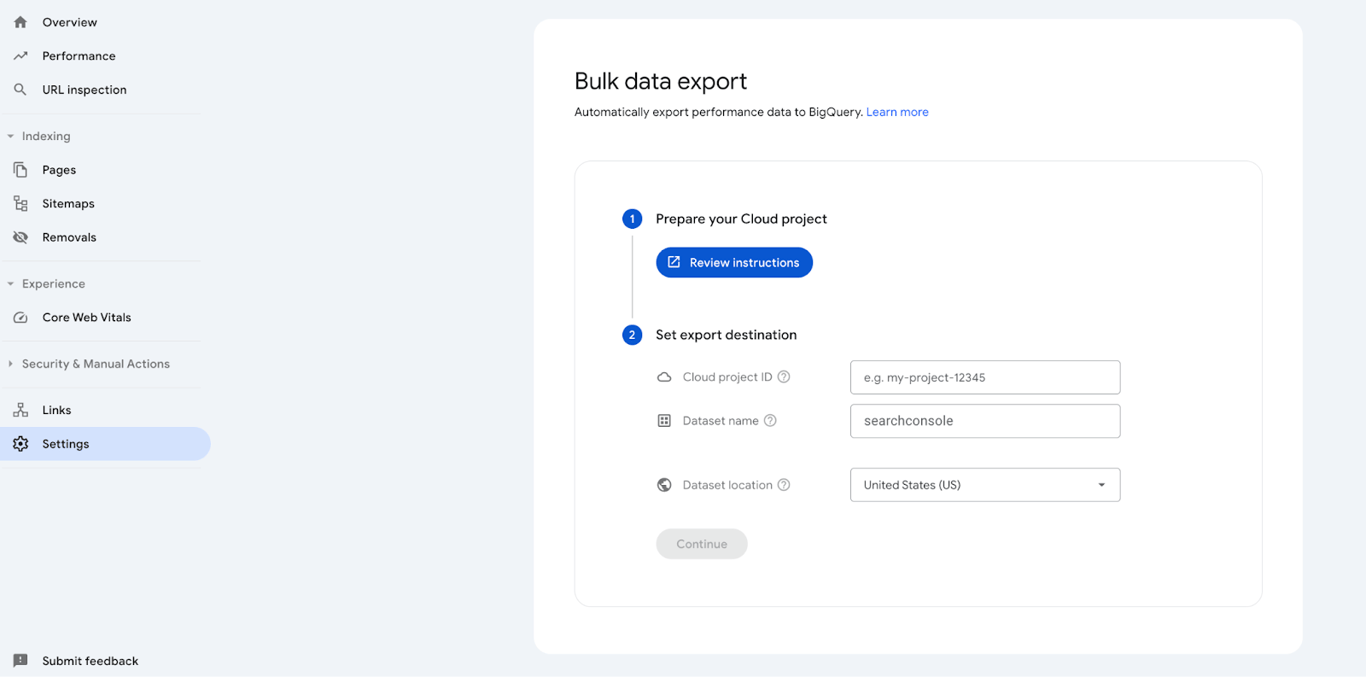
- Fill in your ‘Google Cloud project ID’ (not the project name).
- Then - type in a dataset name within BigQuery where the data will be stored. By default, the name will be searchconsole, but if you’d like to collect search data from several GSC properties to one BigQuery Project, you would need to give different dataset names for each property. The dataset name will always start with ‘searchconsole’, even when you customize it.
- Finally, select a dataset location from the list.
- Click ‘Continue’ to confirm your Bulk data export setup.
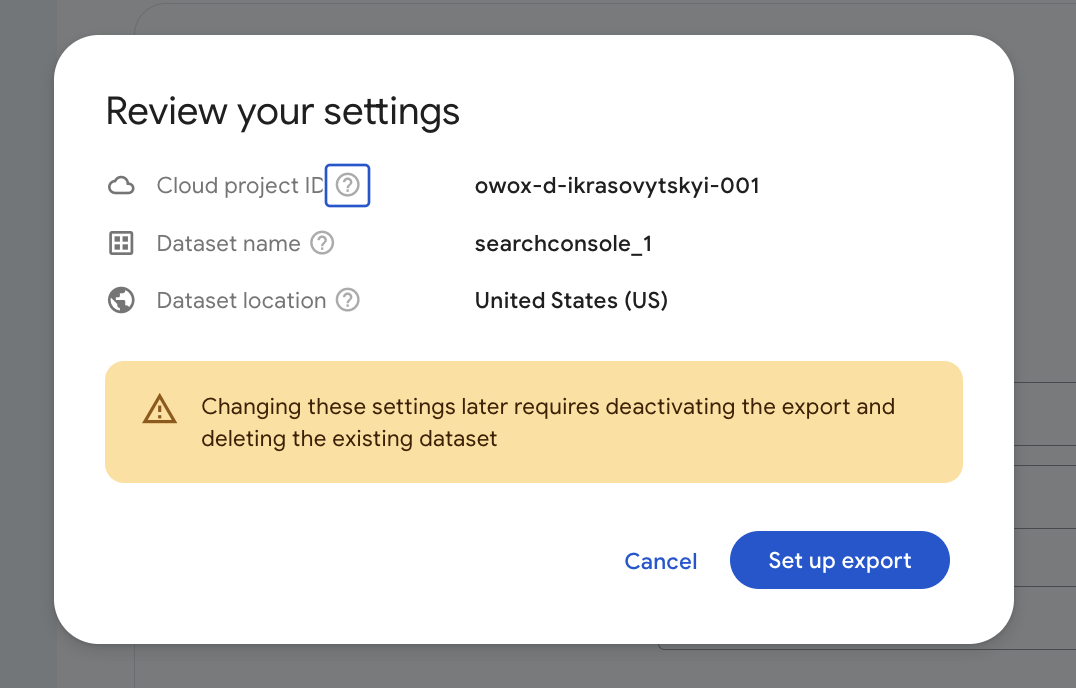
Note: Carefully review your settings, as you won’t be able to change this later.
Great. After setting up, it may take up to 48 hours for the initial data to appear in BigQuery. In 2 days, ensure that data is populating as expected.
Keep in mind that the GSC data export starts sending data daily to BigQuery only after you set it up. This means that you won’t be able to see the data for the previous months or years.
Understanding the Google Search Data Schema
Understanding the Google Search Data Schema
When you set up the bulk data export from Google Search Console to BigQuery, Google automatically creates a dataset in your BigQuery project. Typically, this dataset is named searchconsole, unless you customized it for different properties while setting up the export.
Within this dataset, two primary tables are created:
- searchdata_site_impression
- searchdata_url_impression
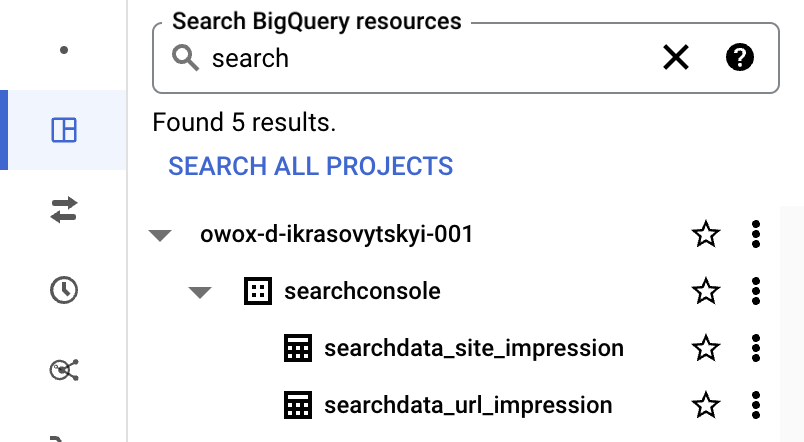
These tables are designed to store site-level and URL-level data respectively, capturing detailed metrics about impressions, clicks, search position and other search-related stats.
Table Schema Overview
Each table in the dataset comes with a rich schema that captures a variety of metrics and dimensions, which can be used for deep analyzes.
Let’s look at some of the key fields available in the searchdata_site_impression table, starting with dimensions:
- data_date shows the date of the data entry.
- site_url specifies the property name
- query is all about the search query (aka keyword) that triggered impressions or clicks to your site.
- country specifies the country where the impressions or clicks originated, which is useful for geo-targeted performance analysis (but this field is empty too often due to privacy restrictions)
- search_type stands for the type of search (eg. WEB, DISCOVER or IMAGE)
- device that was used for the search, helps you understand device-specific engagement (e.g., mobile, desktop, tablet)
And here are the 3 main metrics included into both tables:
- impressions field is all about the number of times your site was seen in search results.
- clicks is the number of clicks to your site from the search results.
- sum_top_position is the average position of your site in search results for a specific query.
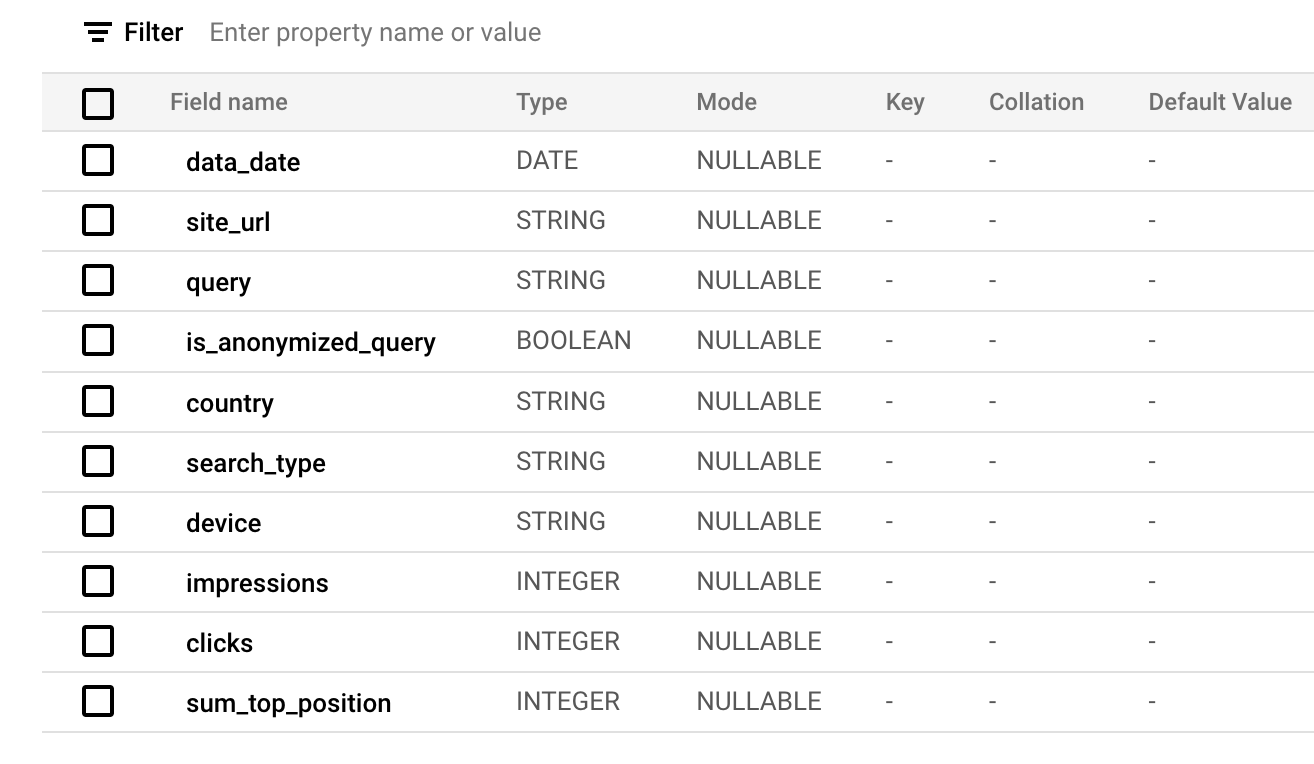
Note: With SQL, you can easily calculate the CTR: using the SUM(clicks)/SUM(impressions) AS CTR statement.
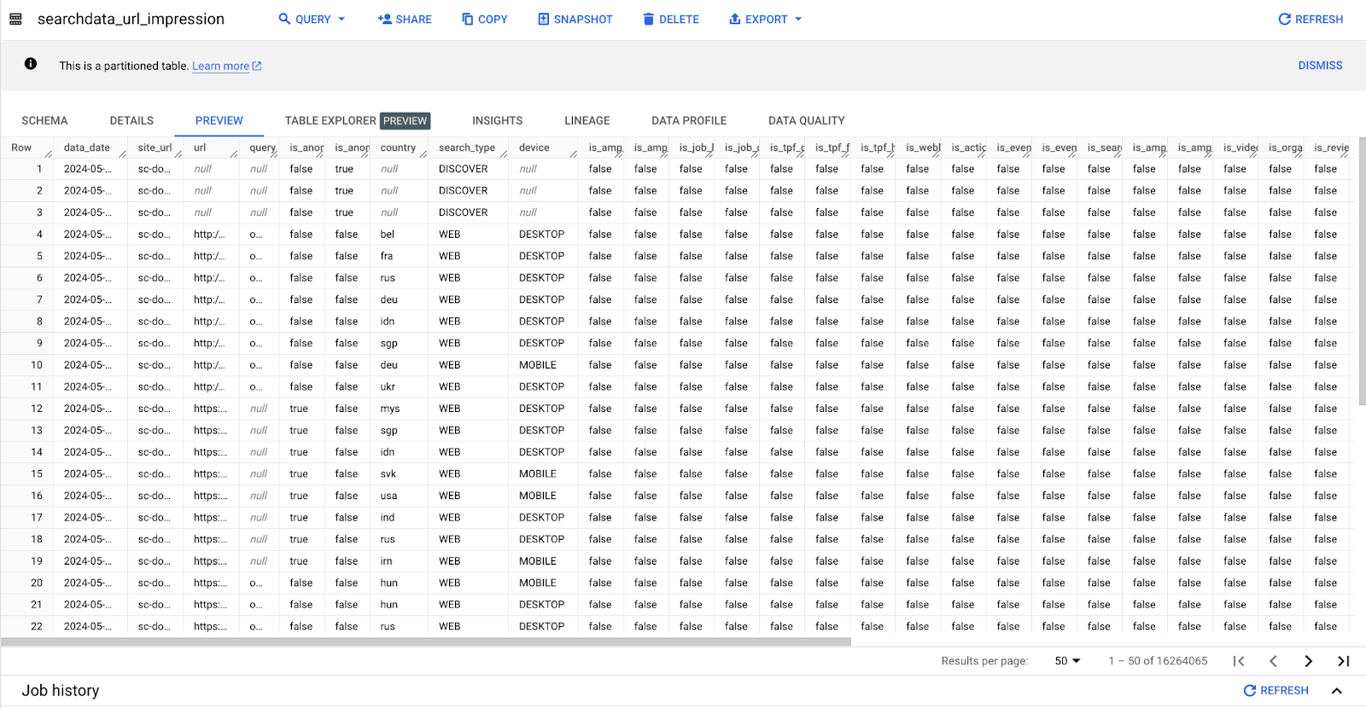
The table called searchdata_url_impression also has a bunch of additional fields, for example:
- URL field that specifies the exact URL that the search patterns relate to.
- is_organic, is_video, and is_job_listing and other boolean fields offer insights into the type of content that is performing well in search results, such as whether an entry is from organic search results, contains video content, or relates to job listings.
Example SQL Query to Bulk Export Data
Example SQL Query to Bulk Export Data
As I’ve mentioned earlier in this article - analyzing Google Search Console data in BigQuery allows you to get really deep reports of any granularity, so you have insights (I hate this word, but that’s true) into the website’s search performance.
Using SQL queries - is the best way to get the data into a format suitable for analysis so then you can uncover patterns, and trends, and identify areas for growth, so the marketing team can make more data-informed decisions faster.
Let me share with you a sample SQL query to GSC data:
#1: Top Performing Keywords by Clicks
The query below helps to identify which search queries are driving the most traffic to your site, focusing on the most clicked results over the last 28 days of available data. This insight is crucial for understanding which topics (and pages) are most appealing to your audience.
Note: You can have the same report in GSC UI, but I just wanted to start with something super simple here, plus this one could be dynamically updated in your Google Sheets on a schedule.
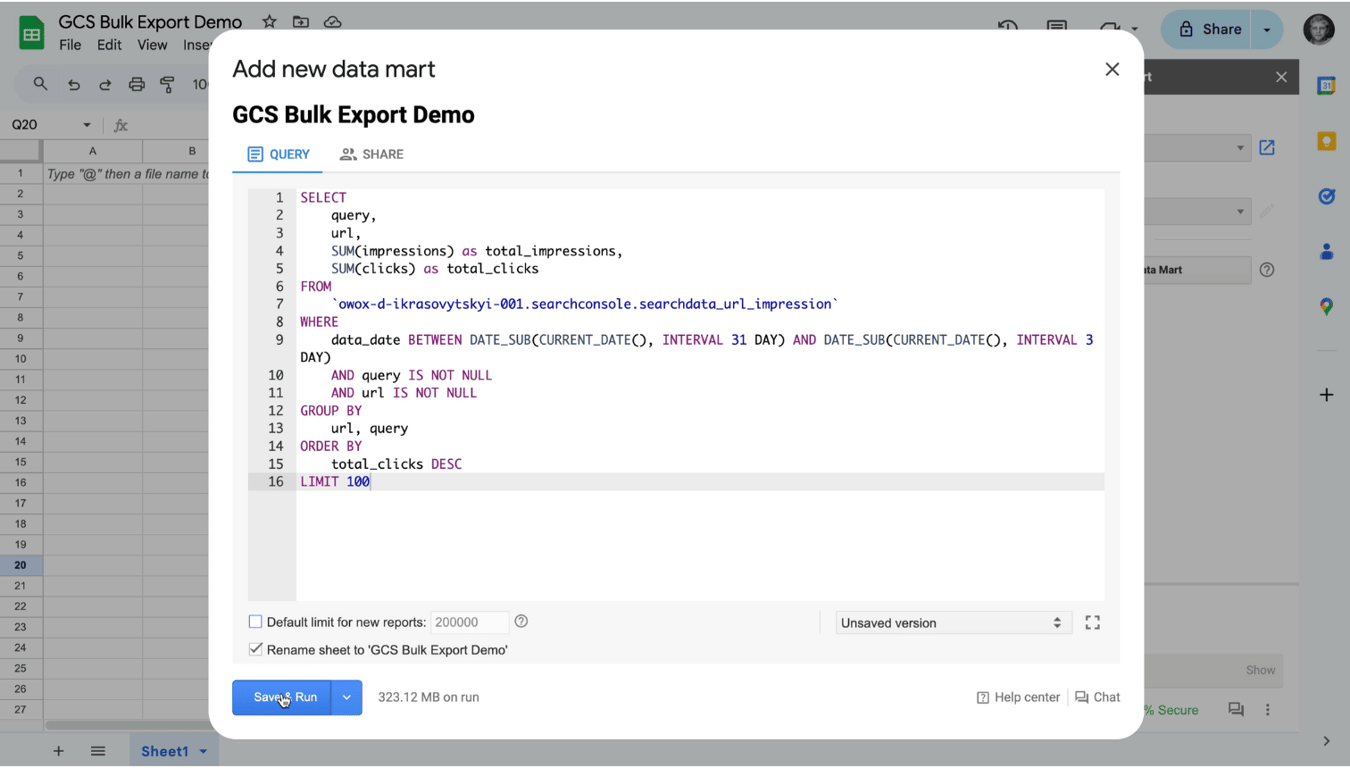
SELECT query, url, SUM(impressions) as total_impressions, SUM(clicks) as total_clicks FROM `your_project_id.searchconsole.searchdata_url_impression` WHERE data_date BETWEEN DATE_SUB(CURRENT_DATE(), INTERVAL 31 DAY) AND DATE_SUB(CURRENT_DATE(), INTERVAL 3 DAY) AND query IS NOT NULL AND url IS NOT NULL GROUP BY url, query ORDER BY total_clicks DESC
Here’s a breakdown of the elements of the query and the rationale behind each:
Dimensions and Metrics:
1. query;
2. url;
3. SUM(impressions) as total_impressions aggregates the total number of times the URL was displayed in search results for the associated queries within the selected time frame;
4. SUM(clicks) as total_clicks aggregates the total number of times users clicked on the search results leading to the specific URLs.
Filters:
The date range filter dynamically selects the data for the past 28 days, accounting for a three-day delay in data availability. So we query just the data from 31 days ago to 3 days ago.
This dynamic calculation keeps the report relevant and up-to-date each day you check the report, without manually adjusting the date range.
data_date BETWEEN DATE_SUB(CURRENT_DATE(), INTERVAL 31 DAY) AND DATE_SUB(CURRENT_DATE(), INTERVAL 3 DAY)
Plus, we need to add the ‘Query’ and ‘URL’ validity conditions.
AND query IS NOT NULL AND url IS NOT NULL
These conditions ensure that only rows with valid data in both the query and url fields are included in the results. It filters out any records where these fields might be empty, which could represent incomplete or irrelevant data entries, thereby maintaining the integrity and relevance of the analysis.
SQL Query Setup
Next, we need to use GROUP BY url, query to group our data by each unique combination of URL and query, which means the aggregated metrics (impressions and clicks) are calculated per URL per search query.
In this, we use the ORDER BY total_clicks DESC statement to sort the results by the total number of clicks in descending order, prioritizing the queries that were the most successful at driving users to the site.
Run Report in Google Sheets
Data sitting in the database means nothing to the business. That’s the rule. In order to make data utilized, we, analysts, need to deliver them to where end users live - into Spreadsheets. In this example, I am going to use the OWOX Report Extension to pull data from BigQuery into Google Sheets.
You can install it from the Google Workspace Marketplace and get started completely for Free.
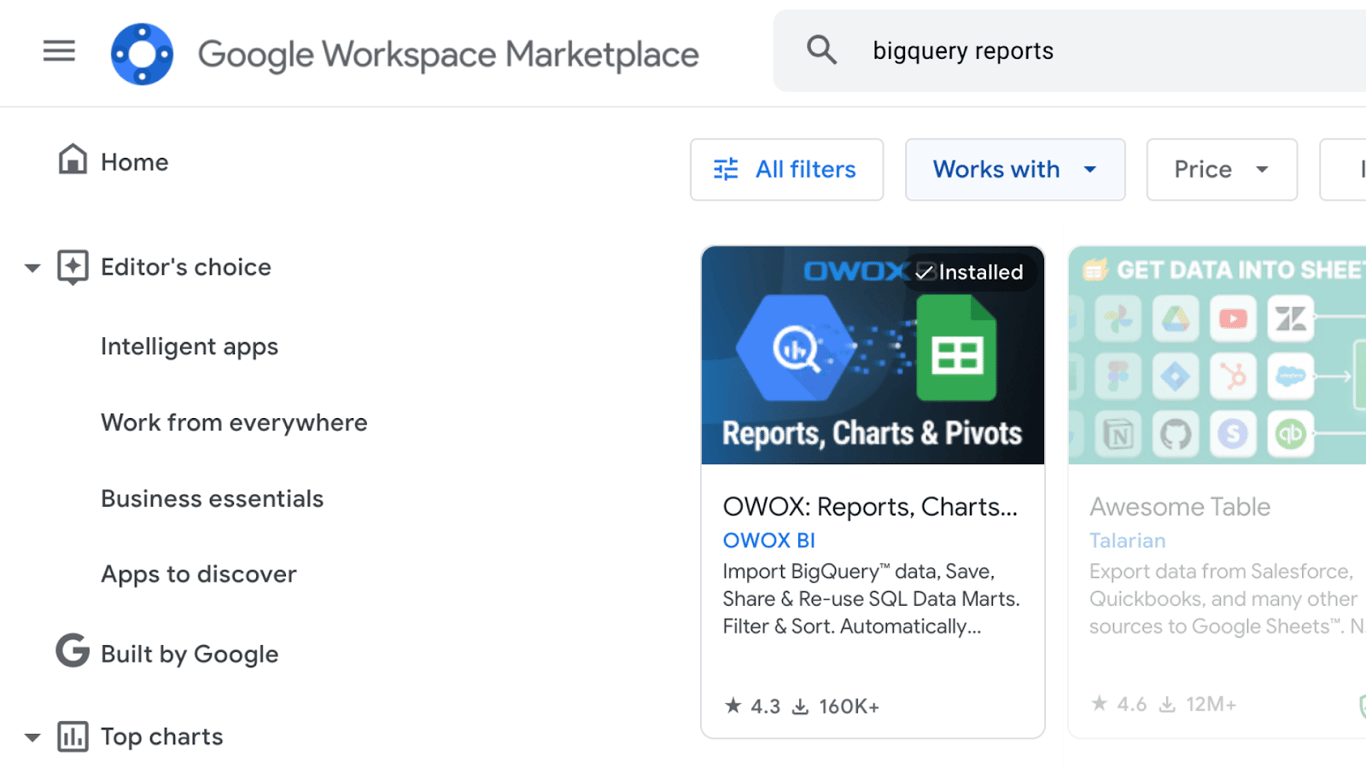
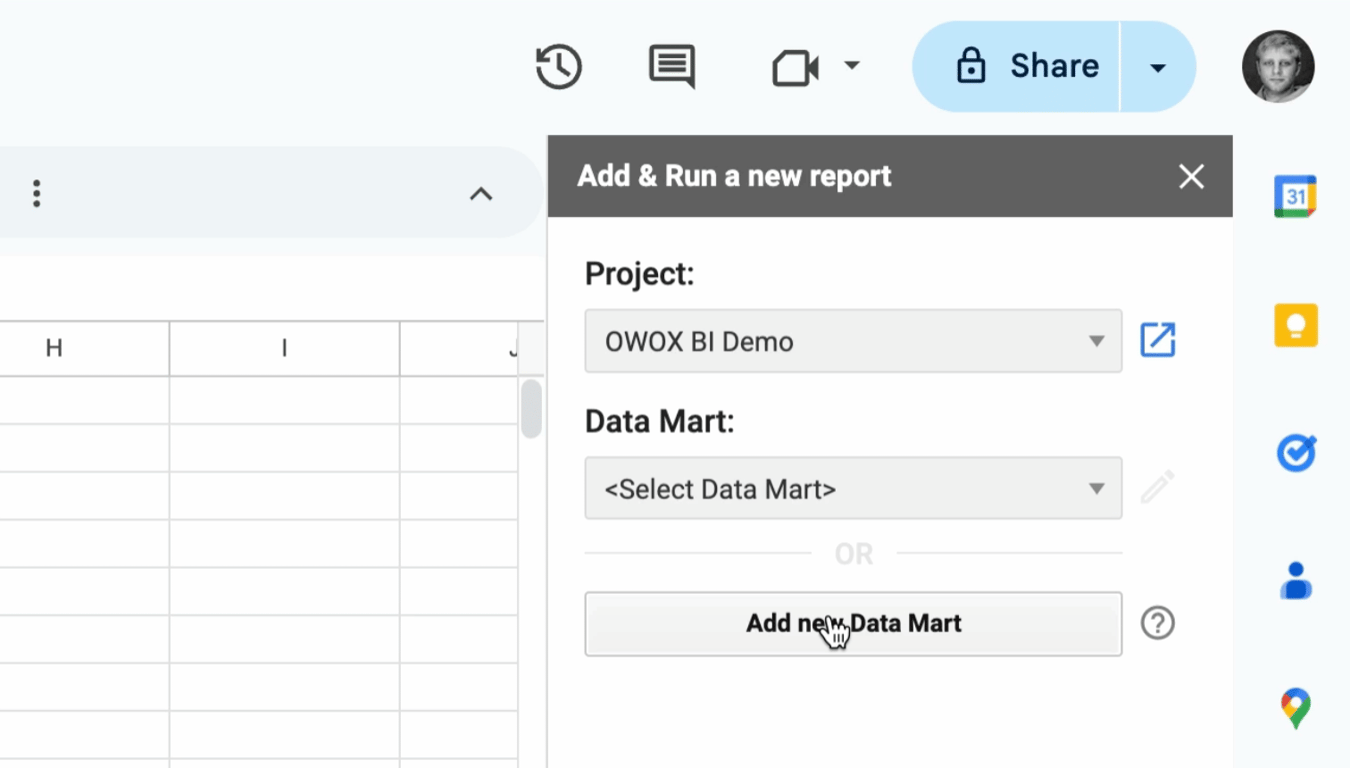
First, we need to run the extension, select ‘BigQuery project’ and click to ‘Add new Data Mart’
Next, we need to create a data mart (aka SQL Query) and give it a name. Simply copy the query from above, enter your project_id and paste into the Query window.
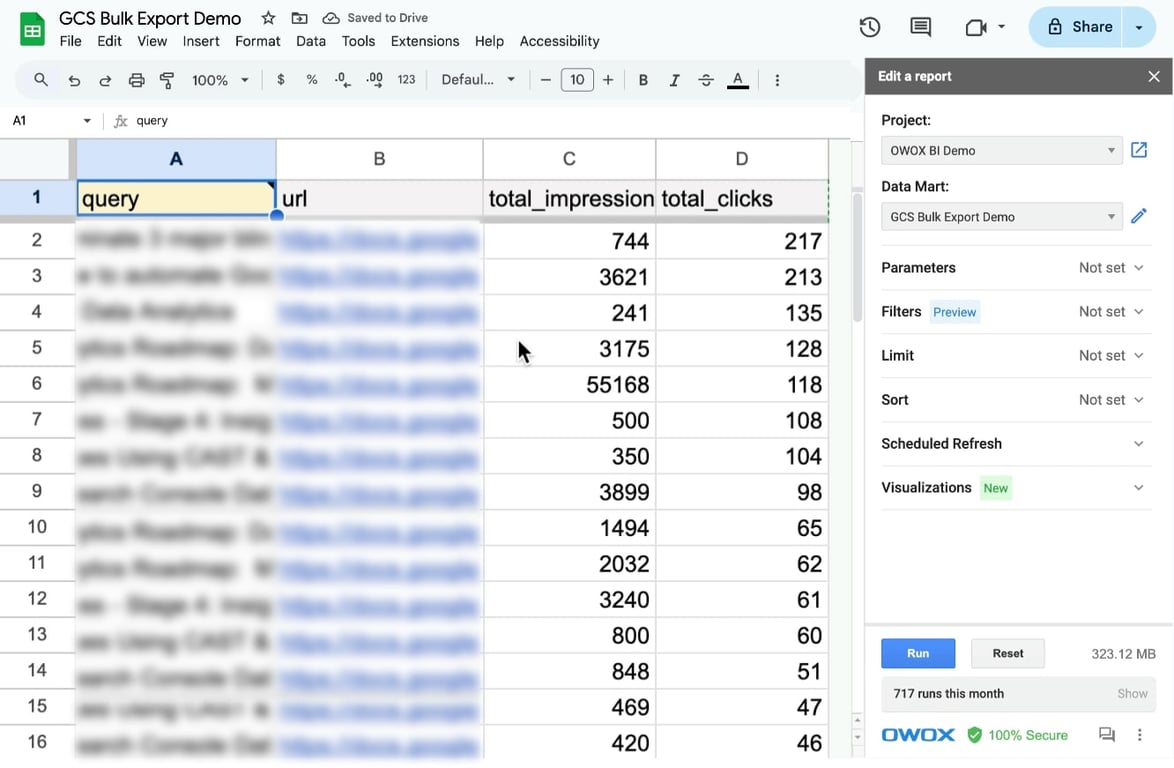
We have our search performance data (I just used a test property for one of the old websites from the ecommerce niche) already available in Google Sheets. The tab is now called the same as the Data Mart we prepared previously.
If you are an analyst, the way to prove your value and deliver your work is to share the data mart with the business user, so he can run it himself (without you giving BigQuery permissions - just share the data mart you saved).
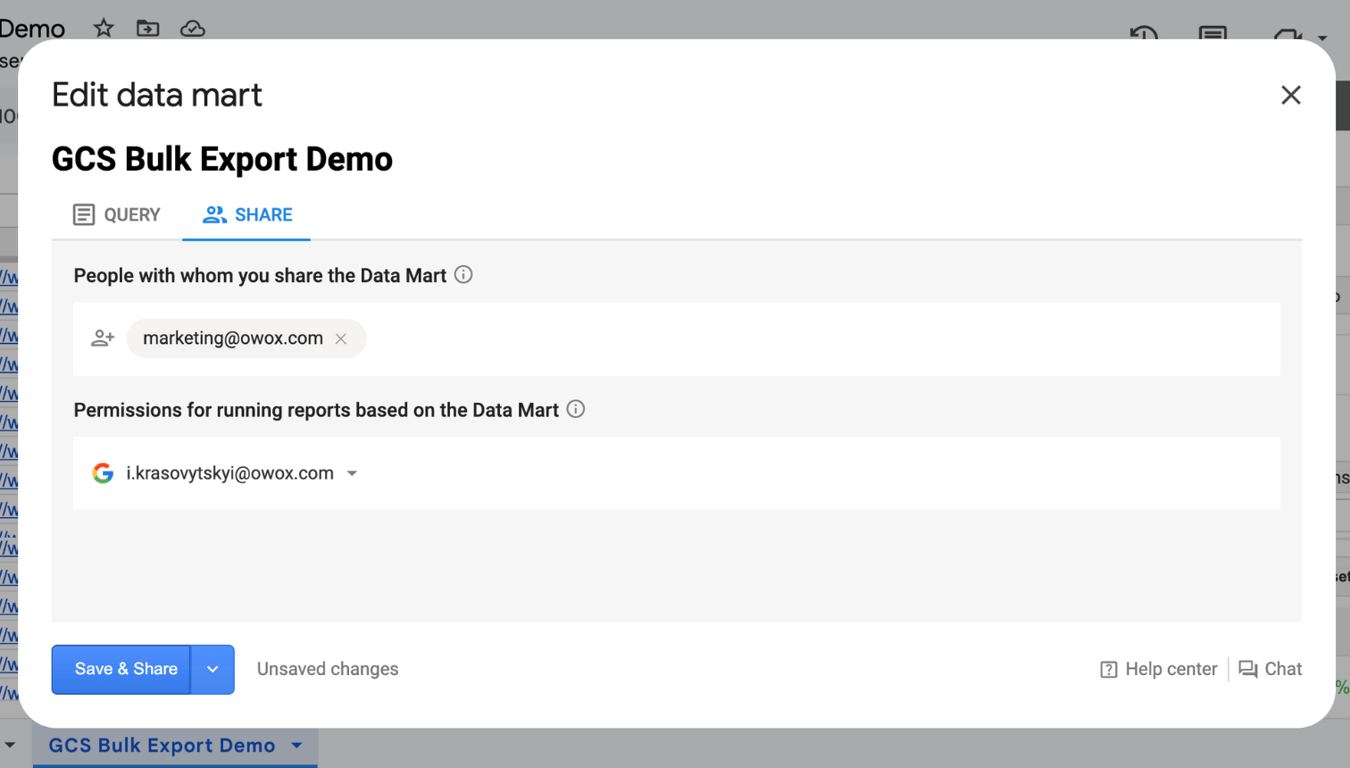
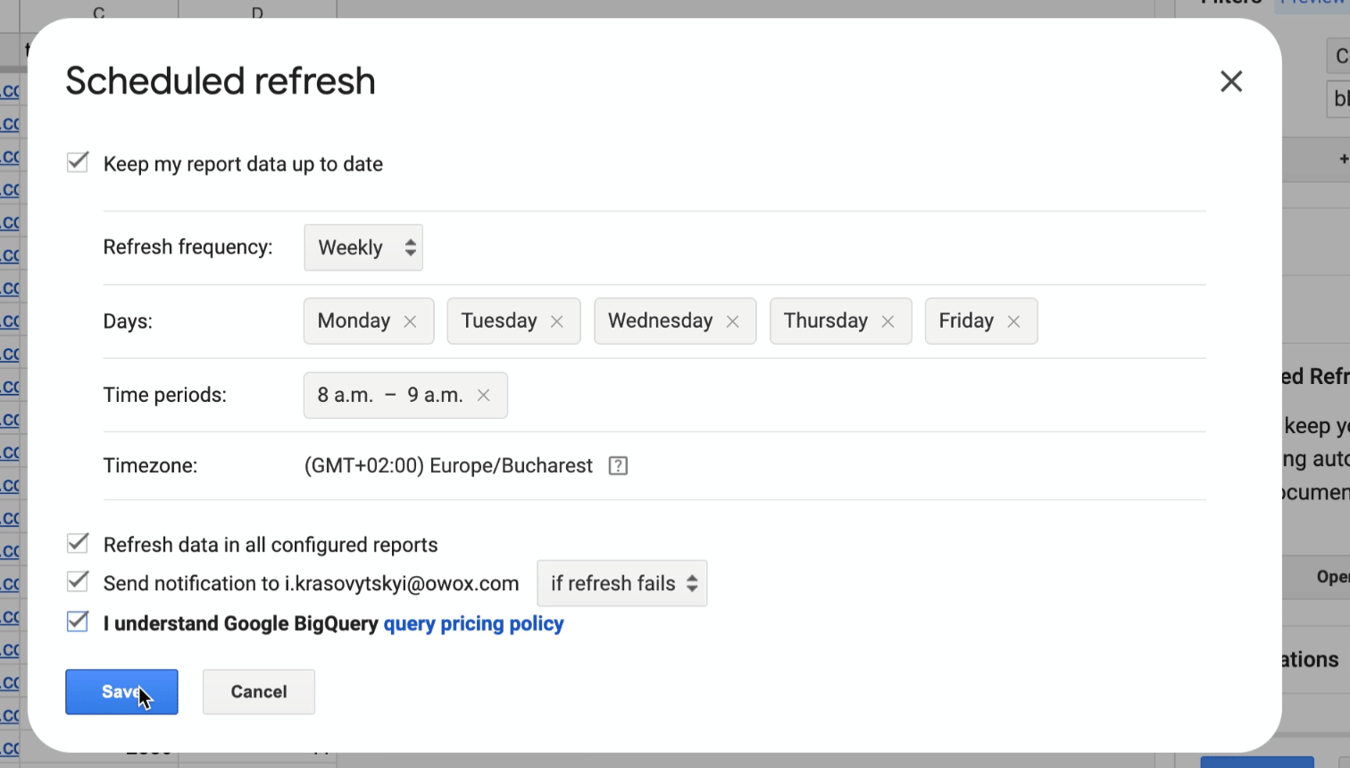
The business user won’t see the query itself and won’t be able to edit it, but instead has the Filter and Sort functionality (without the need to edit SQL code) and the ability to Schedule report updates exactly when he needs them.
I typically set all reports to be updated on weekdays every morning.
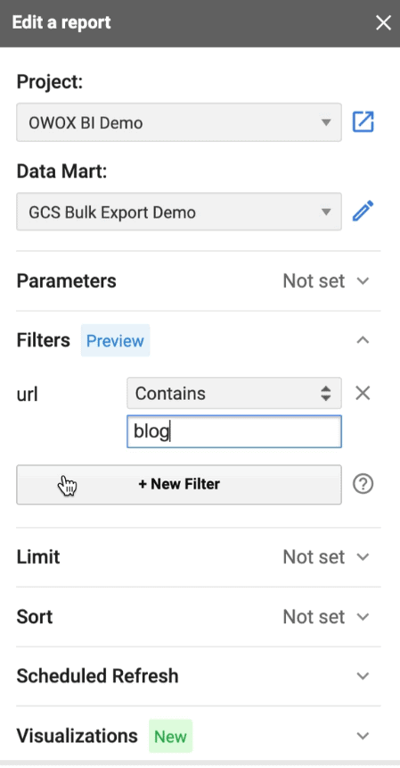
Here is the way to filter the report by extracting only the URLs that contain ‘blog’. Or you can remove any kind of sorting from the query, so the report end-user can sort the data by let’s say the total impressions column and limit to 100 before extracting data to spreadsheets.
And use this way to create a few ‘views’ based on specific needs or scenarios out of the same broad data mart you developed.
So grab the OWOX BigQuery Data Marts extension from Google Workspace Marketplace and redefine the way you build and share reports across your organization.
Note: If your goal is to make corporate data utilized - deliver them to Google Sheets instead of a BI tool. Make sure business users PLAY with data, not just look at them once in a while.
And if you need help crafting SQL Queries - you can use our AI SQL-copilot created by our expert team specifically for Google BigQuery SQL, and it’s 100% Free. You won’t have any limitations, plus it knows Search Console data, so you will get actionable queries quickly.
#2: Search Performance Comparison by Device Type
Understanding how your content performs across different devices can help tailor your SEO and content strategy effectively. This query compares the number of impressions and clicks across mobile, desktop, and tablet devices over the last 28 days.
SELECT device, SUM(impressions) as total_impressions, SUM(clicks) as total_clicks, ROUND(SUM(clicks) / SUM(impressions), 4) as ctr FROM `your_project_id.searchconsole.searchdata_url_impression` WHERE data_date BETWEEN DATE_SUB(CURRENT_DATE(), INTERVAL 31 DAY) AND DATE_SUB(CURRENT_DATE(), INTERVAL 3 DAY) GROUP BY device ORDER BY total_impressions DESC
In this query, we sum up impressions and clicks by device type and then calculate the click-through rate (CTR) for each device (rounding to 4 signs after the decimal).
It helps identify which devices yield the highest engagement, providing insights into user behavior and potential device-specific optimizations.
#3: Keyword Trends Over Time
Tracking how specific keywords perform over time can reveal trends and seasonal variations in user interest. This query illustrates how to monitor the performance of a particular keyword across several months.
SELECT Data_date, query, SUM(impressions) as total_impressions, SUM(clicks) as total_clicks, ROUND(SUM(clicks) / SUM(impressions), 4) as ctr, ((sum(sum_position) / sum(impressions)) + 1.0) AS Position FROM `your_project_id.searchconsole.searchdata_url_impression` WHERE query = '{query default="sql" pattern="^[a-z0-9-_]+$" type="input"}' GROUP BY data_date, query ORDER BY data_date
By focusing on a specific query, this query tracks daily impressions and clicks, calculating daily CTR. It can be used to monitor the effectiveness of SEO adjustments or to understand how external factors like seasonality or competitor activity impact your search performance.
As you might have noticed, I’ve used the special syntax for defining the query to be a dynamic parameter.
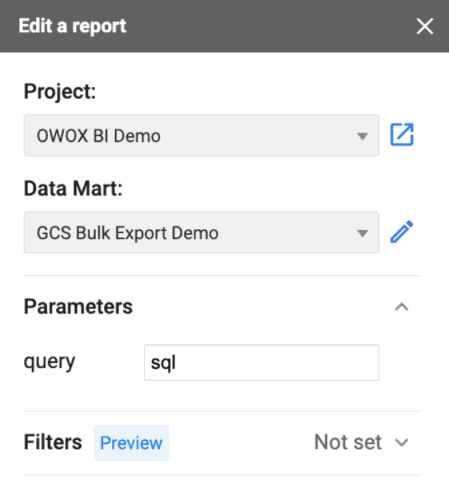
You can run this query with OWOX BigQuery Data Marts extension and simply swap that query by entering a specific keyword in the sidebar.
These queries can serve as a starting point for deeper analysis and be customized to fit more specific analytical needs, providing a solid foundation for enhancing your website’s search engine optimization strategy.
Maximizing Search Performance Insights with BigQuery and SQL
Maximizing Search Performance Insights with BigQuery and SQL
There’s never been a better time to start integrating your Google Search Console data with BigQuery. The sooner you begin, the quicker you’ll uncover valuable insights that could be transformative for your business.
Take advantage of the full potential of your search data and make informed, data-driven decisions that propel your organization forward.
Get into a new realm of depth that the limited GSC’s native user interface could never offer:
- Comprehensive data analysis
- Customizable reports
- Reports based on blended data
Plus, it all is automated on the fly. Tools like OWOX BigQuery Data Marts extension simplify the transfer of this enriched data directly into Google Sheets, democratizing data access across the organization and enabling stakeholders to engage directly with the latest data insights.
Besides GSC data, OWOX BigQuery Data Marts can revolutionize how your company interacts with business data by bridging the gap between data warehouses and spreadsheet users.
Here are a few tips on using OWOX BigQuery Data Marts:
- Share and Collaborate: Share your data marts and allow business users to generate custom reports without accessing or editing SQL.
- Automate with Ease: Set up custom schedules to refresh reports automatically, ensuring they’re ready exactly when needed.
- Filter and Customize: Utilize built-in filter and sort functions to customize the data extracted (GCS data is really huge to query all that every time) directly from the Google Sheets interface.
Turn your data into decisions.
Governed data marts give you the clean foundation ML needs to actually work.
- No AI hallucinations
- Analyst-governed definitions
- Every number traces to SQL