How to connect LinkedIn Ads to Databricks, step by step
To connect LinkedIn Ads to Databricks, create a connector Data Mart on a Databricks storage, sign in with LinkedIn, enter the ad account, choose the Ad Analytics endpoint and name the catalog, schema and table. The analytics table identifies rows by URNs, not names, so load the Campaigns endpoint as a second Data Mart and join the two. The SQL is in this guide.
For most B2B teams LinkedIn is the most expensive click in the plan, and the hardest to connect to an outcome. Campaign Manager reports clicks and leads. Whether a lead became pipeline is recorded somewhere else, and the two meet in a spreadsheet.
A table in Databricks is where they can meet properly. This guide loads LinkedIn Ads data into Databricks with the LinkedIn Ads connector in OWOX Data Marts. It follows the five setup screens, then deals with the detail most guides leave out: the analytics table that arrives has no campaign names in it.
What you end up with
Two Delta tables in your own Databricks workspace.
linkedin_ads_ad_analytics: daily performance. Impressions, clicks, cost and engagement for each creative on each day.linkedin_ads_ad_campaigns: one row per campaign, with its name, status, objective and type.
Each is its own connector Data Mart. The connector reads the LinkedIn API, writes the tables and refreshes them on a schedule. It does not model the data. Joining the two into a report is SQL you write, shown below.
Before you start
In LinkedIn
A LinkedIn user with access to the ad account in Campaign Manager, and the account’s ID, which Campaign Manager shows next to the account name.
In Databricks
A storage of type Databricks connected to your OWOX Data Marts project. The storage guide asks for the workspace host, the HTTP path of a SQL warehouse and a personal access token. The token’s user needs permission to create schemas and tables in the catalog you choose, and to run queries on that warehouse.
The SQL warehouse behind the HTTP path does the work, so it sets the cost. Turn on auto stop and start small. Databricks pricing shows what a short daily job is billed for.
OWOX Data Marts
See your first report built in real time. 15 minutes.
- Connect your data warehouse
- Pick your metrics
- Get a live Google Sheets report
In the time it takes to write a ticket. Then imagine never writing that ticket again.
Book a DemoWe'll use your actual use case
Step 1: create the Data Mart and choose the connector
Step 1: create the Data Mart and choose the connector
Click New Data Mart, give it a title, pick the Databricks storage and click Create Data Mart. On the Data Setup tab, set Definition Type to Connector.
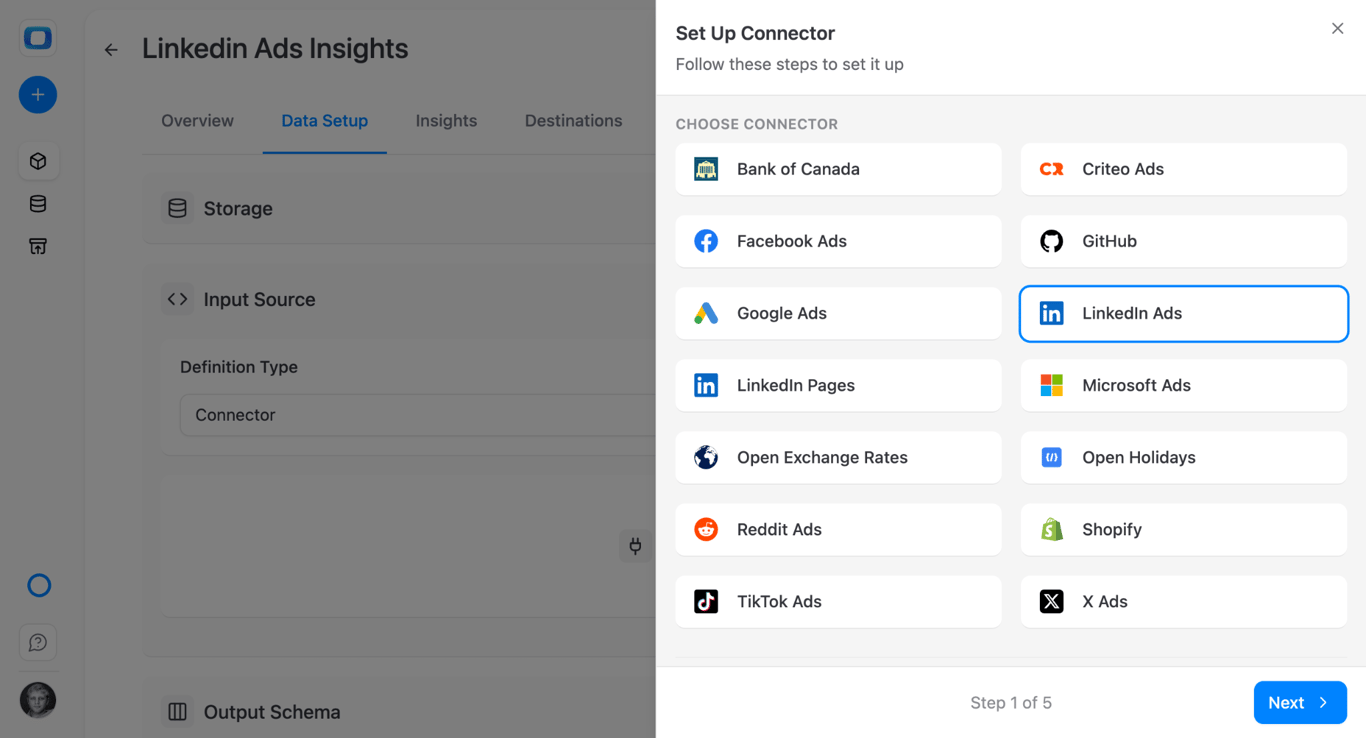
Choose LinkedIn Ads and click Next.
Step 2: sign in and enter the account
Step 2: sign in and enter the account
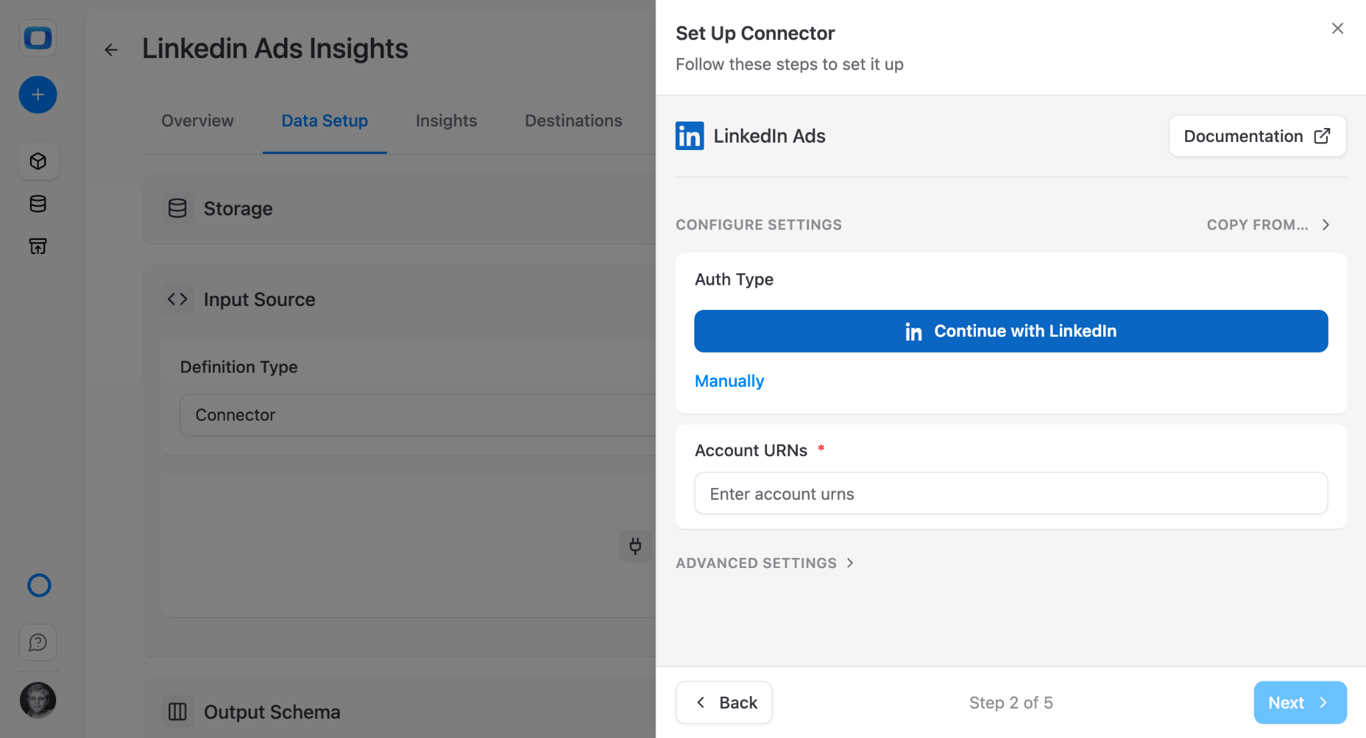
Continue with LinkedIn is the short way: sign in as the user who has access to the ad account and allow access.
Manually means creating your own LinkedIn app. The app has to be verified by an administrator of your company page and approved for the Advertising API, which can take up to a day. From it you take a client ID, a primary client secret and a refresh token generated with the r_ads and r_ads_reporting scopes. The credentials guide has each step. The sign-in button avoids all of it.
Then fill in Account URNs with the ID of the ad account.
Step 3: choose the endpoint
Each Data Mart loads one endpoint. LinkedIn Ads has five.
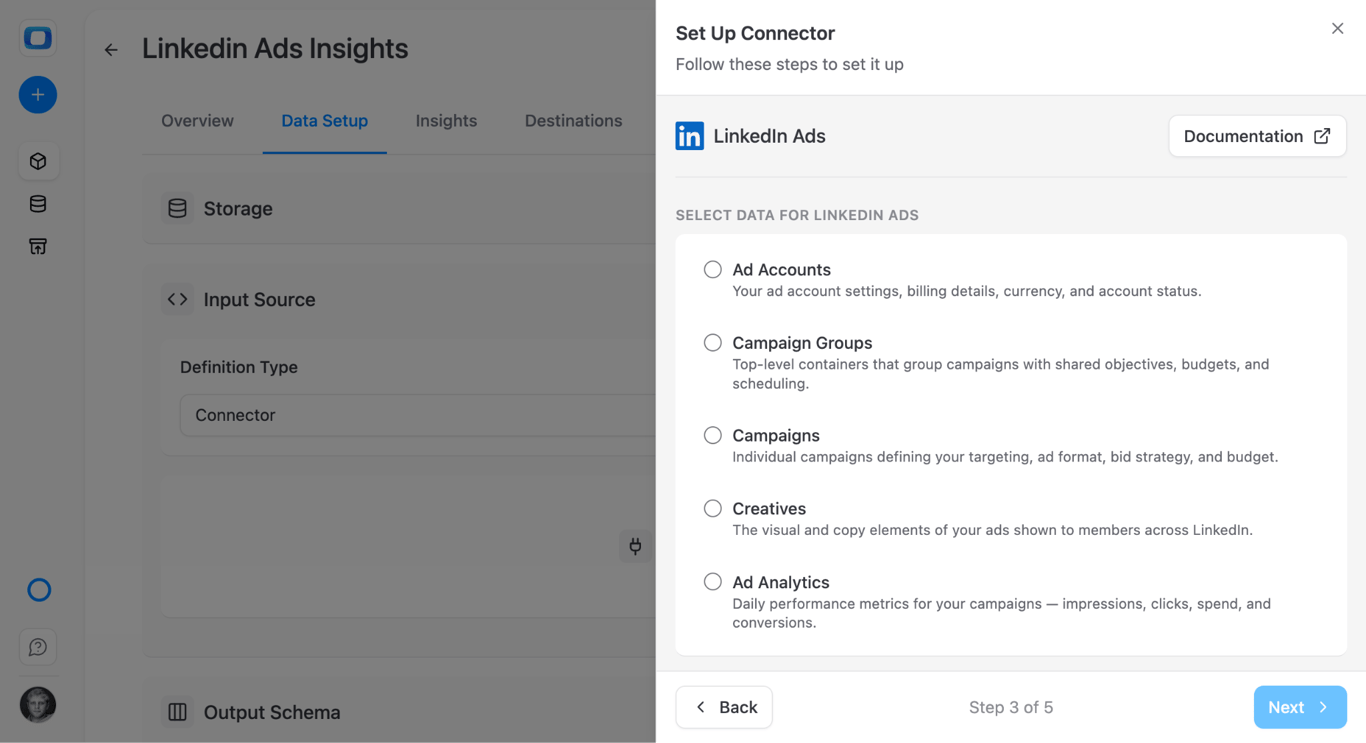
- Ad Analytics. Daily performance metrics. The one for reporting.
- Campaigns. Targeting, format, bid strategy, budget and, most usefully, the campaign name.
- Campaign Groups. The level above campaigns, with shared objectives and budgets.
- Creatives. The ads themselves.
- Ad Accounts. Account settings, currency and status.
Create the Ad Analytics Data Mart first and the Campaigns one right after it. You will want both.
Step 4: choose the fields
Ad Analytics offers a long list, most of it engagement detail.
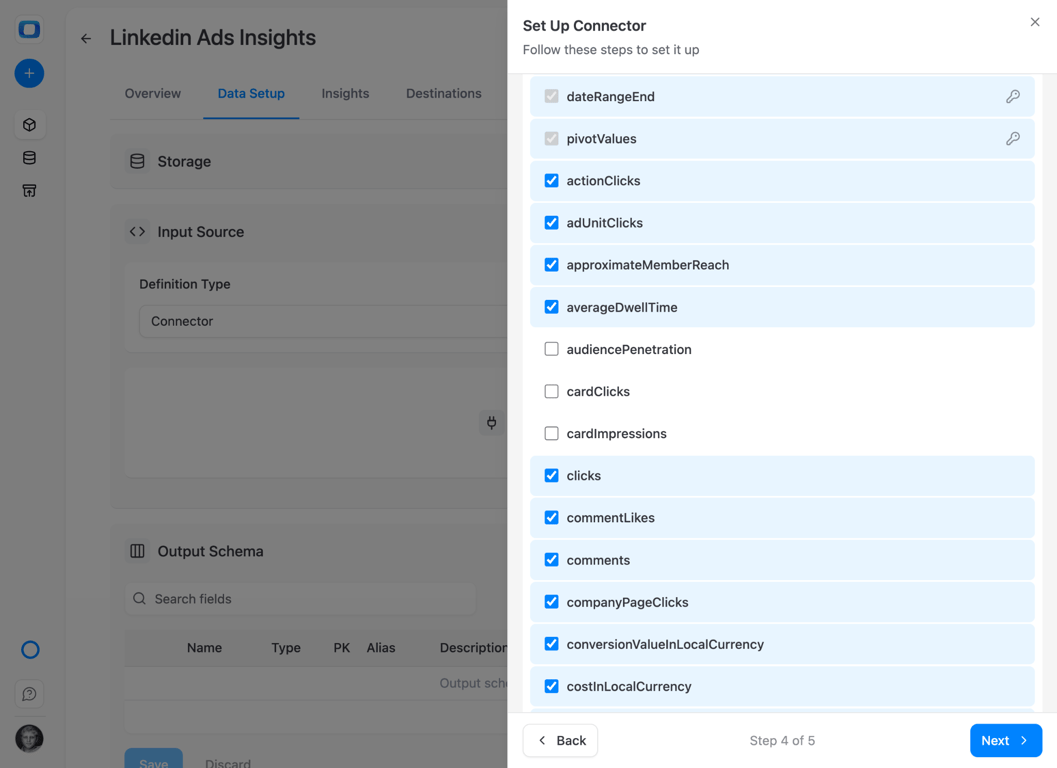
Take impressions, clicks, costInUsd and the conversion or lead fields you report on. For accounts billed in another currency there is also costInLocalCurrency. Fields can be added later, and the connector adds the columns.
Step 5: name the catalog, schema and table
Step 5: name the catalog, schema and table
On Databricks the destination has three levels.
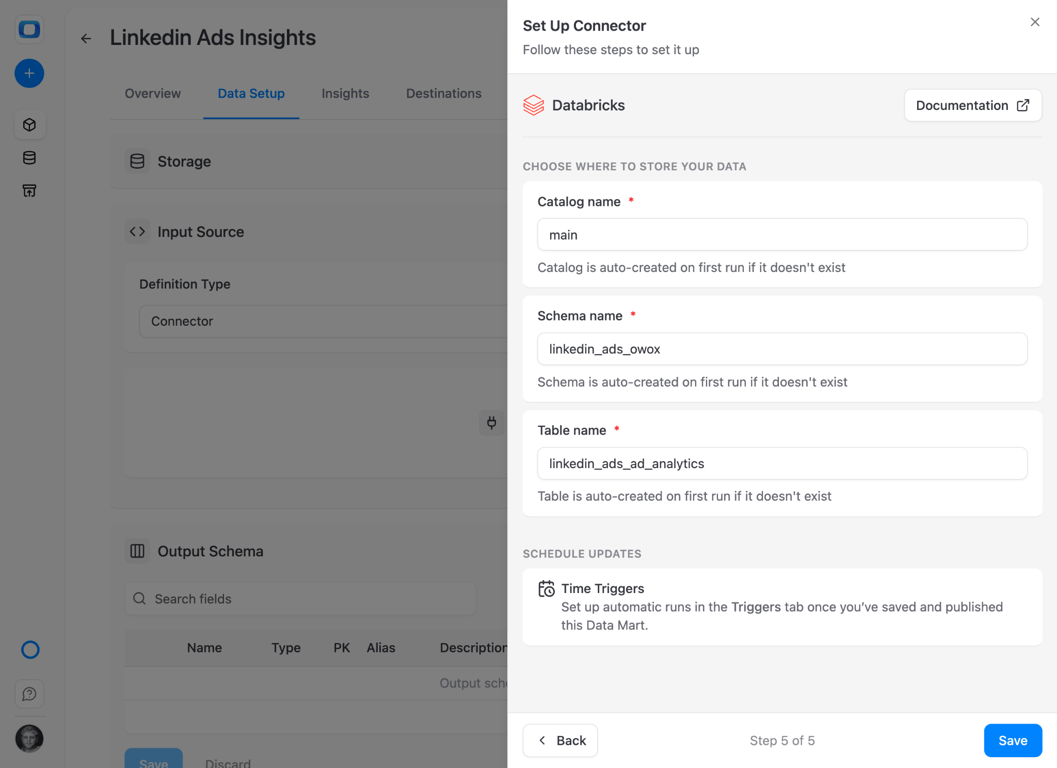
The setup proposes the catalog main, a schema named after the source and a table named after the endpoint. Each is created on the first run if it does not exist. Use the same schema for the Campaigns Data Mart, so the two tables sit together.
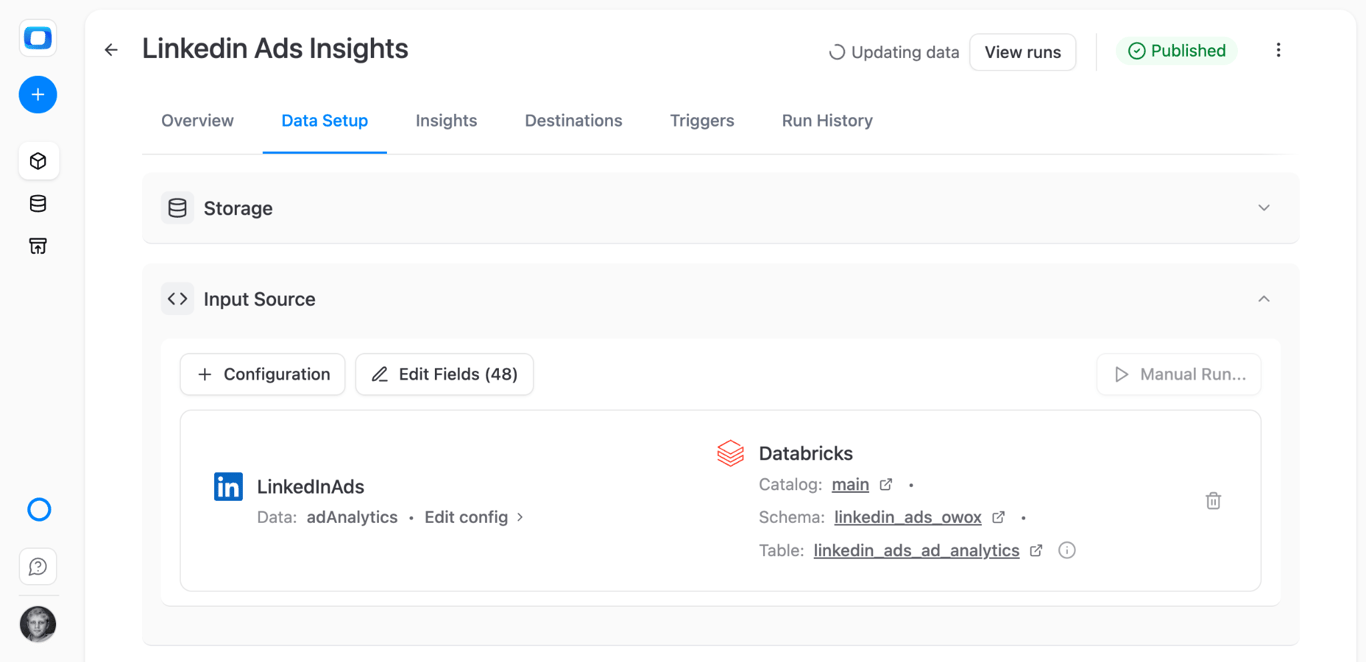
Click Save, then Publish & Run Data Mart. Publishing starts the first import.
Load history and set the schedule
Load history and set the schedule
Backfill
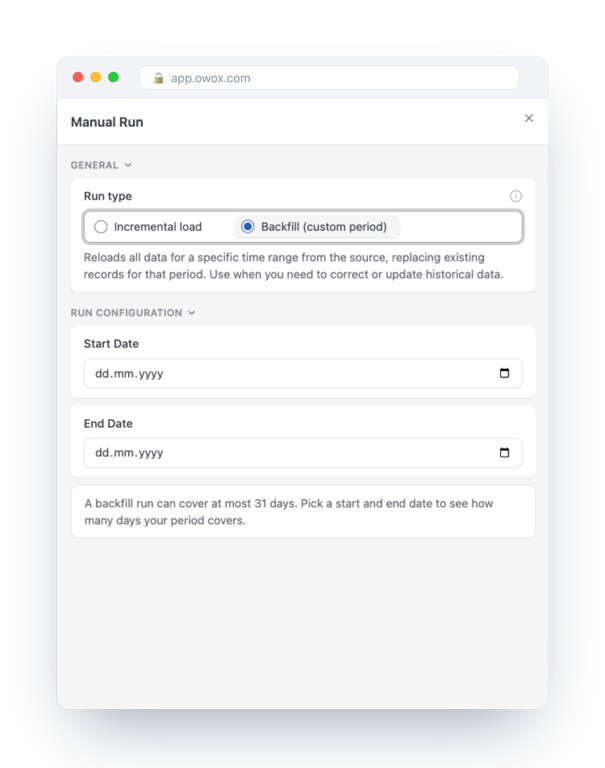
Click Manual Run and choose Backfill (custom period). One backfill run covers at most 31 days. For a longer history, run consecutive periods, each after the previous one has finished.
Schedule
A Data Mart without a trigger does not run again. On the Triggers tab, add a trigger of type Connector Run: daily, weekly, monthly or at an interval.
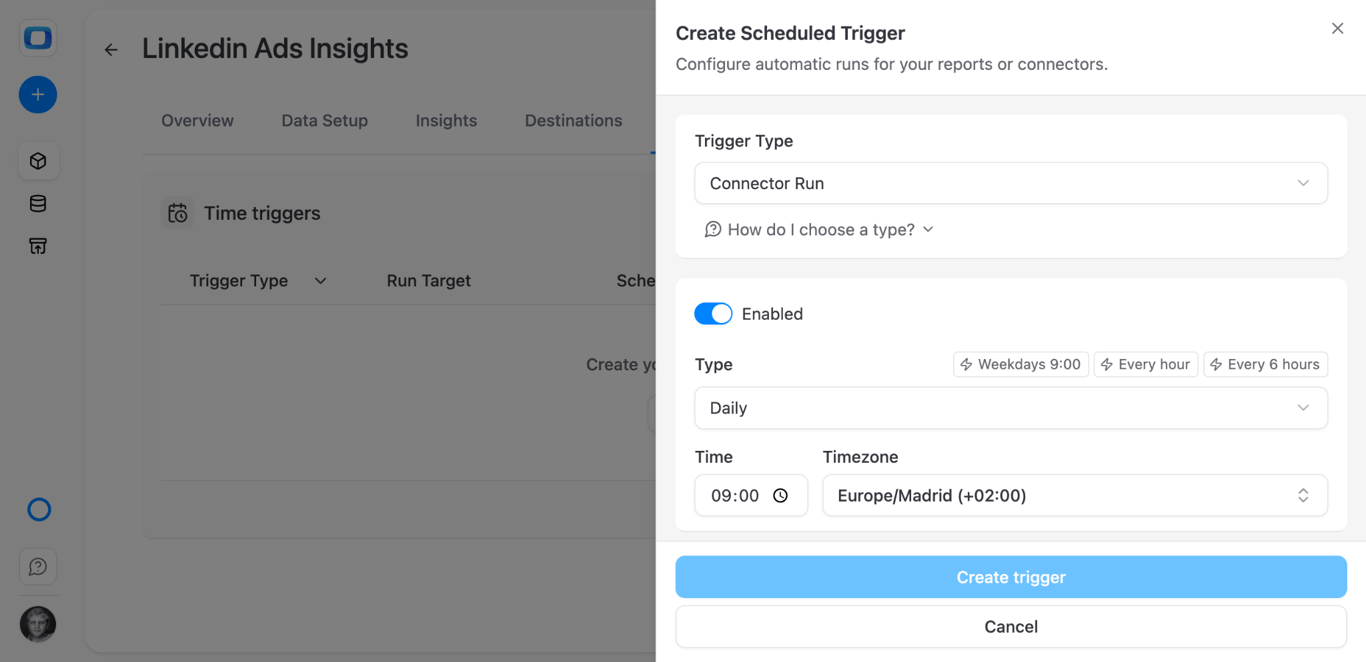
Scheduled runs are incremental. Each one loads the current day plus the days set by the Reimport Lookback Window, two by default. LinkedIn conversions can be attributed days after the click, so raise the lookback if your reports depend on them. Rows are merged on the keys, so a re-imported day replaces the earlier version.
If a run ends with a warning
LinkedIn’s analytics endpoint returns at most 15,000 rows per request and has no paging. The connector requests one day at a time to stay under that limit. An account with more than 15,000 active creatives on a single day can still exceed it. The run then finishes with a Warning status and lists the affected days, and data for those days may be incomplete.
What the tables look like in Databricks
What the tables look like in Databricks
The identifiers are in pivotValues. The connector requests analytics by creative, campaign, campaign group and account at once. LinkedIn returns those four identifiers as URNs, and they arrive together in one text column, in a form like this:
urn:li:sponsoredCreative:…, urn:li:sponsoredCampaign:…,
urn:li:sponsoredCampaignGroup:…, urn:li:sponsoredAccount:…
There is no campaign_name column in this table. You extract the campaign ID from pivotValues and join to the Campaigns table for the name.
A three-level name, no quoting. With the proposed names the table is main.linkedin_ads_owox.linkedin_ads_ad_analytics. Column names keep LinkedIn’s camel case, dateRangeStart, costInUsd, but Databricks does not treat names as case-sensitive, so they need no quotes.
The day is dateRangeStart, a date column. With daily data, dateRangeStart and dateRangeEnd are the same day. Metrics are numeric.
Keys and comments in the catalog. The connector declares the keys as the table’s primary key and writes each field’s description as a column comment, so the long field list is documented in Catalog Explorer.
Query the data
Both queries were validated on a Databricks SQL warehouse against an analytics table loaded by the connector, in a shared schema called ads_owox. The join was checked with a stand-in for the Campaigns table.
Cost, clicks and cost per click by campaign ID and day, for the last 30 days:
SELECT
  dateRangeStart AS date,
  regexp_extract(
    pivotValues, 'sponsoredCampaign:([0-9]+)', 1
  ) AS campaign_id,
  SUM(impressions) AS impressions,
  SUM(clicks) AS clicks,
  SUM(costInUsd) AS cost_usd,
  SUM(costInUsd) / NULLIF(SUM(clicks), 0) AS cpc
FROM main.ads_owox.linkedin_ads_ad_analytics
WHERE dateRangeStart >= date_sub(current_date(), 30)
GROUP BY 1, 2
ORDER BY date, cost_usd DESC;
regexp_extract with group 1 returns the digits after sponsoredCampaign:. Swap in sponsoredCreative or sponsoredCampaignGroup to report at another level.
The same report with campaign names, joined to the Campaigns table:
WITH a AS (
  SELECT
    dateRangeStart AS date,
    regexp_extract(
      pivotValues, 'sponsoredCampaign:([0-9]+)', 1
    ) AS campaign_id,
    impressions,
    clicks,
    costInUsd
  FROM main.ads_owox.linkedin_ads_ad_analytics
)
SELECT
  a.date,
  c.name AS campaign,
  SUM(a.impressions) AS impressions,
  SUM(a.clicks) AS clicks,
  SUM(a.costInUsd) AS cost_usd
FROM a
LEFT JOIN main.ads_owox.linkedin_ads_ad_campaigns c
  ON a.campaign_id = c.id
GROUP BY a.date, c.name
ORDER BY a.date, cost_usd DESC;
This second query is the one worth publishing. Save it as a SQL Data Mart, and the people who read the report see campaign names and never meet a URN.
From table to report
On a Data Mart’s Destinations tab you attach reports to Google Sheets, Data Studio, Slack or email, each with its own columns and schedule. Do that on the Data Mart built from the joined query, not on the raw analytics table. Databricks to Google Sheets walks through the scheduled report and the self-service route for business users.
Two directions from here matter for B2B.
LinkedIn next to the other channels. One row per day and channel, with LinkedIn’s costInUsd mapped to the same spend column as the rest. Each platform is a connector Data Mart of its own, and a UNION ALL over them is the unified table.
LinkedIn next to pipeline. If CRM data is in Databricks, the join key is whatever your campaigns write into the lead: a UTM campaign value or the campaign ID. Decide that convention first. The SQL is the easy part.
Where to go next
The same five screens load the other sources into the same workspace: Google Ads, Facebook Ads and TikTok Ads.
On Snowflake the steps are the same and the naming rules differ: see LinkedIn Ads to Snowflake. For the platform itself, start with what Databricks is and how it works.
Turn your data into decisions.
Governed data marts give you the clean foundation ML needs to actually work.
- No AI hallucinations
- Analyst-governed definitions
- Every number traces to SQL
Frequently Asked Questions
How often does the connector load LinkedIn Ads data into Databricks?
As often as the Connector Run trigger you set: daily, weekly, monthly or at an interval. Each scheduled run is incremental and loads the current day plus the days in the Reimport Lookback Window, two by default. Raise the lookback if you report on conversions that LinkedIn attributes several days after the click.
Is the OWOX LinkedIn Ads connector open source?
Yes. The connectors are part of the OWOX Data Marts repository on GitHub, and the connectors package is published under the MIT licence. You can read how the LinkedIn Ads connector requests analytics and how it writes to Databricks.
How do I get campaign names for LinkedIn Ads data in Databricks?
The analytics table identifies rows by URNs stored in the pivotValues column. Extract the campaign ID with regexp_extract(pivotValues, 'sponsoredCampaign:([0-9]+)', 1) and join it to the id column of the table loaded from the Campaigns endpoint, which holds the name. Publish that joined query as a SQL Data Mart so reports show names.
What LinkedIn Ads data can I import into Databricks?
Ad Analytics gives daily performance per creative: impressions, clicks, cost in USD and in local currency, and engagement and conversion fields. Campaigns, Campaign Groups, Creatives and Ad Accounts hold names, statuses, objectives and settings. Each endpoint is loaded by its own Data Mart into its own table.
Can I connect LinkedIn Ads to Databricks without writing code?
Yes. In OWOX Data Marts you create a Data Mart on a Databricks storage, set its definition type to Connector, choose LinkedIn Ads, sign in with LinkedIn and pick the endpoint, the fields and the catalog, schema and table. The connector creates the table and loads it. SQL only comes in afterwards, when you query the table.