OKF vs dbt Exposures vs LookML: How to Describe a Data Model
Every data team eventually has to write down its model – not just the tables, but what they mean and how they join. Three common ways to do that are Google’s Open Knowledge Format (OKF), dbt exposures, and LookML.
They’re often mentioned together, but they solve overlapping-but-different problems, and they differ sharply on the thing that matters most in 2026: portability and whether a machine can read the result.
Here’s a fair comparison. New to the idea of a written model? Start with what OKF is and our guide to data modeling.
What each one actually is
- OKF – an open, vendor-neutral format from Google for describing a model as plain markdown: one file per table, a schema block, and a joins section. It’s a description of the model itself, meant to be portable, git-friendly, and readable by both people and AI agents.
- dbt exposures – a way, inside a dbt project, to declare the downstream uses of your dbt models (a dashboard, an ML job) so lineage and ownership are explicit. It documents how models are consumed; it lives in your dbt project as YAML.
- LookML – Looker’s language for a semantic model: dimensions, measures, and joins that power consistent metrics across Looker. It’s rich and battle-tested – and it lives inside Looker.
Side by side
| OKF | dbt exposures | LookML | |
|---|---|---|---|
| Describes | The model (tables, columns, joins) | Downstream uses of dbt models | A semantic layer (metrics, joins) |
| Format | Open markdown | YAML in a dbt project | LookML in Looker |
| Portable / tool-agnostic | Yes | Tied to dbt | Tied to Looker |
| Lives in git | Yes | Yes (with dbt) | Partially |
| AI-readable | Yes (that’s a design goal) | Somewhat | Only via Looker |
| Lock-in | None (open standard) | dbt ecosystem | Looker ecosystem |
| Best at | A portable, shareable model | Lineage & ownership in dbt | Governed metrics in Looker |
OWOX Data Marts
See your first report built in real time. 15 minutes.
- Connect your data warehouse
- Pick your metrics
- Get a live Google Sheets report
In the time it takes to write a ticket. Then imagine never writing that ticket again.
Book a DemoWe'll use your actual use case
Where dbt exposures fit
If your transformation layer is dbt, exposures are the natural, correct way to close the loop between models and their consumers. They make lineage explicit and help ownership and impact analysis. What they’re not is a full, standalone description of your data model that lives independently of dbt – they describe usage within the dbt graph. If dbt is your center of gravity, exposures are the right tool for what they do. For how the design underneath connects, see dimensional data modeling.
Where LookML fits
LookML is excellent at what it’s for: a governed semantic layer so every Looker report answers consistently. If Looker is your BI platform, LookML is powerful and worth mastering. The trade-off is portability – the model is expressed in Looker’s language and realized inside Looker, so handing it to another tool, or to an external AI agent, isn’t straightforward. Great in-ecosystem; limited when you want the model to travel.
Where OKF fits
OKF occupies the space the other two leave open: a portable, open description of the model itself, independent of any transformation tool or BI vendor.
Because it’s plain markdown, it versions in git, reviews in a pull request, and – crucially – reads cleanly as context for an LLM, so text-to-SQL and data agents stop guessing your schema.
It doesn’t replace dbt or Looker; it’s the tool-agnostic layer you can keep alongside them and move between stacks.
You can author it visually and export it from OWOX Model Canvas, which also opens Google’s official GA4, Stack Overflow, and Bitcoin samples.
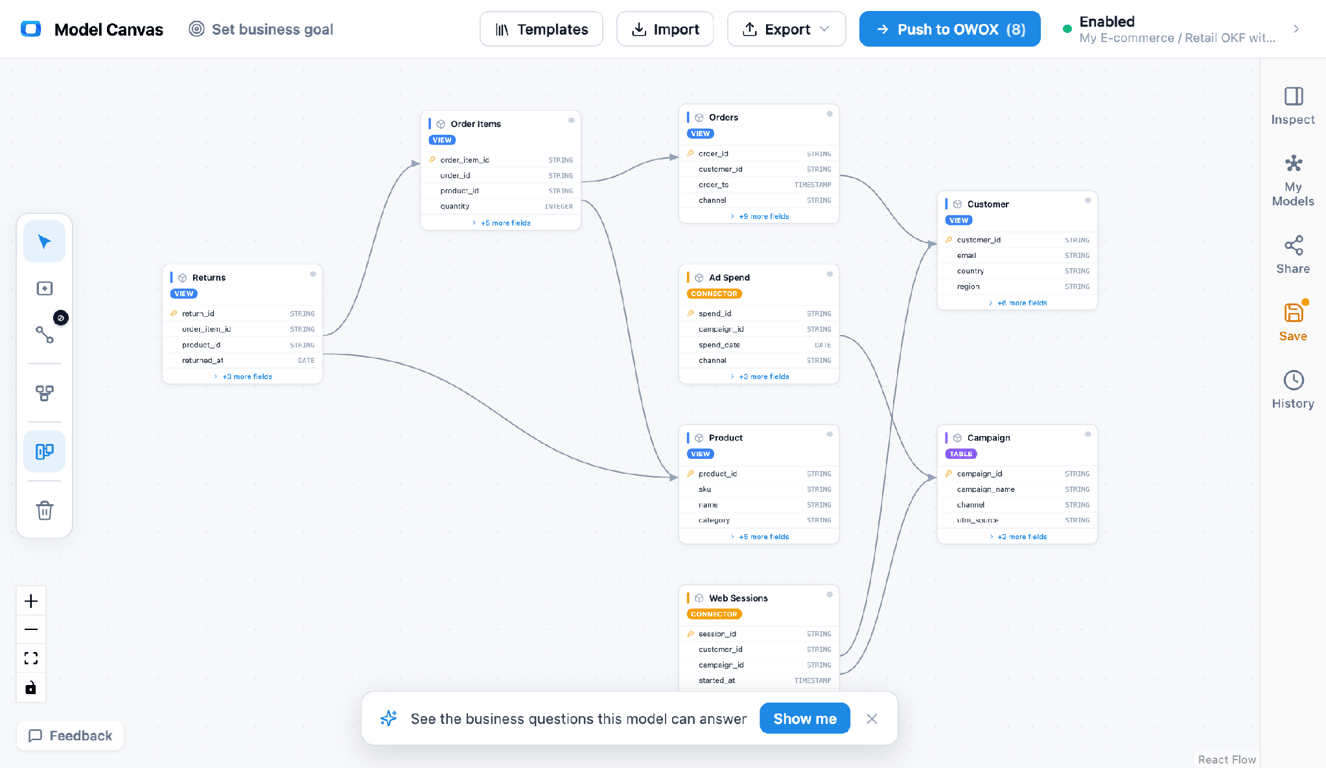
Author the model visually, then export OKF – an open, git-friendly, AI-readable description you can move between tools.
The 2026 tiebreaker: can an AI read it?
The 2026 tiebreaker: can an AI read it?
For years the choice between these was about your existing stack – dbt shop, Looker shop, or neither. There’s now a tiebreaker that cuts across all of them: which of these can an AI agent consume directly?
Text-to-SQL and “chat with your data” tools fail when they lack a trustworthy, machine-readable model – they invent columns and pick wrong joins. LookML can’t leave Looker; dbt exposures describe usage, not the full model; OKF was designed from the start to be a portable, agent-readable description.
If part of your roadmap is letting an LLM answer questions against your data with zero hallucination, an open format like OKF is the one that ships that context anywhere. This is also why teams pair the model with a governed layer like OWOX Data Marts so dashboards, spreadsheets, and AI all read one definition.
Which should you use?
- You’re a dbt shop and need lineage/ownership → dbt exposures (and keep OKF for a portable model on top).
- You’re a Looker shop standardizing metrics → LookML.
- You want a portable, open, AI-readable model that isn’t locked to one tool → OKF.
- Most modern stacks → a mix: transform in dbt, serve metrics where you serve them, and keep the model itself in an open format so it travels. Compare the broader toolset in best data modeling tools.
Turn your data into decisions.
Governed data marts give you the clean foundation ML needs to actually work.
- No AI hallucinations
- Analyst-governed definitions
- Every number traces to SQL
Frequently Asked Questions
Is OKF tied to Google or any vendor?
OKF is an open standard and the tooling around it is open-source. The model is portable markdown you own — no lock-in to Google, dbt, or Looker.
Do I need to write OKF by hand?
No. You can author the model visually and export OKF from OWOX Model Canvas (free, no sign-up), or generate it with one of the open-source OKF tools and refine it in the canvas.
Can I use OKF with dbt or Looker?
Yes. OKF doesn't compete with your transformation or BI layer; it's a portable description you keep alongside them, version in git, and hand to tools or agents that need the model.
Which is best for AI / LLM context?
OKF, by design — it's an open, plain-markdown description an agent can read directly. LookML is locked to Looker, and dbt exposures describe usage rather than the full model.
Is OKF a replacement for LookML?
Not exactly. LookML is a semantic layer realized inside Looker; OKF is a portable, tool-agnostic description of the model. If you want metrics governed inside Looker, use LookML; if you want a model that travels between tools and to AI, use OKF alongside it.
What is the difference between OKF and dbt exposures?
OKF describes the data model itself — tables, columns, and joins — as a portable, open markdown file. dbt exposures declare the downstream uses of dbt models (dashboards, jobs) inside a dbt project. One is a portable model; the other is usage metadata within dbt.