Databricks pricing explained: DBU rates, compute types and what drives your bill
Databricks bills compute in DBUs, and the price of a DBU depends on what kind of compute used it: from $0.15 for classic jobs to $0.75 for serverless notebooks on Premium in AWS US East. Classic compute adds a second bill from your cloud provider; serverless includes it. The same work can cost several times more on the wrong compute type.
Databricks pricing is consumption-based, and the unit is the DBU (Databricks Unit). What makes the bill hard to read is that a DBU does not have one price. It has a different price for each kind of compute, and for classic compute there is a second bill from your cloud provider on top.
The short version, on Databricks’ list prices for the Premium plan on AWS US East (Northern Virginia), checked in October 2026:
- Jobs cost $0.15 per DBU on classic clusters and $0.35 serverless.
- All-purpose (interactive) compute costs $0.55 per DBU classic and $0.75 serverless.
- SQL warehouses cost $0.22 per DBU classic, $0.55 pro and $0.70 serverless.
- Serverless prices include the cloud compute. Classic prices do not.
This guide explains each line, works through a monthly bill, gives you the SQL to see your own spend, and then looks at the part that is usually largest and least planned: reporting.
How Databricks pricing works
Databricks charges for compute by the second, with no up-front cost on pay-as-you-go. Three things set the price of any workload: how many DBUs it consumes, what kind of compute consumed them, and which plan your workspace is on.
What a DBU is
A DBU is a normalized unit of processing power per hour. It is not tied to one machine size: a larger instance emits more DBUs per hour than a smaller one, so the same unit can price any cluster. Your DBU charge is simply DBUs consumed × the price per DBU for that compute type.
One bill or two
With classic compute, the clusters run on virtual machines in your own cloud account. Databricks bills you for the DBUs, and AWS, Azure or Google Cloud bills you separately for the machines, storage and network. Databricks’ own pricing pages say it in a line under each classic price: “plus underlying compute costs billed by cloud provider”.
With serverless compute, Databricks runs the machines, and the DBU price includes them. That is why serverless looks expensive per DBU and often is not: you are comparing one all-in price against half of a two-part one.
Plans: Premium and Enterprise
On AWS and Google Cloud, Databricks sells two plans, Premium and Enterprise. The Standard tier that older pricing guides list is gone: Databricks ended it on both clouds and automatically upgraded remaining Standard workspaces to Premium on 1 October 2025, as its subscription documentation describes.
Azure Databricks is sold and billed by Microsoft as a first-party Azure service, and its tiers are named differently. Databricks notes that the Premium tier on Azure corresponds to the Enterprise tier on AWS and Google Cloud.
DBU rates by compute type
The compute type is the largest single factor in the bill. These are Databricks’ list prices per DBU for AWS US East (Northern Virginia), read from its jobs, interactive and SQL pricing pages in October 2026.
| Compute | Premium | Enterprise |
|---|---|---|
| Jobs, classic | $0.15 | $0.20 |
| Jobs, serverless | $0.35 | $0.45 |
| All-purpose, classic | $0.55 | $0.65 |
| Interactive, serverless | $0.75 | $0.95 |
| SQL warehouse, classic | $0.22 | $0.22 |
| SQL warehouse, pro | $0.55 | $0.55 |
| SQL warehouse, serverless | $0.70 | $0.70 |
Classic rows are DBU charges only; the cloud provider’s bill for the machines is extra. Serverless rows include it. Prices differ by region and cloud, and pipelines, model serving and other products have their own rates on the same pages.
Jobs compute
Jobs compute runs scheduled work with nobody at the keyboard: pipelines, batch processing, production notebooks on a timer. It is the cheapest way to buy a DBU. Anything that runs on a schedule belongs here.
All-purpose compute
All-purpose clusters are for interactive work: notebooks, development, exploration. On Premium a classic all-purpose DBU costs $0.55 against $0.15 for a jobs DBU, close to four times as much for the same processing. The most common avoidable cost in Databricks is a production job still running on the all-purpose cluster it was developed on.
SQL warehouses
SQL warehouses serve SQL queries and BI tools, and they are where reporting costs land. They come in three types. Classic and pro run in your cloud account, so you also pay for the machines. Serverless starts in seconds, stops when idle and includes the machines in its $0.70.
OWOX Data Marts
See your first report built in real time. 15 minutes.
- Connect your data warehouse
- Pick your metrics
- Get a live Google Sheets report
In the time it takes to write a ticket. Then imagine never writing that ticket again.
Book a DemoWe'll use your actual use case
SQL warehouse sizes and what they cost per hour
SQL warehouse sizes and what they cost per hour
A SQL warehouse has a size, and the size sets how many DBUs it uses for every hour it is running. Databricks’ pricing calculator lists them for serverless warehouses:
| Size | DBUs per hour | Serverless, per hour |
|---|---|---|
| 2X-Small | 4 | $2.80 |
| X-Small | 6 | $4.20 |
| Small | 12 | $8.40 |
| Medium | 24 | $16.80 |
| Large | 40 | $28.00 |
| X-Large | 80 | $56.00 |
| 2X-Large | 144 | $100.80 |
| 3X-Large | 272 | $190.40 |
| 4X-Large | 528 | $369.60 |
Dollar figures are DBUs × $0.70, the Premium serverless price in AWS US East in October 2026. The number to remember is the hourly one for your size, because a warehouse bills for as long as it is up, not for how many queries it answered. A Small warehouse that stays awake through a ten-hour working day costs $84 that day whether it ran four queries or four thousand.
A worked example: one month, one team
A worked example: one month, one team
Take a team on Premium in AWS US East, paying list prices. The DBU volumes are assumptions; the prices are from the tables above.
| Workload | DBUs | Databricks charge |
|---|---|---|
| Nightly pipelines, jobs classic | 1,000 | $150 |
| Notebooks, all-purpose classic | 400 | $220 |
| Reporting, Small serverless SQL warehouse, 6 hours a day, 22 days | 1,584 | $1,108.80 |
That is $1,478.80 from Databricks, plus an AWS bill for the machines under the first two rows. Reporting is 75% of the Databricks charge, and its size was never chosen: 6 hours a day is simply how long the warehouse was kept awake.
Change one assumption. If dashboards refresh on a timer and the same warehouse is up 12 hours a day, the reporting line becomes 264 hours × 12 DBUs × $0.70 = $2,217.60, with the same data and the same readers.
What else is on the bill
Compute is most of it, but not all.
Cloud infrastructure for classic compute. The virtual machines, their disks and network traffic are billed by your cloud provider. This is the part committed-use discounts from Databricks do not touch, and the part your cloud provider’s own reservations and spot pricing do.
Storage. Your tables live in object storage in your own cloud account (S3, ADLS or Google Cloud Storage) and are billed there. Where Databricks manages storage for you, it meters it in a separate unit, the DSU (Databricks Storage Unit).
Other products. Declarative pipelines, model serving, vector search and AI features each have their own DBU rates, listed product by product on the pricing overview.
Committed use. Pay-as-you-go is the list price. Databricks offers discounts in exchange for committing to a level of usage; the size of the discount is negotiated, not published.
How to see what you are spending
How to see what you are spending
Databricks records billable usage in system tables, and you can query them with SQL. Two tables answer most questions: system.billing.usage holds every billable record, and system.billing.list_prices holds the list price of each SKU over time.
System tables need a workspace enabled for Unity Catalog. Users who are both account admin and metastore admin can read them by default; anyone else needs USE CATALOG on system, plus USE SCHEMA and SELECT on the billing schema. The tables are free to use. You pay only for the compute that runs the query.
Cost by product and day
SELECT
  u.usage_date,
  u.billing_origin_product,
  SUM(u.usage_quantity) AS dbus,
  SUM(u.usage_quantity * p.pricing.default)
    AS list_cost
FROM system.billing.usage AS u
JOIN system.billing.list_prices AS p
  ON u.sku_name = p.sku_name
  AND u.cloud = p.cloud
  AND u.usage_start_time >= p.price_start_time
  AND (p.price_end_time IS NULL
    OR u.usage_start_time < p.price_end_time)
WHERE u.usage_date >=
  DATE_SUB(CURRENT_DATE(), 30)
GROUP BY u.usage_date, u.billing_origin_product
ORDER BY u.usage_date, list_cost DESC;
billing_origin_product separates JOBS, SQL, ALL_PURPOSE and the rest. The cost here is at list price; if you have a committed-use discount, your invoice will be lower by that discount.
Which SQL warehouse is the bill
SELECT
  usage_metadata.warehouse_id AS warehouse_id,
  SUM(usage_quantity) AS dbus
FROM system.billing.usage
WHERE billing_origin_product = 'SQL'
  AND usage_date >=
    DATE_SUB(CURRENT_DATE(), 30)
GROUP BY usage_metadata.warehouse_id
ORDER BY dbus DESC;
The most expensive jobs
SELECT
  usage_metadata.job_id AS job_id,
  SUM(usage_quantity) AS dbus
FROM system.billing.usage
WHERE usage_metadata.job_id IS NOT NULL
  AND usage_date >=
    DATE_SUB(CURRENT_DATE(), 30)
GROUP BY usage_metadata.job_id
ORDER BY dbus DESC
LIMIT 20;
A job that appears here under ALL_PURPOSE rather than JOBS is the mismatch from the rates table: the same work at close to four times the DBU price.
Spend by team
SELECT
  custom_tags['team'] AS team,
  SUM(usage_quantity) AS dbus
FROM system.billing.usage
WHERE usage_date >=
  DATE_SUB(CURRENT_DATE(), 30)
GROUP BY custom_tags['team']
ORDER BY dbus DESC;
This one only works if clusters and warehouses are tagged. custom_tags carries whatever tags you put on the compute, so a team tag has to exist before the usage does. Untagged usage comes back as one large NULL row, which is itself a finding.
What drives a Databricks bill up
What drives a Databricks bill up
Rates are fixed. What moves is how much compute runs, on what, and for how long. Five causes account for most surprises.
- Compute left running. An interactive cluster or a classic SQL warehouse that nobody stopped bills DBUs, and machines, through the night and the weekend.
- The wrong compute type. Production pipelines on all-purpose clusters pay $0.55 per DBU for work that costs $0.15 on jobs compute.
- Oversized clusters and warehouses. Sized for the busiest hour of the quarter and never revisited. Each size up on a SQL warehouse uses 1.5 to 2 times the DBUs per hour.
- Queries that scan everything. No partition filter,
SELECT *on wide tables, the same heavy join recomputed by every dashboard. Longer queries keep compute up longer. - No owner. Without tags and a report that somebody reads, the bill belongs to nobody and nothing changes.
How to bring it down
Each cause has a direct fix, and the first two usually pay for the rest.
Stop compute that is idle. Set auto-termination on interactive clusters and auto stop on SQL warehouses. This is the cheapest change on the list and it applies from the next idle minute.
Move scheduled work to jobs compute. If it runs on a timer, it does not need an interactive cluster. The third query above tells you which jobs to move first.
Start small and size up on evidence. A SQL warehouse can be resized in place. Begin a size below where you think you need to be and raise it only if queries queue.
Prefer serverless for bursty SQL. Reporting and ad hoc analysis arrive in bursts with long gaps between them. A warehouse that starts in seconds and stops when idle fits that shape; a classic warehouse kept warm all day does not.
Tag everything, then publish the report. Tags turn the fourth query into a table of spend by team. It only changes behaviour if the people who own the spend see it, on a schedule, without asking for it.
Databricks pricing compared with Snowflake and BigQuery
Databricks pricing compared with Snowflake and BigQuery
The three platforms measure different things, so a price-per-unit comparison says little. What differs is the shape of the bill.
Databricks prices a DBU by compute type and, for classic compute, leaves the machines on your cloud bill. You have the most control over the infrastructure and the most to manage. Snowflake prices a credit by edition and region, with the machines always included; Snowflake pricing walks through its rates the same way this guide does. BigQuery charges either for the data each query scans or for reserved capacity, with no cluster to size at all.
In all three, the part of the bill that grows without anyone deciding it is the same: queries that people and dashboards send all day. The data warehouse comparison covers the architectural differences, and what Databricks is explains the lakehouse design behind the pricing.
One definition, many readers
The reporting line in the worked example is the one to fix by design, not by tuning. Its cost is set by how long a SQL warehouse is awake, and that is set by how many tools and people query it, and when.
OWOX Data Marts does not change what a DBU costs and does not transform your data. It gives each reporting query one definition, one schedule and one record of every run. You connect Databricks as a storage with a host, a personal access token and the HTTP path of a SQL warehouse, so every run goes to a warehouse you chose. The setup guide recommends the same three settings as the section above: auto stop on, start small, serverless where available.
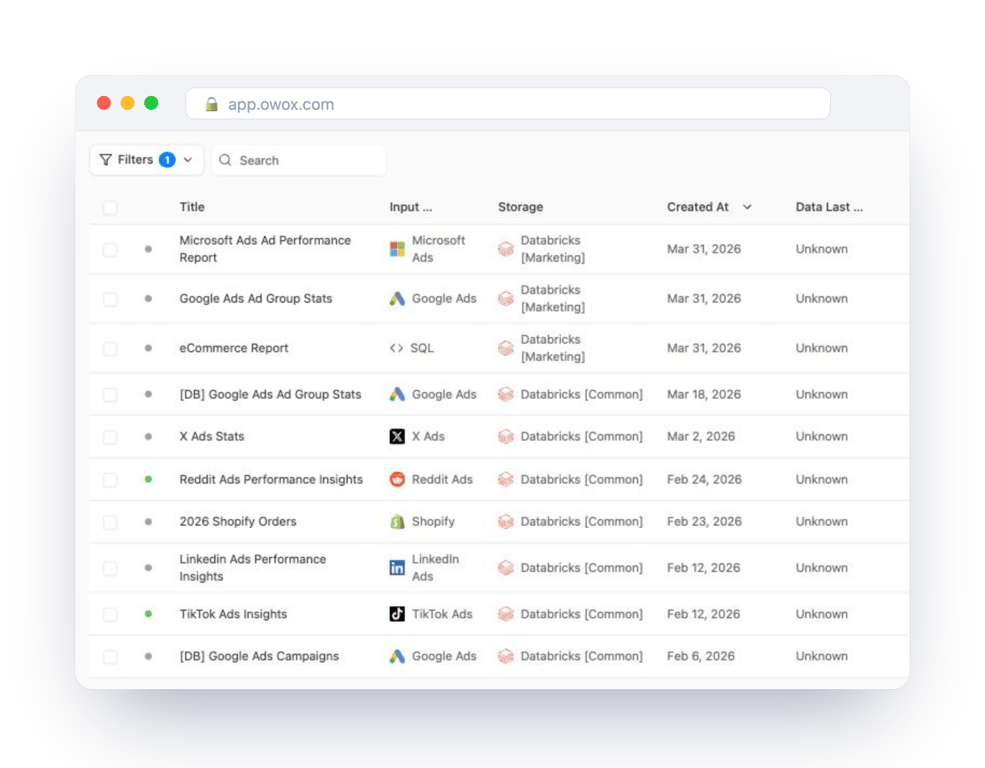
A Data Mart is a SQL query, a table or a view that an analyst publishes under a business name. Reports are built on it and delivered to Google Sheets, Data Studio, Slack or email, on triggers you set.
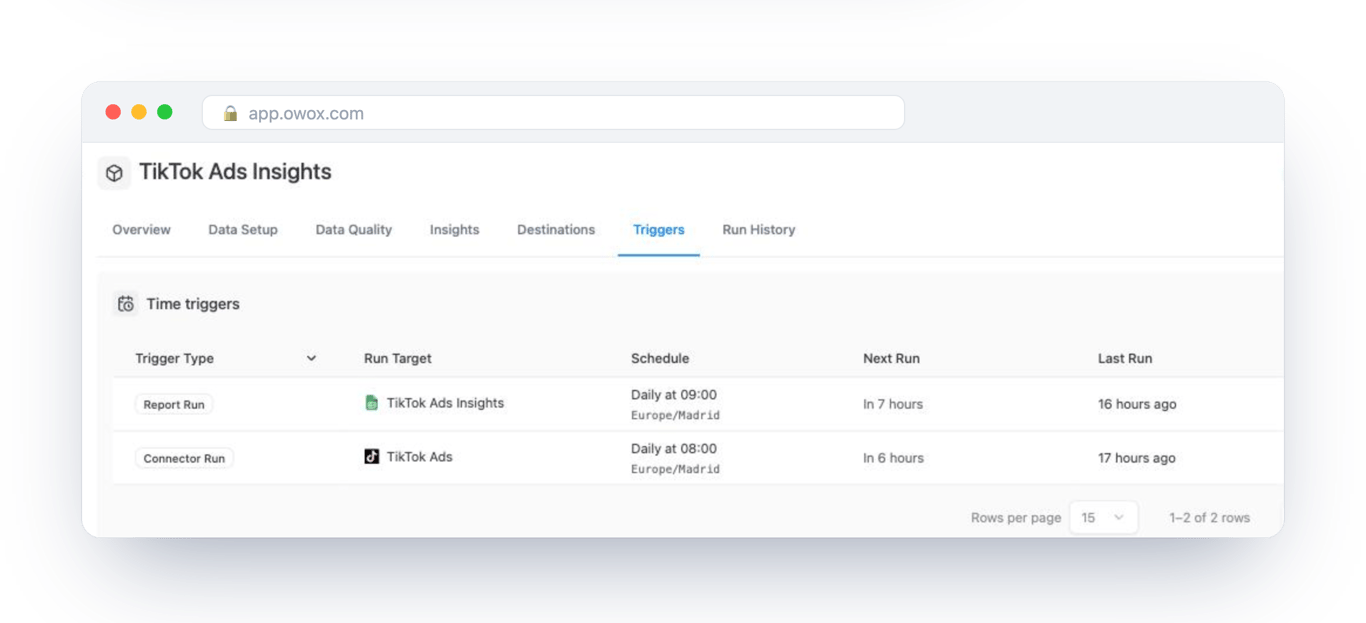
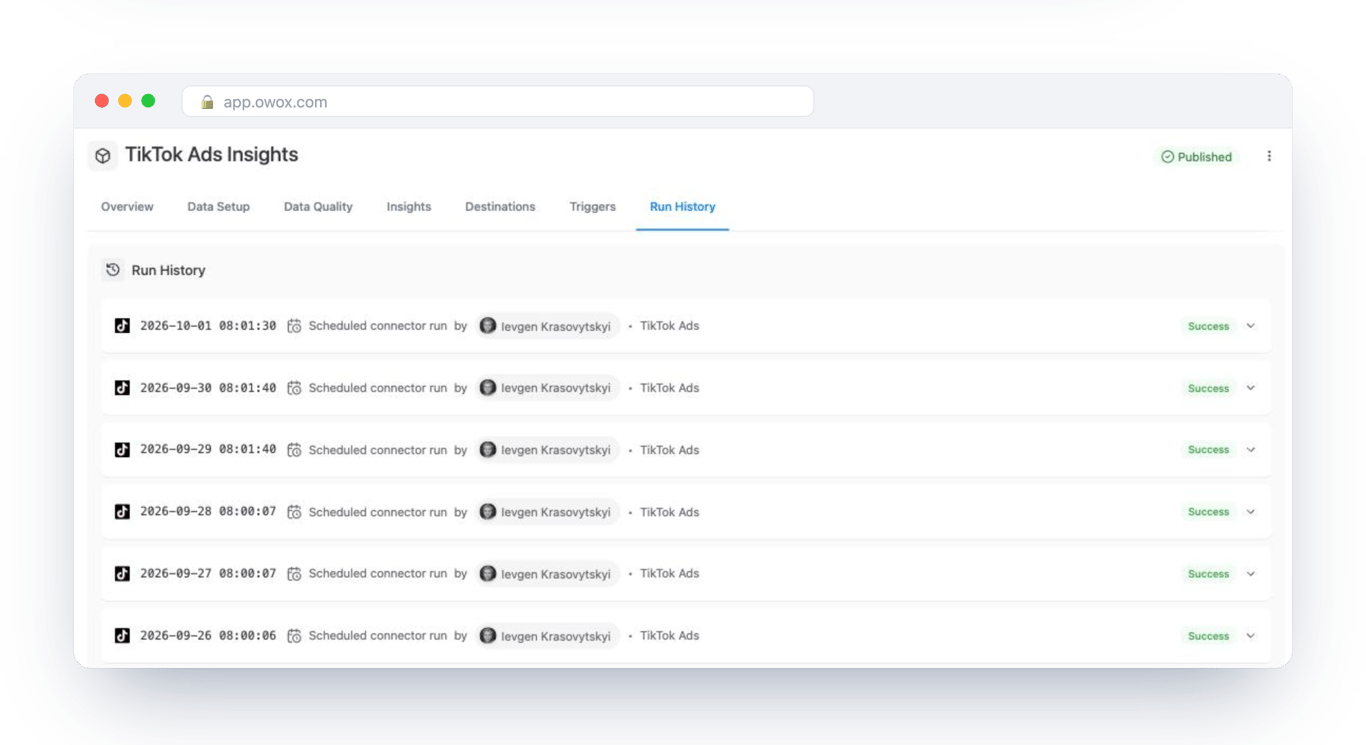
That is where the arithmetic changes. A report delivered to Google Sheets at 09:00 is one run a day: the warehouse starts, answers and stops. The people who open the sheet afterwards are reading a . The warehouse hours behind that report are a number you can write down in advance, and Run History shows each one.
The spend report itself can be delivered the same way. If the identity behind the storage connection has SELECT on system.billing, the first query in this guide can be published as a Data Mart like any other and sent to finance every Monday. Databricks to Google Sheets is the walk-through for setting up the destination.
Turn your data into decisions.
Governed data marts give you the clean foundation ML needs to actually work.
- No AI hallucinations
- Analyst-governed definitions
- Every number traces to SQL
Frequently Asked Questions
How do I estimate my Databricks bill?
Multiply the DBUs each workload uses by the price per DBU for its compute type and plan. Databricks' pricing calculator gives the DBUs per hour for an instance type or SQL warehouse size. For classic compute, add your cloud provider's charge for the machines; serverless prices already include it. For what you have actually used, query system.billing.usage joined to system.billing.list_prices.
Does Databricks charge for storage?
For data in your own cloud account, no. Tables live in S3, ADLS or Google Cloud Storage and your cloud provider bills the storage. Where Databricks manages storage for you, it meters it in Databricks Storage Units (DSUs). Either way, retained table history adds to the volume stored, so retention settings affect the storage line.
What is the cheapest way to use Databricks?
Run scheduled work on jobs compute, which lists at $0.15 per DBU on Premium in AWS US East against $0.55 for all-purpose compute (October 2026). Set auto-termination on interactive clusters and auto stop on SQL warehouses, start SQL warehouses small and resize on evidence, and use serverless SQL for bursty reporting so nothing stays up between queries.
Is Databricks free or paid?
Databricks is a paid platform with consumption-based pricing and no up-front cost. Its pricing pages offer pay-as-you-go with a 14-day free trial. After that you pay per DBU consumed, at a price that depends on the compute type and plan, plus your cloud provider's charges for the machines when you use classic compute.
How does Databricks pricing compare to Snowflake?
They measure different things, so a unit-price comparison does not work. Databricks bills DBUs at a price that depends on the compute type, and with classic compute your cloud provider bills the machines separately; serverless prices include them. Snowflake bills credits per second of warehouse time, with the cloud compute included. Compare the two on the same workload, using each vendor's own usage views, not on list prices.
Why is Databricks so expensive?
A Databricks bill usually grows for a few known reasons: interactive clusters left running overnight and at weekends, scheduled work running on all-purpose compute when jobs compute lists at a fraction of the price, clusters and SQL warehouses sized larger than the work needs, and queries that scan whole tables. With classic compute there is also a second bill from the cloud provider, which makes the total harder to read.
What is a DBU in Databricks?
A DBU (Databricks Unit) is a normalized unit of processing power per hour. Larger instances emit more DBUs per hour, and each kind of compute has its own price per DBU. On Premium in AWS US East in October 2026 a DBU lists at $0.15 for classic jobs, $0.55 for classic all-purpose compute and $0.70 for a serverless SQL warehouse.
How much does Databricks cost per month?
It depends on how many DBUs you use and on which compute. As a worked example at October 2026 list prices on Premium in AWS US East: 1,000 DBUs of classic jobs ($150), 400 DBUs of all-purpose compute ($220) and a Small serverless SQL warehouse up 6 hours a day for 22 days ($1,108.80) come to $1,478.80 from Databricks, plus the cloud bill for the classic clusters.