Website traffic analysis: what it is and how to do it
Website traffic analysis is the practice of collecting and reading data about who visits your website, where they come from, and what they do once they arrive. You do it by tracking events on every page with an analytics tool such as Google Analytics 4, grouping those events into sessions and users, breaking the traffic down by source, channel and landing page, and comparing the metrics that matter for your goals (engagement, conversions, revenue) over time. The point is not a bigger visitor count but knowing which visits turn into customers, so you can decide where to put effort and budget.
This article covers the key terms, the tools, how sources, channels and keywords are reported, the default channel grouping in Google Analytics 4, and the dimensions, segments and metrics to check when you analyze website traffic.
What is website traffic?
To measure a website’s performance, analysts and marketers look at website traffic: the total number of visitors along with information on where they came from and how they got to the site.
Understanding website traffic analytics becomes much easier when you comprehend the key terms involved. Let’s delve deeper into each one, so you have a solid foundation to build upon. Keyword research is crucial in analyzing website traffic and gaining insights into competitor strategies.
- Events are requests your site receives from visitors. This includes webpage loads (known as page_view), images or button clicks (click event), interactions with forms on your site (form_start and form_submit events), and much more. However, events may not be a true reflection of a visit because a single page can generate multiple events.
- Sessions are a set of interactions, such as page views, page interactions, or e-commerce activities that take place within a given time frame by a single user. It’s a way to bundle all the events taken by one visitor during their visit to your site in a session by sessionization.
- Users refer to unique visitors to your site and take action on it. Users can have multiple sessions on your site.
- Metrics are units of measurement in data analytics. Metrics provide quantifiable traffic data, such as the number of page views, the time spent on site, or the bounce rate.
- Event parameters are specific settings or criteria used to filter or classify your analytics data. They could include geographical location, age, gender, or behavior of your users.
- Dimensions describe the characteristics of your data. Dimensions can be used to organize, segment, and categorize traffic data for better analysis and reporting. For instance, the ‘city’ dimension could help you understand where your visitors are located.
Each of these terms plays its own role in website traffic statistics analysis.
Having a proper analytics setup will not only improve your understanding of website traffic analytics but also help you analyze and optimize your website more effectively.
Tools to analyze website traffic
Tools to analyze website traffic
Your toolbox for traffic checker will contain several tools to visualize and explore your site metrics. These services are programmed to examine your website from the inside out and give you a report based on this examination.
One essential tool is Google Search Console, a free tool that provides insights into website performance in search engine results.
Simple tools for website analysis
The most popular (and free) tool for website analysis is Google Analytics 4. Google Analytics 4 shows data about website statistics and data on user behavior in the form of events and sessions. Actions on the website are registered as events, and then those events are merged into sessions according to Google Analytics 4 logic.
A traffic checker is another essential tool for analyzing and monitoring website traffic, keyword rankings, and competitors’ data.
What you should know about your web traffic are its source channels and metrics. This would help you answer the most important questions as a website manager or owner:
- Which pages are attracting the most visitors?
- How much time they’re spending on those pages,
- Where they’re coming from (e.g., social media, Google search, paid ads)
- How do they convert website visitors into leads or customers?
- You can even find the path they take through your site.
This information empowers you to identify what’s working well on your website and what’s not, where improvements could be made, which marketing strategies are driving traffic, and, most importantly, how you could increase your conversion rates to drive business growth.
You can find answers to these questions by looking at sources and channels in reports and dashboards.
Google Analytics is really very powerful for analyzing websites, but it has its limitations which are not so comfortable for marketers and business owners:
- It doesn’t account for internal data (such as sales data from your CMS or CRM)
- Its attribution models are limited to the data it collects itself
- Without internal sales data, LTV, cohort and ROPO reports are built on incomplete revenue.
Luckily, there are tools for end-to-end analytics for businesses that dream big.
Specialized tools for end-to-end analytics
As a website is part of the overall marketing and business strategy, it’s essential to analyze it in the overall context: connected with advertising channels, affiliate expenses, your CRM or CMS systems, email marketing tools, and other data flows.
A comprehensive website statistics report is crucial for effectively presenting website data. It should include comparative metrics to provide stakeholders with actionable information.
To establish end-to-end analytics, start by collecting all of your marketing and sales data in one place, creating a single source of truth for data across your organization, and merging the data flows. That is what turns traffic numbers into marketing analytics that drives decisions.
OWOX Data Marts
See your first report built in real time. 15 minutes.
- Connect your data warehouse
- Pick your metrics
- Get a live Google Sheets report
In the time it takes to write a ticket. Then imagine never writing that ticket again.
Book a DemoWe'll use your actual use case
Common functionality of analytics systems
Common functionality of analytics systems
Analytics systems collect, process, and report on user interactions with websites, capturing event data like clicks and scrolls. They group these events into sessions for meaningful analysis and provide customizable reports, helping businesses understand and optimize web performance by offering insights into user behavior and website effectiveness.
Tracking traffic data is crucial for analyzing website performance, visitor engagement, and competitor analysis, providing valuable insights into traffic sources and user interactions.
Collect online event data
Most of the web traffic analytics systems collect information about actions on the website, registering clicks, scrolling, form submissions, etc. All of these events are gathered by the analytics system and marked with a timestamp and other event parameters from the data-trace of each website visitor. This is the event data (in GA Universal it was called hit data), which is essential for web analytics.
Tracking and analyzing your own website traffic is crucial for evaluating the effectiveness of SEO and marketing strategies.
In order to track event data, you need to add a tracking code of the analytics system to your website pages, typically called Pixel.
Group events into sessions
Without grouping all these website interactions into sessions, it’s impossible to use them for web performance analysis effectively.
Keep in mind that every analytics system has its own unique logic for creating sessions from events. Imagine having a list of all website activities but lacking the details, like who executed those actions, how long they were taking place, or how regularly. Without this information, you would be blind when it comes to analyzing website activities and performance.
Analyzing traffic statistics is crucial for gaining insights into website performance, keyword rankings, and competitor strategies. This brings us back to sessions - they are fundamental for analyzing web traffic. The total number of sessions is a metric that provides some immediate insights. In fact, it’s often the first pre-processed data that you’ll spot in your reports.
Web traffic analytics reporting
Website analytics reporting is a way for an analytics system to inform you about what’s happening on your website.
Tracking website traffic statistics is crucial for gaining insights into user behavior and traffic sources. Tools like Google Analytics can help monitor and analyze these statistics, guide marketing strategies, and improve content targeting.
You can use prebuilt reports (such as a social media traffic report) or build your reports by combining metrics, parameters, and dimensions. For a more advanced approach tailored to professional needs, explore SEO tools for agencies that offer deeper analytics and customizable reporting features.
However, the most insightful reports are built with raw unsampled data (Google Analytics 4’s standard reports are unsampled, but explorations apply data sampling when a query exceeds its limits). The completeness of input data defines the quality of the report and the decisions you make based on this report.
Understanding key entities like sources, channels, and keywords is crucial for accurate reporting in web traffic analytics.
Key entities involved in reporting web traffic analytics
Key entities involved in reporting web traffic analytics
In web traffic analytics, understanding key entities like sources, channels, and keywords is crucial for accurate reporting. These entities help track where visitors come from, how they navigate to your site, and what they search for, enabling businesses to analyze user behavior and optimize their online presence effectively.
Analyzing traffic sources is essential for understanding the origins of website visitors and their impact on website performance.
Source
The source defines the site or the platform from which a user clicks a link to enter your website (in JavaScript, this is the «document.referrer» string). If the source page is another page on your site, it’s the previous page.
The source of your traffic may be presented as a link to the web address from which each particular visitor came.
Your sources might be:
- yourbestfriendwebsite.com
- youtube.com
- thebestbusinessesreview.us
- google.com
- facebook.com
- owox.com
- etc.
The point is that people can visit your website from different types of links and through different channels.
Traffic from organic search is primarily generated through search engines like Google, making it crucial to enhance this traffic source.
When the source is undefined, typically, the traffic is marked as Direct.
This happens for one of 2 main reasons:
- The User types the URL in the browser (or uses a bookmarked tab);
- The source is not specified due to privacy regulations and cookie restrictions.
Channels (presented as a medium in UTM)
The channel refers to how a visitor navigates to your site. For example, these are some of the channels in Google Analytics 4:
- organic (free search traffic: e.g. Google or Bing search)
- paid search (paid search: e.g. Google Ads)
- referral (your partners, affiliates)
- display (banner ads)
- social (social media posts: e.g. Instagram stories)
- email (email marketing)
- none (undefined or unset medium)
- other (you can pre-configure custom UTM tags based on your mediums)
Evaluating and improving website performance through data analysis is crucial for capturing higher organic search traffic. Effective SEO measures and tools that offer detailed reports on a website’s organic search performance compared to its competitors can provide valuable insights.
You can read more about UTM tagging and use it in your own web traffic analysis. It’s handy to create custom segments based on channels and analyze targeted traffic apart from all other traffic.
For example, here is how Google Analytics 4 lays out each channel and the mediums (the general categories) to which it belongs. The medium description is essential to identify channels and define their type.
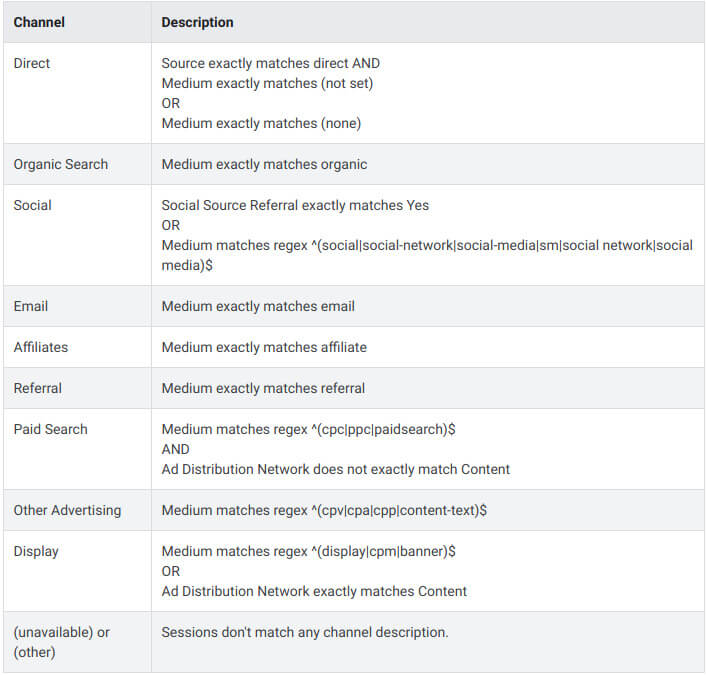
Default mediums in Google Analytics 4
Keyword
A keyword generally refers to a word or phrase that users enter into a search engine. Keywords are closely linked to how a search engine interprets a user’s intent and how it ranks and displays links, websites, and resources in the search results.
Search engine optimization (SEO) plays a critical role in driving traffic to websites by focusing on optimizing for search engines like Google, which accounts for a vast majority of global online traffic.
To understand which keywords drive valuable traffic and conversions, you need to analyze them and determine what your customers are actually searching for when they seek out your website, services, or products. Creating content that closely aligns with your customers’ intentions will yield the best results.
Analytics tools identify the keywords that users enter into the search bar as “keyword referral data.” As you may already know, there are two types of keyword referral data:
- organic
- paid
Data about organic keywords is hidden due to Google’s policies, while data on paid keywords is visible and available for your analysis. That’s the reason, some reports will show a «not provided» value. You can also get «not provided» values from a paid channel if your campaigns are not correctly set.
Now that you are familiar with sources, mediums, channels, and keywords, we can proceed to channel grouping, the way to analyze your traffic by your rules.
Channel grouping: default and manual
Channel grouping: default and manual
A channel grouping is a level of classifying web traffic. The default channel grouping in Google Analytics 4 matches the lineup of channels described below.
Analyzing competitor website traffic can provide valuable insights by comparing traffic metrics between your site and those of rival websites. This helps in understanding market trends and improving your own traffic generation strategies.
Channels for Google Ads traffic
- Paid Shopping (Source platform is “Google Ads” AND Google Ads campaign type is “Shopping”)
- Paid Search (Source platform is “Google Ads” AND Google Ads ad network type is one of “Google Search”, “Google Partners”)
- Paid Video (Source platform is “Google Ads” AND Google Ads ad network type is one of “YouTube Search”, “YouTube Videos”)
- Display (Source platform is “Google Ads” AND Google Ads ad network type is one of “Google Display Network”)
- Paid Social (Source platform is “Google Ads” AND Google Ads ad network type is one of “Social”)
Channels for other traffic
- Direct (Source exactly matches “(direct)” AND Medium is one of (“(not set)”, “(none)”)
- Cross-network (Campaign Name contains “cross-network”)
- Paid Shopping (Source matches a list of shopping sites OR Campaign Name matches regex
^(.*(([^a-df-z]|^)shop|shopping).*)$) AND Medium matches regex^(.*cp.*|ppc|retargeting|paid.*)$) - Paid Search (Source matches a list of search sites AND Medium matches regex
^(.*cp.*|ppc|retargeting|paid.*)$) - Paid Social (Source matches a regex list of social sites AND Medium matches regex
^(.*cp.*|ppc|retargeting|paid.*)$) - Paid Video (Source matches a list of video sites AND Medium matches regex
^(.*cp.*|ppc|retargeting|paid.*)$) - Display (Medium is one of (“display”, “banner”, “expandable”, “interstitial”, “cpm”)
- Paid Other (Medium matches regex
^(.*cp.*|ppc|retargeting|paid.*)$) - Organic Social (Source matches a regex list of social sites OR Medium is one of (“social”, “social-network”, “social-media”, “sm”, “social network”, “social media”)
- Organic Video (Source matches a list of video sites OR Medium matches regex
^(.*video.*)$) - Organic Search (Source matches a list of search sites OR Medium exactly matches organic)
- Referral (Medium is one of “referral”, “app”, or “link”)
- Email (Source = email|e-mail|e_mail|e mail OR Medium = email|e-mail|e_mail|e mail)
- Affiliates (Medium = affiliate)
It’s handy to use this grouping in a general way, but as you know, these groups are aggregated, so they can hide some insights that might be useful for you.
For example, if you want to analyze traffic from your outreach campaign, you should create a custom channel group based on a referral channel, separating traffic with the help of UTM tags.
How to analyze website traffic
How to analyze website traffic
Analyzing website traffic involves examining the data collected from visitors’ interactions on your site to gain insights into user behavior, preferences, and trends. This process helps identify the sources of traffic, user engagement levels, and the effectiveness of marketing strategies. By understanding these metrics, businesses can optimize their website’s performance, improve user experience, and drive conversions.
To understand how much traffic a competitor’s site receives, various tools like Google Analytics and Ahrefs can be used to analyze and track website traffic.
Main dimensions
Dimensions are attributes of your data. Adding dimensions is the most popular and simplest approach to analysis.
- For example, a one-dimensional report
This report shows how many sessions originated from each country. It’s a simple breakdown by location and helps you understand which countries drive the most traffic to your website.
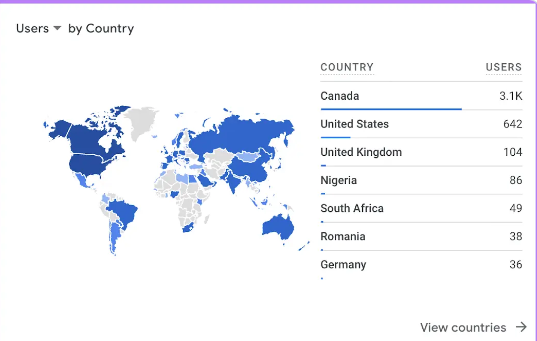
Understanding website statistics is crucial for gaining insights into website traffic and current trends, which can help you stay competitive in the online landscape.
And here’s what we can get by adding one more dimension:
- Dimension: Browser; metric: Pages per session
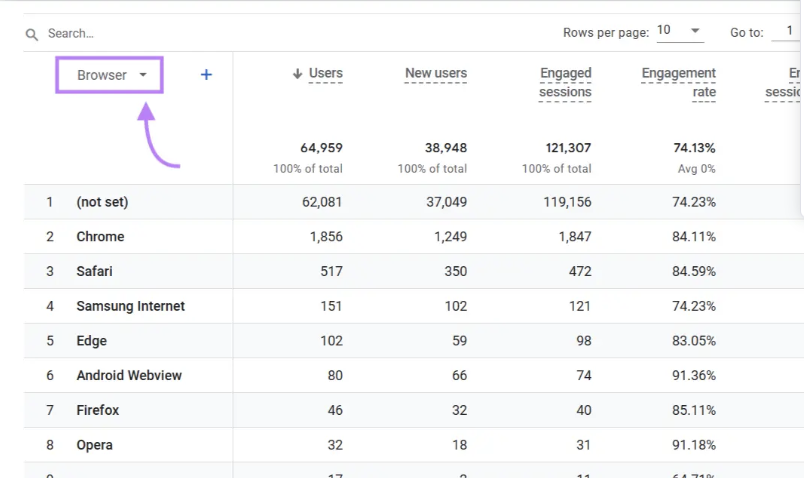
You can add a dimension like Browser to see how the number of pages viewed per session changes based on the user’s browser. This insight helps identify if certain browsers, like Chrome or Safari, result in higher or lower engagement, which could reveal issues with user experience or performance on different platforms.
By adding this additional dimension, we can see something that was previously hidden: the fact that the browser influences the pages/session metric quite a lot, even for people in the same city.
By choosing the right dimension-metric combination, you can find a lot of useful insights for your website development.
Segmentation
Segments offer a great possibility for analysts to compare part of the traffic with the whole picture. Comparing segments to other segments or to total data, you can conduct a simple analysis that might be useful for beginners.
It’s also crucial to use multiple tools for analyzing web traffic stats, as different tools offer unique features that provide a more comprehensive understanding of website traffic estimates.
Segments are important based on the understanding that aggregate data can’t help you a lot («All data in aggregate is crap,» according to Avinash Kaushik, who knows what he’s talking about). But if you slice and dice your data the right way, you’ll see many interesting insights.
In Google Analytics, you can create a segment in any kind of report.
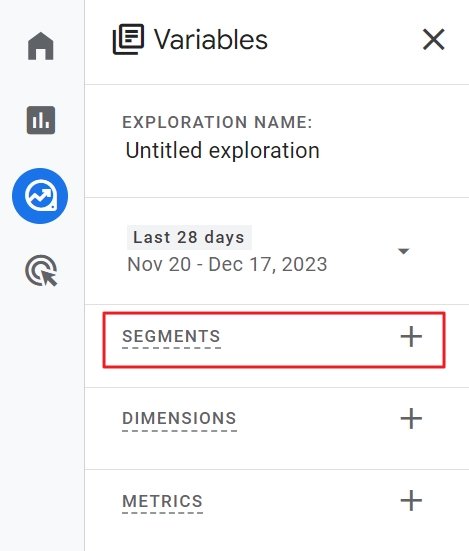
Here are some examples of segments for you to try out:
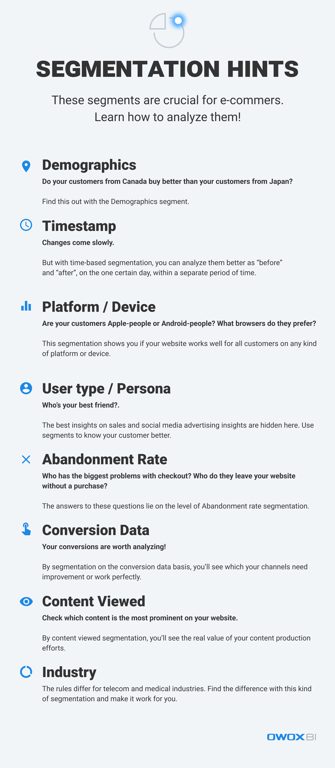
The other way to use segments is to create them for better performance of remarketing, trigger emails, and special offer campaigns.
Okay, we’ve gotten through the segmentation part. That’s great! But to prepare you fully, let’s see what web traffic metrics you have to know to analyze everything correctly.
Main metrics
As Peter Drucker once said, «You can’t manage what you don’t measure.» But measuring on its own is a dead end. Explaining and interpreting is how you get profit from measuring. So be careful with metrics; don’t forget about the real people standing behind them.
Monitoring and analyzing traffic stats is crucial for understanding website performance, including sources of visitors and engagement metrics.
Here’s a list of essential metrics for an e-commerce website (and the corresponding reports in GA4):
- New visits / total traffic
User → User Attributes → Demographic details
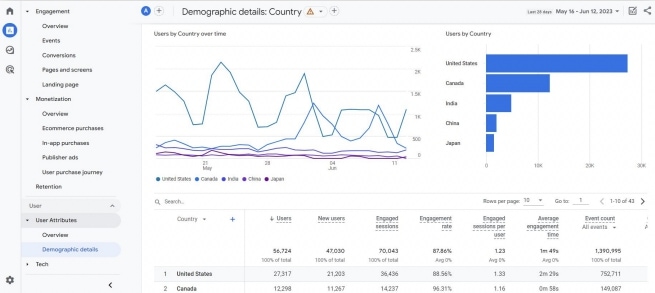
If you want to find out where your customers come from to optimize your ads campaigns, develop the website, and email marketing, you need this report. These primary dimensions are available in the Demographic details report: Country, Region, City, Language, Age, Gender, and Interests. The report shows a map of the world by default, and color saturation demonstrates the proportion of sessions from different regions.
- Behavioral metrics: Bounce Rate, Average Visit Duration, Pages per Visit
Engagement → Overview
This group of metrics shows your visitors’ behavior on the website: whether they’re active and interested (Average Session Duration), how many pages they view (Pages / Session), how fast they leave the site (Bounce Rate), etc.
Also, in the device and platform dimensions, you can find insights about how page loading speed and website presentation on different devices influence your visitors’ behavior. Sometimes, waiting for the page to load is painful, and people leave the website; the bounce rate starts growing, and you can notice this to make improvements.
- Pages investigations: landing & exit pages
Engagement → Landing page (for exit pages, add the Exits metric to an exploration)
This is another dimension to investigate. Looking at all behavioral metrics at the level of pages will help you understand the most popular and least popular pages and give a hint about what to do to improve the situation. For example, if one of your checkout pages is among the popular exit pages, it might be a sign of technical problems.
- On-page event tracking
Engagement → Events
You may track a lot of events on your website, from a simple click anywhere on the page to conversion events: purchases, email subscriptions, comments and feedback, etc. Why do you have to track all of these events? If you want to grow, you should look at the keywords your customers are entering in the search bar and identify the most popular and least popular buttons.
- Multi-channel funnel investigations
Advertising → Attribution
If you imagine a way to get from anywhere on the internet to make a purchase on your site, you can see that’s a long path. Or a funnel, as marketers call it. Website traffic analytics tools help you understand the sequence of channels that lead a visitor to make a conversion and show the importance of each channel.
If you see that your typical user journey, a sequence of channels that it takes to convert your visitor into a customer, has more than three channels, you need an attribution model that evaluates the whole hero’s journey and the contribution of each channel at each funnel stage. A single-touch model such as last click won’t fit your needs, as one of the channels will be overvalued while the value of other channels will be underestimated.
As you see, metrics and investigations are waiting for you. You can explore more marketing metrics in this article. Remember one more thing while working with metrics and statistics: they’re always dynamic, and the change in values matters more than today’s or yesterday’s values on their own.
Also, don’t forget that statistics about website traffic are not the end of your website analysis. Let’s take it one more step ahead.
Join sessions to orders, source by source
Engagement metrics describe a visit; they do not tell you whether that traffic buys. The step that does is a join between sessions and the orders placed in them, at source/medium level. The query below runs on the demo shop behind the public [Demo] E-commerce project in OWOX Data Marts (synthetic data); point it at your own sessions and orders tables.
WITH sessions AS (
  SELECT session_id,
    CONCAT(source, ' / ', medium) AS source_medium
  FROM `owox-demo.ecommerce.sessions`
  WHERE date BETWEEN '2026-07-01' AND '2026-09-30'
),
orders AS (
  SELECT session_id, COUNT(*) AS completed
  FROM `owox-demo.ecommerce.orders`
  WHERE status = 'Completed'
  GROUP BY session_id
)
SELECT source_medium,
  COUNT(*) AS sessions,
  ROUND(100 * COUNT(*)
    / SUM(COUNT(*)) OVER (), 1) AS pct_sessions,
  SUM(IFNULL(o.completed, 0)) AS orders,
  ROUND(100 * SUM(IFNULL(o.completed, 0))
    / SUM(SUM(IFNULL(o.completed, 0))) OVER (), 1)
    AS pct_orders,
  ROUND(100 * SUM(IFNULL(o.completed, 0))
    / COUNT(*), 2) AS orders_per_100
FROM sessions AS s
LEFT JOIN orders AS o USING (session_id)
GROUP BY source_medium
ORDER BY sessions DESC| Source / medium | Share of sessions | Share of orders | Orders per 100 sessions |
|---|---|---|---|
| tiktok / cpc | 23.1% | 7.3% | 0.67 |
| google / organic | 20.3% | 24.6% | 2.54 |
| facebook / cpc | 19.4% | 10.4% | 1.13 |
| direct / (none) | 19.3% | 39.3% | 4.27 |
| bing / cpc | 5.5% | 5.8% | 2.21 |
| google / cpc | 3.8% | 4.5% | 2.50 |
| email / newsletter | 3.5% | 6.5% | 3.94 |
| reddit / cpc | 3.2% | 1.1% | 0.71 |
| linkedin / cpc | 1.4% | 0.4% | 0.62 |
| twitter / cpc | 0.5% | 0.1% | 0.25 |
A quick rule for reading it: divide the share of orders by the share of sessions. Around 1, the source brings buyers in proportion to its traffic. Well above 1 (direct 2.0, email 1.9), it brings people who already intend to buy. Well below 0.5 (TikTok 0.3, Reddit 0.3), it brings visits, not orders. Before cutting a source on that alone, check what it does earlier in the journey: in how to build an attribution model in BigQuery, the same demo shows TikTok opening journeys that other channels close, with a first-click ROAS more than twice its last-click ROAS.
Measure website traffic and merge internal data with online data
On your way to end-to-end analytics, you’ll get to the stage of merging the sales data, also known as internal / CMS / CRM data with the user behavior data and, basically, your cost data.
At this stage, you’ll enrich your on-site analytics data with information about sales performance and completed orders. Additionally, tracking traffic for your own website using tools like Google Analytics and MonsterInsights can provide valuable insights into your website’s performance and the effectiveness of your SEO and marketing strategies.
With sales and CRM data, you can evaluate the real value of your marketing efforts and estimate the performance of the entire sales funnel without missing important insights.
Here is why traffic metrics alone are not enough. In the demo shop behind the public [Demo] E-commerce project in OWOX Data Marts (synthetic data), we joined July–September 2026 sessions with the orders placed in them:
| Channel group | Share of sessions | Pages per session | Single-page sessions | Completed orders per 100 sessions | Share of completed orders |
|---|---|---|---|---|---|
| Paid marketing | 56.9% | 2.5 | 24.7% | 1.09 | 29.6% |
| Organic / referral | 23.8% | 2.6 | 23.9% | 2.75 | 31.1% |
| Direct | 19.3% | 2.6 | 24.4% | 4.27 | 39.3% |
By pages per session and single-page share, the three groups look the same. By orders, paid traffic converts at a quarter of the rate of direct and brings under a third of the sales for more than half of the visits. A traffic report would call these channels equal; only the join with orders shows they are not.
With sales, cost and traffic data joined, you can answer questions like these:
- What was the order completion rate by the campaign?
- What was the ROAS by gross profit by source and medium?
- How many transactions were recorded in the CRM and how many customers were there in each store over a given period of time?
- What’s my ROPO effect?
- and much more…
These answers let you make sound decisions about website performance and measure online advertising across channels. OWOX Data Marts lets an analyst publish SQL over the company’s own warehouse as Data Marts, a shared model that reports and AI questions read from.
Dashboards for website traffic data
Dashboards for website traffic data
Google’s Looker Studio offers pre-designed report layouts that help streamline the process of creating data visualizations and reports. These layouts provide a foundation for displaying data in a visually appealing and easily interpretable way, allowing users to quickly generate insights from their data.
With various customizable options, they can be tailored to meet specific business needs, whether for tracking website performance, monitoring sales metrics, or analyzing marketing campaigns. They save time and ensure consistency in reporting across different projects.
Key takeaways
Start with simple tools for investigating web traffic and progress to more sophisticated tools. Every business must find the perfect set of analytic tools to grow. Consider the limitations of free versions of tools and prepare for each step on your way to end-to-end analytics.
Analyzing traffic statistics is crucial for gaining insights into website performance, keyword rankings, and competitor strategies.
Web traffic analytics is probably the first step of your journey to gain data clarity.
Turn your data into decisions.
Governed data marts give you the clean foundation ML needs to actually work.
- No AI hallucinations
- Analyst-governed definitions
- Every number traces to SQL
Frequently Asked Questions
What is website traffic analysis?
It is the practice of measuring who visits your site, where they come from and what they do there, then connecting that to outcomes such as orders or leads. The usual starting point is sessions and users by source, medium and channel in Google Analytics 4.
How do I analyse website traffic in Google Analytics 4?
Start with the Traffic acquisition report to see sessions by session source / medium and channel group, then look at engagement and key events for each, and break them down by landing page, device and country. Use segments in Explorations for deeper cuts.
Why are engagement metrics not enough to judge traffic?
Two sources can have the same pages per session and engagement while converting at very different rates. Join sessions to the orders placed in them and compare each source's share of orders with its share of sessions to see which traffic buys.
What is the difference between a source and a medium?
The source is where a visit came from, such as google or facebook; the medium is the type of traffic, such as organic, cpc or email. Together, as source / medium, they tell paid search from organic search on the same search engine.