AI data analyst tools you can trust: an honest comparison
Nine AI data analyst tools compared on what an analyst has to answer for: who calculates the number, where its definition is kept, whether you can check the calculation, and where your data goes. We ran the three designs behind them on our own demo data and report the result as it came out. Every claim about another vendor is quoted from its own documentation, read on 9 October 2026 and re-read on 11 October. It ends with a test to run on any of them and a summary to forward.
“Which of these AI tools can we actually trust with our numbers?” The person asking is usually a founder, a CFO or a head of marketing. The person who has to answer is the analyst, and the answer will carry the analyst’s name the first time a number comes back wrong.
If you are the person who asked, the section “What to send back to the person who asked” is written for you. It is five lines. The rest is for the analyst.
This comparison is written by OWOX. We make one of the nine tools, OWOX Data Marts. Everything about the other vendors’ products is quoted from their documentation, and our own test runs are at the end, with their limits.
The short answer
You can trust an AI data analyst tool as far as you can check where its number came from. So the useful comparison is not which tool is smartest. It is who writes the query, where the meaning of “revenue” is kept, and whether you can open the calculation afterwards. The two tables below answer that for nine tools.
Start from the definitions you already keep. Every tool here works from something your team wrote down: a semantic view, a prepared model, dbt metrics, a Data Mart. The right tool is usually the one that reads what you already maintain. If you maintain nothing yet, one number and one agreed sentence is enough to start.
Test it on your own questions before anyone relies on it. In our runs a simple revenue question came back with the agreed figure in all 36 answers; in 33 it came first, and the other 3 led with gross, labelled. In a second, different test, 10 of 66 answers were wrong, and seven of those looked like normal answers. A short test near the end shows how to find that kind on your data.
In most of these tools the figures behind an answer are sent to an AI company so it can write the reply; the second table says where.
The comparison at a glance
Tools that let a business user ask a question about warehouse data in a chat and get a number back. For tools by job, see data analysis tools. The nine fall into three designs, numbered in the first table.
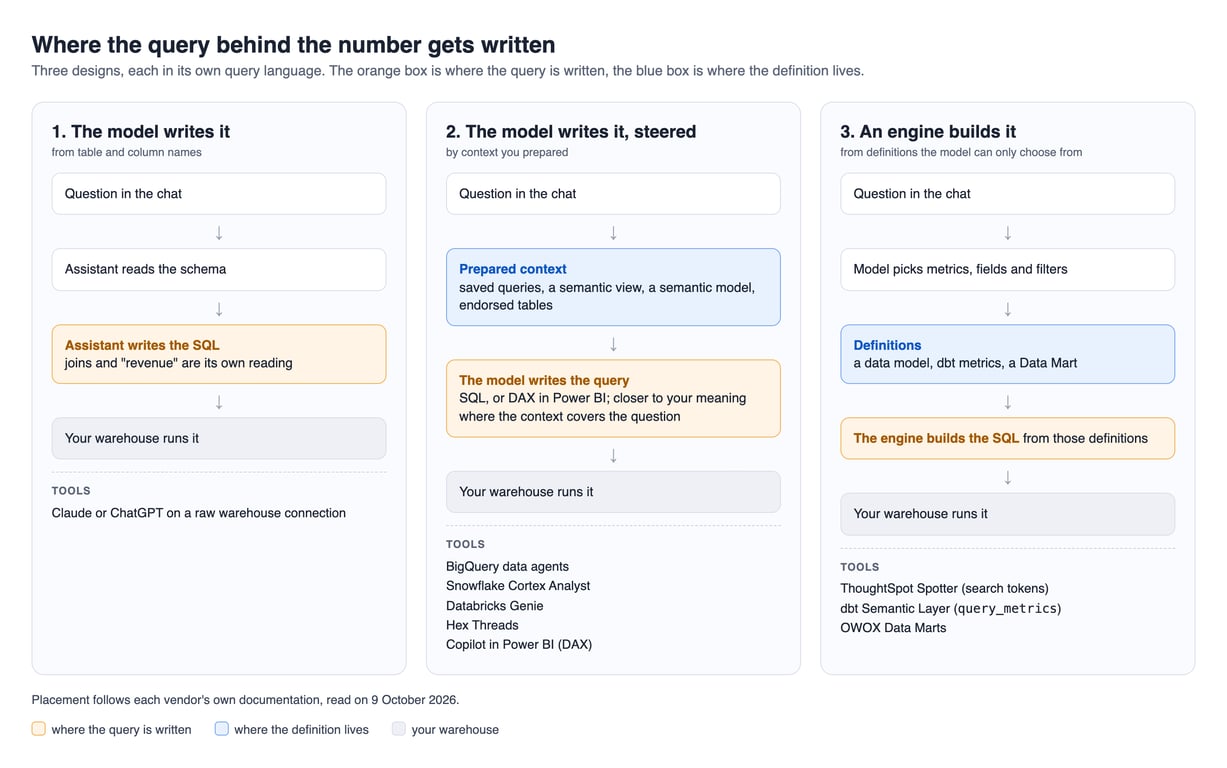
Who writes the query, and where the meaning of “revenue” is kept. Rows two to eight come from vendor documentation; not stated means the pages we read do not say it:
| Tool | Design | Who writes the query | Where the definition lives |
|---|---|---|---|
| Claude or ChatGPT, raw connection | 1 | The assistant, in SQL | Only in table and column names |
| BigQuery data agents | 2 | A verified query if one matches, else the agent, in SQL | Verified queries, glossary, instructions |
| Snowflake Cortex Analyst | 2 | The model, in SQL, from a semantic view | The semantic view |
| Databricks Genie | 2 | The model, in SQL, guided by example SQL | The Genie Agent’s context |
| Copilot in Power BI | 2 | Existing measures, or DAX that Copilot generates | The Power BI semantic model |
| Hex | 2 | The agent, in SQL | Semantic models and endorsed data |
| ThoughtSpot Spotter | 3 | ThoughtSpot generates the SQL; the answer is built from search tokens (our reading of two pages) | A ThoughtSpot data model |
| dbt Semantic Layer over MCP | 3 | dbt for query_metrics, the model for text_to_sql |
dbt metrics |
| OWOX Data Marts | 3 | OWOX, from the Data Mart | The Data Mart |
Where to find the query behind an answer, and what leaves your warehouse:
| Tool | Can you see the query | What reaches the model |
|---|---|---|
| Claude or ChatGPT, raw connection | In the chat and the warehouse job log | The rows the query returns |
| BigQuery data agents | Yes, before the answer, by Google’s launch post | Gemini for Google Cloud. What exactly is sent: not stated |
| Snowflake Cortex Analyst | In the API response (our reading) | Stays inside Snowflake by default |
| Databricks Genie | Yes, in the response; managers also see a Monitoring tab | Not stated |
| Copilot in Power BI | With Fabric IQ on, the DAX query in the reasoning steps; without it, the fields, measures and filters used | Azure OpenAI. Inside your tenant boundary; an admin setting can allow processing outside your region |
| ThoughtSpot Spotter | The search tokens, which you can edit. The SQL: not stated | The filtered query results for the question, not whole tables |
| Hex | In the Thread’s notebook | Schemas, code and output |
| dbt Semantic Layer over MCP | Through a separate tool, get_metrics_compiled_sql, which returns the SQL without running it |
Not stated |
| OWOX Data Marts | Yes, in Run History, unless the answer came from chat memory | Rows and totals |
For every “not stated”, ask the vendor in writing whether result rows are sent to a language model, which provider hosts it, in which region, and whether anything is retained or used for training.
OWOX Data Marts
See your first report built in real time. 15 minutes.
- Connect your data warehouse
- Pick your metrics
- Get a live Google Sheets report
In the time it takes to write a ticket. Then imagine never writing that ticket again.
Book a DemoWe'll use your actual use case
The nine tools, one by one
The vendor’s own words, and when each tool is the right pick.
Claude or ChatGPT on a raw warehouse connection
Google’s BigQuery MCP server is the documented example: it works with “Gemini CLI, ChatGPT, Claude” and gives the assistant execute_sql (Google). MCP is the standard way an assistant calls an outside system’s tools. In our runs, clear column names were enough for a simple question.
Pick it if the person asking is an analyst who reads the SQL first. Setup is in BigQuery MCP for Claude.
Conversational Analytics in BigQuery
Generally available since 23 June 2026 (release notes; the launch post is dated 1 July). The strongest context for a data agent is a verified query: “Deterministic SQL that executes when it matches a user prompt”. Otherwise “the agent generates SQL in response to your questions”, and the service “is powered by Gemini for Google Cloud” (documentation). The launch post says you can review “the exact SQL it generates before it returns an answer” and publish agents to “Gemini Enterprise, Data Studio, or your own application” (Data Studio is Google’s current name for Looker Studio).
Pick it if your data is in BigQuery and people work in Google’s tools.
Snowflake Cortex Analyst
By default it “is powered by Snowflake-hosted LLMs from Mistral and Meta, ensuring that no data, including metadata or prompts, leaves Snowflake’s governance boundary” (overview). For a question similar to a verified query it “uses that query to generate the SQL query in its response”; the page does not say whether the verified query runs unchanged (verified queries). It is “a convenient REST API” you put behind your own app; people can also ask in Snowflake CoWork, “a ready-to-use agentic application”, or from Claude and ChatGPT through Snowflake’s managed MCP server.
Pick it if everything you report on is in Snowflake and keeping data inside one boundary matters most.
Databricks Genie
“Data access is always evaluated using each end user’s own Unity Catalog permissions” (set-up). Managers “can see the questions they’ve asked on the Monitoring tab” (best practices). Databricks is the most direct about repeatability: “Like other large language models (LLMs), Genie can exhibit non-deterministic behaviors.” (monitoring, which also says generated SQL “is included in the response”).
Pick it if your data is in Databricks with Unity Catalog in good order and an analyst will keep adding example queries.
Copilot in Power BI
“Copilot can answer questions by using existing measures and columns in your semantic model. It can also generate DAX queries for ad hoc calculations.” What you can check depends on Fabric IQ, “currently available only when viewing reports in the Power BI service”: with it on, each reasoning step shows “the generated DAX query, and the query results used to produce the response”, but “When Fabric IQ is enabled, Copilot doesn’t return verified answers” (asking questions).
Microsoft is plain about limits: “AI behavior is nondeterministic. Copilot doesn’t always produce the exact same response, even with the same input” (preparing data). The same exact prompt “within a rolling 24-hour window” is answered from a cache (overview). On data: “Your data stays within your organization’s tenant boundary and isn’t used to train foundation models” (privacy). But outside “the United States or EU data boundary” Copilot is off unless an admin enables the setting “Data sent to Azure OpenAI can be processed outside your tenant’s geographic region, compliance boundary, or national cloud instance” (overview).
Pick it if your reports already live in Power BI on maintained semantic models.
ThoughtSpot Spotter
ThoughtSpot makes the claim we make for our own product: “Rather than letting an LLM hallucinate SQL, ThoughtSpot uses proprietary, database-specific query generation” (semantic layer). The user sees “the answer title and the search tokens used to construct the answer” (getting started). Spotter “never sends entire tables or databases to LLM providers. It only transmits the relevant, filtered query results necessary to answer the specific question that is asked”. Multi-step analysis in Spotter 3 goes further, “sending CDW query results to LLMs for analysis” (data handling).
Pick it if you want a full BI product around the assistant and are ready to model your data in ThoughtSpot.
Hex
“The Notebook agent is intended to be used by technical users who can audit the SQL and code that the agent suggests.” “The Threads agent is intended to be used by non-technical members outside the data team” (AI overview). “Enabling Endorsed Mode restricts the agent to using only endorsed assets” (Threads). Hex sends “schemas” and “project code and output content as model context”.
Pick it if your analysts already work in Hex.
dbt Semantic Layer through the dbt MCP server
The assistant asks for a metric by name and dbt compiles the SQL (tools). It needs metrics, not only models. The same server also gives “access to private APIs, text-to-SQL, and SQL execution” (about), so one connection is the governed route or the raw one, depending on which tools you switch on.
Pick it if your metrics are already dbt metrics and your team maintains them.
OWOX Data Marts
Ours. A Data Mart is a dataset an analyst defines on a table, a view or a SQL query you already have, with a description for every field. Data Marts and the relationships between them form a data model of the business; OWOX does not build a semantic layer on top. The OWOX MCP server gives assistants published Data Marts and nothing else: “They cannot run arbitrary SQL”, only “structured queries built from the fields, filters, and aggregations” (OWOX documentation). Each call is recorded in Run History with “the query definition and executed SQL”.
The limits: “the resulting data rows and totals are sent” to the company behind the assistant, Anthropic for Claude or OpenAI for ChatGPT. OWOX’s MCP server is part of OWOX Data Marts Cloud. The assistant still chooses the Data Mart and the field. It runs on Google BigQuery, Snowflake, AWS Redshift, AWS Athena and Databricks (supported storages).
Pick it if people want to ask in Claude or ChatGPT and you want the definition behind the chat to be the one behind your and Data Studio reports. You can start with one Data Mart.
Which one fits your setup
The “Pick it if” lines above are the fit list. Three rules settle the rest.
If two lines describe you, pick the one whose definitions you already maintain. Writing them is the expensive part of every option. With dbt metrics in place, do not add a second set; the case for keeping one is in metric definitions without a semantic layer.
If you have two sets of definitions, say dbt metrics and Power BI semantic models, start with the one finance signs off on.
If you have none, you are not behind. Take the number you are asked for most, save its query as a view, write one sentence on what it counts, and get the person who asks for it to agree. Then give that query to the tool in its own form: a verified query on BigQuery, a semantic view on Snowflake, a Data Mart if people ask in Claude or ChatGPT. The longer version is in can you trust AI with your business numbers.
What none of them fix
- Somebody has to decide what the number means, and own it afterwards. Owning a definition means deciding when it changes and writing the change down where the tool reads it, not vouching for every answer a chat gives.
- The same question can still come back differently. Databricks and Microsoft say so. In our runs the figures held; only in the Data Mart setup did the wording change which one came first; see why AI gives different answers to the same data question.
- Every question is charged for. Ask each vendor: what am I charged per question, and in what unit?
- A refusal has to be tried. The setups we asked all declined what the data could not answer, so a refusal alone does not separate tools.
A test to run on any of them
A simple question over clean, well-named data tends to come back right however the model is connected, so a vendor demo of one shows little. This takes one sitting and shows more.
- Pick the number your leadership argues about most. Usually revenue.
- Ask for it three ways, each in a new session: “revenue last quarter”, “how much did we earn in Q3”, “Q3 top line”.
- Check the label of the first figure in each answer. In our runs through a Data Mart, “top line” brought gross first, labelled, with net beside it; a difference marks a word to define.
- Find the query behind each answer, where the second table says to look. An answer with no query behind it did not come from your data.
- Ask one question your data cannot answer, such as headcount, and note whether the tool refuses or produces a number.
- Add five harder questions for which you already have a query you would sign: a breakdown by category, a filter on a status, a count of distinct customers. In our separate 25-question test, this kind of question is where the wrong answers were, seven of them plausible figures; comparing against a query you trust is how you would catch them.
What to send back to the person who asked
What to send back to the person who asked
Short enough to forward:
- Yes, we can ask our data questions in an AI chat. The right tool depends on where our data and definitions already live.
- In the authors’ own small tests, a simple revenue question came back right every time. In a second test of 25 questions, with a different AI model that could not look at the data, 10 of 66 tries were wrong; seven looked like normal answers, with a different meaning of “revenue” from the agreed one. I will repeat it on ours.
- Every tool worth using needs someone to write down what each number means and keep it up to date. I will start with the number we argue about most.
- Before we roll anything out I will ask the same question three ways, add harder questions I know the answer to, and check that I can see the calculation behind each answer. Expect the wording of a question to change which figure the AI says first.
- In most of these tools, the figures the AI reads to answer you are sent to the company that makes the AI, not only your question. Before a pilot, ask security or our auditors whether that is acceptable.
How we tested and compared
Which tools. On 9 October 2026 we ran 14 Google searches on the question, read the 24 ranking lists that loaded and the seven AI Overviews that were on topic. A tool is here if at least six lists mention it and at least two Overviews name it. Seven passed, from Copilot in Power BI (18 lists, three Overviews) to Snowflake Cortex Analyst (six lists, three Overviews). The counts were made by hand from that day’s search results; a mention anywhere in a list counts. We added the dbt Semantic Layer for readers who already have dbt metrics, and our own product, which is on none of the lists.
Sources. Every statement about another vendor is quoted from that vendor’s documentation or product blog, read on 9 and 11 October 2026, with the link next to it. A cell that is our reading of a page says so. Not stated means the pages we read do not say it. No prices: they change with your contract.
Our own runs. Of the nine, we ran our own product and a raw Claude connection; every row about another vendor’s product comes from its documentation. On 11 October 2026 we asked one question about one week of demo orders (21–27 September 2026, 275 order lines) in three wordings, three runs each, with Claude Opus in a fresh session every time. The agreed definition is net revenue, completed orders only: $64,717.20. Gross, every order status, is $77,267.82.
| Pasted CSV export, no tools | Raw SQL on BigQuery, no instructions | Raw SQL plus a two-line definition in the instructions | Published Data Mart only | |
|---|---|---|---|---|
| Design | Before any tool | 1 | 2, in its thinnest form | 3 |
| “revenue”: led with | Net, 3 of 3 | Net, 3 of 3 | Net, 3 of 3 | Net, 3 of 3 |
| “earn”: led with | Net, 3 of 3 | Net, 3 of 3 | Net, 3 of 3 | Net, 3 of 3 |
| “top line”: led with | Net, 3 of 3 | Net, 3 of 3 | Net, 3 of 3 | Gross, 3 of 3, labelled, net next to it |
| Said which orders it counted | 9 of 9 | 9 of 9 | 9 of 9 | 9 of 9 |
| Answers with a wrong figure | 0 | 0 | 0 | 0 |
| Where the definition came from | The model’s reading of the status column |
A column named line_net_revenue |
The instructions text | Field descriptions in the Data Mart |
On “top line” the Data Mart answers led with gross, $77,267.82, labelled, with net next to it. “Top line” commonly means gross revenue, and the Data Mart describes both fields without saying which one the phrase refers to. A headcount question was refused by the export and the Data Mart, the two setups asked. A Data Mart request and its Run History record are traced in governed AI analytics on BigQuery.
Limits. One model, run as Claude Code sub-agents and not a chat app, on clean demo data, three runs per cell. The raw view already had a column called line_net_revenue, and four of the nine uninstructed answers named it as their reason. Design 2 was a two-line instructions text, not a vendor’s semantic view. The SQL in the raw setups is as each session reported it, no log was opened, and the Data Mart runs were told which two Data Marts to use.
The second test. The same day, a test from a separate OWOX article on text-to-SQL accuracy, put 25 questions, 22 of them answerable, to claude-sonnet-5-5. In one setup it wrote SQL from table and column names and could not run a query; it was correct in 56 of 66 runs. Seven misses returned a plausible wrong figure, gross where the agreed revenue is net, and the task allowed SQL only, so the model had no way to add a caveat. Three returned an empty result a reader would notice, from a filter on completed where the data says Completed. Through published Data Marts, one run per question, it was correct in 20 of 22, led with gross once, and declined one answerable question. Both setups declined the three unanswerable ones. Model, questions and query access all differ from the runs above, where raw access led with net 18 of 18, so we cannot isolate which mattered.
References
- Hex, AI data privacy
Turn your data into decisions.
Governed data marts give you the clean foundation ML needs to actually work.
- No AI hallucinations
- Analyst-governed definitions
- Every number traces to SQL
Frequently Asked Questions
Which AI data analyst tool is the most accurate?
No vendor in this comparison publishes an accuracy figure that can be compared with another vendor's. Of the nine we ran two on demo data: our own, OWOX Data Marts, and a raw Claude connection. A simple revenue question came back right in every setup. In a second test of 25 questions, a model writing SQL from table and column names, unable to run a query, was wrong in 10 of 66 runs; seven of those returned a plausible wrong figure. Accuracy depends mostly on the definitions you give the tool. Databricks and Microsoft both state in their documentation that their assistants can return different outputs for the same prompt. The practical answer is to test on questions you already have a trusted query for, and to check that you can see the query behind each answer.
Can I just connect ChatGPT or Claude to my data warehouse?
Yes. Google, for example, runs a BigQuery MCP server that works with Gemini CLI, ChatGPT and Claude and gives the assistant tools to list tables and run SQL. The assistant then writes its own queries from your table and column names, with no definition of what a number means. That suits an analyst who reads the SQL before believing the result. It is the wrong setup for someone who only sees the answer.
What is the difference between text-to-SQL and a governed AI analyst?
In text-to-SQL the language model writes the query, so the meaning of a metric and the joins are its own reading of your schema. In a governed setup the model chooses from definitions an analyst wrote, and an engine builds the SQL from them. ThoughtSpot Spotter, the dbt Semantic Layer and OWOX Data Marts work the second way. Several tools sit in between: the model still writes SQL, but is steered by saved queries or a semantic view.
Do AI data analyst tools send my data to OpenAI or Anthropic?
It depends on the tool. Snowflake says Cortex Analyst is powered by default by Snowflake-hosted models, so data does not leave Snowflake's governance boundary. Microsoft says Copilot in Power BI keeps data within your organization's tenant boundary. ThoughtSpot's documentation says multi-step analysis sends warehouse query results to a language model. With OWOX Data Marts, the result rows and totals are sent to the provider of the assistant you connected, Anthropic for Claude or OpenAI for ChatGPT. Check this against your own rules before a pilot.
Do I need a semantic layer before I use an AI data analyst?
You need a written definition of each number, in some form. Every tool in this comparison except a raw connection asks for one: a semantic view in Snowflake, a Genie Agent in Databricks, a prepared semantic model in Power BI, dbt metrics, or a Data Mart in OWOX Data Marts. If you already maintain one of these, start with the tool that reads it, because a second definition layer is more to keep current.
Which AI data analyst tools work inside Claude or ChatGPT?
From the documentation read for this comparison between 9 and 12 October 2026: Google's BigQuery MCP server works with ChatGPT and Claude, Snowflake's managed MCP server can serve Cortex Analyst as a tool to MCP clients such as Claude and ChatGPT, the dbt MCP server has a setup guide for Claude, Hex's MCP server lets Claude start Hex Threads, and the OWOX MCP server works with Claude and ChatGPT. For BigQuery data agents, Databricks Genie, Copilot in Power BI and ThoughtSpot Spotter, the pages we read describe the vendor's own interfaces, Slack, Teams or an API, and do not state access from Claude or ChatGPT.