Key benefits of Google Analytics 4
In this article, we analyze the key advantages of Google Analytics 4 and why you should not delay your transition to the new version.

The main benefits of Google Analytics 4 over Universal Analytics are one event-based data model for websites and apps, a native export of raw data to BigQuery, consent mode, and explorations for ad hoc analysis.
Google officially shut down Universal Analytics as planned. The standard version stopped working on July 1, 2023, followed by Universal Analytics 360, which had a one-year processing extension and stopped on July 1, 2024.
As of 2025, all users must transition to Google Analytics 4, as the previous version is no longer supported. Universal Analytics, the previous version, had different features and reporting methods; therefore, it’s essential to understand these differences when transitioning to the new platform.
In this article, we analyze the key advantages of Google Analytics 4, including its ability to generate custom reports, and why delaying the transition has risked losing historical data once the UA interface became read‑only on July 1, 2024. Unlike UA, GA4 offers enhanced event-based tracking and new reporting capabilities.
Additionally, make sure the data collected in the previous version is preserved or properly migrated to GA4 for continued analysis.
What Prompted the Changes in Google Analytics?
What Prompted the Changes in Google Analytics?
Over the past decade, people have begun to live online and regularly access the internet from multiple devices. Having previously analyzed cookies, devices, browsers, visits from contextual advertising, search, and targeted networks, it’s now extremely important to analyze a specific user’s flow across devices, platforms, and products.
User privacy and privacy practices have become central to these changes, with modern analytics tools like GA4 incorporating features to address evolving data protection regulations and user concerns.
Today, businesses that know their clients win. The latest Google Analytics update reflects the fact that we now understand a user not as a set of cookies but as a specific person. We understand that they can act on different platforms and that an individual’s profiles across platforms need to be connected.
A New Era has Begun
According to estimates of Western analytical giants, the following situation exists in the US and Western European markets, affecting the quality of analytics data:
- 85% of companies cite customer experience management as their priority. This means they invest in tracking and customer experience analytics. They understand that it’s necessary to build a business and analytics around the user, rather than focusing on the flow of traffic and sessions that the analytics system displays.
- 40% of companies build their marketing using the account-based marketing (ABM) model. This is a strategy for highlighting and building personal communication with a specific client.
Cookies are slowly becoming a thing of the past. Their lifetime is limited, and the ability to work with third-party cookies is restricted. They are no longer a reliable source of data about people or reliable support for building an analytical platform. Consequently, Google Analytics 4 is moving away from cookies. Google no longer plans a blanket phase-out of third-party cookies; Chrome is shifting to user controls and Privacy Sandbox APIs, but GA4 still relies on first-party cookies for basic session stitching, while emphasizing user- and event-level modeling. Google Analytics 4 automatically hides user IP addresses to support privacy, and there’s no option to switch this off. This approach is designed to comply with today’s data protection regulations.
Introduction to Google Analytics 4
Introduction to Google Analytics 4
Google Analytics 4 (GA4) is Google’s latest analytics platform, built to help businesses better understand how people interact with their websites and apps. Unlike Universal Analytics, which focuses mainly on sessions, GA4 uses an event-based model that provides more flexibility in how you collect and interpret data about user behavior.
With Google Analytics 4, digital marketers can create custom reports tailored to their unique business objectives, track user interactions in real time, and build audiences based on specific actions or attributes. The platform’s advanced analytics capabilities enable businesses to analyze the entire customer journey, from the first website visit to app usage and eventual conversion.
OWOX Data Marts
See your first report built in real time. 15 minutes.
- Connect your data warehouse
- Pick your metrics
- Get a live Google Sheets report
In the time it takes to write a ticket. Then imagine never writing that ticket again.
Book a DemoWe'll use your actual use case
What are the Benefits of Google Analytics 4
What are the Benefits of Google Analytics 4
In 2021, Google Analytics experienced a big update that changed many things:
- Architecture
- Data pipelines
- Mechanics of data acquisition and user identification
- Automatic events
- Analytical capabilities;
- Integrations
- Data-based attribution
- New interface
- Audience Segmentation and Targeting
- Predictive Insights and Machine Learning Features
GA4 now offers standard reports for quick insights and also allows you to create a custom report tailored to your specific needs.
1. New Architecture
Google Analytics and many other analytics systems employ a session-based/cookie-based architecture, featuring a root identifier for each set of cookies. In Google Analytics, this identifier is referred to as the Client ID. There are also sessions – user visits – on which all reports are based. At one time, this was a prerequisite for switching to an e-commerce model of system operation.
However, over time, numerous errors and problems have emerged related to the session model. For instance, building a normal cohort analysis, counting conversions, and evaluating advertising campaigns in terms of their effectiveness and impact on business proved to be a challenge.
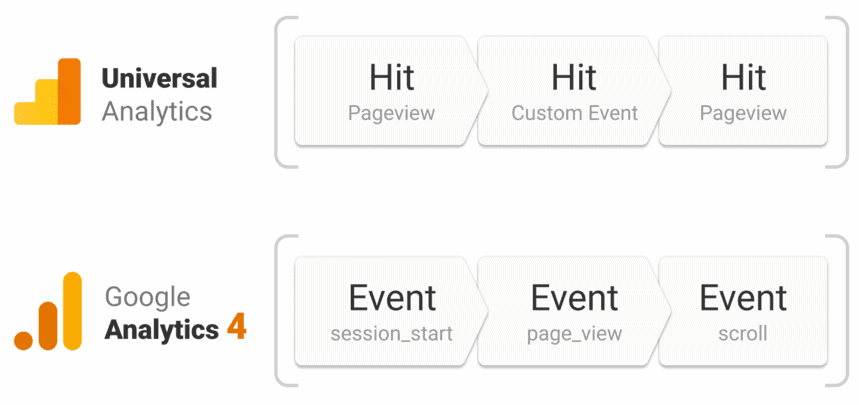
Google Analytics 4 is an event-based and user-centric system. Instead of relying on sessions, GA4 tracks every interaction as an event tied to the user, allowing for deeper analysis and flexible attribution.
Here are the key points:
- Every user interaction is treated as an event, identified by an event name that allows for organized analysis and categorization.
- GA4 builds the user’s journey through the website using these logged events.
- Events can be treated like micro conversions, enabling funnel-based attribution–essential for evaluating marketing effectiveness early in the customer journey.
- You can define up to 30 key events per property, compared to 20 goals per view in Universal Analytics. Each event can send up to 25 parameters; 30 key events per property (higher limits on 360).
- GA4 tracks conversions through conversion events, which assign value to different traffic sources.
Each event can include up to 25 parameters, giving you greater flexibility to track detailed user behavior with custom events.
2. Data Pipelines (Cross-Platform Analytics)
At first glance, little has changed in terms of data pipelines. In Universal Analytics, you could configure the website and mobile app tracking via Firebase. But what did we really have? There was a data pipeline from the website, as well as an independent data pipeline from mobile applications. To connect them, you had to do a reasonable amount of tinkering with cookies.
Additionally, there was a separate data pipeline from the CRM system that included the User ID. Importantly, Universal Analytics required you to set up separate properties for each data source, such as the website and each mobile app. If, for some reason, we couldn’t allocate the User ID, we used Google Signals instead.
Now, Google Analytics 4 can utilize data as a single pipeline: website, application, and user ID. GA4 allows you to combine data from both website and mobile app platforms within a single property, providing unified reporting and tracking.
Sub-properties and roll-up properties are available to GA4 360 customers. Previously, we had three independent data pipelines; now, we have unified reporting across websites, mobile applications, and User IDs.
When setting up data streams in GA4, you can track data from the web, such as your website, and from mobile apps, including the Android app, all within the same property.
3. Getting Complete User Flow Data
Google Analytics 4 introduces a more intelligent way of identifying users–moving beyond cookies and focusing on user-based tracking through multiple identifiers.
Key highlights:
- Previously, data relied on cookies or manually collected identifiers like User ID from CRM, ERP, CMS, or PPM systems.
- In GA4, each user can now have multiple identifiers:
- User ID (if available)
- Google Signals
- Device ID (used when User ID is unavailable)
- In Reports, GA4’s Blended identity prioritizes User-ID and device-based signals; Google signals aren’t part of reporting identity.
- All statistics are built around the user or unified device identifier, not cookies.
Previously, a person who visited a website from two different browsers but from the same device had two different Client IDs.
This meant it was not possible to link statistics for these IDs if there was no authorization on the website and no User ID was provided. According to Google Analytics, these were two different visitors. Now, thanks to Device ID, these visits can be consolidated into a single profile within the Google Analytics 4 platform.
GA4 also tracks user events across different devices and platforms, helping you connect the dots between user interactions and get a clearer picture of the whole customer journey.
When building user profiles, the data from these interactions and events plays a key role in understanding behavior and generating accurate insights. Additionally, the DebugView tool in GA4 enables real-time debugging of events and user interactions, making troubleshooting more efficient.
4. Automated Events
Previously, after installing Google Analytics on the website, we received empty fields. We only received traffic that wasn’t always collected correctly because the company, for example, had several domains, and cross-domain tracking wasn’t configured. This problem was especially relevant for small and medium-sized businesses. Companies received useless statistics, according to which little could be understood or predicted about the effectiveness of advertising investments.
Once GA4 is set up, it automatically starts tracking common events like page views, scrolls, outbound clicks, file downloads, purchases, and more without any extra configuration. Enhanced Measurement covers page_view, scroll, outbound_click, file_download, site_search, video engagement, form interactions.
This built-in tracking captures important user actions, like purchases, so you can better understand how people interact with your site or app. This allows people who aren’t well-versed in Google Analytics and don’t want to waste their time to get the event preset out of the box. GA4 also provides advanced user engagement metrics by automatically tracking interaction events, for example, engagement rate and user engagement time replace bounce rate.
5. Advanced Analytical Capabilities
Universal Analytics is famous for complex reports and conflicting data. It presents users with a million tables, numbers, and formats. Moreover, when setting up reports, you may encounter incompatible parameters and only discover them when you save the report. Reports aren’t user-friendly, and the system’s capabilities are limited by its architecture, which is based on cookies and Client ID.
In Google Analytics 4, you can create reports, data slices, and audiences and compare them on the go. It’s much faster and more convenient. Now you have a single dataset containing information about users and the actions they take on the website or in the application, and you can structure this data in a way that is convenient for you.
GA4 allows you to explore your data in detail and customize detailed reports in all the ways you need, offering flexibility and granular insights.
In fact, Google Analytics 4 is a set of well-customized dashboards. It ships with reusable Explorations and Overview cards that can be customized into dashboards. Moreover, GA4 offers superior audience segmentation capabilities compared to Universal Analytics, allowing businesses to target their users more effectively and enhance data quality for more accurate insights.
GA4’s engagement rate offers a more nuanced understanding of user interactions than the bounce rate (Bounce rate still exists in Reports > Engagement but is now the inverse of engagement rate).
6. Simplified Integrations, Including Google BigQuery
Universal Analytics is hard to integrate. The Measurement Protocol allows you to transfer data to Google Analytics, but it’s not always stable and transparent in tracking and testing. As a result, we have unstable custom integrations and far from transparent rules of the game, for example, with sampling or the amount of data being uploaded. We receive data in large numbers in various poorly connected interfaces.
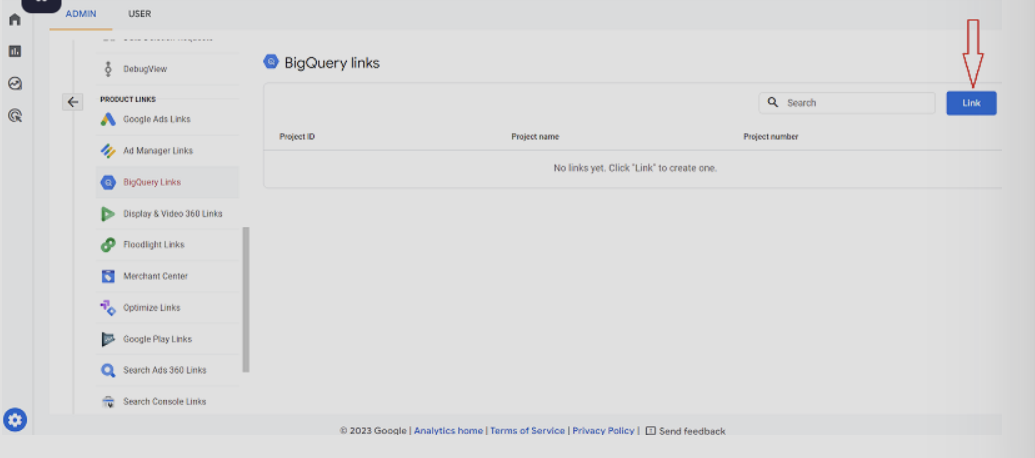
Google Analytics 4 is a single data system. Now, we can view all data on user actions across our websites in a single interface. This data can be easily integrated with Google’s advertising services and with BigQuery. Notably, GA4 integrates with Google BigQuery at no extra cost for data analysis, making it more accessible for businesses to leverage advanced analytics. However, compared to other tools like Mixpanel or BigQuery itself, GA4 offers less flexibility for advanced funnel creation, data filtering, and retroactive data manipulation, as different tools provide more customization options for these tasks.
7. User-Friendly Interface
Google Analytics 4 introduces a modern, streamlined interface designed to reduce clutter and improve usability. While it may feel unfamiliar at first, especially for long-time Universal Analytics users, the new layout focuses on flexibility, faster navigation, and easier access to key insights.
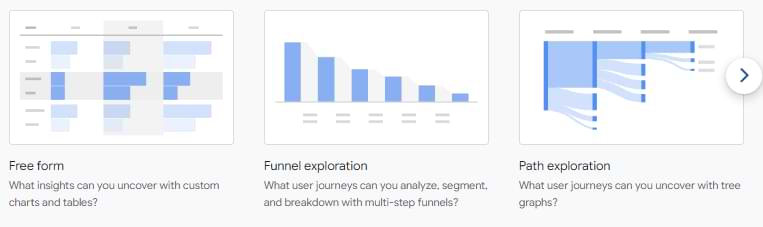
Instead of overwhelming users with dozens of predefined reports, GA4 offers customizable dashboards and tools, such as Explorations, which allow you to build tailored visualizations and reports.
8. Data-Based Attribution
As of January 7, 2022, a data-driven cross-channel attribution model is now available to all Google Analytics 4 users. It became the default attribution model across GA4 reports in September 2023. GA4 supports scheduled report emails from the ‘Share & export’ menu; for complex bursts use Looker Studio or the API. Additionally, reporting workflows have changed, as GA4 replaces the traditional view filters from Universal Analytics with data filters applied directly to data streams, which may necessitate alternative solutions for more granular filtering.
What do we want from an attribution model? For it to be accurate and understandable. But the standard attribution models available in Universal Analytics meet only one of these requirements.
For example, the most popular last-click attribution model (Last-Click, Last Non-Direct Click) is quite understandable – all value is given to the last campaign. However, it has an obvious drawback – it overlooks the contributions of all campaigns except the last.
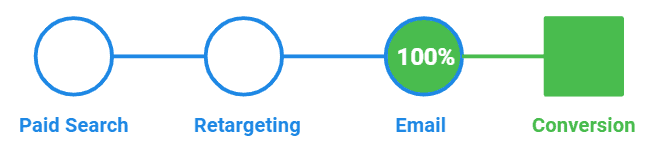
Many people use associated conversions, especially to evaluate display campaigns. This model gives value to the conversions of every campaign the user has interacted with. However, such an assessment is extremely inaccurate, as it considers only the existence of a campaign in the chain and overlooks its degree of influence.
Probabilistic attribution models such as Data-Driven produce more accurate results. They assess how much a specific campaign has increased the likelihood of conversion, and accordingly, determine its value. A key benefit of data-driven attribution in GA4 is that it offers more accurate credit distribution for conversions, potentially improving ROI by better reflecting the true impact of each channel.
Previously, only Google Analytics 360 users had access to data-based attribution. And to use it, they needed to fulfill additional requirements.
Unlike previous versions, Google Analytics 4 allows you to change the predefined attribution model for all reports. Now you can apply not only rule-based cross-channel models for free but also an alternative data-based model. Additionally, funnel analysis in GA4 is no longer limited by the restrictions present in Universal Analytics, allowing for more flexible and extensive tracking across multiple sessions and historical data.
Let’s summarize:
- Google Analytics has become smarter. It automates many operations that were previously done manually.
- There are more opportunities. Google Analytics has become a more professional analytics platform than it was in previous editions.
9. Audience Segmentation and Targeting
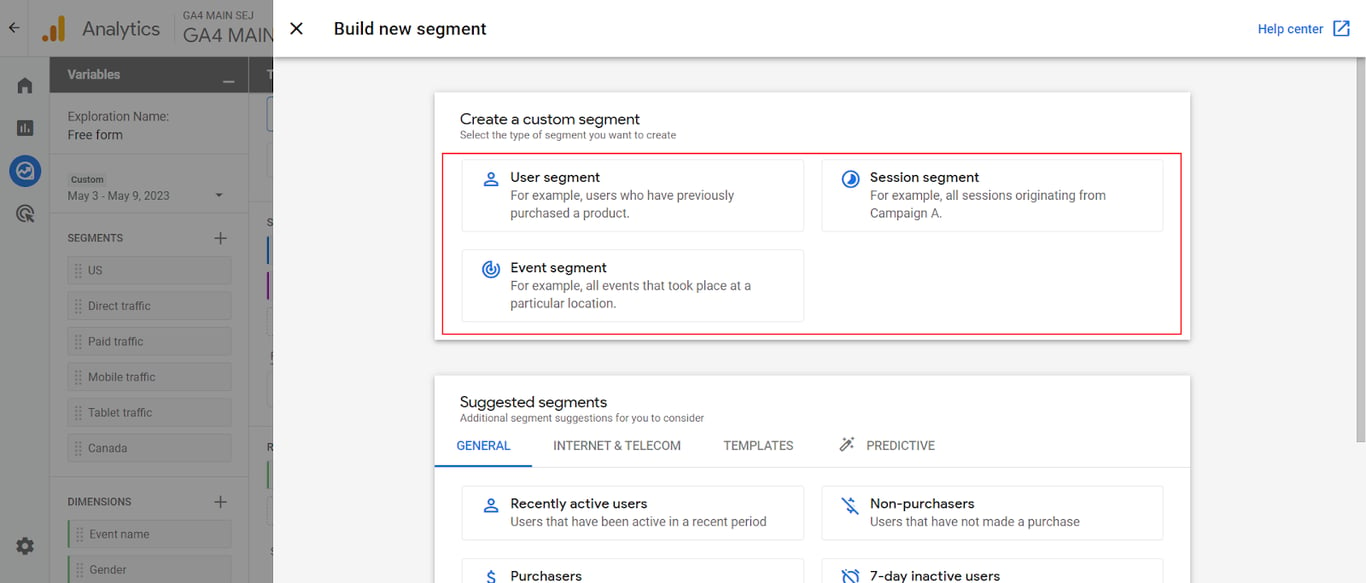
One of the standout benefits of Google Analytics 4 is its advanced audience segmentation and targeting capabilities. Unlike Universal Analytics, GA4 empowers businesses to create highly customized audiences based on a wide range of user behaviors, demographics, and interests. This means you can segment users not just by basic metrics, but also by specific events captured across both your website and mobile apps.
GA4 provides deeper insights into user behavior, offering engagement metrics like time spent on site, pages per session, and more, allowing for more precise audience definitions. With the ability to create audiences based on these granular behaviors, businesses can deliver personalized marketing campaigns that resonate with each segment. The integration with Google Ads makes it easy to activate these audiences for targeted advertising, ensuring your marketing efforts reach the right users at the right time.
Additionally, GA4 introduces audience triggers, enabling businesses to automatically create custom events when users meet certain criteria, such as completing a series of actions or reaching a milestone. This feature, combined with BigQuery integration, enables sophisticated analysis of large datasets, allowing businesses to uncover new insights and optimize their strategies.
10. Predictive Insights and Machine Learning Features
Google Analytics 4 incorporates machine learning to provide you with more than just basic reports. It can pick up on trends, spot anything out of the ordinary, and even predict what users might do next, like who’s at risk of dropping off or who’s likely to buy, based on their past activity.
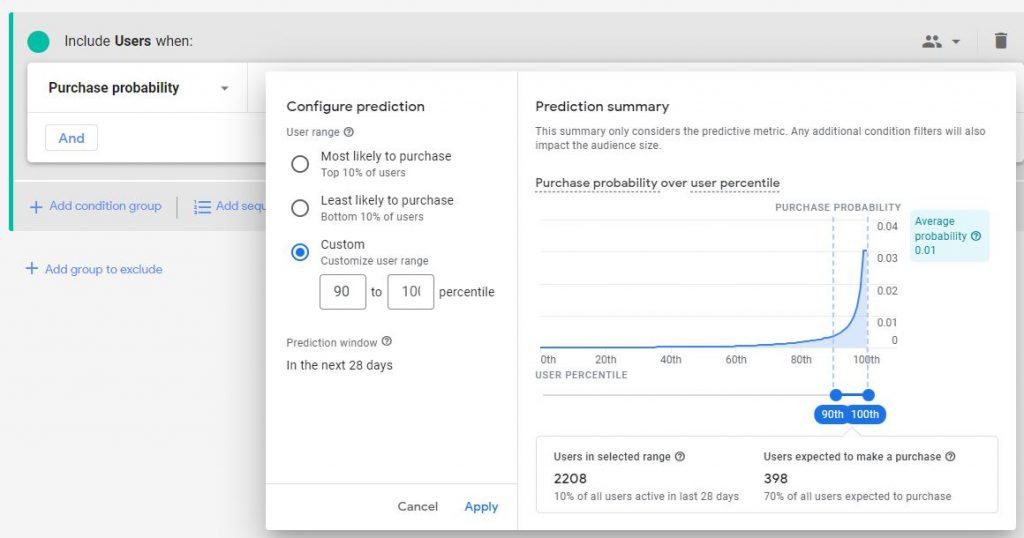
These predictive metrics enable businesses to take a more proactive approach, engaging users earlier and adjusting campaigns to drive more conversions. To populate, predictive metrics require at least 1,000 purchase or churn events within a 28-day period.
If your website receives high traffic and transaction volumes, GA4 can generate predictive audiences such as:
- Likely 7-day purchasers
- Likely 7-day churning users
- Predicted 28-day top spenders
- Likely first-time 7-day purchasers
- Likely 7-day churning purchasers
You can directly use these audiences in your Google Ads campaigns to create highly targeted, data-backed ad strategies. This adds a strategic layer to your analytics setup that wasn’t available in Universal Analytics.
Why Understanding the Complete User Journey is Critical in GA4
Why Understanding the Complete User Journey is Critical in GA4
To be effective in the current reality, businesses need to:
- Know your customers as people, not just as a set of data points. Otherwise, over the next few years, there will be nothing to focus on.
- Understand the entire customer journey, not fragments. Without customer journey analytics, it’s impossible to invest correctly (with minimal CRR and maximum ROMI).
- Build personalized communication with each client. A new cycle of data-driven development has emerged for digital marketing and analytics. Businesses have a real opportunity to track one person across several devices and merge this data into a single analytical environment (in the same Google Analytics 4), then transfer it to an analytical database and merge it with data from their own systems.
This means it’s extremely important to collect all information about your users and use it in marketing and automation analysis.
Essential Steps to Successfully Transition to Google Analytics 4
Essential Steps to Successfully Transition to Google Analytics 4
Moving to Google Analytics 4 isn’t just a simple switch; it requires some planning and technical setup to ensure your data continues to work for you. Here are the key actions businesses should take to ensure a smooth and effective transition.
- Try to identify your audience as precisely as possible and accumulate user data. Consider how you’ll ensure that you receive a User ID on the side of your website and other platforms. The data collected at this stage is crucial for future analysis and for building effective tracking strategies.
- When identifying visitors, don’t forget about protecting personal data. Display a compliant cookie‑consent banner and document lawful basis under GDPR or CCPA. Users must obtain clear consent for processing personal data to avoid potential fines under GDPR when using GA4.
- If you have a mobile application, compile the data in Google Analytics 4.
- Set up tracking of all significant events: micro conversions and conversions required to evaluate the funnel.
- Stay informed about API updates and adjust your data collection systems accordingly. In GA4, consider how data filters are applied directly to data streams, as this impacts how you manage and refine incoming data compared to Universal Analytics.
- Set up basic reports and audiences. For example, Google Analytics 4 can be used as an analytical dashboard for company management. Leverage custom dimensions to tailor your reports and gain deeper insights into specific user interactions and event parameters.
- Merge all available audience data into a single database. Try to save as much data as possible about your audience (whether identified or not) in your databases.
- Update corporate training materials on Google Analytics.
Key Takeaways
As of 2025, the shift to Google Analytics 4 is no longer optional, as Universal Analytics has been fully retired. However, many businesses are still adjusting to the platform’s new structure and interface, particularly in managing multiple data streams**.**
GA4 offers powerful benefits, including cross-platform tracking, event-based data, advanced insights, and improved alignment with privacy standards. Delaying migration risks losing historical data critical for informed decision-making. Since GA4 stores data for only up to 14 months in the standard (free) tier, while GA4 360 extends retention to 50 months, businesses should act quickly to set up parallel tracking, preserve key insights, and adapt their reporting systems accordingly.
When GA4’s own reports are not enough
When GA4’s own reports are not enough
The GA4 interface samples large explorations, keeps event-level data for 14 months at most on a standard property, and cannot join data from other systems. Its native BigQuery export removes those limits: every event lands in your own project, where it can be queried in full and joined with ad spend, orders or CRM data. The setup is covered in connecting GA4 to BigQuery.
Once the events are in the warehouse, OWOX Data Marts lets an analyst publish the SQL behind a report as a Data Mart and delivers reports on it to Google Sheets or Data Studio (the former Looker Studio) on a schedule. It does not collect or change GA4 data: it works on the tables the export wrote. How raw export tables become reporting tables is covered in GA4 export to BigQuery and data modeling.
Turn your data into decisions.
Governed data marts give you the clean foundation ML needs to actually work.
- No AI hallucinations
- Analyst-governed definitions
- Every number traces to SQL
Frequently Asked Questions
How long does GA4 keep historical data?
Event-level data used in explorations is kept for 2 months by default and up to 14 months on a standard property; Analytics 360 allows longer. Standard reports built on aggregated data are not affected by this setting. For longer history, export to BigQuery.
What are predictive audiences in GA4?
GA4 utilizes machine learning to create predictive audiences, such as likely purchasers or churners, enabling businesses to target users based on their future behavior probabilities.
Does GA4 work with ad blockers?
Many ad blockers and browser privacy settings block the Google tag, and then GA4 receives nothing from that visitor. Server-side tagging on your own domain can reduce, but not remove, that loss. No client-side analytics tool is immune.
Can GA4 track both websites and apps together?
Yes, GA4 enables you to combine website and mobile app data in a single property for unified reporting and analysis of the entire user journey.
What makes GA4 better than Universal Analytics?
GA4 utilizes an event-based model, provides cross-platform tracking, enhanced privacy controls, and predictive insights, making it more flexible and future-ready than Universal Analytics.