

Automating Your Ads Reporting Stack in Google Sheets: A Marketer’s Guide
Learn to integrate ad platforms like TikTok, Reddit, and LinkedIn with Google Sheets. Automate reporting and campaign analysis without expensive tools.

Tired of spending hours manually gathering data for your ad reports? Imagine a system where your campaign metrics update automatically, freeing up time for high-impact work like optimizing cross-channel campaigns. In this guide, we'll show you how to set up a seamless ad reporting system using Google Sheets, saving you time and effort.
With Google Sheets and OWOX’s free connectors, you can integrate data from multiple ad platforms like TikTok, LinkedIn, and Facebook in just a few simple steps. Automating your reports means scheduled updates and faster decision-making using always-fresh data, without analyst bottlenecks, all without paying for costly ETL tools or relying on data teams, thanks to OWOX’s free, open-source connectors built for marketers.
What Is Automated Ad Reporting, and Why Does It Matter?
Automated ad reporting is the process of automatically collecting, analyzing, and presenting ad campaign data without manual input. By connecting your ad platforms to Google Sheets, you can generate reports that update automatically on a schedule, eliminating the need for constant data exports.
Importance of Automated Ad Reporting:
- Saves Time: Automates repetitive tasks, freeing up your time for strategy.
- Reduces Errors: Eliminates the risk of human mistakes in data handling.
- Scheduled Insights: Keeps your campaign data refreshed at regular intervals, enabling timely decision-making without manual updates.
- Scalability: Handles large amounts of data without extra manual effort.
- Consistency: Ensures reports are generated regularly, keeping your data reliable.
What Are OWOX Google Sheets Connectors?

OWOX Google Sheets Connectors are free, open-source tools designed to seamlessly integrate ad platform data, such as TikTok, Reddit, LinkedIn, and Facebook, directly into Google Sheets.
Built using Google Apps Script, these connectors enable marketers and analysts to automate data imports without the need for complex setups or coding skills. This approach empowers users to create custom dashboards, perform detailed analyses, and make timely, data-driven decisions with always-fresh campaign data.
Benefits of Using OWOX Connectors:
- No-Code Integration: Easily connect ad platforms to Google Sheets without any programming knowledge.
- Open-Source Transparency: Access and modify the underlying code to tailor the connectors to specific needs.
- Cost-Effective: Utilize the connectors for free, eliminating the need for expensive BI tools or third-party services.
- Customizable Data Imports: Select specific metrics and dimensions to import, ensuring relevant data is captured.
- Seamless Automation: Schedule automatic data refreshes to keep reports up-to-date without manual intervention.
- Prebuilt templates and native Sheets integration: This lets marketers jumpstart campaign reporting in minutes, no SQL needed.
Key Platforms You Can Integrate with Google Sheets
With OWOX Google Sheets connectors, you can seamlessly pull data from various ad platforms into Google Sheets. Below are some of the most popular platforms you can integrate for streamlined reporting and analysis.
TikTok Ads
Integrating TikTok with Google Sheets allows you to automatically import your TikTok Ads data for easy analysis and reporting. By using the OWOX TikTok Ads connector, you can pull key metrics such as impressions, clicks, and conversions directly into your sheets, eliminating the need for manual exports.
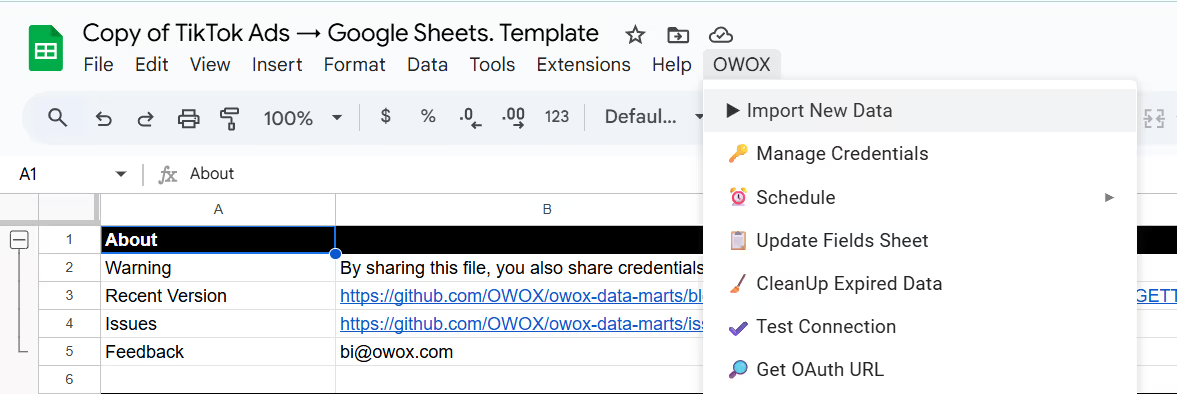
This integration ensures your data is always up-to-date and ready for analysis.
Reddit Ads
Integrating Reddit Ads with Google Sheets is simple with OWOX's free, open-source connector. This tool automatically pulls campaign data, such as impressions, clicks, and spend, directly into your sheets. By automating the data import process, you can shift your focus from manual exports to in-depth analysis and strategy.

For more information and to access the connector, visit the OWOX Reddit Ads Connector page.


LinkedIn Ads
Integrating LinkedIn Ads with Google Sheets is straightforward using OWOX's free, open-source connector. This tool allows you to automatically import campaign data, including impressions, clicks, and spend, directly into your spreadsheet. By eliminating manual exports, you can focus on analysis and strategy.

The connector is built with Google Apps Script, ensuring full transparency and control over your data. It's designed for marketers and analysts who prefer a hands-on, customizable approach without relying on third-party platforms.
For more information and to access the connector, visit the OWOX LinkedIn Ads Connector page.
Facebook (Meta) Ads
Connecting Facebook Ads to Google Sheets is made easy with the OWOX free, open-source connector. This integration automatically imports key campaign data, such as clicks, impressions, and spend, directly into your Google Sheets.
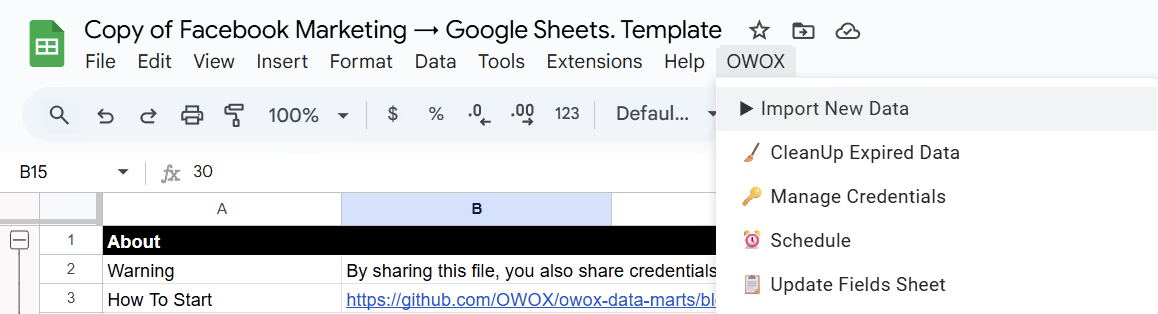
By automating this process, you can reduce manual effort and focus on strategic analysis. The OWOX connector leverages Google Apps Script, ensuring full control and transparency over your data.


Criteo Ads
With OWOX's free, open-source connector, you can effortlessly pull Criteo Ads data into Google Sheets, automating the process of collecting key metrics like impressions, clicks, and spend. This eliminates the hassle of manual exports and ensures you always have the latest campaign performance data at your fingertips.

For more details and to access the connector, visit the OWOX Criteo Ads Connector page.
Twitter Ads (now X Ads)
Streamlining your Twitter Ads reporting is simple with the OWOX free, open-source connector.
By directly importing campaign data such as engagement rates, impressions, and spend into Google Sheets, this integration removes the need for constant manual updates. With timely data sync, you can track performance efficiently and make data-driven decisions on the fly.
For more information and to access the connector, visit the OWOX Twitter Ads Connector page.
Microsoft Ads (formerly Bing Ads)
Managing Microsoft Ads (formerly known as Bing Ads) data can be cumbersome, especially when relying on manual exports or rigid dashboards. The OWOX free, open-source connector simplifies this process by automating the import of your Microsoft Ads data into Google Sheets.
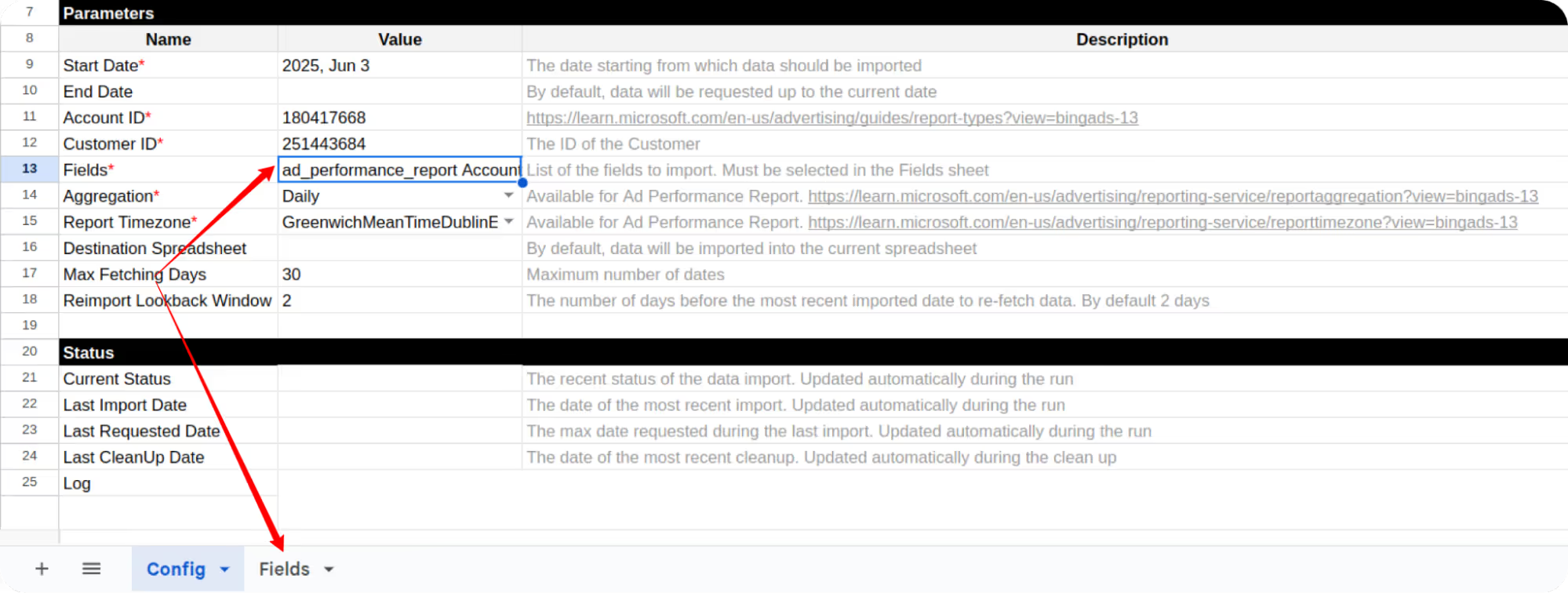
This integration allows you to seamlessly access key metrics such as impressions, clicks, and spend, enabling you to build customized reports and dashboards tailored to your specific needs.


Step-by-Step: Automating Your Marketing Campaign Analysis Report
Automating your marketing campaign analysis report in Google Sheets simplifies data collection, reporting, and decision-making. Follow these easy steps to streamline the process and ensure your reports are always up-to-date.
Step 1: Integrate Ad Platforms with Google Sheets
The first step involves setting up automated data flow from ad platforms like Facebook, TikTok, Reddit, LinkedIn, Criteo, Twitter, and Bing Ads into Google Sheets using OWOX’s free connectors.
With this integration, you no longer have to manually export or import data, and campaign metrics like impressions, clicks, and spend stay up-to-date automatically. That means less time on reporting and quicker, clearer insights for your team.
Step 2: Setting Up Your Reporting Template
Once your ad data is flowing into Google Sheets, the next step is to structure your connector template so that the imported data is clean, consistent, and ready for analysis. This includes setting up the right parameters for your campaigns and defining the fields that matter to your team.
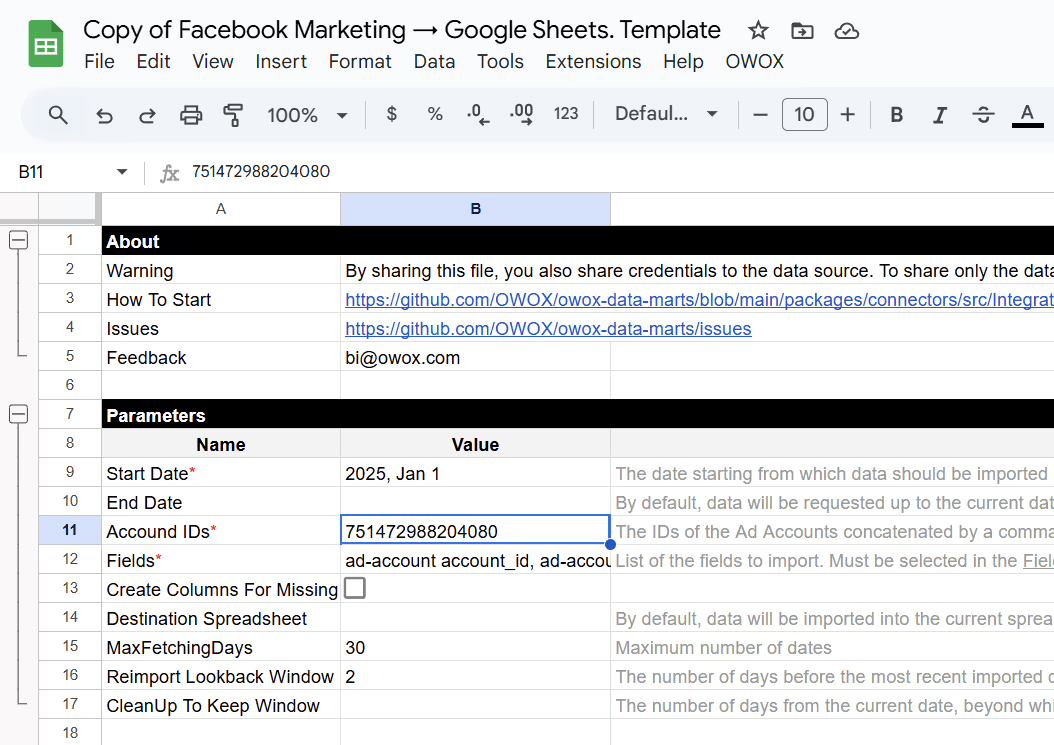
Here's how:
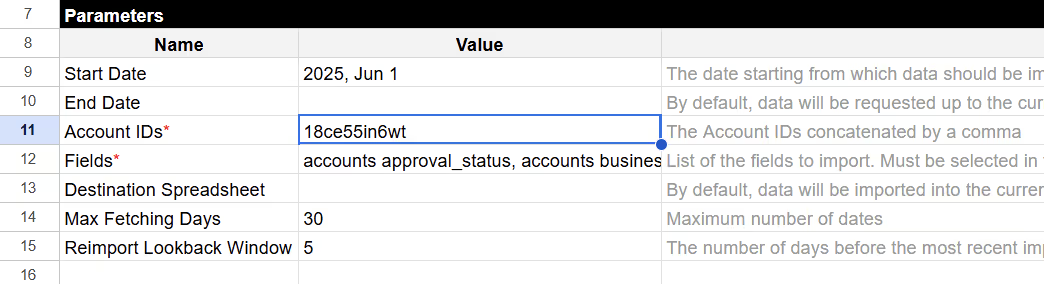
- Apply Predefined Template Settings: Set the start date, input your account IDs, and adjust connector settings like fetch windows and cleanup rules to control how data is pulled.
- Select Only the Needed Fields: In the Fields tab, choose relevant metrics such as ad account, ad creatives, ad insights, or breakdowns like device and country. This keeps your data clean and focused.
- Validate Template Inputs Before Running: Make sure your account IDs and selected fields are correct to avoid errors during the first import.
- Use Consistent Sheet Naming: Name your sheet clearly to facilitate easier navigation and integration with other data sources.
- Keep Data Clean and Consistent: Every refresh pulls only the latest, structured campaign data, so your reports are not just “raw data dumps” but organized inputs for real analysis.
By following these steps, you can collect and structure campaign data properly, ensuring it’s clean, consistent, and ready for analysis.
💡If you’d like to visualize this data with auto-generated charts and pivot tables, consider adding the OWOX BigQuery Data Marts after your template is fully configured.
Step 3: Authenticate and Import Your Ad Data
Once your template is configured, it’s time to bring the data in. This step connects your Google Sheet to the ad platform via your access token and imports the selected campaign data.
- Open the OWOX Extension Menu: Go to the top menu in your spreadsheet → OWOX → Manage Credentials. Paste the access token you generated earlier and click OK to save it securely.
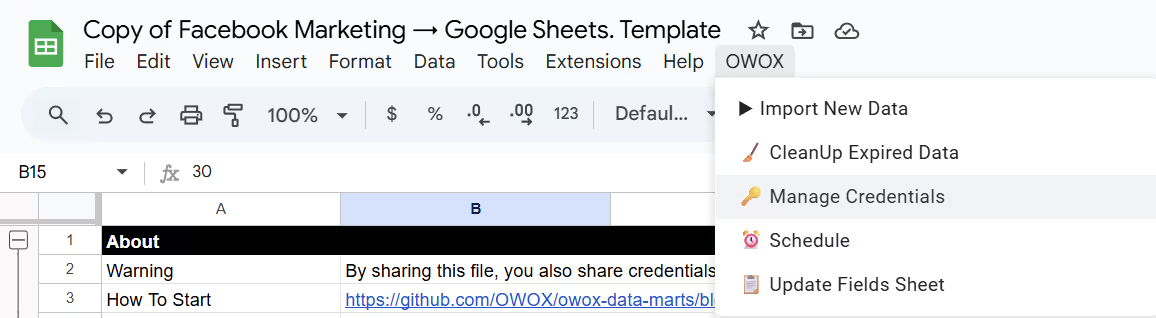
- Initiate the Import: From the same menu, click OWOX → Import New Data. This will start pulling data based on the parameters and fields defined in your template.
- Check Logs and Imported Sheets: The Logs tab will confirm when the import is finished. New tabs will appear for each data type, like ad_account or ad_campaign, based on your connector settings.

By completing this step, your spreadsheet becomes a live reporting hub where fresh campaign data flows in automatically, ready for analysis and visualization.
Step 4: Automate the Data Refresh with Apps Script Trigger
To keep your reports up-to-date, set up the Google Sheets integration to automatically refresh and update the data from your ad platforms at regular intervals. You can choose to refresh the data daily, weekly, or based on your preferred schedule.
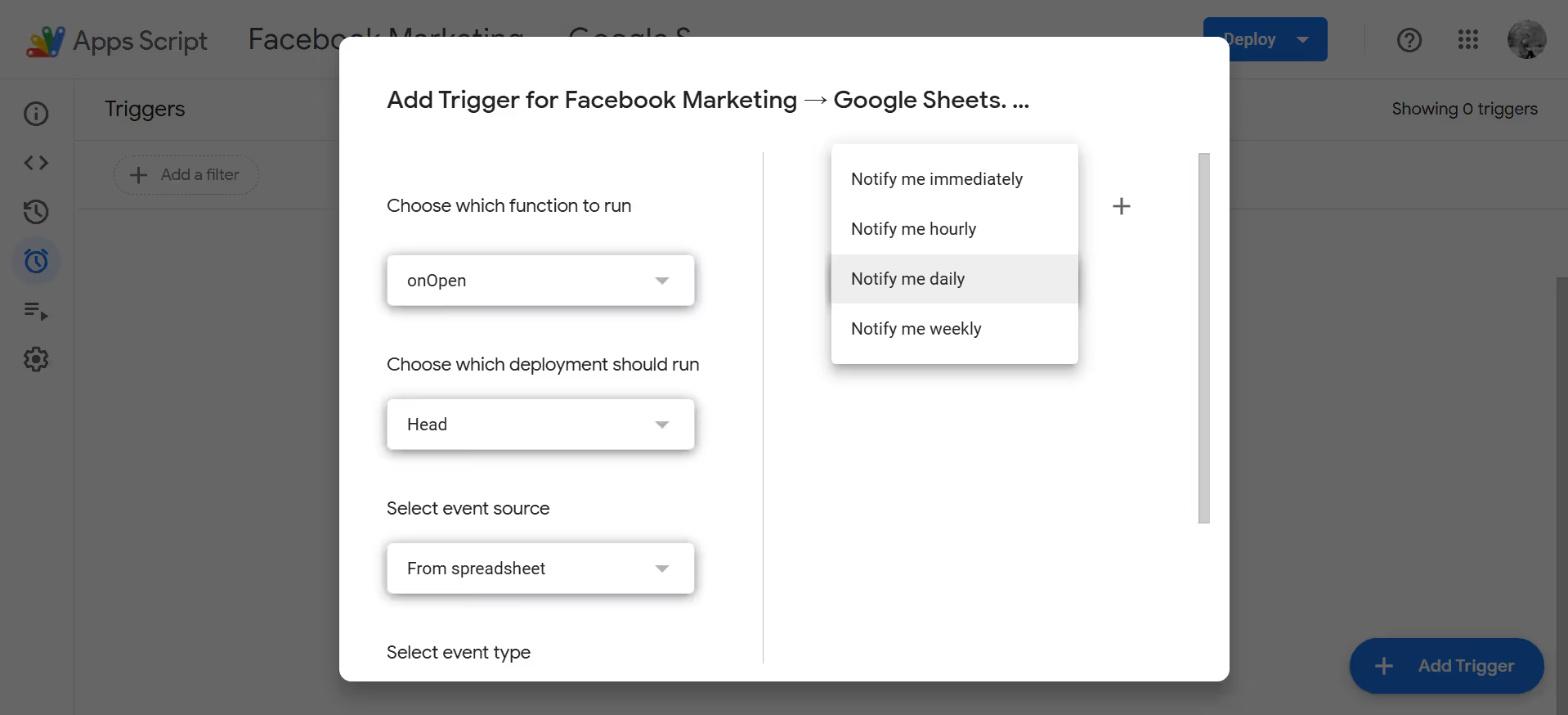
This automation ensures that your campaign metrics are always current without the need for manual updates, allowing you to focus on analysis and decision-making.
Why Choose the Community Apps Script Edition for Automating Ad Reporting
The Community Apps Script Edition lets analysts run lightweight, transparent connectors inside Google Sheets. You keep full control over how data is collected, structured, and refreshed, without vendor lock-in or extra tools.
Open-Source Transparency Analysts Can Trust
Unlike black-box SaaS connectors, the Community Apps Script Edition runs entirely inside Google Sheets with code you can read, audit, and customize. Analysts stay in control of every step, from authentication to data fetch. This transparency ensures you know exactly what is being pulled, reducing risks and allowing easy adjustments whenever reporting needs evolve.
Lightweight Setup Inside Google Sheets
Getting started takes minutes: copy the template from GitHub, enter your credentials, and you’re ready to run. No servers, no extra tools, and no infrastructure are required. Since everything runs in Google’s own environment, you can quickly automate campaign reporting without relying on IT or external vendors, keeping your process lean and efficient.
Customizable Data Fields for Precise Reporting
Every campaign is different, and not every metric matters equally. The template includes a Fields tab where analysts can select only the dimensions and KPIs they need. This ensures reports stay tidy, consistent, and relevant, while avoiding cluttered exports. Field-level control also simplifies joins and downstream analysis when combining multiple platforms into unified reports.
Automated Refresh with Built-In Apps Script Triggers
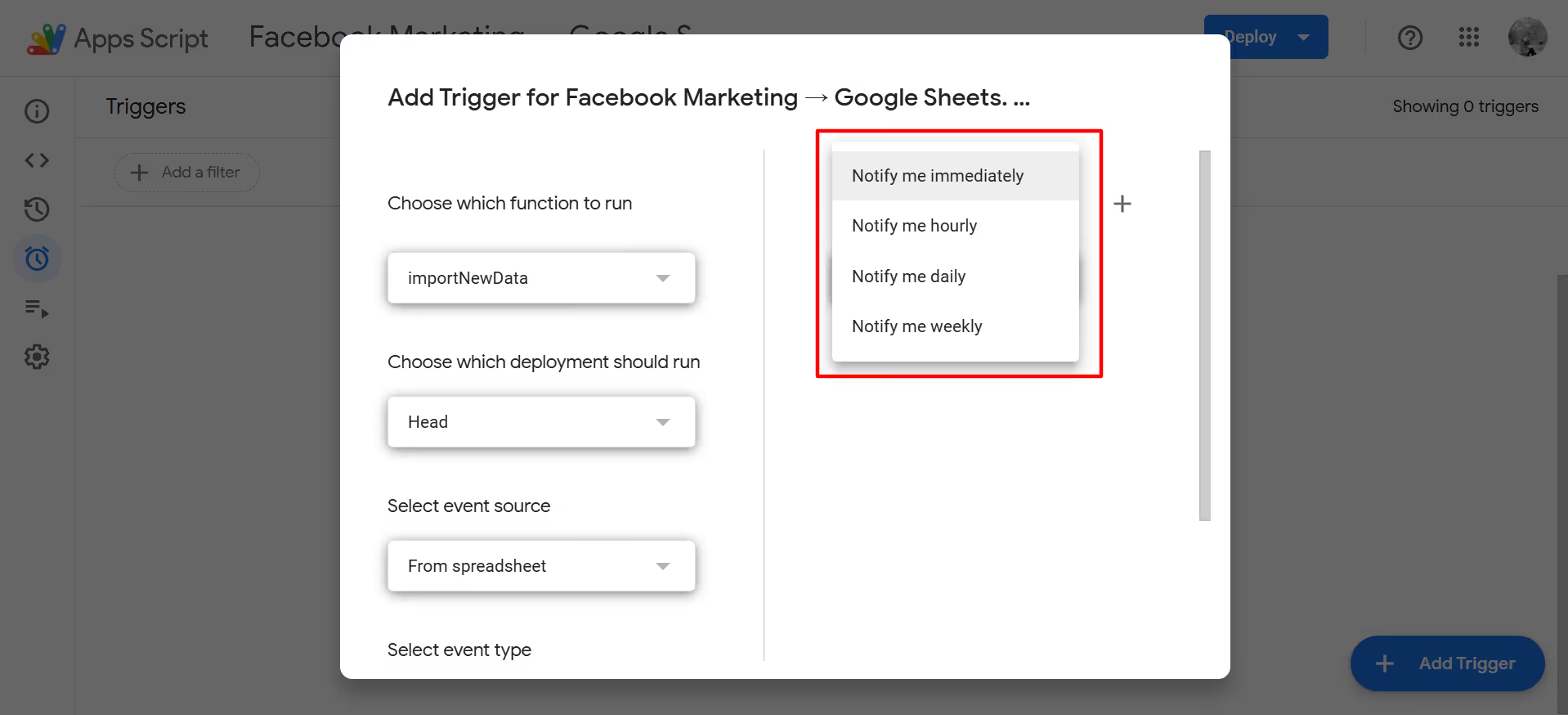
Once your template is running, you can automate refreshes using Google’s built-in Apps Script triggers. Simply set the frequency, daily, hourly, or weekly, and let the script handle updates in the background. This guarantees that campaign metrics are always current in your Sheets, saving you from manual reruns and reducing reporting delays.
Scales Easily Across Multiple Ad Platforms
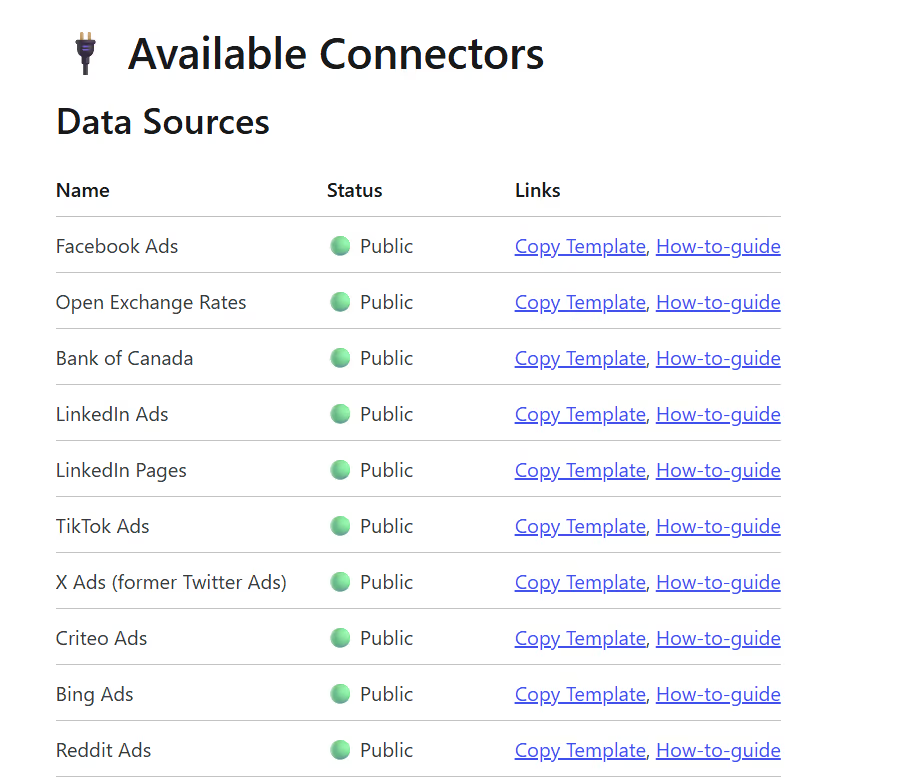
Start with one connector and expand as needed. TikTok, LinkedIn, Reddit, and others all follow the same structure. Each template keeps consistent schema formatting, making it easy to maintain reporting logic across platforms. This repeatable setup helps analysts scale reporting without additional complexity, ensuring every ad source follows the same clean, governed process.
Automated Ads Reporting with OWOX Data Marts (Community Apps Script Edition) Built for Analysts
OWOX Data Marts (Community Apps Script Edition) offers automated ads reporting by syncing your ad platform data into Google Sheets on a scheduled basis. With this open-source tool, you get up-to-date insights across campaigns, without needing to export data manually or rely on a data team.
This solution enables faster analysis, better decision-making, and streamlined reporting, all while giving analysts full control over the data without relying on third-party tools or BI teams.
Check out our GitHub repository to explore how OWOX Data Marts (Community Apps Script Edition) enables scheduled ads reporting for analysts.
For more advanced reporting needs, you can move beyond Google Sheets and sync your ad data directly into BigQuery. OWOX Data Marts (Community Edition) helps you centralize analysis at scale while keeping the same flexibility and control that analysts value.
Frequently asked questions
.png)
.png)




"AI by its nature will hallucinate. You need guardrails so you can trust your data."
"We had six or seven different channels and no single source of truth. It was almost impossible"
"We regained time. And time is the one resource that never comes back."