How to connect Criteo Ads to Google Sheets with OWOX Data Marts
There is no direct Criteo Ads to Google Sheets connector. The route that holds up is Criteo Ads, then a data warehouse, then Sheets – and OWOX Data Marts runs all of it.
If you’ve tried to export Criteo Ads data to Google Sheets by hand, you know the pain: CSV downloads, a reporting view you can’t reshape and no history you control.
The route that holds up is not a direct pipe from Criteo Ads into a sheet. It is Criteo Ads, then a data warehouse, then Google Sheets. OWOX Data Marts runs that whole path: a Criteo Ads data mart loads your ad data into your data warehouse, and Google Sheets reads it from there – through a report, or through the OWOX Data Marts extension. The quickest start is OWOX Cloud, but you can also run OWOX Data Marts yourself as free open source.
Why we made this free connector
Why we made this free connector
At OWOX, we’ve always believed that businesses shouldn’t have to rent their own data. So the Criteo Ads connector is free and open source: run OWOX Data Marts yourself and there is no paid tier and no hidden features. The longer story is in why we built free data connectors for analysts.
Join the open-source movement
We’re not just releasing a free connector – we’re inviting you to help shape the future of open marketing analytics tools.
At OWOX, we believe that data access and transparency should be a right, not a luxury. That’s why this connector is 100% open-source – giving you full control over how it works, what it does, and how far it can go.
If you like what we do, please ⭐ star our GitHub repo to show your support – it helps us reach more analysts and grow the number of available connectors.
Also, feel free to:
- Explore the code and customize it to fit your needs.
- Contribute to this data connectivity ecosystem: suggest new connectors, pull new connectors, and/or provide documentation to support the wider community.
- Join our community and share your feedback.
We’ve built the core, the foundation – now it’s your turn to take it further.
Why bring Criteo Ads data into Google Sheets?
Why bring Criteo Ads data into Google Sheets?
Criteo’s own reports cover retargeting performance well, and are hard to bend once you need them next to other channels:
- Custom reports your way: reshape Criteo data to fit your reporting, not the platform’s.
- Side by side with other paid channels: blend Criteo performance with CRM, GA4 or offline conversions.
- Automated dashboards and live insights your team can share, instead of manual exports.
Sheets is where marketers want to work, and that part is right. The open question is where the data should live while they do.
OWOX Data Marts
See your first report built in real time. 15 minutes.
- Connect your data warehouse
- Pick your metrics
- Get a live Google Sheets report
In the time it takes to write a ticket. Then imagine never writing that ticket again.
Book a DemoWe'll use your actual use case
Why the data goes through a data warehouse
Why the data goes through a data warehouse
A sheet is where people read data, not where it should live. That is why OWOX Data Marts puts a data warehouse in the middle, and why there is no direct Criteo Ads-to-sheet connector. Four things follow.
The sheet has a ceiling
A Google Sheets file holds at most 10 million cells. Ad data eats cells quietly: every ad, every day and every breakdown is a row, and every field you pull is a column, so a wide import burns through the limit faster than the row count suggests.
The data warehouse holds the full history, while the sheet report holds only the columns you choose. A backfill loads a custom date range once, and a trigger keeps the data fresh afterwards.
History outlives the sheet
Data loaded into a data warehouse stays there. A tab that gets overwritten, a sheet someone re-copies or an upstream API that changes its schema does not take last year’s numbers with it. That continuity is what campaign-over-campaign and year-on-year questions depend on.
Criteo is rarely the only paid channel
The moment the question is “what did Criteo add next to the other channels?”, Criteo data alone is not enough, and blending tabs in a sheet means lookup formulas that break when a campaign is renamed.
In the data warehouse the Criteo tables sit next to the other ad platforms, and an analyst can join them once, in SQL. OWOX Data Marts publishes the result to Sheets like any other data mart.
OWOX Data Marts does not model the data for you. It publishes and governs the query the analyst wrote, so everyone reads the same definition.
One number, every place you read it
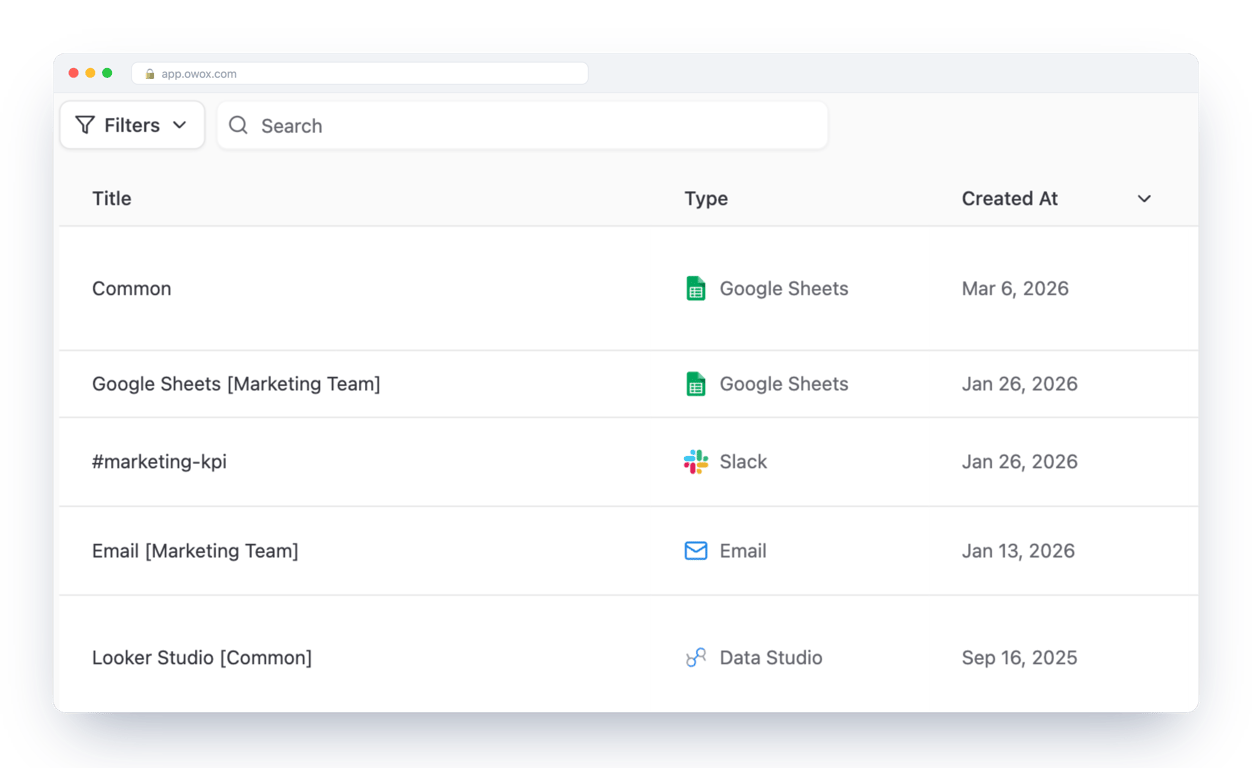
The same data mart can feed a Google Sheets report, a Looker Studio dashboard, a Slack channel or an email, so the number in the sheet is the number in the dashboard. Business users read it without needing data warehouse credentials.
How it works
- A Criteo Ads data mart of the Connector type loads your ad data into tables in your data warehouse. A manual run backfills history, and a trigger keeps it fresh.
- Google Sheets is connected as a destination. The data mart publishes its data there.
- You read it in Sheets with a report created on the data mart, or by pulling it with the OWOX Data Marts extension inside Google Sheets.
- Or you just ask. Through OWOX MCP you can blend the same data with other Criteo Ads endpoints, other ad platforms, or your CRM and GA4 data, using the data model.
OWOX Data Marts does not transform your data. It loads, publishes and governs it, and any SQL on top is written by an analyst.
What you need
- A Criteo account with access to the advertiser you want to load, and its Advertiser ID.
- Criteo API credentials: a Client ID and a Client Secret. The connector documentation walks through them.
- A data warehouse. OWOX Data Marts supports BigQuery, Snowflake, Databricks, AWS Athena and AWS Redshift. The examples here use BigQuery.
- OWOX Data Marts: OWOX Cloud for the quickest start, or self-managed with Node.js and the OWOX CLI (free and open source).
- A Google account for the Google Sheets report.
Step-by-step: send Criteo Ads data to Google Sheets
Step-by-step: send Criteo Ads data to Google Sheets
Seven steps. The first five load your Criteo Ads data into your data warehouse. The last two bring it into Google Sheets.
Step 1: Start OWOX Data Marts ( ~2 min)
Choose how to run it:
-
OWOX Cloud: sign in or sign up and you are ready for step 2.
-
Self-managed (open source): install Node.js 22.22.0 or later, then run:
npm install -g owox
owox serve
Open
http://localhost:3000and you are in. The OWOX docs cover deployment options beyond a local machine.
Step 2: Connect your data warehouse ( ~3 min)
Open Storages in the left menu and add your data warehouse, for example BigQuery. This is where the Criteo Ads tables will be created. The BigQuery walkthrough, including the service account, is in the Criteo Ads → BigQuery guide.
Step 3: Create the Criteo Ads data mart ( ~3 min)
- Click New Data Mart, give it a title and select the data warehouse from step 2.
- Set the type to Connector and choose Criteo Ads (the Criteo data source).
- Add your Advertiser ID, Client ID and Client Secret. The credentials guide in the connector documentation shows where to find each one.
Step 4: Choose what to load and backfill your history ( ~3 min)
- Select the endpoint: statistics, placements, placement categories or transactions, and the fields you need.
- Set the dataset, or keep the default.
- Click Publish Data Mart.
- Click Manual Run and choose Backfill for the first run. Add the start and end dates and click Run. This puts your historical Criteo data into the data warehouse.
- Open Run History and check for Success.
Step 5: Schedule the refresh ( ~1 min)
- Open the Triggers tab of the data mart and click Add Trigger.
- Choose Connector Run as the trigger type, then set daily, weekly, monthly or interval, plus the time, days and time zone.
- Click Create Trigger. Criteo Ads data now refreshes on its own.
Step 6: Connect Google Sheets as a destination ( ~2 min)
Open Destinations in the left menu, click New Destination and choose Google Sheets (more on the Google Sheets destination). A destination is where a data mart can deliver its data; the same list also holds Looker Studio, Slack and email.
Step 7: Bring the data into Google Sheets ( ~2 min)
You have two ways to read the data mart in Sheets. Both are part of spreadsheet reporting in OWOX Data Marts.
Option A: a report on the data mart. Reports live on the Destinations tab.
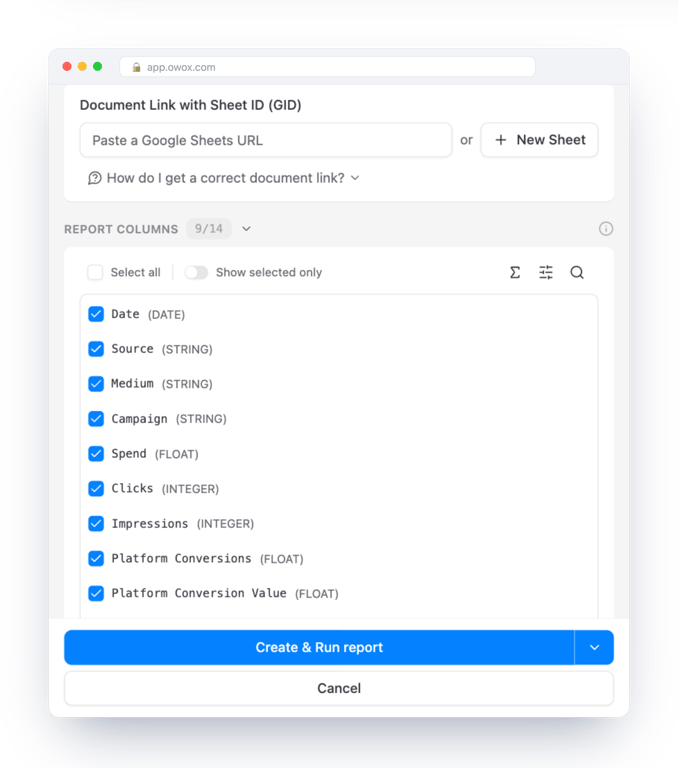
- Open the data mart, go to the Destinations tab and click New Report under your Google Sheets destination.
- Give the report a title and share the Google document with the address the form shows.
- Paste the URL of your Google Sheet, or click New Sheet to create one.
- Choose the report columns you want in the sheet.
- Click Create & Run report.
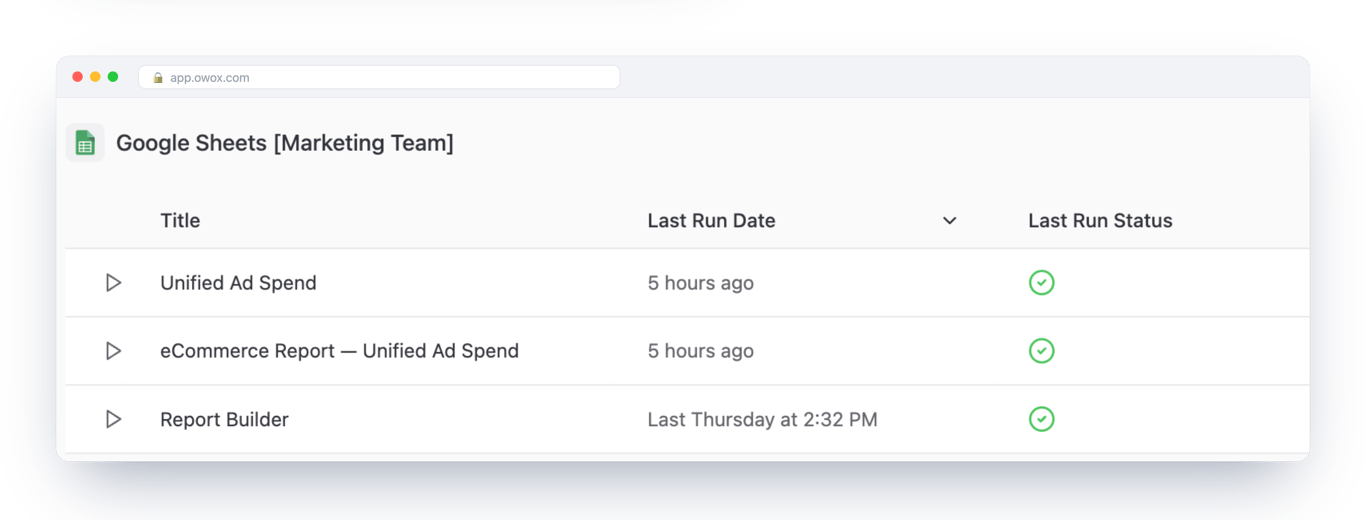
Each report is listed on the Destinations tab with its last run and status. Run it again whenever you need fresh data, or put it on a schedule with a report trigger.
Option B: the OWOX Data Marts extension. Install OWOX Data Marts from the Google Workspace Marketplace, open it inside Google Sheets and pull the data mart from there, without leaving the sheet. If your team works in Excel, there is an OWOX Excel add-in too.
Ask the blended question in plain language
Ask the blended question in plain language
Criteo Ads data rarely answers a question on its own. With OWOX MCP you can blend it with other Criteo Ads endpoints, with other ad platforms, or with your CRM data and GA4 data (GA4 through its native BigQuery export), using the data model, and ask for all of it in plain language.
Once ad spend is a governed data mart, nobody has to write the join to ask about it. Connect Claude to OWOX Data Marts with the OWOX Claude connector and a marketer can ask:
Compare our Criteo spend with our other paid channels.
Claude asks OWOX which data marts are relevant, reads their fields and the joins the analyst defined, and queries the one it picks. Ask it against raw data warehouse tables instead and it has to guess the join.
| Ungoverned | Against the data model | |
|---|---|---|
| What the model sees | Raw data warehouse tables | The published data marts |
| What it does | Invents the join | Reads the analyst’s join |
| What you get | A plausible number, confidently wrong | The number, and the query behind it |
MCP is the interface here, not the guarantee. The guarantee is the governed data mart behind it, and every question is logged in Run History. For how that works end to end, read governed MCP analytics.
What’s next?
This connector is part of our effort to make data ownership simple, transparent and accessible for everyone.
Here are more resources to explore:
- The Criteo Ads connector for each data warehouse: BigQuery, Snowflake, Databricks, AWS Athena and AWS Redshift.
- The full data warehouse setup in the Criteo Ads → BigQuery guide.
- The same route for another platform: Facebook Ads → Google Sheets, LinkedIn Ads → Google Sheets and TikTok Ads → Google Sheets. More free connectors are on the connectors page.
Check out our GitHub repo, leave us a ⭐ star, and let’s build better tools together.
Turn your data into decisions.
Governed data marts give you the clean foundation ML needs to actually work.
- No AI hallucinations
- Analyst-governed definitions
- Every number traces to SQL
Frequently Asked Questions
Is there a direct Criteo Ads to Google Sheets connector?
No. The route is Criteo Ads, then a data warehouse, then Google Sheets. A Criteo Ads data mart of the Connector type loads your data into your data warehouse, and Google Sheets reads it from there through a report on the data mart or through the OWOX Data Marts extension.
What do I need to connect Criteo Ads?
Your Advertiser ID and Criteo API credentials: a Client ID and a Client Secret. The connector documentation walks through where to find each one.
Which Criteo Ads data can I load?
You choose the endpoint in the data mart: statistics, placements, placement categories or transactions, and then the fields you need.
How often does Criteo Ads data refresh?
You set it with triggers. A Connector Run trigger loads new data into your data warehouse daily, weekly, monthly or on an interval, and a Report Run trigger pushes the result to your Google Sheets report. A manual backfill loads a custom date range once.
Can I use Criteo Ads data in Excel?
Yes. Once the data is in your data warehouse, the OWOX Excel add-in can read the same data mart, so Excel and Google Sheets show the same numbers.
Is the Criteo Ads connector free?
OWOX Data Marts is free and open source when you run it yourself, including the Criteo Ads connector. For OWOX Cloud, see the pricing page.