Data analysis tools in 2026: 19 tools by the job they do
Most lists of data analysis tools rank products that do different jobs against each other. This one sorts 19 tools by the job: collecting behaviour, moving data, storing it, governing what it means, analysing it, and reporting on it. For each, what it is for, what is free, and where it stops.
Note: Originally published in July 2023. Fully updated in October 2026: the list is reorganised by the job each tool does, every vendor description is taken from the vendor’s own page this month, and the OWOX entry describes the current product.
“Data analysis tools” is a category that does not exist. A web analytics property, a data pipeline, a warehouse, a spreadsheet and a BI platform are all sold as data analysis tools, and a list that ranks them against each other tells you nothing about which one you need. This list sorts 19 tools by the job they do. Pick the job first; the choice inside each group is small.
For every tool: what it is for, what is free, and where it stops. Where a vendor’s own page is the source, the month it was checked is noted. If your question is specifically about marketing reporting on a budget, the free marketing analytics tools guide is the shorter route.
What data analysis tools do, and why the job matters
What data analysis tools do, and why the job matters
Data analysis in a business is a chain, not a product. Data is collected from websites, apps and ad platforms; moved into a store the company controls; stored with history; governed, so that “revenue” and “conversion” mean one thing; analysed by someone with a question; and reported to the people who act on it.
Every tool below does one or two of those jobs well and the rest badly or not at all. Most reporting failures come from asking a tool to do a job it was not built for: blending sources inside a dashboard, or keeping history inside a tracking tool. The groups below follow the chain.
Collecting behaviour: web and product analytics
Collecting behaviour: web and product analytics
These tools record what people do on a site or in an app. They are the start of the chain, not the end of it.
Google Analytics 4

GA4 is the default web and app analytics property, event-based, free, and linked to Google Ads. Its most useful feature for analysis is the free export of raw events to BigQuery: standard properties can export daily, up to one million events a day, with streaming export at BigQuery rates (Google Analytics Help, checked October 2026). The interface reports can be sampled on large ranges; the export is not. The GA4 export data model covers how to shape it.
Stops at: anything outside Google. Ad spend from other platforms, orders and CRM records are not in GA4.
Matomo on-premise
Matomo is the open-source web analytics platform you host yourself. Matomo’s own position is “you own your data, no one else”, “No data sampling”, and On-Premise “is, and forever will remain free to download” (matomo.org, checked October 2026). It is the usual answer when GA4 is ruled out for compliance; the Google Analytics alternatives list covers the others.
Stops at: you host and patch it, and it still knows nothing about ad spend.
Mixpanel

Mixpanel describes itself as a “product intelligence platform for the AI era, combining analytics, session replay, experiments, feature flags, and AI-powered insights”, with a free plan to start (mixpanel.com, checked October 2026). It is built for product teams asking about funnels, retention and feature adoption.
Stops at: marketing spend and revenue; those live elsewhere and have to be joined in a warehouse.
Amplitude
Amplitude presents itself as a platform for building “self-improving products”, with Product Analytics, Session Replay, Feature Experimentation and Web Experimentation, and a free plan of “2M events per month” (amplitude.com, checked October 2026). The same product-team fit as Mixpanel, with experimentation in the same tool.
Stops at: the same boundary. It is a behaviour tool, not a reporting layer for the business.
OWOX Data Marts
See your first report built in real time. 15 minutes.
- Connect your data warehouse
- Pick your metrics
- Get a live Google Sheets report
In the time it takes to write a ticket. Then imagine never writing that ticket again.
Book a DemoWe'll use your actual use case
Moving data: pipelines and marketing connectors
Moving data: pipelines and marketing connectors
These tools copy data from where it is produced to where it can be analysed. They differ in breadth, in who runs them, and in whether they land raw tables or pre-shaped marketing data.
Fivetran

Fivetran calls itself an “automated data movement platform” to “securely move, manage, and transform data to power analytics, operations, and AI at scale”, with a catalogue it describes as “900+ sources and destinations” and a free plan (fivetran.com, checked October 2026). It is the managed option for teams that want pipelines to be someone else’s problem.
Stops at: it lands tables; the meaning of the tables is still yours to define.
Airbyte open source
Airbyte is “open-source data movement for ELT pipelines and AI agents”, with a catalogue of several hundred connectors, built to run on Kubernetes with abctl and single-VM installs documented (Airbyte on GitHub and docs, checked October 2026). The self-managed alternative to Fivetran.
Stops at: you run it, and connector quality varies across the catalogue.
Supermetrics

Supermetrics positions itself as a way to “connect, manage, analyze, and activate” marketing data into spreadsheets, BI tools and warehouses, with a free trial (supermetrics.com, checked October 2026). It is the quickest path from an ad platform to a Google Sheet.
Stops at: governance. Once the data is in a personal spreadsheet, nothing enforces that two sheets agree.
Funnel

Funnel calls itself “the leading marketing intelligence platform”, a hub to “centralize your marketing data once” with channel standardisation built in and two products, Funnel Data Hub and Funnel Measure (funnel.io, checked October 2026). No free tier is shown on its site.
Stops at: the data is governed inside Funnel and ungoverned again once exported to your own tools.
Improvado

Improvado now leads with an AI agent, “The AI Agent That Connects, Analyzes, Creates & Optimizes”, over a marketing data layer it describes as “one connection · one memory · 1,000+ sources”, with a demo rather than a free trial (improvado.io, checked October 2026).
Stops at: it is an agency-and-enterprise product; the implementation is a project, not an install.
Adverity

Adverity says it “connects and governs marketing data so every decision your team and your AI make is one you can defend”, through Adverity Connect for integration and Adverity Atlas, a “marketing knowledge layer” (adverity.com, checked October 2026). No free trial is advertised.
Stops at: the same enterprise boundary as Improvado, and the governance lives in Adverity’s platform rather than your warehouse.
Storing it: the warehouse
One entry, because the warehouse is the job every other tool in this list either feeds or reads.
Google BigQuery
Google describes BigQuery as “a fully managed, AI-ready data platform that helps you manage and analyze your data with built-in features like machine learning, search, geospatial analysis, and business intelligence” (BigQuery documentation, checked October 2026). The BigQuery sandbox needs no credit card and grants “a lifetime limit of 10 GiB of storage” and “1 TiB of processed query data each month” (sandbox documentation, checked October 2026). The GA4 export, Data Studio and most tools in this list connect to it natively; BigQuery, everything you need to know is the primer. Snowflake, Redshift, Athena and Databricks fill the same role in other stacks; the warehouses comparison weighs them.
Stops at: a warehouse stores and computes. It does not decide what a column means or who may read it.
Governing what it means: Data Marts
Governing what it means: Data Marts
The job most lists skip. A warehouse full of raw tables produces as many definitions of revenue as there are people writing queries. Governance is where one definition is written and everything downstream reads it.
OWOX Data Marts
OWOX Data Marts lets an analyst define a Data Mart in Google BigQuery, Snowflake, AWS Redshift, AWS Athena or Databricks as SQL, a table or a view, document what it means, control who may read it, and publish it to Google Sheets, Data Studio, Slack, email or an AI assistant over MCP. The free connectors collect ad-platform, Shopify and reference data into the same warehouse. OWOX does not transform data; it publishes, schedules and logs the SQL the analyst wrote.
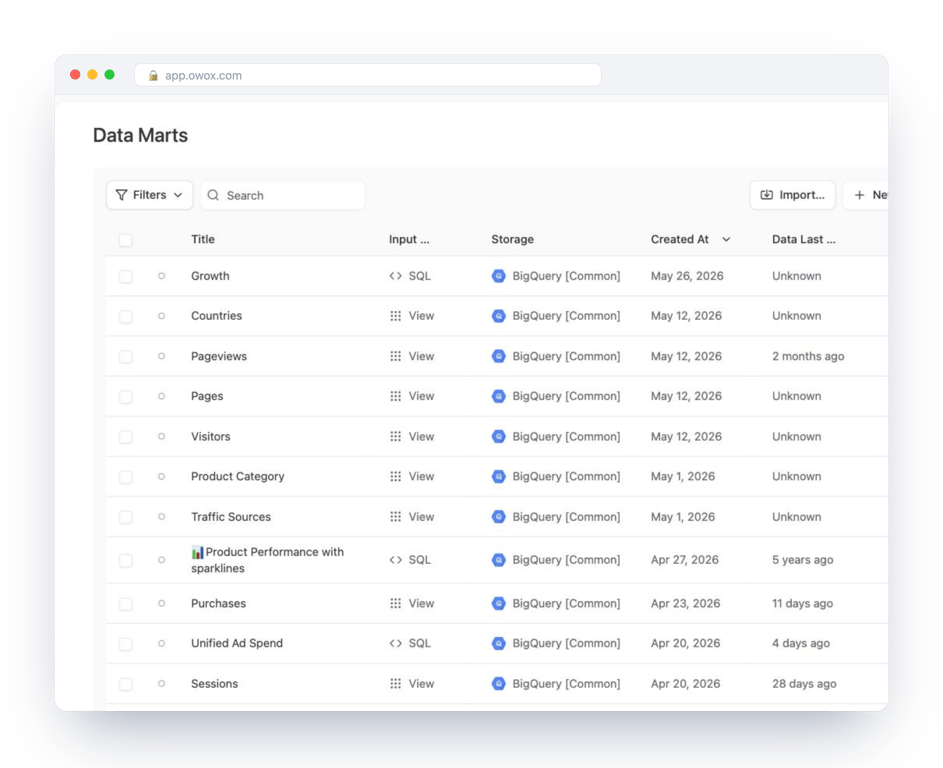
The Community edition is self-managed and “forever free” on the pricing page; connectors are MIT-licensed and the platform core is ELv2 (OWOX Data Marts on GitHub, checked October 2026). The hosted cloud editions, with AI assistants and setup by OWOX data experts, are paid.
For analysis specifically, the governed Data Mart changes what an AI assistant can do. Asked “What was our cost per order by channel last month?”, an assistant reading raw tables invents the join; one reading the published Data Mart runs the analyst’s query and logs it. The governed MCP analytics article shows the difference, and metrics definitions without a semantic layer explains why this is lighter than a semantic-layer project.
Stops at: it expects a warehouse and an analyst who writes SQL. It is not a tracking tool and not a dashboard.
Analysing it: workbenches
Where a person with a question does the work. are the most used data analysis tool in every company and the most under-estimated; the two dedicated workbenches here add reproducibility.
Google Sheets and Excel
Pivot tables, formulas and charts over a few hundred thousand rows cover most of the ad-hoc analysis a marketing or finance team does. The failure mode is the source: a pasted export is stale the moment it is pasted. Read the sheet from a governed Data Mart instead, through the OWOX extension for Google Sheets, or Connected Sheets for BigQuery; the extension vs Connected Sheets comparison explains when each fits. Array formulas, QUERY and pivots are covered in the Google Sheets tips topic.
Stops at: data volume and reproducibility. Aggregate in the warehouse; analyse the aggregate in the sheet.
KNIME Analytics Platform

KNIME Analytics Platform is a free, open-source visual workflow tool for data science: node-based pipelines that, in KNIME’s words, “access any data type from any source” through a catalogue of several hundred connectors, without extensive coding. KNIME Business Hub adds the enterprise layer where “analytics and AI models are validated and monitored” (knime.com, checked October 2026).
Stops at: it is an analyst’s workbench. Sharing results with business users still needs a reporting layer.
Reporting on it: BI and visualisation
Reporting on it: BI and visualisation
Where the result reaches the people who act on it. Every tool here reads from something; the quality of the dashboard is the quality of what it reads.
Data Studio

Google’s free report builder, called Looker Studio from 2022 until Google renamed it back in 2026, with a drag-and-drop editor, native connectors to BigQuery, Sheets, GA4 and Ads, and “more than 1,400 data sources” through partner connectors; the self-service tier “remains available at no cost” (cloud.google.com/data-studio, checked October 2026).
Stops at: it has no data layer. Blend in the warehouse, not in the report.
Looker

Google Cloud’s governed BI platform, described as “a product that helps you explore, share, and visualize your company’s data”, built on LookML, “Looker’s language for describing your SQL data” (Looker documentation, checked October 2026). The model is the governance; a data team maintains it.
Stops at: the LookML project. Without a team to own the model, there is no Looker.
Microsoft Power BI

Microsoft describes Power BI as “a unified analytics platform” with “self-service BI for everyone”, Copilot report generation and a place inside Microsoft Fabric; Power BI Desktop is free to “create rich, interactive reports with visual analytics” (microsoft.com, checked October 2026). The default in Microsoft-centric companies.
Stops at: sharing and collaboration are the paid tiers, and the semantic model lives inside Power BI rather than in the warehouse.
Tableau

Tableau’s help describes the workflow as “connect to your data”, “build views from scratch”, “create dashboards”, “create custom fields using calculations” and “publish data sources and workbooks” to Tableau Cloud or Server (help.tableau.com, checked October 2026). The visual-analysis benchmark for analysts who explore by dragging fields.
Stops at: licensed per user, and like Power BI it keeps its data model inside the tool.
Qlik Cloud Analytics

Qlik now positions Qlik Cloud Analytics as the successor to Qlik Sense, built “with AI-driven insight, trusted data products, and agentic automation”, with a free trial (qlik.com, checked October 2026). The associative engine, which lets users click through any field and see what relates, is the thing people choose it for.
Stops at: enterprise licensing, and a model that lives in Qlik.
Metabase
Metabase is “the easy-to-use open source Business Intelligence and Embedded Analytics tool that lets everyone work with data”; the AGPL Open Source plan is free and self-hosted with unlimited users, questions and dashboards (Metabase on GitHub and metabase.com/pricing, checked October 2026). The free BI choice for teams on BigQuery, Postgres or MySQL.
Stops at: row-level permissions, SSO and support are paid, and it is only as consistent as the tables it reads.
Sisense

Sisense describes itself as an “AI-Powered Embedded Analytics Platform” with a “governed distribution layer for product AI” for shipping analytics inside your own product (sisense.com, checked October 2026). It belongs here for software companies embedding dashboards for their customers, not for internal reporting.
Stops at: demo-led, enterprise, embedded. Not the tool for a team that needs a report by Friday.
AI in data analysis tools: what to ask before you trust it
AI in data analysis tools: what to ask before you trust it
Almost every tool above now ships an AI feature: Copilot in Power BI, agents in Improvado and Qlik, AI insights in Mixpanel, Gemini in Looker. The question to ask is the same for all of them: what is the assistant allowed to read?
An assistant pointed at raw tables has to guess the join between ad spend and orders, and it will guess confidently. An assistant pointed at a governed layer, LookML in Looker, Atlas in Adverity, a published Data Mart in OWOX, reads a definition someone wrote and can show its query. The second kind can be wrong; it cannot be unaccountable. If a vendor cannot tell you which of the two its assistant is, assume the first. Nine AI tools are compared on exactly that, with each vendor’s documentation quoted, in AI data analyst tools you can trust.
How to choose
Four questions decide most of it.
- Which job is actually broken? Nobody can see the data (collect), the numbers do not agree (govern), or the dashboard is late (report). Buy for that job.
- Where will the data live? Prefer tools that land data in a warehouse you own; a tool that keeps the only copy is renting you your own history. The warehouse-first argument spells out the cost of the alternative.
- Who owns the definitions? If the answer is “the BI tool”, every other tool disagrees with it. If it is “an analyst, in the warehouse”, every tool can read the same thing.
- Can you test it on real data this month? Free tiers and trials exist for most of the list; a 30-day parallel test on one real question beats a feature matrix.
The shortest working stack is GA4 or Matomo for behaviour, the free connectors or Airbyte into your warehouse, governed Data Marts in the middle, and Data Studio, Metabase or Google Sheets on top. Everything else on this list is what you add when a specific job outgrows that.
Turn your data into decisions.
Governed data marts give you the clean foundation ML needs to actually work.
- No AI hallucinations
- Analyst-governed definitions
- Every number traces to SQL
Frequently Asked Questions
What are data analysis tools?
Software that does one job in the data chain: collecting behaviour (GA4, Matomo, Mixpanel), moving data into a warehouse (Fivetran, Airbyte, Supermetrics), storing it (BigQuery), governing what it means (OWOX Data Marts), analysing it (spreadsheets, KNIME) or reporting on it (Data Studio, Power BI, Tableau, Metabase). No single tool does all six, which is why the job matters more than the ranking.
Is SQL a data analysis tool?
SQL is the language most data analysis tools speak to a warehouse, not a tool in itself. It matters because the definitions that make reports agree with each other, the joins and the metrics, are written in SQL. A governed Data Mart is that SQL written once, documented and published, so dashboards, spreadsheets and AI assistants all read the same definition.
Is Excel a data analysis tool?
Yes, and the most used one. Pivot tables, formulas and charts cover most ad-hoc analysis a team does. Its weakness is the source: a pasted export is stale as soon as it is pasted. Read the sheet from a governed Data Mart or a live warehouse connection instead, and keep heavy aggregation in the warehouse.
What is data analysis?
Organising, explaining and interpreting data to answer a business question: which channel brings profitable customers, why conversion fell this month, where to put next quarter's budget. In practice it is a chain of jobs, from collecting behaviour and moving data into a warehouse to governing definitions, analysing and reporting, and each job has its own tools.
How do you choose a data analysis tool?
Name the job that is broken first: nobody can see the data (collect), the numbers do not agree (govern), or reports are late (report). Prefer tools that land data in a warehouse you own, decide who owns the metric definitions, and run a 30-day test on one real question before you commit. Most of the tools in this list have a free tier or trial for exactly that.