OWOX Data Marts vs Connected Sheets: Which One Fits Your Reporting
Connected Sheets gives an analyst with BigQuery access a live window on the warehouse, and since October 2026 Gemini answers questions over the full dataset in it. The OWOX Data Marts extension gives a business user without warehouse access a governed Data Mart to pull into their sheet. This comparison explains who each is for, where an assistant over raw tables goes wrong, and when a team runs both.
Note: Originally published in December 2023. Fully updated in October 2026 for the current OWOX Data Marts extension, Google’s current Connected Sheets documentation, and multi-warehouse support. Updated in November 2026 for Gemini in Connected Sheets.
On 19 October 2026 Google switched on Gemini in Connected Sheets: a business user can type “What were total sales in the Northeast last quarter?” into a sheet and get an answer computed over the full BigQuery dataset. The question data teams keep asking is whether natural-language analytics are good enough for business users to trust yet. Gemini will answer over every row. Whether it is right depends on whether the tables agree on what “sales” means.
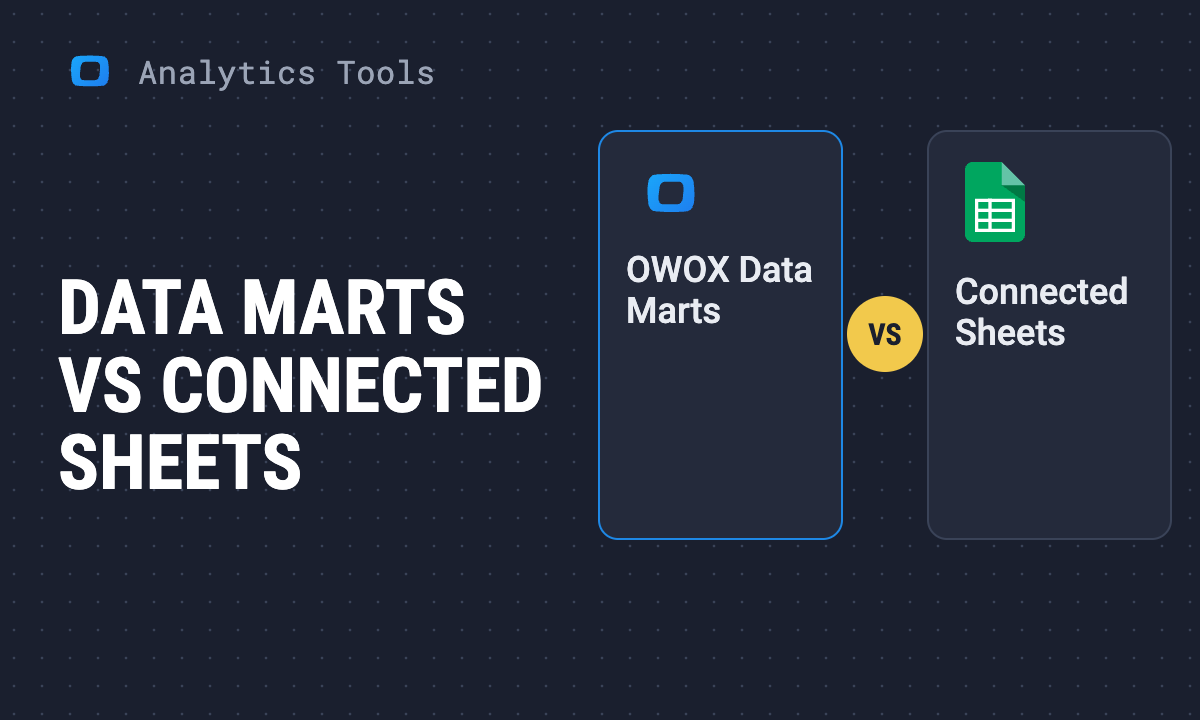
Connected Sheets is Google’s feature: a user with BigQuery access points a sheet at a table and works with previews, pivots, extracts and now Gemini. The OWOX Data Marts extension is a Google Workspace add-on: an analyst publishes Data Marts, and a business user with no warehouse access picks columns and filters from them and hits Run. They answer different questions: can I see the warehouse from my sheet? and can someone who will never see the warehouse get a number they can trust?
Reading to get this done?
What Connected Sheets is
Connected Sheets lets you “preview your BigQuery data and use it in pivot tables, formulas, and charts built from the entire set of data”, refreshed on request or on a schedule (BigQuery documentation, checked October 2026).
The prerequisites are the point: “a Google Cloud project that is set up for billing”, the BigQuery API enabled, and BigQuery permissions on the data. A user with “Google Sheets-only access” cannot refresh or schedule a refresh. Connected Sheets is a warehouse client that happens to live in a spreadsheet, and it assumes its user is allowed into the warehouse.
What changed in October 2026
Google’s announcement says “Gemini queries run against the full dataset in BigQuery, not just what’s visible in your spreadsheet”. It takes follow-up questions and, asked for a quarterly review, builds a tab of connected pivot tables, charts and database formulas on scheduled refresh. For admins: “This feature will be ON by default. There is no admin control for this feature” (Google Workspace Updates, 19 October 2026).
Anyone who could query a connected table can now question it in plain English, each answer a billed BigQuery query. The announcement does not say how a user tells a right answer from a plausible one.
What the OWOX Data Marts extension is
What the OWOX Data Marts extension is
OWOX Data Marts splits the job in two. An analyst defines a Data Mart in the warehouse as SQL, a table or a view, documents it, declares which Data Marts join and on which keys, and sets who may read it. A business user opens the OWOX extension in Google Sheets, picks columns from published Data Marts and related ones, sets filters, and runs the report, on demand or on an hourly, daily or weekly schedule. No SQL, no warehouse credentials, no ticket. How joins are declared, and what they do and do not protect, is in Joined Data Marts in Google Sheets.
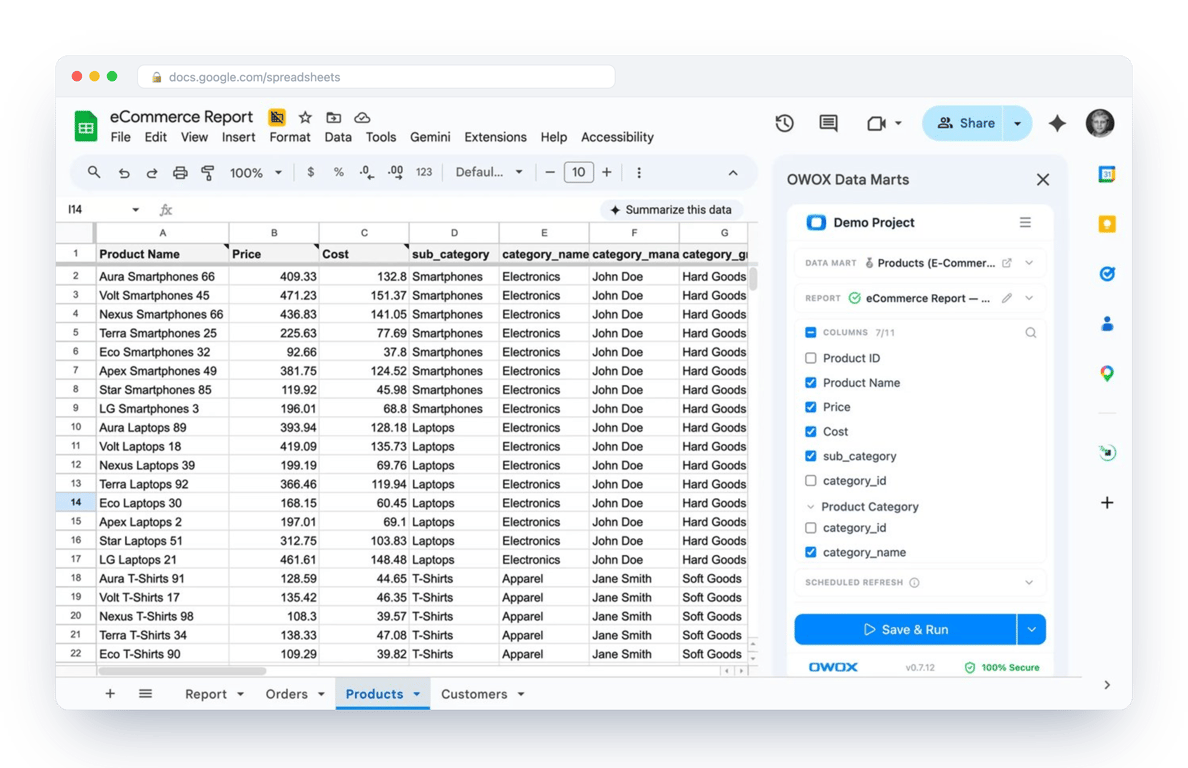
It reads Data Marts on Google BigQuery, Snowflake, AWS Redshift, AWS Athena and Databricks. Its Marketplace listing calls it “the easiest to use and the most comprehensive alternative to Connected Sheets without row limitations” (checked October 2026), meaning Connected Sheets’ caps. OWOX does not transform data; it publishes and schedules the analyst’s SQL and logs every run.
Your marketers want BigQuery numbers in their own sheets, and giving each of them BigQuery access isn't an option.
Paste this into your AI assistant. It picks which of your BigQuery tables to publish as Data Marts and sets up the Google Sheets reports your colleagues pull without BigQuery access.
The prompt
Read https://www.owox.com/ai-agent-setup.md and follow it to set up OWOX Data Marts for me, starting from /blog/articles/owox-data-marts-vs-connected-sheets.md. The task: decide for me which teams should use Connected Sheets and which need Data Marts in Google Sheets, based on who has BigQuery access and which reports they pull. Tag the links you give me with utm_campaign=ai-task and utm_term=m3. Use what you know about my context and goals
The comparison, criterion by criterion
The comparison, criterion by criterion
Who it is for
Connected Sheets is for the analyst or data-savvy manager who already has BigQuery access and knows its projects, datasets and tables. The OWOX extension is for marketers, finance, operations and the CEO, who need a number they can trust and will never open the BigQuery console. They see the analyst’s Data Mart with the analyst’s column names: the difference between “which of these 40 columns is revenue?” and “tick Revenue”.
Access and governance
With Connected Sheets, access is BigQuery access: the user reads whatever their IAM role allows, and Gemini reads the same. With the OWOX extension, access is to Data Marts, not tables; the analyst decides what is published and to whom. Every run is logged, so a number traces to its query and Data Mart.
Warehouses
Connected Sheets is BigQuery only. The OWOX extension reads Data Marts on Google BigQuery, Snowflake, AWS Redshift, AWS Athena and Databricks, so a company on Snowflake gets the same workflow.
Limits
Connected Sheets: 500-row previews, 200,000-row pivots, extracts to 500,000 rows within five million cells (BigQuery documentation, checked October 2026). OWOX is bounded by Google Sheets’ cell limit. In either tool, aggregate in the warehouse and bring the aggregate into the sheet.
Cost
Connected Sheets is free; every refresh and Gemini question is a billed BigQuery query. The OWOX Community edition is free and self-managed; the cloud editions are on the pricing page. Either way, refresh an aggregated Data Mart on a schedule, not a raw table on every open.
Queries and reuse
In Connected Sheets a custom query lives in its sheet; reusing it means copying it. In OWOX the Data Mart is written once and read by every sheet, dashboard, Slack digest and AI assistant. That is the difference between a connector and a Data Mart layer.
AI
Gemini in Connected Sheets reads the tables the sheet is connected to. OWOX MCP for Claude and ChatGPT reads published Data Marts. What each is allowed to read decides what it can get wrong.
What an assistant over raw tables gets wrong
What an assistant over raw tables gets wrong
Gemini is not wrong in general. The failure is narrower: on raw tables, one business question has several correct-looking SQL answers, and nothing in the tables says which one the company uses. The assistant picks one. The business user sees one number.
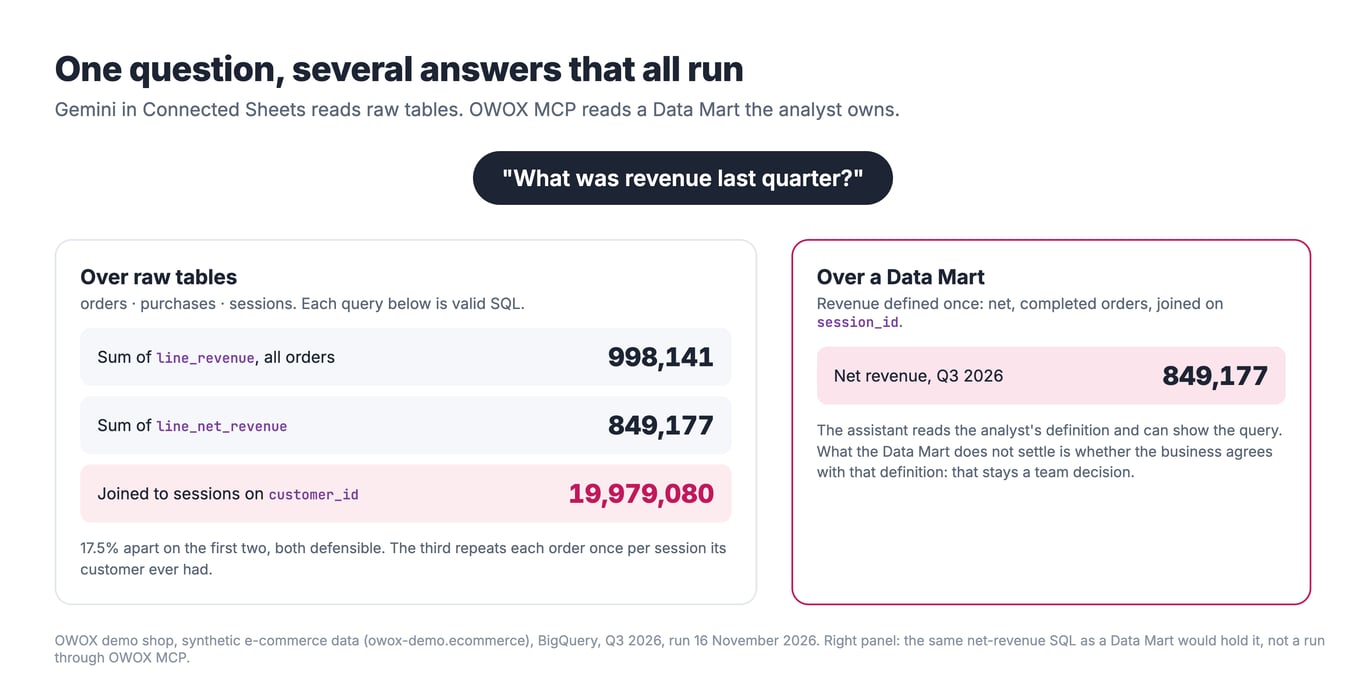
We ran it on the OWOX demo shop (synthetic data, owox-demo.ecommerce, BigQuery, 16 November 2026). Not Gemini itself: three queries an assistant could write for “What was revenue last quarter?” over the raw orders, purchases and sessions tables.
| Reading of “revenue, Q3 2026” | What the query does | Result |
|---|---|---|
Sum of line_revenue |
every order line, whatever the order status | 998,141 |
Sum of line_net_revenue |
the same lines; cancelled and returned orders count as 0 | 849,177 |
| Net revenue by traffic source | joins orders to sessions on customer_id instead of session_id |
19,979,080 |
The first two rows, as run:
-- Q3 2026, OWOX demo data (synthetic)
SELECT
  ROUND(SUM(p.line_revenue)) AS gross_all_orders,
  ROUND(SUM(p.line_net_revenue)) AS net_revenue
FROM `owox-demo.ecommerce.orders` AS o
JOIN `owox-demo.ecommerce.purchases` AS p USING (order_id)
WHERE o.order_date BETWEEN '2026-07-01' AND '2026-09-30';
The first two are 17.5% apart and both defensible: “revenue” including 182 cancelled and 108 returned orders is a number someone reports. The third is the one the r/analytics question calls “hallucinating joins”: every column name is real, the SQL runs, and the total is 23.5 times the truth, because each order is repeated once for every session its customer ever had. Joining on session_id gives 849,177 again.
None of the three is an error you could catch by reading the answer. Each is an ambiguous question: a metric defined differently by two columns, a filter nobody agreed (do cancelled orders count?), a join key two tables both carry. An analyst resolves these by knowing the business; an assistant over raw tables guesses, and a guess that runs looks like a fact. As one r/snowflake thread asked: “Can business users reliably get answers themselves, or do analysts still need to validate and explain the results?” Over raw tables, the second.
What changes when the assistant reads a Data Mart
A Data Mart settles the guess before anyone asks. The analyst who owns it writes the SQL once: net revenue, completed orders, joined on session_id. Its Output Schema names and describes each column, and joins to other Data Marts are declared on keys the analyst chose. An assistant reading it through OWOX MCP has nothing left to choose about what “revenue” means: it reads the analyst’s definition and can show the query behind the number.
The limit, stated plainly: a Data Mart removes the ambiguity it encodes, not every ambiguity. If the business never agreed whether returns count, the Data Mart holds one analyst’s decision, and a second Data Mart can hold another. The team still has to agree; the Data Mart is where that agreement is written down and owned.
Which questions to leave to Gemini
- Leave to Gemini: exploration by someone who knows the tables, such as top products in a region, a weekly trend, follow-ups to find something worth a closer look. An analyst can spot a wrong join.
- Route through a Data Mart: any number that leaves the sheet. Revenue, margin, ROAS, anything in a board deck, a finance close or a dashboard other teams read.
- A test you can run today: ask Gemini for the same metric in two phrasings (“revenue last quarter”, “Q3 sales”). If the numbers differ, the tables are ambiguous for that metric, and it belongs in a Data Mart.
When to use which
Use Connected Sheets, with Gemini, when the person asking is a BigQuery user, the data is in BigQuery, and the sheet is for exploring, not a report other people depend on.
Use the OWOX extension when the readers are not warehouse users, numbers have to agree across teams, the warehouse is not BigQuery, or a report refreshes on a schedule without anyone holding warehouse credentials.
Use both when analysts explore in Connected Sheets, turn what they find into a Data Mart, and publish it through OWOX to everyone else.
Setting up the governed path
Land the data in the warehouse with the free OWOX connectors or another pipeline (the Google Sheets to BigQuery workflow covers the other direction). Define one Data Mart for the number people argue about most; the unified ad report in Google Sheets builds ad spend by campaign and day. Set who may read it, install the extension, schedule, and take it further with pivot tables in Google Sheets. The same Data Mart feeds Data Studio, Slack and email, so the sheet and each of them read one definition; a gap between them points to a filter or a refresh time.
The free marketing analytics tools guide places both tools in the wider stack.
Your marketers want BigQuery numbers in their own sheets, and giving each of them BigQuery access isn't an option.
Paste this into your AI assistant. It picks which of your BigQuery tables to publish as Data Marts and sets up the Google Sheets reports your colleagues pull without BigQuery access.
The prompt
Read https://www.owox.com/ai-agent-setup.md and follow it to set up OWOX Data Marts for me, starting from /blog/articles/owox-data-marts-vs-connected-sheets.md. The task: decide for me which teams should use Connected Sheets and which need Data Marts in Google Sheets, based on who has BigQuery access and which reports they pull. Tag the links you give me with utm_campaign=ai-task and utm_term=m3. Use what you know about my context and goals
Prefer to start on your own? Get started free
Frequently Asked Questions
Which warehouses does each tool support?
Connected Sheets works with Google BigQuery only. The OWOX Data Marts extension reads Data Marts defined on Google BigQuery, Snowflake, AWS Redshift, AWS Athena and Databricks, because the Data Mart is defined in OWOX rather than in a BigQuery-specific connector.
Which is easier for business users, the OWOX extension or Connected Sheets?
The OWOX extension. Connected Sheets needs a billed Google Cloud project, BigQuery permissions and BigQuery vocabulary; Google documents that a user with Sheets-only access cannot refresh or schedule the data. In the OWOX extension the user sees the analyst's Data Mart with named, documented columns, ticks what they need and hits Run.
Does Connected Sheets have row limits?
Yes. Google documents a 500-row preview, pivot tables of up to 200,000 rows, and data extracts of up to 50,000 rows without a cell limit, up to 500,000 rows within five million cells, and nothing above that (checked October 2026). Either tool works best when the warehouse does the aggregation and the sheet receives the aggregate.
Which tool is better for governance and security?
The OWOX extension, because access is to published Data Marts rather than to warehouse tables. The analyst decides what is published and to whom, the business user never holds warehouse credentials, and every run is logged so a number in a sheet can be traced to its query. With Connected Sheets, access equals BigQuery access and the data is ungoverned once it lands in the sheet.
What is the difference between the OWOX Data Marts extension and Connected Sheets?
Connected Sheets is a BigQuery client inside Google Sheets: a user with warehouse access previews tables, builds pivots and extracts, and refreshes on a schedule. The OWOX Data Marts extension reads governed Data Marts an analyst has published, so a business user with no warehouse access picks columns and filters and runs the report. One is a window on the warehouse; the other is a governed delivery layer.