YEAR and YEARFRAC functions in Google Sheets: get the year from a date and the years between two dates
YEAR returns the year of a date as a number. YEARFRAC returns the time between two dates in years, with decimals, by one of five day count conventions. This guide covers both: how to get the year from a date, how to count years between two dates, how to calculate age correctly, what each day count convention returns for the same dates, and the errors to expect.
To get the year from a date, use YEAR:
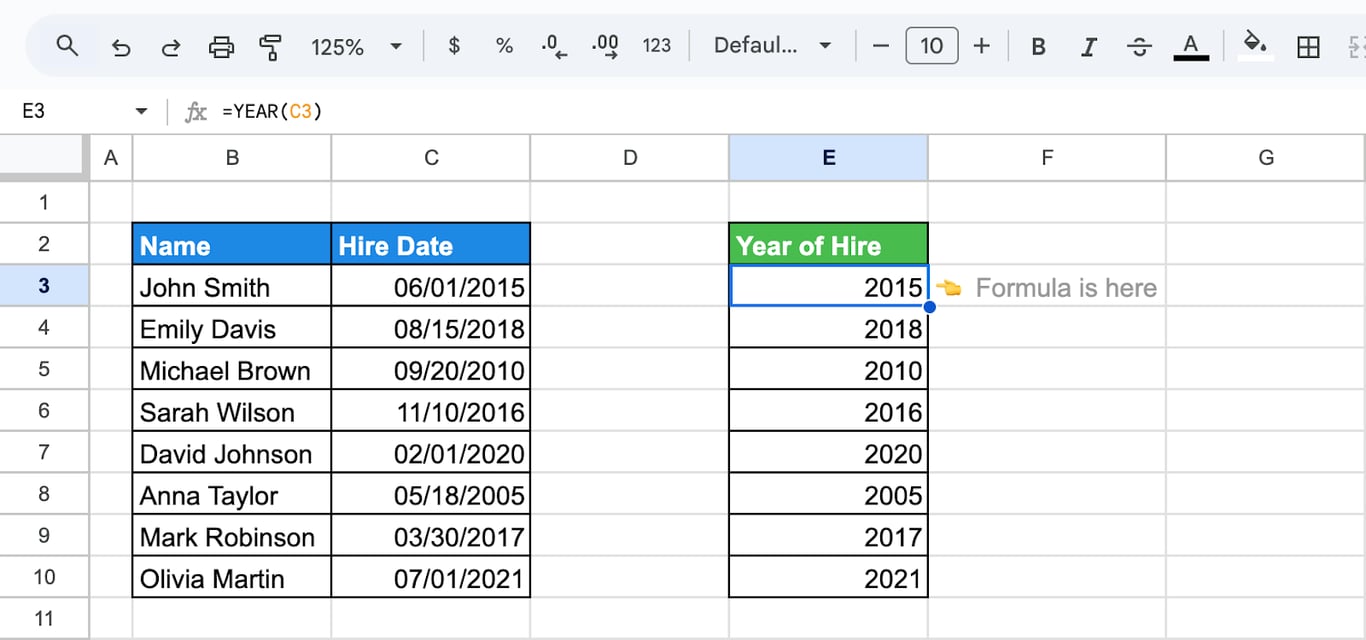
=YEAR(C3)
With 06/01/2015 in C3, the formula returns 2015, as a number. To get the years between two dates, use YEARFRAC:
=YEARFRAC(C3, D3, 1)
It returns the time from the first date to the second in years, with decimals: 0.5 for half a year, 10 for ten years.
| You need | Formula |
|---|---|
| The year of a date | =YEAR(C3) |
| The current year | =YEAR(TODAY()) |
| The year as text | =TEXT(C3, "yyyy") |
| Years between two dates, with decimals | =YEARFRAC(C3, D3, 1) |
| Whole years between two dates | =DATEDIF(C3, D3, "Y") |
| Age in whole years | =INT(YEARFRAC(C3, TODAY(), 1)) |
YEAR: get the year from a date
YEAR: get the year from a date
=YEAR(date)
- date: a cell with a date, a function that returns a date, or a date serial number.
=YEAR(C3)
What YEAR accepts
- A cell with a date:
=YEAR(C4). - A function that returns a date:
=YEAR(TODAY()),=YEAR(DATE(2024, 12, 31) + 1), which returns 2025. - A date in quotes:
=YEAR("2024-03-15")returns 2024. A text such as “03/15/1985” is read according to the locale of the spreadsheet, so the ISO form, year-month-day, is the safe one to type. - A serial number: Google Sheets stores a date as the number of days since 30 December 1899.
=YEAR(45000)returns 2023.
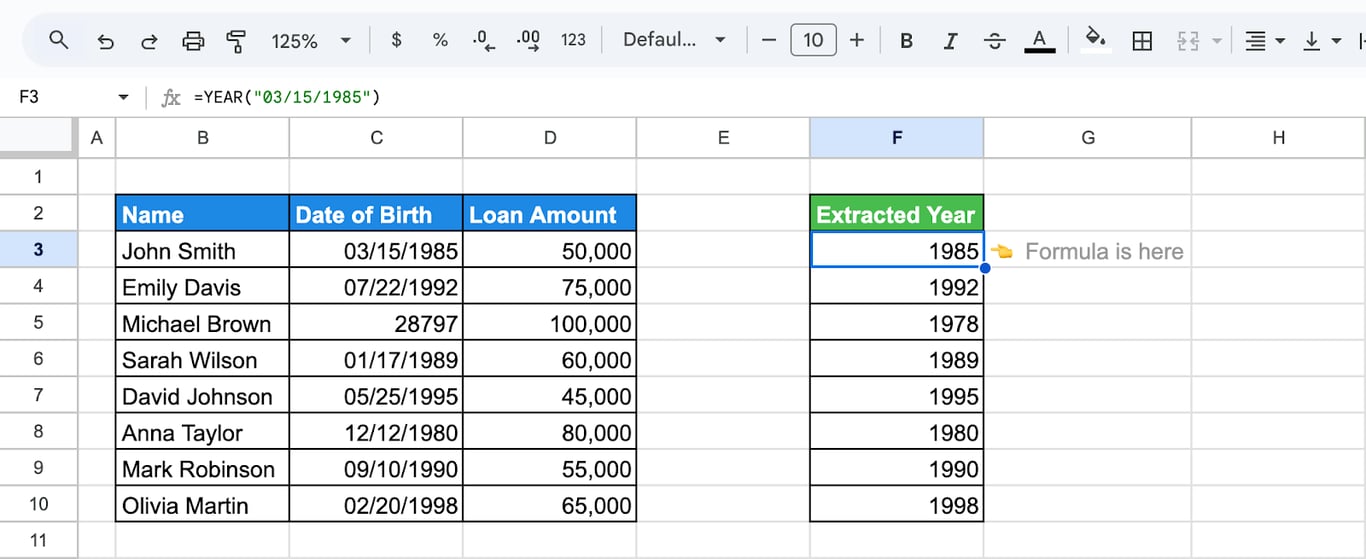
The third row of the screenshot holds 28797 instead of a formatted date, and YEAR still returns 1978: the format of the cell does not matter, only the value.
Group and sum by year
Add a helper column with =YEAR(B3) and build a pivot table on it, or total one year directly:
=SUMPRODUCT((YEAR(B3:B12) = 2023) * D3:D12)
The range must not include the header row: YEAR of a text is an error. In QUERY, the same grouping is SELECT year(B), sum(D) GROUP BY year(B).
A fiscal year that does not start in January
For a fiscal year that begins on 1 July and is named after the year in which it ends:
=IF(MONTH(C3) >= 7, YEAR(C3) + 1, YEAR(C3))
Check the year of a date
=IF(YEAR(C3)=YEAR(DATE(2024,6,7)),"Yes","No")
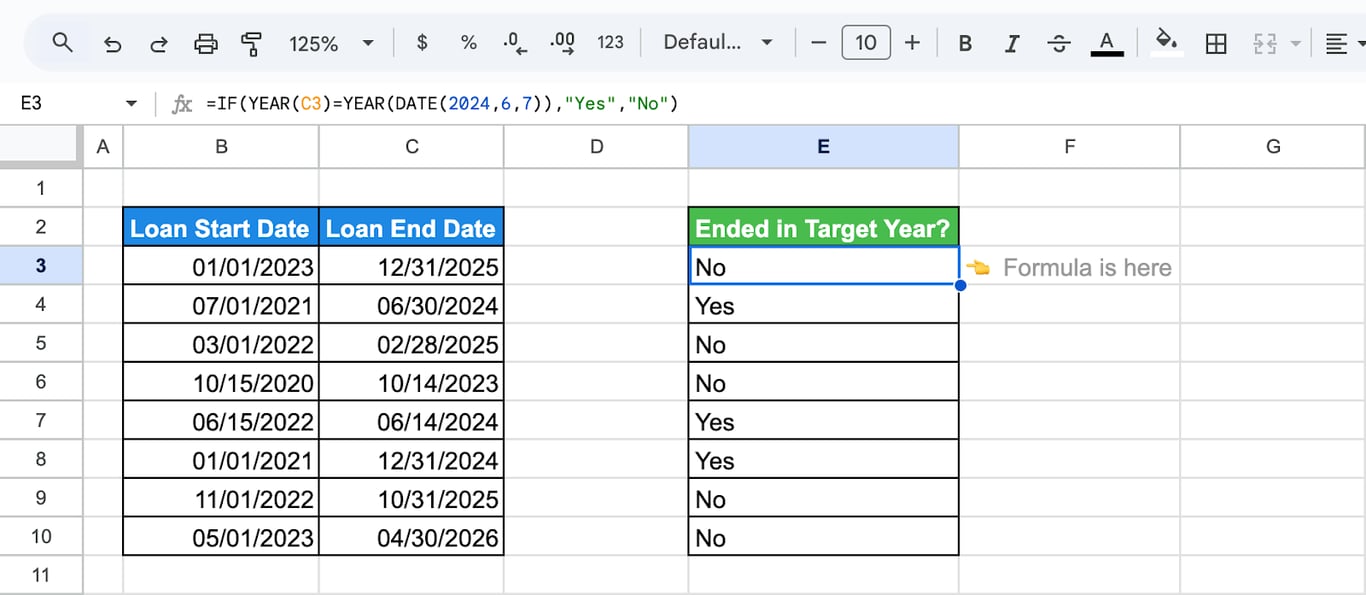
=IF(YEAR(C3) = 2024, "Yes", "No") does the same; the DATE version is useful when the date to compare with is in a cell.
YEARFRAC: years between two dates
YEARFRAC: years between two dates
=YEARFRAC(start_date, end_date, [day_count_convention])
- start_date, end_date: the two dates. In our test the order did not matter: swapped dates returned the same positive number.
- day_count_convention: optional, 0 to 4. How days and years are counted. The default is 0.
=YEARFRAC(C3,D3,1)
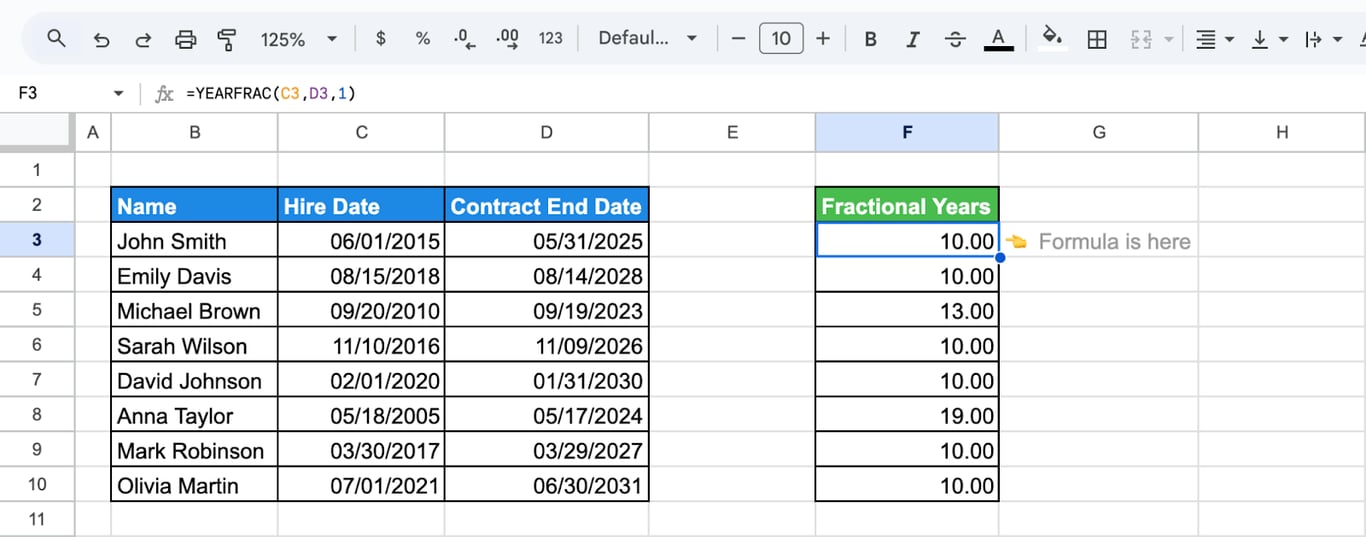
The day count conventions
The convention decides how many days a month and a year have. The results below are from our test for 1 January 2024 to 1 July 2024, 182 days of a leap year:
| Convention | Method | Result |
|---|---|---|
| 0 (default) | US 30/360: every month has 30 days, the year 360 | 0.5 |
| 1 | Actual/actual: real days, real length of the year | 0.4973 |
| 2 | Actual/360: real days, a year of 360 | 0.5056 |
| 3 | Actual/365: real days, a year of 365 | 0.4986 |
| 4 | European 30/360 | 0.5 |
The differences are small and they matter in finance, where the convention is part of the contract. For ages, tenures and anything about real calendar time, use 1.
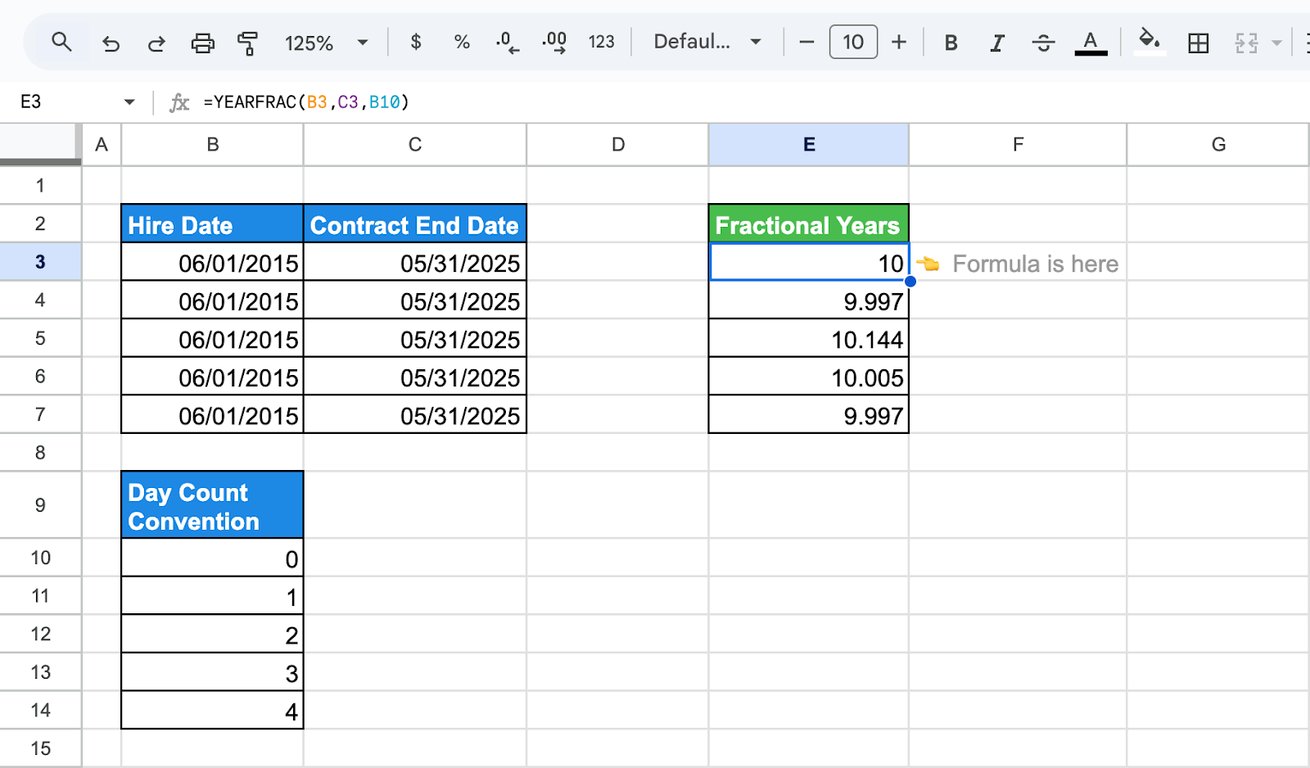
In the screenshot one period, 1 June 2015 to 31 May 2025, gives five slightly different results.
Interest for a part of a year
Interest for a period is the amount times the annual rate times the fraction of the year:
=D3 * E3 * YEARFRAC(B3, C3, 0)
with the amount in D3 and the rate in E3 entered as a percentage, 5.5%. A rate typed as the plain number 5.5 has to be divided by 100, or the result is a hundred times too large.
OWOX Data Marts
See your first report built in real time. 15 minutes.
- Connect your data warehouse
- Pick your metrics
- Get a live Google Sheets report
In the time it takes to write a ticket. Then imagine never writing that ticket again.
Book a DemoWe'll use your actual use case
Calculate age
The subtraction that is wrong half of the time
=YEAR(TODAY())-YEAR(C3)
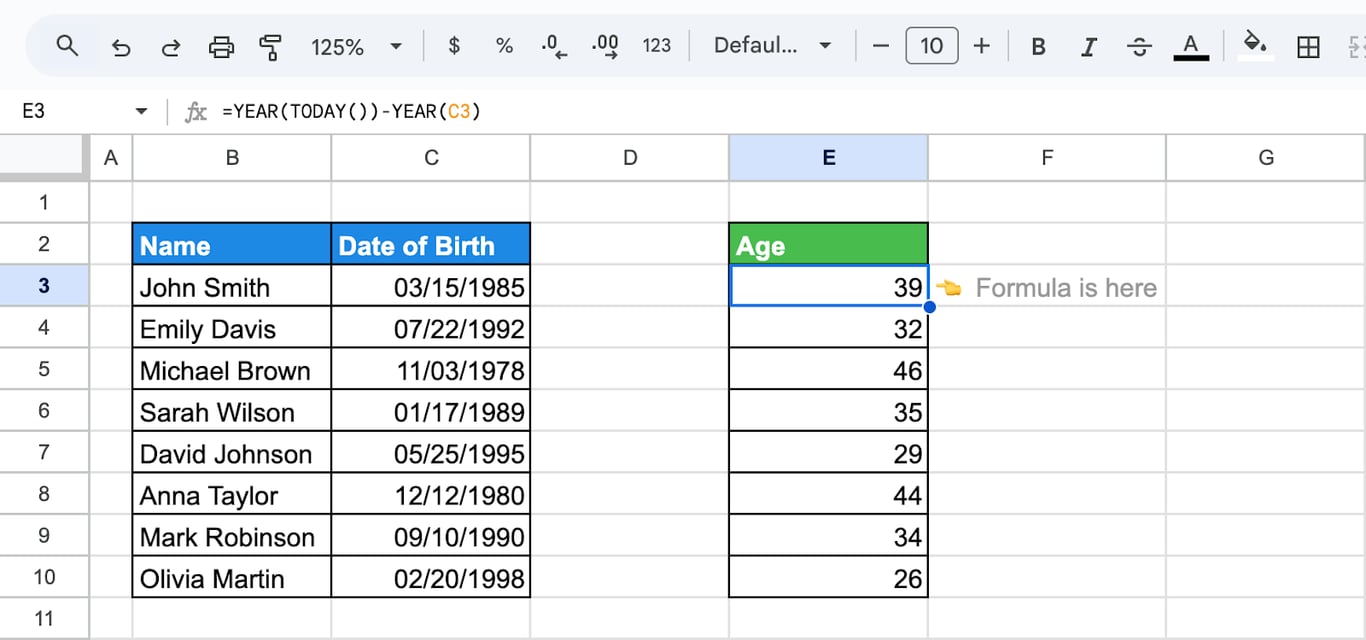
This compares the two years and ignores the month and day. For someone whose birthday is still ahead this year, it returns one year too many.
Age with decimals
=YEARFRAC(C3,TODAY(),1)
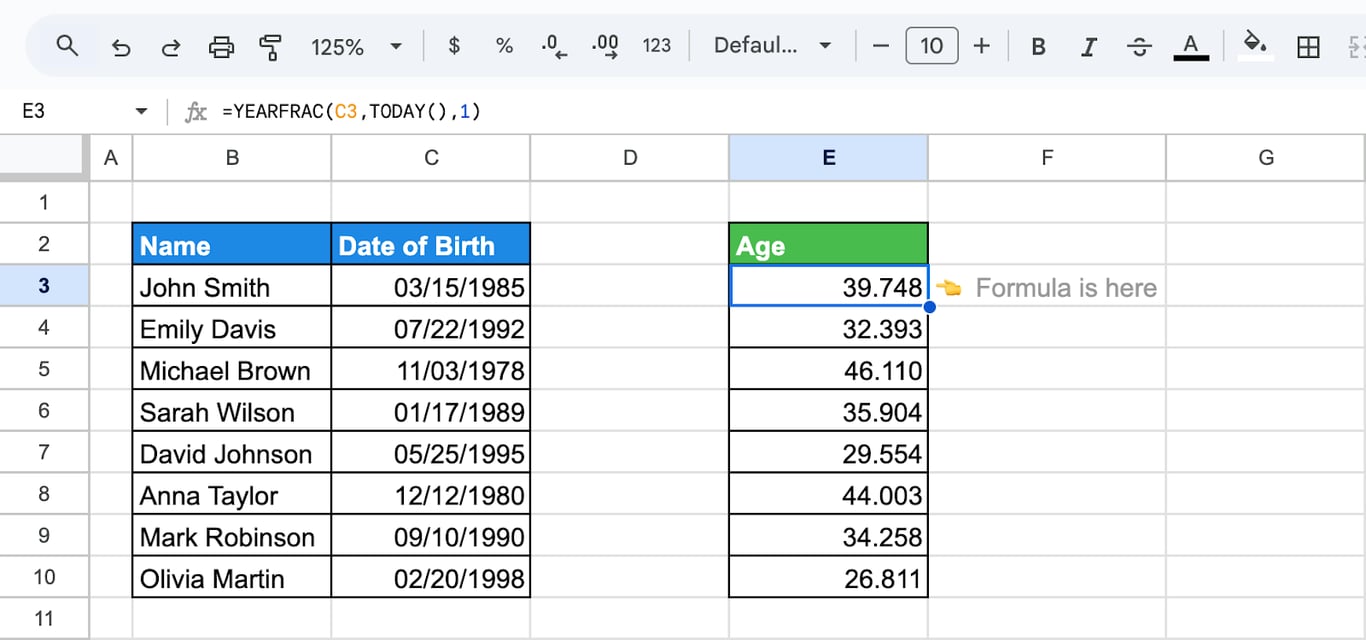
Age in whole years
=INT(YEARFRAC(C3,TODAY(),1))
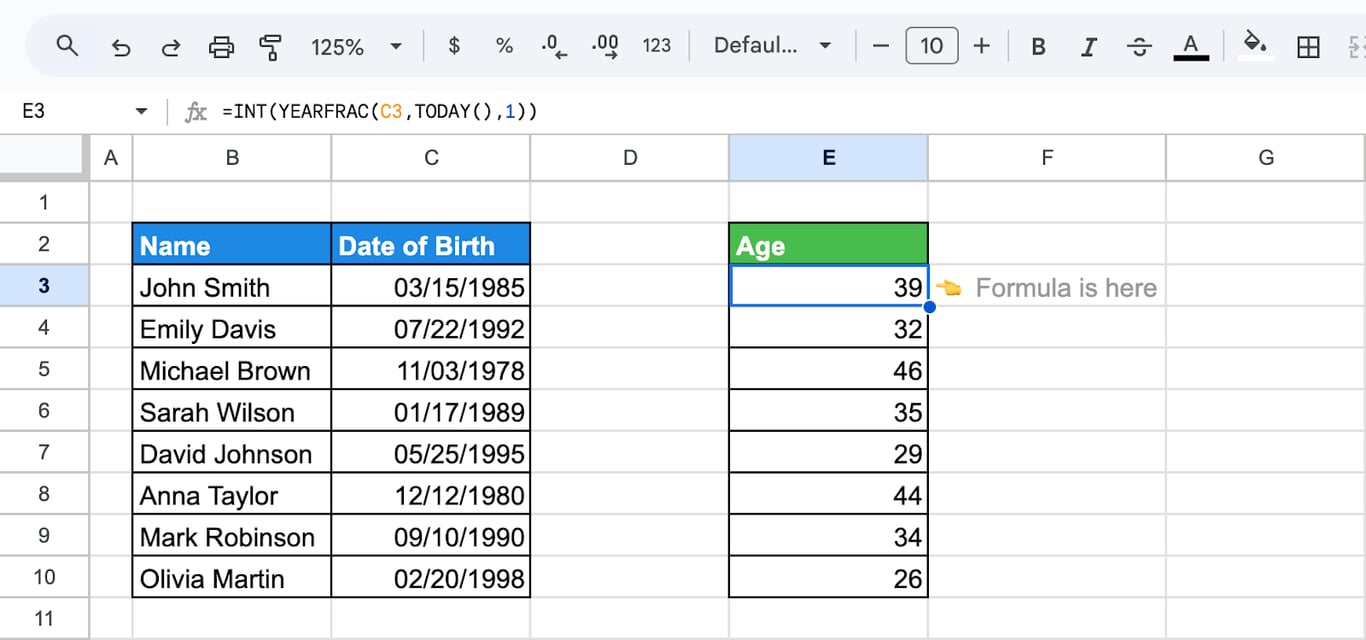
INT drops the decimals. In our test, for a date of birth of 15 June 1990, the formula returned 35 on 14 June 2026 and 36 on 15 June 2026, the same as =DATEDIF(C3, TODAY(), "Y"). DATEDIF is described in the guide to date functions; TODAY makes the result change by itself as time passes.
Errors and wrong results
⚠️ Error: #VALUE!
✅ Solution: The value is a text that is not a date: =YEAR("abc"). Dates imported as text, often left-aligned in the cell, cause this. Convert them with DATEVALUE or rebuild them with DATE. See dates and times.
⚠️ Error: YEAR returns 1899.
✅ Solution: The cell is empty or holds 0. Day zero of the date system is 30 December 1899. Skip empty cells: =IF(C3 = "", "", YEAR(C3)).
⚠️ Error: The result looks like a date in 1905.
✅ Solution: The result cell is formatted as a date, and the number 2015 is shown as day 2015 of the date system. Set the format to Format > Number > Number or Automatic.
⚠️ Error: #NUM! in YEARFRAC.
✅ Solution: The convention is outside 0 to 4.
⚠️ Error: The wrong year from a typed date.
✅ Solution: “03/04/2024” is 4 March in one locale and 3 April in another. Type dates as DATE(2024, 3, 4) or “2024-03-04”.
⚠️ Error: YEARFRAC differs slightly from what was expected.
✅ Solution: The default convention counts 30-day months. Add 1 as the third argument for real days.
Related date functions
- Date functions: DATE, DATEDIF, EDATE and the rest in one place.
- MONTH and EOMONTH: The month of a date and the end of a month.
- DAY, DAYS and DAYS360: Days of a date and between dates.
- WEEKDAY and WEEKNUM: Day of the week and week number.
- NOW and TODAY: The current date in formulas.
- WORKDAY and NETWORKDAYS: Working days between dates.
- Dates and times: How Sheets stores and formats them.
The year column should not depend on who built the report
The year column should not depend on who built the report
Calendar year or fiscal year, the order date or the payment date: each report that derives the year with its own helper column makes that choice again, and two reports on the same export can put the same order into different years. Exports add a second problem when their dates arrive as text and YEAR returns #VALUE! until someone repairs them.
The OWOX Data Marts extension for Google Sheets covers that half. A data analyst publishes a data mart (a table or an SQL query in your data warehouse) and makes it available for reports. In Sheets you open the extension, pick the data mart, tick the columns you want and run it. The rows land in a tab, ready for your formulas.
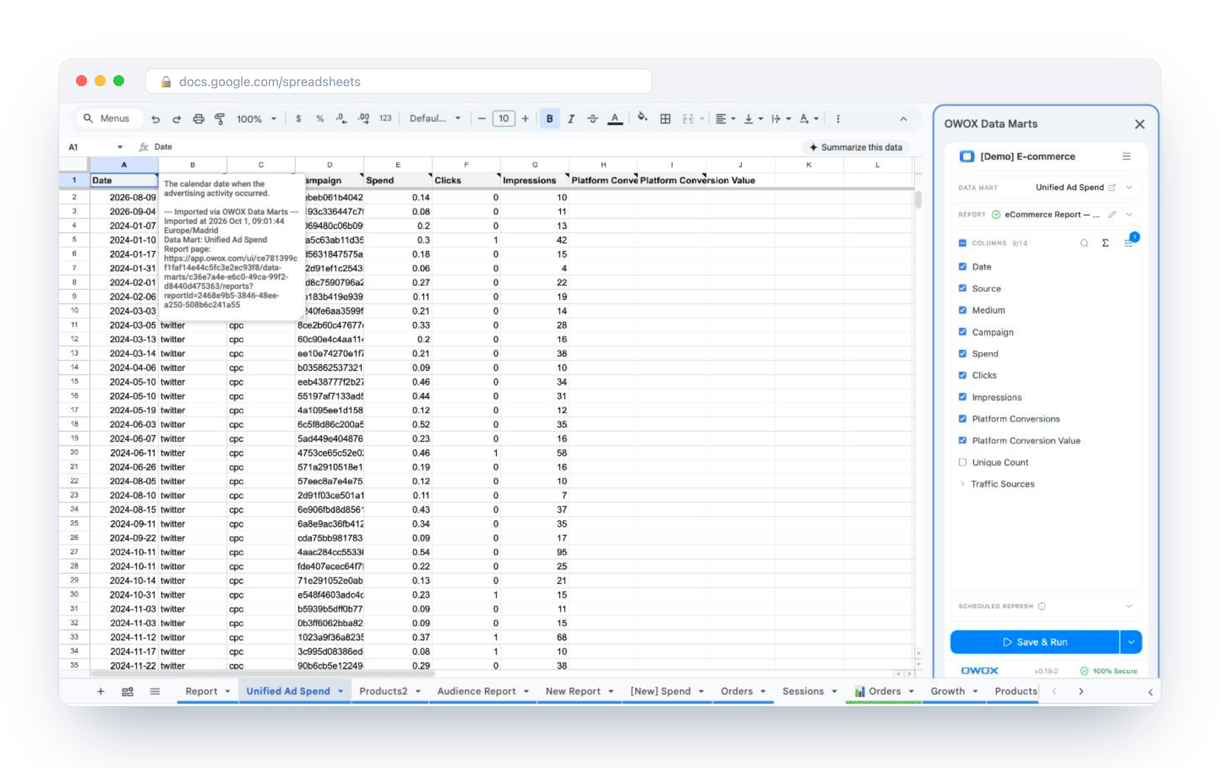
What changes for the person who maintains the sheet:
- Refresh replaces re-export. Refresh current report in the extension menu re-runs the same pull, and a scheduled refresh keeps the tab current without anyone touching it.
- The source is written on the sheet. The header cell of an imported tab carries a note with the data mart it came from, the time of the import and a link to the report.
- No SQL and no warehouse access needed. The analyst decides which data marts and columns are available. You choose from that list.
The extension does not write or change the analyst’s SQL. When the year and the fiscal period are defined once in that SQL, every report built on the data mart groups by the same year, and YEAR is left for the quick question in a sheet. The extension comes with the OWOX Cloud plans of OWOX Data Marts; spreadsheet reporting describes both ways data reaches a sheet.
Turn your data into decisions.
Governed data marts give you the clean foundation ML needs to actually work.
- No AI hallucinations
- Analyst-governed definitions
- Every number traces to SQL
Frequently Asked Questions
How can I troubleshoot errors with YEAR or YEARFRAC?
#VALUE! means the value is a text that Sheets does not read as a date: convert it with DATEVALUE or rebuild it with DATE. A result of 1899 means the cell is empty or holds 0. #NUM! in YEARFRAC means the day count convention is outside 0 to 4. A year that looks like a date in 1905 means the result cell is formatted as a date; change the format to Number.
Can YEAR or YEARFRAC work with dates in different formats (e.g., "MM/DD/YYYY" vs. "YYYY-MM-DD")?
Yes, both YEAR and YEARFRAC can work with dates in various formats, as long as the values are recognized as valid dates in Google Sheets. Ensure the input dates are correctly formatted or converted using the DATE or DATEVALUE function to avoid errors and ensure accurate calculations.
Can YEAR and YEARFRAC functions be combined with other functions?
Yes, YEAR and YEARFRAC can be combined with other functions in Google Sheets for advanced calculations. For instance, use YEAR with IF for conditional logic or YEARFRAC with SUM to calculate cumulative time spans. These combinations enhance functionality for analyzing time-based data efficiently.
Can the YEAR function handle non-date values?
A text that is not a date returns #VALUE!. A number is treated as a date serial number, so =YEAR(45000) returns 2023, and an empty cell counts as 0 and returns 1899. Check for empty cells with IF before applying YEAR.
When should I use YEARFRAC instead of YEAR?
Use YEARFRAC instead of YEAR when you need precise fractional differences between two dates, such as for financial interest or pro-rata calculations. YEAR only extracts the full year from a date, while YEARFRAC accounts for the exact time span, including partial years, for more accurate results.
How does the YEARFRAC function work in Google Sheets?
YEARFRAC returns the time between two dates in years, as a decimal. Its syntax is =YEARFRAC(start_date, end_date, [day_count_convention]). The optional third argument, 0 to 4, sets how days are counted: the default 0 assumes 30-day months and a 360-day year, and 1 uses the actual days and the actual length of the year.
What does the YEAR function do in Google Sheets?
The YEAR function in Google Sheets extracts the year from a given date, returning it as a four-digit number. For example, using =YEAR("2024-11-20") will return 2024. It's helpful for analyzing or grouping data by year in spreadsheets.