

How to measure post-view conversions
Maximize ROI by measuring post-view conversions and tracking the impact of media ad views on sales. Learn how to identify the ads that lead to a sale.

.png)
Marketers often use banner and video ads to promote products. But if your sales are generally growing, how can you figure out what advertising has affected this growth and in what way? How can you know who saw your ad and then went to your site and converted into customers? After all, purchases can be made weeks after watching a video! A post-view conversion report reveals this information.
.png)
Want to measure the effectiveness of media advertising and understand which video or banner led to a sale? Try OWOX Data Marts and create your own post-view conversion report.
What are post-view conversions?
A report on post-view conversions — conversions after a consumer has viewed an ad — helps you understand how ad views affect sales of your goods or services. The buying algorithm often looks like this:
- The user sees a promotional video or banner ad on a third-party site.
- The user doesn't click on the ad (skips half the video, scrolls past the banner, leaves the site).
- After a while, the user goes to your site and performs a targeted action (buys the item you were advertising).
Such conversions are called post-view conversions. It's almost impossible to track them because there's no direct connection between the advertising (a video or banner ad) and the purchase itself.
The trick is to link a user who saw an ad weeks or even months ago on a third-party site with that user's conversion activity on your site. In the case of deferred conversions, there's no direct link to the transition. In addition, to track post-view conversions, you need to negotiate with advertising sites. And because many of them are market giants (Google, Facebook, YouTube), it makes things more difficult.
At OWOX, we've worked with one of the largest multi-channel retailers of consumer appliances and electronics in Ukraine together with the 1+1 Digital media holding to track post-view conversions. You can read a description of our solution on the OWOX blog.


Setting up post-view tracking with OWOX Data Marts
To track post-view conversions effectively, you'll need access to media advertising data on third-party sites and proper tracking setup. You'll also need a special tracking implementation that links data on ad views without clicks to activity on your site or in your physical store — that is, data on online and offline sales.
OWOX Data Marts provides tools to help you track post-view conversions by collecting user activity data at the user level and storing it in Google BigQuery. To use OWOX Data Marts for post-view conversion tracking, you'll need to:
- configure the collection of unsampled user activity data on your site
- prepare tracking implementation for each creative (banner or video) in the ad campaign you're going to track
- know media ad rotation dates
- collect all data in a single repository, such as Google BigQuery.
Your publisher should also implement proper tracking in their ad management system. Only then will your Google BigQuery project receive data on ad views.
Read more about post-view conversion tracking in the Google Analytics Help Center.
With proper tracking implementation, data is collected at the user level and stored in your Google BigQuery project. You'll now be able to track your customer's entire path, from viewing ads to going to your website and shopping. With this data, you can calculate the media ad's ROAS and CPA and get a post-view report.
Read the OWOX and 1+1 Digital case study on how to measure the effectiveness of video ads.
How to interpret post-view results
With a post-view conversions report, you can evaluate the effectiveness of your media advertising:
- Analyze ad views that didn't lead the viewer directly to the site
- Determine all customer touchpoints
- Measure the ROAS of media ads
- Assess the level of involvement of a new audience
- Increase micro and macro conversions
- Optimize the allocation of your advertising budget
If your business actively uses media ads for promotion, without a post-view report you won't know which banner, video, and platform brings you the most profit.
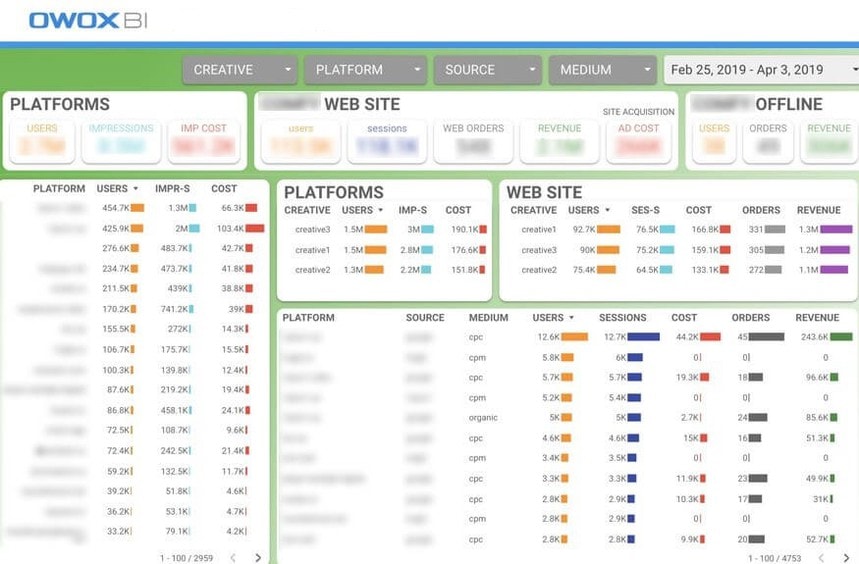
With proper analytics dashboards, you can answer the following questions:
- Which advertising campaigns and which platforms best motivate users to visit the site?
- How much has the value of an attracted customer or order increased, taking into account the additional costs of the advertising campaign?
- How many new customers, orders, and purchases did each ad campaign generate?
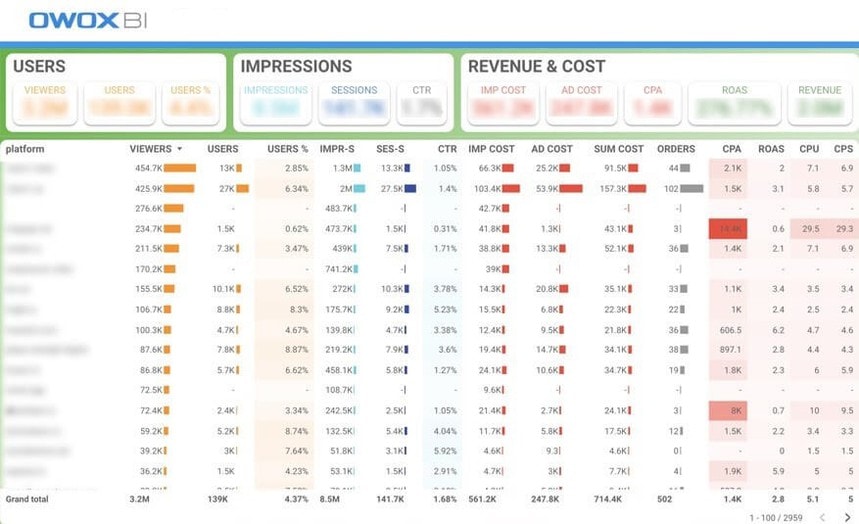
With post-view conversion tracking, you can measure important KPIs including:
- ROAS with online and offline sales
- CPA taking into account the costs of video and context ads that participated in the sales funnel
Want to build reports like post-view, LTV, and ROPO?
Explore OWOX Data Marts to see how it can help you overcome your marketing analytics challenges.
Key takeaways
Use a post-view conversions report to understand which channels work best with media ads, which should be abandoned, and which budgets should be increased. With this report, you can link displays to sales and settlements:
- Customer cost involvement
- Return on video advertising
In other words, it will become clear whether your ad money was spent productively.
If you still have questions, ask in the comments below:)
And if you want to learn more about post-view conversions and other topics in the field of marketing analytics, subscribe to our newsletter with useful tips for today's marketers and analysts.
Frequently asked questions







"AI by its nature will hallucinate. You need guardrails so you can trust your data."
"We had six or seven different channels and no single source of truth. It was almost impossible"
"We regained time. And time is the one resource that never comes back."