OWOX Model Canvas vs Lucidchart for ERDs
Lucidchart is a general diagramming suite that can draw an ERD; OWOX Model Canvas is a data-native tool built only for models.
That’s the whole comparison in one line: a versatile canvas that does ERDs among many things**, versus a specialist canvas whose output is a real, portable data model.**
If you already run your diagramming in Lucidchart, adding an ERD is convenient. If the ERD needs to become something a machine can use, the specialist wins. See the wider field in our best free ERD tools roundup.
TL;DR
- Pick Lucidchart if you want one great paid tool for flowcharts, org charts, and the occasional ERD, and your team already lives in it.
- Pick OWOX Model Canvas if you want a data-native model – grain, keys, and joins as first-class concepts – that exports OKF for git and AI, free and with no sign-up.
Side by side
| Lucidchart | OWOX Model Canvas | |
|---|---|---|
| Type | General diagramming suite | Data-native model canvas |
| Understands keys/joins as data | No – generic shapes | Yes – first-class |
| Output | Image; some SQL import | OKF (portable markdown), image |
| AI features | AI diagram assist | AI drafting + AI-readable output |
| Open samples | – | Opens Google’s GA4 / Stack Overflow / Bitcoin |
| Open-source | – | Yes (Apache-2.0) |
| Free tier | 3 documents | Unlimited, no sign-up |
| Price | Free (limited) + paid | Free |
OWOX Data Marts
See your first report built in real time. 15 minutes.
- Connect your data warehouse
- Pick your metrics
- Get a live Google Sheets report
In the time it takes to write a ticket. Then imagine never writing that ticket again.
Book a DemoWe'll use your actual use case
Where Lucidchart wins
Lucidchart’s advantage is breadth. It’s a mature, polished suite for any diagram – flowcharts, architecture, org charts, and ERDs – with strong collaboration and integrations into the tools teams already use.
If you need one place to diagram everything and the ERD is just one of many artifacts, that consolidation is worth a lot. OWOX Model Canvas is deliberately narrow by comparison; it doesn’t draw flowcharts.
Where OWOX Model Canvas wins
Because OWOX Model Canvas is built only for data models, it understands them:
- Data-native. Tables, primary/foreign keys, and join paths are real concepts, not just boxes and connectors you have to keep consistent by hand.
- A portable, AI-readable output. It exports OKF (Google’s Open Knowledge Format) – plain markdown describing the model – which you can version in git, review in a pull request, or hand to an LLM as context. A Lucidchart diagram is an image; OKF is a model a machine can read.
- Open-source & free forever. Apache-2.0, no sign-up, no three-document cap, opens Google’s official samples, and can push a model into OWOX Data Marts.
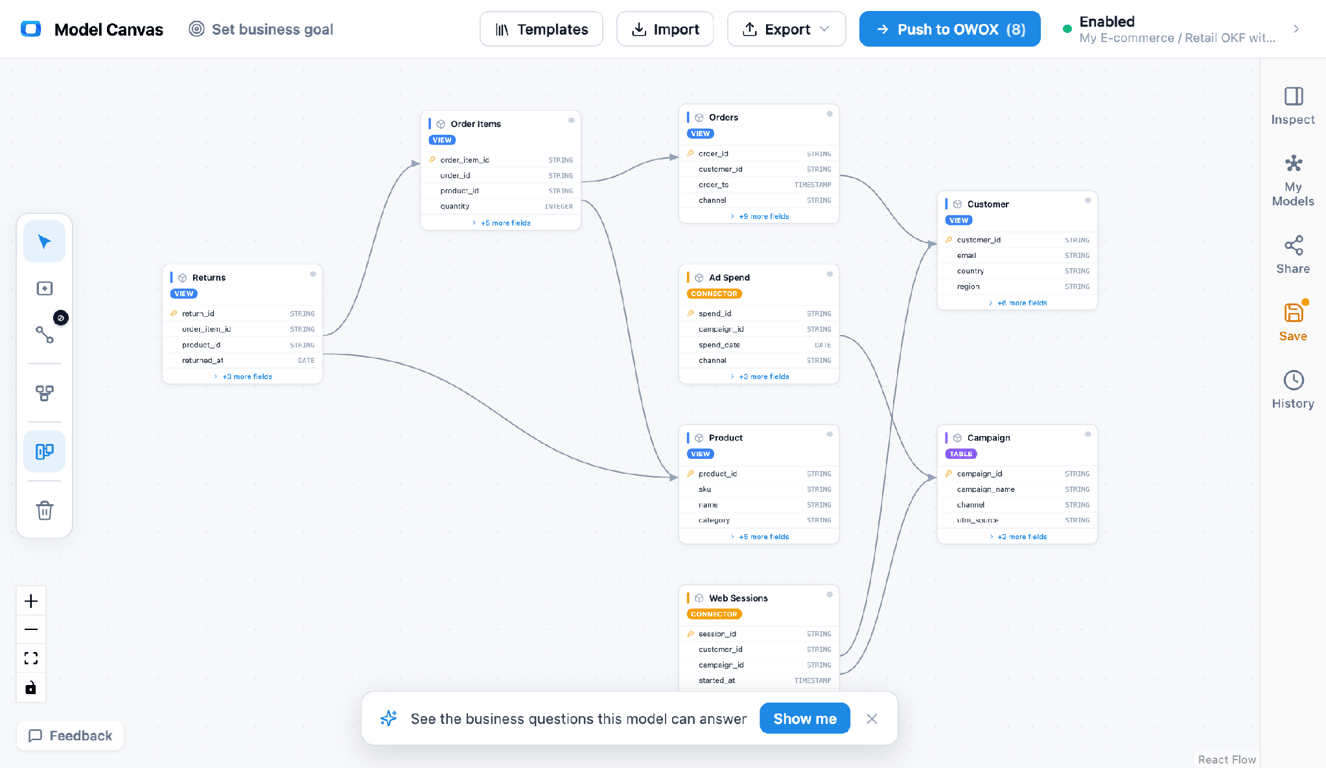
A data-native canvas: keys and joins are first-class, and the model exports to OKF (portable markdown) or an image.
The real difference: generic diagram vs data model
The real difference: generic diagram vs data model
In Lucidchart, an ERD is a drawing – shapes and lines that look like a schema but carry no underlying data semantics. In OWOX Model Canvas, the ERD is the model: the keys and joins mean something, and the export is a structured spec.
That distinction is quiet until you need the schema to do work – generate tables, live in version control, or serve as context for an AI. A generic diagram tool stops at the picture; a data model tool produces something reusable. For why that reusable, open format matters now, see what OKF is.
Which should you choose?
- You need an all-purpose diagramming tool your whole team uses → Lucidchart.
- You need a real, portable, AI-readable data model → OWOX Model Canvas.
- You’ve hit Lucidchart’s free-tier limits and only need ERDs → OWOX Model Canvas (free, unlimited, no sign-up).
New to modeling? Start with our guide to data modeling and understanding star schema, or browse the template gallery.
Turn your data into decisions.
Governed data marts give you the clean foundation ML needs to actually work.
- No AI hallucinations
- Analyst-governed definitions
- Every number traces to SQL
Frequently Asked Questions
Do I need to sign up?
Lucidchart requires an account. OWOX Model Canvas runs anonymously in the browser.
Can I turn a Lucidchart ERD into real tables or a portable model?
Lucidchart focuses on the diagram (with some SQL import/export). For a portable spec you can version and feed to tools or AI, OWOX Model Canvas exports OKF and can push to OWOX Data Marts.
Which is better for AI / text-to-SQL?
OWOX Model Canvas, because OKF gives an LLM a structured, readable model as context. A Lucidchart image doesn't.
Is Lucidchart free for ERDs?
Lucidchart's free tier is limited (around three documents) with paid plans beyond that. OWOX Model Canvas is free with no document limit and no sign-up.
What's the main difference from OWOX Model Canvas?
Lucidchart is a general diagram suite; OWOX Model Canvas is built only for data models and exports OKF — a portable, machine-readable spec. One produces a picture; the other produces a model.
Can Lucidchart make ERDs?
Yes. Lucidchart has ERD shapes and some SQL import, and it's a capable general diagramming tool. It treats the ERD as a drawing rather than a data-native model with first-class keys and joins.